

MageGee
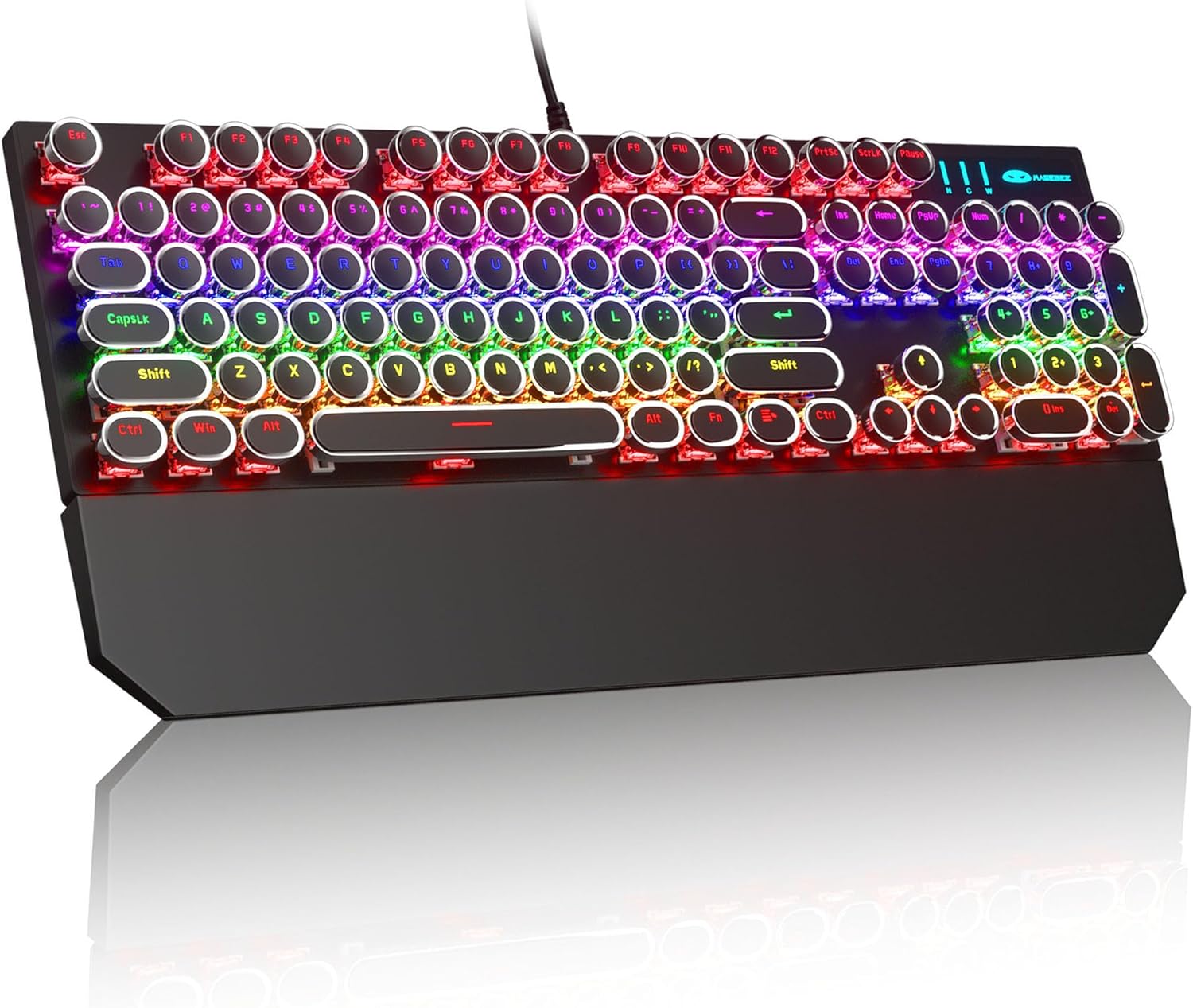
MageGee Typewriter Mechanical Gaming Keyboard
Bottom line: The MageGee Typewriter Mechanical Gaming Keyboard: Full 104-key layout keeps the number pad and F1-F12 row; main trade-off: blue switch noise is disruptive in shared rooms or on calls.
As an Amazon Associate, SpecPicks earns from qualifying purchases. Full disclosure →
Pros & Cons
Pros
- ✓ Full 104-key layout keeps the number pad and F1-F12 row
- ✓ Blue switches deliver a loud, tactile typewriter-style click
- ✓ Double-shot molded keycaps keep legends from wearing off
- ✓ Magnetic wrist rest included, no separate purchase needed
- ✓ Aluminum alloy top panel with matte anti-scratch finish
Cons
- ✗ Blue switch noise is disruptive in shared rooms or on calls
- ✗ Wired USB 2.0 only, with no wireless or Bluetooth option
- ✗ Single ice blue backlight color, not per-key RGB
- ✗ Round typewriter keycaps take adjustment from flat caps
Manufacturer description
The MageGee Typewriter Mechanical Gaming Keyboard brings round, punk-style keycaps to a full 104-key layout, so you get the clicky-clacky character of a vintage typewriter without giving up the F1-F12 row or the number pad. Blue switches supply the tactile bump and audible click that make long typing sessions satisfying, while anti-ghosting across all 104 keys keeps fast game inputs from dropping. Ice blue LED backlighting runs through several modes you cycle with Fn plus Ins, Home, Page, Delete, or End, and the arrow keys adjust brightness and animation speed. Because the keycaps are…
SpecPicks Verdict
SpecPicks has no buyer-rating or benchmark data for MageGee Typewriter Mechanical Gaming Keyboard, so this read rests on the manufacturer's listed specs (how we evaluate). Compare with similarly-priced alternatives in the keyboards & mice category before committing. On the listing's own facts, the case for it is "Full 104-key layout keeps the number pad and F1-F12 row"; the main trade-off is "Blue switch noise is disruptive in shared rooms or on calls". If those two points fit how you will use it, put it beside one or two close alternatives in the Compare tool to confirm the price.
Before ordering, check the listed dimensions, ports, power requirements and supported devices or systems in the spec table below against how you plan to use it, and confirm them on the retailer's listing. Prices and stock are set by the retailer and may have moved since this page was last updated.
Frequently Asked Questions
Does this MageGee keyboard work with a Mac?
MageGee lists Mac compatibility alongside Windows (2000, XP, ME, Vista, 7, 8) and Linux. It connects over USB 2.0 as plug and play, with no drivers or software to install.
How loud are the blue switches?
Blue switches are the clicky type, producing an audible click on every keystroke by design, described as clicky-clacky typewriter sound. Expect it to be heard by anyone nearby, so it suits solo desks better than shared offices.
Is it a full-size keyboard with a number pad?
Yes. It is a full-size 104-key board with the standard layout, including the F1-F12 function row and a dedicated number pad.
Does the wrist rest come with it?
Yes, a magnetic wrist rest is included. It attaches magnetically to the keyboard rather than needing to be bought separately.
Can I change the backlight color or effects?
The backlight is ice blue with multiple LED modes. Press Fn plus Ins, Home, Page, Delete, or End to switch lighting effects, and use the arrow keys to adjust brightness and speed. Color options beyond ice blue are not listed.
Key Features
Quoted from the manufacturer's listing. Where it differs from the pros and cons above, those note the conditions the listing leaves out.
- 【Retro Typewriter Style Mechanical Keyboard】It's a cute and funning white keyboard, plating punk rounded keycap with beautiful blue switch clicky-clacky sound make typing enjoyable, just like a typewriter.
- 【104-Key Anti-ghosting Keyboards】This is a Full-Size keyboard, featuring standard keyboard layout with F1-F12 function keys and number pad, provides high responsive commands for typing and gaming.
- 【Multiple LED Ice Blue Backlit Modes】The Keyboard is Double-shot injection molded keycap for clear backlight and extreme durability, press Fn+Ins/HM/Pg/Del/End can adjust various kinds lighting effect, arrow keys change backlight brightness and speed.
- 【Ergonomics Design】High low key layout with suspended round key fits fingers effectively, adjustable double kickstand feet, help reduce hand fatigue, aluminum alloy metal panel, matte texture, sturdy and robust, protect it from scratch.
- 【Extensive Compatibility】MageGee mechanical keyboards use USB 2.0 connector making it compatible with Windows (2000, XP, ME, Vista, 7, 8), Linux and Mac, plug and play, no drivers or software required.
Full Specifications
| Brand | MageGee |
|---|---|
| Color | White |
| Style | Contemporary |
| Connectivity | USB |
| Compatibility | PC, Switch, Mac, Linux |
| Connection Type | Wired |
| Special Feature | Lighting |
| Compatible Devices | Laptop |
| Keyboard Description | Gaming |
| Connectivity Technology | USB |
| Recommended Uses For Product | Gaming |
| Keyboard backlighting color support | Single Color |
| Full listing title | MageGee Typewriter Mechanical Gaming Keyboard, Retro Punk White Round Keycaps, 104 Keys LED Blue Backlit Wired Keyboards for Laptop MAC PC Gamer, with Magnetic Wrist Rest, Blue Switch |
Ready to buy?
MageGee Typewriter Mechanical Gaming Keyboard, Retro Punk White Round Keycaps, 104 Keys LED Blue Backlit Wired Keyboards for Laptop MAC PC Gamer, with Magnetic Wrist Rest, Blue Switch is listed on Amazon. Price, availability, shipping and returns are set by Amazon and its sellers — check the listing for current terms. SpecPicks earns a small commission on qualifying purchases — thank you for supporting independent review work.
Related Keyboards & Mice


More guides & deep dives from the SpecPicks archive
Browse all articles & guides →- How to Build a Windows 98 Retro PC in 2026
- Best 1440p Gaming GPUs in 2026
- Best Budget Gaming PC Build 2026 — ~$1,000 Parts List
- Emulation Hardware in 2026: FPGA, Software, and Cart-Reader Ecosystems
- The Complete Voodoo5 5500 AGP Driver Guide (2026 Edition)
- RTX 4070 Super vs RX 7800 XT — Which to Buy in 2026
- Best Retro Handhelds in 2026: Pocket, Mid-Tier and FPGA Picks
More reviews from the SpecPicks archive
Browse all reviews →- Best Streaming and Podcasting Gear for 2026: 5 Picks for Mic, Light, and Monitoring
- Microsoft + Nvidia AI PCs Run Real Agents: The Local Hardware That Matches (2026)
- Can a 12GB RTX 3060 Still Run 2026's Local LLMs?
- Crucial BX500 vs Samsung 870 EVO: Best Budget SATA SSD for Upgrades
- Tesla Caps AI Spend at $200/Week — The Local RTX 3060 Rig Case
- Jellyfin on Raspberry Pi 4 8GB with an SSD (2026 Guide)
- KOORUI 27" 4K vs Samsung Odyssey 27" 4K: Best 4K Monitor for Console & PC Gaming
- Best Gaming CPU Coolers Under $100 in 2026
- Retro Games With 1:1 Remakes: The Faithful Rebuild List
- Late 2000s Windows XP Gaming PC Build: Parts & Setup Guide
- Windows 98 SE on >512MB RAM: The vcache Fix Explained (2026)
- Best CPU Cooler for a Ryzen 7 5800X (AM4) in 2026
- Qwen3.6-35B-A3B on an 8GB Laptop: What the Krasis Benchmark Means for Local Inference
- Mistral AI Seeks €3 Billion to Fund Its European Push — The Local-vs-Cloud Angle
- 3dfx Voodoo3 3000 PCI vs Voodoo5 5500 AGP: Win98 Performance Synthesis (2026)
- Build a PiKVM V3 Device for Remote Server Management (2026)
- Sound Blaster Audigy 2 ZS vs Live! 5.1: WinXP Gaming Audio in 2026
- Best Streaming Starter Kit for New Twitch Streamers in 2026
- Plug-and-Play Retro Consoles Compared: Genesis Mini vs SNES vs NES Classic
- Best CPU Cooler for AM5 and LGA1700 Overclocking (2026)
- Corsair Launches Lightweight Budget HS35 v3 Gaming Headset
- Best AM4 Upgrade Parts Under $100 Each in 2026
- Raspberry Pi Projects for Home Automation in 2025
- Is the KOORUI 27-Inch 4K QD-Mini LED a Good Match for an RTX 3060?
Earliest SpecPicks reviews
Browse full archive →- Best GPU for Llama 3.1 8B (2026)
- Best GPU for Qwen 3 14B (2026)
- Best GPU for Qwen 3 32B (2026)
- Best GPU for Llama 3.1 70B (2026)
- Best GPU for DeepSeek-R1 32B (2026)
- Best GPU for Llama 3.1 405B (2026)
- How to run Llama 3.1 8B on NVIDIA GeForce RTX 5090
- How to run Qwen 3 14B on NVIDIA GeForce RTX 5090
- How to run Qwen 3 32B on NVIDIA GeForce RTX 5090
- How to run Llama 3.1 70B on NVIDIA GeForce RTX 5090
- How to run DeepSeek-R1 32B on NVIDIA GeForce RTX 5090
- How to run Llama 3.1 8B on NVIDIA GeForce RTX 4090