

Timetec
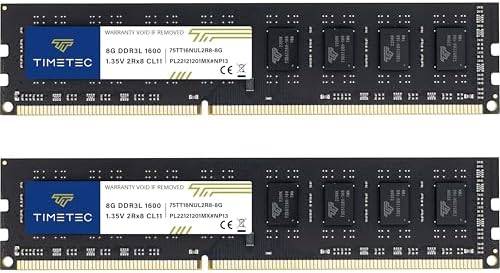
Timetec 16GB KIT(2x8GB) DDR3 1600MHz (DDR3-1600) PC3-12800 (PC3-12800U) Non-ECC Unbuffered 1.5V CL11 2Rx8 Dual Rank 240 Pin UDIMM Desktop PC Computer Memory RAM(SDRAM) Module Upgrade
Bottom line: The Timetec 16GB KIT: 16GB kit (2x8GB) fills two DIMM slots on older DDR3 desktop boards; main trade-off: desktop 240-pin UDIMM only, not compatible with laptop SO-DIMM slots.
As an Amazon Associate, SpecPicks earns from qualifying purchases. Full disclosure →
Pros & Cons
Pros
- ✓ 16GB kit (2x8GB) fills two DIMM slots on older DDR3 desktop boards
- ✓ JEDEC-standard 1.5V CL11 timings run at spec without BIOS tweaking
- ✓ 2Rx8 dual-rank modules work with both Intel and AMD DDR3 platforms
- ✓ Lifetime warranty from purchase date, backed by US-based tech support
Cons
- ✗ Desktop 240-pin UDIMM only, not compatible with laptop SO-DIMM slots
- ✗ Non-ECC and unbuffered, so unusable in ECC servers or workstations
- ✗ 1600MHz CL11 is baseline DDR3 speed, slower than 1866/2133 enthusiast kits
- ✗ 1.5V spec, not the 1.35V DDR3L some low-power boards require
SpecPicks Verdict
SpecPicks has no buyer-rating or benchmark data for Timetec 16GB KIT(2x8GB) DDR3 1600MHz (DDR3-1600) PC3-12800…, so this read rests on the manufacturer's listed specs (how we evaluate). Compare with similarly-priced alternatives in the memory & ram category before committing. On the listing's own facts, the case for it is "16GB kit (2x8GB) fills two DIMM slots on older DDR3 desktop boards"; the main trade-off is "Desktop 240-pin UDIMM only, not compatible with laptop SO-DIMM slots". If those two points fit how you will use it, put it beside one or two close alternatives in the Compare tool to confirm the price.
Common buyer scenarios for memory & ram of this kind: matching it to an existing build, replacing a failing part, or upgrading from a previous-generation equivalent. Check the spec table below against your current setup — particularly socket / form-factor / power-rating fields — and confirm compatibility on the retailer's listing before purchase. Prices and stock are set by the retailer and may have moved since this page was last updated.
Key Features
Quoted from the manufacturer's listing. Where it differs from the pros and cons above, those note the conditions the listing leaves out.
- DDR3 1600MHz PC3-12800 240-Pin Unbuffered Non-ECC 1.5V CL11 Dual Rank 2Rx8 based 512x8
- Module Size: 16GB KIT(2x8GB Modules) Package: 2x8GB ; Voltage JEDEC standard 1.5V
- PCB Color Green; all Timetec products are high quality and rigorously tested to meet stringent standards
- For DDR3 Desktop Compatible with Intel and AMD CPU, Not for Laptop
- Guaranteed Lifetime warranty from Purchase Date and Free technical support based on United States
Full Specifications
| Brand | Timetec |
|---|---|
| Voltage | 1.5 Volts |
| RAM Size | 16 GB |
| Model Name | Timetec |
| Form Factor | DIMM |
| Module Size | 16GB KIT(2x8GB Modules) Package: 2x8GB ; Voltage JEDEC standard 1.5V |
| Memory Speed | 1600 MHz |
| Model Number | 75TT |
| Compatibility | PC |
| Number of Pins | 240 |
| Mfr Part Number | 75TT |
| Memory Generation | DDR3 |
| Compatible Devices | Desktop |
| Data Transfer Rate | 1600 MHz |
| Memory Form Factor | DIMM |
| Additional Features | DDR3 |
| Computer Memory Size | 16 GB |
| Warranty Description | Lifetime |
| RAM Memory Technology | DDR3 |
| Column Address Strobe Latency | CL11 |
Ready to buy?
Timetec 16GB KIT(2x8GB) DDR3 1600MHz (DDR3-1600) PC3-12800 (PC3-12800U) Non-ECC Unbuffered 1.5V CL11 2Rx8 Dual Rank 240 Pin UDIMM Desktop PC Computer Memory RAM(SDRAM) Module Upgrade is listed on Amazon. Price, availability, shipping and returns are set by Amazon and its sellers — check the listing for current terms. SpecPicks earns a small commission on qualifying purchases — thank you for supporting independent review work.
Related Memory & RAM


More guides & deep dives from the SpecPicks archive
Browse all articles & guides →- Best Budget Gaming PC Build 2026 — ~$1,000 Parts List
- Best 1440p Gaming GPUs in 2026
- How to Build a Windows 98 Retro PC in 2026
- The Complete Voodoo5 5500 AGP Driver Guide (2026 Edition)
- Best Retro Handhelds in 2026: Pocket, Mid-Tier and FPGA Picks
- Emulation Hardware in 2026: FPGA, Software, and Cart-Reader Ecosystems
- RTX 4070 Super vs RX 7800 XT — Which to Buy in 2026
More reviews from the SpecPicks archive
Browse all reviews →- CompactFlash as a Hard Drive: The Win98 Retro Storage Guide
- KOORUI 27" QD-Mini LED vs Samsung Odyssey 27" 4K: Which 4K Panel for Console + PC?
- How to run Llama 3.1 8B on Arc B580
- Sound Blaster Audigy FX Install Guide for Win98 SE Period-Correct Builds
- Gemma 4 Stealth Update Fixes Tool Calling: What Changes Locally
- Best AIO Liquid Cooler for Ryzen X3D & High-End Intel (2026)
- Using Claude to Hunt PCI Device IDs on Win98: Voodoo, Audigy, GeForce 4 Ti
- Local AI and Gaming Setup Picks 2026: 5 Buys With Price Anchors
- Raspberry Pi 4 8GB vs a Used Mini PC for a 2026 Beginner Homelab
- Best SSD for 2000s LAN Party PC Builds (2026)
- Local AI Video After Seedance 2.5: What GPU Generates 30-Second Clips
- Steam Deck: Linux's Trojan Horse for PC Gamers
- Best Sim Racing Wheel & Pedal Setup in 2026
- Blue Yeti vs HyperX QuadCast 2 S: Which USB Mic Wins for Streaming in 2026?
- Kimi K2.7 Code on an RTX 3060 12GB: Can a $300 GPU Run It?
- Best Budget SATA SSD for Gaming in 2026
- Radeon Pro W7900 48GB vs RTX A6000 48GB for Local 70B Inference (2026)
- 8BitDo Pro 2 on Win98 SE and WinXP: Mapping a Modern Bluetooth Pad to DOSBox, Glide Games, and…
- Best Raspberry Pi 5 Projects and Kits for 2026
- Home Assistant on a Raspberry Pi 4 8GB: 2026 Smart-Home Hub Build
- Best GPU for Running 27B-32B Local LLMs in 2026
- Best Budget Upgrades to Revive an Old Gaming PC in 2026
- Ryzen 5600G vs 5700X vs 5800X: Best CPU for a 1080p Gaming Build (2026)
- ComfyUI on an RTX 3060 12GB: A 2026 Local Stable Diffusion Setup Guide
Earliest SpecPicks reviews
Browse full archive →- Best GPU for Llama 3.1 8B (2026)
- Best GPU for Qwen 3 14B (2026)
- Best GPU for Qwen 3 32B (2026)
- Best GPU for Llama 3.1 70B (2026)
- Best GPU for DeepSeek-R1 32B (2026)
- Best GPU for Llama 3.1 405B (2026)
- How to run Llama 3.1 8B on NVIDIA GeForce RTX 5090
- How to run Qwen 3 14B on NVIDIA GeForce RTX 5090
- How to run Qwen 3 32B on NVIDIA GeForce RTX 5090
- How to run Llama 3.1 70B on NVIDIA GeForce RTX 5090
- How to run DeepSeek-R1 32B on NVIDIA GeForce RTX 5090
- How to run Llama 3.1 8B on NVIDIA GeForce RTX 4090