

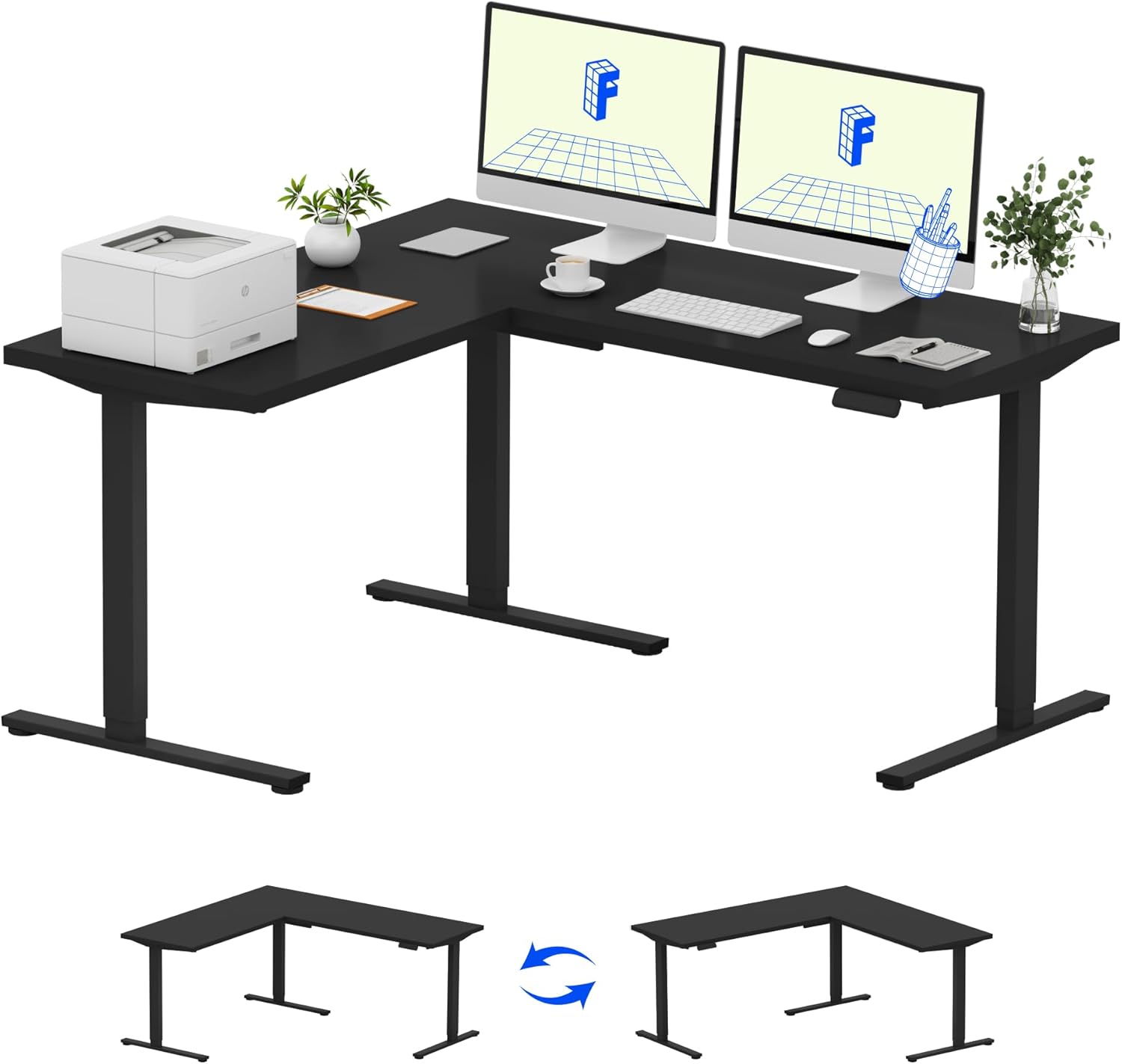
FLEXISPOT 71 x 63 Reversible L-Shaped Corner Standing Desk, Black
Bottom line: The FLEXISPOT 71 x 63 Reversible L-Shaped Corner Standing Desk: Reversible L-shape: mount the long side on the left or right; main trade-off: listing gives two sizes (71 x 63 in title, 63 x 47 in features).
As an Amazon Associate, SpecPicks earns from qualifying purchases. Full disclosure →
Pros & Cons
Pros
- ✓ Reversible L-shape: mount the long side on the left or right
- ✓ Listed 63 x 47 in surface fits multiple monitors plus a laptop
- ✓ Four programmable memory presets for sit and stand heights
- ✓ Anti-collision system stops and reverses on obstacles
- ✓ 5-year FlexiSpot warranty on the frame and motor
Cons
- ✗ Listing gives two sizes (71 x 63 in title, 63 x 47 in features)
- ✗ Ships in two packages that may arrive on separate days
- ✗ L-shaped footprint needs a dedicated corner of the room
- ✗ Listing does not state a weight capacity
Manufacturer description
The FlexiSpot Reversible L-Shaped Corner Standing Desk turns an empty room corner into a full sit-stand workstation. The listing describes a 63 x 47 inch L-shaped work surface. That fits a multi-monitor setup on one wing and a laptop, keyboard or notebook on the other, whether you are working, gaming or studying. The desktop is reversible, so you can put the longer side on the left or the right to suit your room. Height adjustment is electric and quiet. Four programmable memory presets let you switch between your saved sitting and standing heights with one press. A built-in anti-collision…
SpecPicks Verdict
SpecPicks has no buyer-rating or benchmark data for FLEXISPOT 71 x 63 Reversible L-Shaped Corner Standing Desk, so this read rests on the manufacturer's listed specs (how we evaluate). Compare with similarly-priced alternatives in the gaming desks category before committing. On the listing's own facts, the case for it is "Reversible L-shape: mount the long side on the left or right"; the main trade-off is "Listing gives two sizes (71 x 63 in title, 63 x 47 in features)". If those two points fit how you will use it, put it beside one or two close alternatives in the Compare tool to confirm the price.
Common buyer scenarios for gaming desks: matching surface dimensions to the room footprint and monitor count, checking height-adjustment range for sit-stand setups, verifying cable-management channels for a clean multi-monitor build, and confirming weight capacity for a full tower + dual-monitor load. Review the spec sheet for assembly difficulty before ordering.
Frequently Asked Questions
What are the actual dimensions of this FlexiSpot L-shaped desk?
The feature list describes a 63 x 47 inch L-shaped work surface, but the product title says 71 x 63. Check the size chart on the product listing before you measure your corner.
Can I set it up with the long side on the left or the right?
Yes. The L-shaped desktop is reversible, so you can install the longer side on either the left or the right to match your room layout.
Does the desk remember my sitting and standing heights?
Yes. It has four programmable memory presets, so you can save your preferred sitting and standing positions and return to them with one press.
What happens if the desk hits something while it is moving?
A built-in anti-collision system detects obstacles and stops and reverses the desktop. Still, clear chairs and furniture from under the desk before you adjust the height.
What warranty comes with the FlexiSpot corner standing desk?
FlexiSpot covers the frame and motor for 5 years. The listing does not give warranty terms for the desktop itself, so check with FlexiSpot for those details.
Key Features
Quoted from the manufacturer's listing. Where it differs from the pros and cons above, those note the conditions the listing leaves out.
- SPACIOUS L-SHAPED WORKSPACE: Maximize your productivity with a spacious 63" × 47" L-shaped standing desk that easily accommodates multiple monitors, laptops, and office essentials. The expansive work surface keeps everything within reach, making it ideal for work, gaming, or studying.
- REVERSIBLE CORNER DESIGN: Customize your workspace to fit your room with a reversible L-shaped desktop. The longer side can be installed on either the left or right, allowing this adjustable standing desk to adapt to your office layout with ease.
- SMOOTH HEIGHT ADJUSTMENT: Switch effortlessly between sitting and standing with quiet, stable height adjustment. Four programmable memory presets let you save your preferred positions, while the built-in anti-collision system helps stop and reverse the desktop when obstacles are detected.
- ROCK-SOLID SUPPORT: Built with an industrial-grade steel frame and a durable 1" thick desktop, this electric standing desk delivers outstanding stability for everyday work, gaming, and multitasking, helping you stay focused at any height.
- FAST SETUP & WARRANTY: Spend less time assembling and more time working. The included hardware and step-by-step instructions make setup simple, while FlexiSpot's 5-year frame and motor warranty provides lasting peace of mind. The desk ships in two packages that may arrive separately.
Full Specifications
| Base | Alloy Steel |
|---|---|
| Size | 71x63"丨Black |
| Brand | FLEXISPOT |
| Color | Black Frame + Black Top |
| Shape | Rectangular |
| Style | Modern |
| Base Type | Leg |
| Top Color | Black |
| Base Color | Black |
| Item Depth | 63 inches |
| Style Name | Modern |
| Unit Count | 1 Count |
| Desk Design | Standing Desk |
| Desk design | Standing Desk |
| Drawer Type | No Drawer |
| Finish Type | Polished |
| Finish Types | Polished |
| Model Number | MAH0002899 |
| Base Material | Alloy Steel |
| Compatibility | Switch |
Ready to buy?
FLEXISPOT 71 x 63 Reversible L-Shaped Corner Standing Desk, Black is listed on Amazon. Price, availability, shipping and returns are set by Amazon and its sellers — check the listing for current terms. SpecPicks earns a small commission on qualifying purchases — thank you for supporting independent review work.
Related Gaming Desks




More guides & deep dives from the SpecPicks archive
Browse all articles & guides →- Emulation Hardware in 2026: FPGA, Software, and Cart-Reader Ecosystems
- RTX 4070 Super vs RX 7800 XT — Which to Buy in 2026
- Best Budget Gaming PC Build 2026 — ~$1,000 Parts List
- Best Retro Handhelds in 2026: Pocket, Mid-Tier and FPGA Picks
- Best 1440p Gaming GPUs in 2026
- How to Build a Windows 98 Retro PC in 2026
- The Complete Voodoo5 5500 AGP Driver Guide (2026 Edition)
More reviews from the SpecPicks archive
Browse all reviews →- Running a 26B LLM Locally With No GPU: The CPU Setup Guide
- ComfyUI on an RTX 3060 12GB: Stable Diffusion Setup and Real tok-per-image Math
- Raspberry Pi AI HAT+ (26 TOPS): What It Actually Runs in 2026
- Raspberry Pi 5 8GB Review: Specs, Price & Use Cases (2025)
- Best 32-Inch 4K Gaming Monitor for PS5 + PC 2026
- Best Game Controller for Couch & Big-Screen PC Gaming in 2026
- Ryzen 7 9800X3D vs 7800X3D: The Real-Game FPS Gap at 1080p, 1440p, and 4K
- Noctua NH-U12S vs ML240L RGB: Best Cooler for a 5800X
- Best SATA SSDs for Gaming and Emulation in 2026
- Best Budget Gaming Peripherals Under $100 in 2026
- Best SATA SSD in 2026: Crucial BX500 vs Samsung 870 EVO vs WD Blue vs SanDisk
- Old RAM Identification: Decode Part Numbers & Specs
- RTX 3060 12GB Local LLM Guide: Which Models Actually Fit (2026)
- Best Components for a Budget Local-LLM Workstation in 2026
- Started a Homelab Last Month — Is the Ryzen 5 5600G Build Right?
- Best Controller for PC Retro Gaming (2026)
- LLM-Driven Driver Install on Windows 98: How Claude Walks Voodoo + Sound Blaster Setup
- Best Esports Club Practice Room Gear in 2026
- AMD Ryzen 7 7700X3D Review: 7800X3D's OEM-Only Rival
- Build a Budget Local-LLM Workstation Under $1,500: Ryzen 7 5800X + RTX 3060 12GB Benchmarks
- Raspberry Pi 5 IOMMU Driver Heads to the Mainline Linux Kernel
- VibeThinker-3B on an RTX 3060 12GB: Reasoning in 3 Billion Params
- Grok 4.5 Tops AutomationBench at 51%: Cloud Score vs Local-Rig Reality
- Best Wireless Controller for PC Gaming on Couch and Living Room (2026)
Earliest SpecPicks reviews
Browse full archive →- Best GPU for Llama 3.1 8B (2026)
- Best GPU for Qwen 3 14B (2026)
- Best GPU for Qwen 3 32B (2026)
- Best GPU for Llama 3.1 70B (2026)
- Best GPU for DeepSeek-R1 32B (2026)
- Best GPU for Llama 3.1 405B (2026)
- How to run Llama 3.1 8B on NVIDIA GeForce RTX 5090
- How to run Qwen 3 14B on NVIDIA GeForce RTX 5090
- How to run Qwen 3 32B on NVIDIA GeForce RTX 5090
- How to run Llama 3.1 70B on NVIDIA GeForce RTX 5090
- How to run DeepSeek-R1 32B on NVIDIA GeForce RTX 5090
- How to run Llama 3.1 8B on NVIDIA GeForce RTX 4090