

GLOTRENDS
GLOTRENDS WA01 M.2 E Key to PCIe X1 WiFi Bluetooth Adapter
Bottom line: The GLOTRENDS WA01 M.2 E Key to PCIe X1 WiFi Bluetooth Adapter: Runs WiFi 7 BE200NGW and WiFi 6E AX210NGW cards in a desktop PCIe x1 slot; main trade-off: no support for CNVio/CNVio2 cards like AX211NGW, AX201NGW or 9560NGW.
As an Amazon Associate, SpecPicks earns from qualifying purchases. Full disclosure →
Pros & Cons
Pros
- ✓ Runs WiFi 7 BE200NGW and WiFi 6E AX210NGW cards in a desktop PCIe x1 slot
- ✓ Also hosts a Coral TPU M.2 Accelerator (A+E key) for edge AI builds
- ✓ Signal converter only: no adapter driver, just your WiFi card's driver
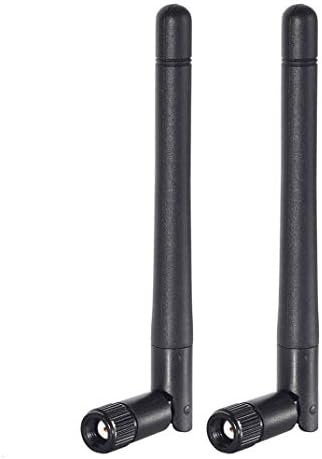
- ✓ Tri-band 6 dBi RP-SMA antenna kit with two 15cm U.FL/IPEX4 pigtails
- ✓ Includes both 12cm regular-profile and 8cm low-profile brackets
Cons
- ✗ No support for CNVio/CNVio2 cards like AX211NGW, AX201NGW or 9560NGW
- ✗ Bluetooth needs a USB cable connected to a motherboard USB port
- ✗ WiFi card not included; the adapter does nothing on its own
- ✗ Mini PCIe WiFi modules are not compatible
Manufacturer description
The GLOTRENDS WA01 is an M.2 Key E to PCIe x1 adapter. It lets you put a laptop-style M.2 2230 WiFi card into any desktop that has a free PCIe x1 slot. Pair it with an Intel BE200NGW for WiFi 7 or an AX210NGW for WiFi 6E. Older cards such as the 9260NGW and 8265NGW also work, as do Broadcom, Realtek and Atheros Key E/A+E modules. WiFi runs over the PCIe x1 lane. Bluetooth runs over USB, from version 4.0 up to 5.4 depending on your card, so you connect the USB cable to a motherboard USB port to turn it on. The adapter only converts the signal and has no driver of its own. You install the…
SpecPicks Verdict
SpecPicks has no buyer-rating or benchmark data for GLOTRENDS WA01 M.2 E Key to PCIe X1 WiFi Bluetooth Adapter, so this read rests on the manufacturer's listed specs (how we evaluate). Compare with similarly-priced alternatives in the networking category before committing. On the listing's own facts, the case for it is "Runs WiFi 7 BE200NGW and WiFi 6E AX210NGW cards in a desktop PCIe x1 slot"; the main trade-off is "No support for CNVio/CNVio2 cards like AX211NGW, AX201NGW or 9560NGW". If those two points fit how you will use it, put it beside one or two close alternatives in the Compare tool to confirm the price.
Before ordering, confirm the board side: this card needs a free PCIe slot of the width the card uses. Your motherboard manual lists which slots share lanes with M.2 sockets or other slots. Prices and stock are set by the retailer and may have moved since this page was last updated.
Frequently Asked Questions
Will the GLOTRENDS WA01 work with an Intel AX211 or AX201 WiFi card?
No. The WA01 cannot run CNVio or CNVio2 modules, including the Intel AX211NGW, AX201NGW, AC 9560NGW, AC 9462NGW and AC 9461NGW. Use a standard PCIe card such as the BE200NGW, AX210NGW or AX200NGW instead.
How do I get Bluetooth working on this adapter?
WiFi runs over the PCIe x1 slot, but Bluetooth runs over USB. Connect the adapter's USB cable to a USB port on your motherboard to enable Bluetooth, which supports versions 4.0 through 5.4 depending on your M.2 card.
Do I need to install a driver for the WA01?
The adapter itself needs no driver because it only converts the signal. You may need to install the driver for the M.2 WiFi module you put in it. Supported operating systems (DOS, Windows, Linux or macOS) depend on that module.
Can I use this adapter with a Google Coral TPU?
Yes. GLOTRENDS lists support for the Coral TPU M.2 Accelerator with A+E key, so you can add it to a desktop through a PCIe x1 slot for edge AI inference.
Will it fit in a small form factor or low-profile case?
Yes. It comes with a 12cm regular-profile bracket already fitted and includes an 8cm low-profile bracket for slim cases. The 6 dBi antennas connect through two 15cm U.FL/IPEX4 to RP-SMA pigtail cables.
Key Features
Quoted from the manufacturer's listing. Where it differs from the pros and cons above, those note the conditions the listing leaves out.
- M.2 Key E to PCIe X1 WiFi Bluetooth adapter with SMA Antenna Kits, work with NGFF M.2 WiFi module, as well as Coral TPU (M.2 Accelerator A+E key)
- The WiFi signal goes through the PCIe X1 interface, and the Bluetooth signal goes through the USB interface (To enable Bluetooth: The USB cable needs to connect with the motherboard USB port)
- Triple Band 2.4GHz 5GHz 6GHz Antenna: 6 dBi RP-SMA Male antenna, with 2 x 15cm U.FL/IPEX4 to RP-SMA Female pigtail cable
- Compatible with BE200NGW, AX210NGW, AX200NGW, 9260NGW, 8265NGW, 8260NGW, 7265NGW, 7260NGW, and Broadcom, Realtek, Atheros NGFF M.2 2230 Interface (Key E/A+E) WiFi module. Support WiFi 4/5/6/6E/7, Bluetooth 4.0/4.1/4.2/5.0/5.1/5.2/5.3/5.4
- To be noted: can not work with M.2 CNVio2/CNVio interface WiFi module, such as intel AX211NGW, AX201NGW, AC 9560NGW, AC 9462NGW, AC 9461NGW, etc. Not support Mini PCIe WiFi module.
- OS compatibility: DOS/Windows/Linux/Mac OS (Based on your WiFi module Compatibility). It is only a signal converter and does not need a driver. But you may need to install a driver for your M.2 WiFi module.
Full Specifications
| Brand | GLOTRENDS |
|---|---|
| Color | Black |
| Connectivity | Bluetooth, USB, WiFi, 2.4GHz |
| Model Number | WA01 |
| Compatibility | Mac, Linux |
| Built-In Media | 6-dBi SMA Antenna Kits |
| Number of Items | 1 |
| Compatible Devices | Coral TPU (M.2 Accelerator A+E key), M.2 E-Key WiFi Module |
| Data Link Protocol | Bluetooth 4.0/4.1/4.2/5.0/5.1/5.2/5.3/5.4, IEEE 802.11a/b/g/n/ac/ax/be |
| Data Transfer Rate | 5000 megabits_per_second |
| Hardware Interface | PCI Express x1 |
| Warranty Description | 12 Month |
| Triple Band 2.4GHz 5GHz 6GHz Antenna | 6 dBi RP-SMA Male antenna, with 2 x 15cm U.FL/IPEX4 to RP-SMA Female pigtail cable |
| Full listing title | GLOTRENDS WA01 M.2 E Key to PCIe X1 WiFi Bluetooth Adapter for M.2 WiFi 4/5/6/6e/7/Coral TPU Module, with 6-dBi SMA Antenna Kits |
Ready to buy?
GLOTRENDS WA01 M.2 E Key to PCIe X1 WiFi Bluetooth Adapter for M.2 WiFi 4/5/6/6e/7/Coral TPU Module, with 6-dBi SMA Antenna Kits is listed on Amazon. Price, availability, shipping and returns are set by Amazon and its sellers — check the listing for current terms. SpecPicks earns a small commission on qualifying purchases — thank you for supporting independent review work.
Related Networking



More guides & deep dives from the SpecPicks archive
Browse all articles & guides →- Best 1440p Gaming GPUs in 2026
- Best Budget Gaming PC Build 2026 — ~$1,000 Parts List
- Best Retro Handhelds in 2026: Pocket, Mid-Tier and FPGA Picks
- The Complete Voodoo5 5500 AGP Driver Guide (2026 Edition)
- RTX 4070 Super vs RX 7800 XT — Which to Buy in 2026
- Emulation Hardware in 2026: FPGA, Software, and Cart-Reader Ecosystems
- How to Build a Windows 98 Retro PC in 2026
More reviews from the SpecPicks archive
Browse all reviews →- EU GPU Price Tracking: Why RTX 5090 Won't Get Cheaper
- GLM-5.2 on an RTX 3060 12GB: Can the New Open-Weights Leader Run Local?
- WoW Mythic+ 3500 on Steam Deck: Is It Possible?
- Best Budget SSDs for Gaming PCs and Consoles in 2026
- llama.cpp MTP support landed - Qwen3.6 27B at 2.44× on a Strix Halo, 2.17× on a RTX 3090 rig
- Gemma 4 Stealth Update Fixes Tool Calling: What Changes Locally
- Running local LLMs on the Ryzen 5 5600G iGPU (no dedicated GPU) in 2026
- GPU-Accelerated Autorouter Handles Monstrous PCB Designs
- CRT vs Monitor for Retro Gaming: Which Wins in 2026
- Does a Gaming Mouse Pad Actually Improve Your Aim? QcK vs Generic
- Best Gaming SSD for PC Builds in 2026: 5 Picks Tested
- Best GPU for Running Ollama on 12GB VRAM in 2026: RTX 3060 12GB Deep-Dive
- Downsized Your Homelab? Here's What It's Worth
- Why LLM Reasoning Still Happens in Words, Not Vectors
- Best Gaming Headset for PC and Console in 2026
- Raspberry Pi 5 + Hailo-8 vs Jetson Orin Nano Super: Which Edge AI Box Wins for Vision Workloads?
- Best GPU Under $400 for Llama-Class 8B Models in 2026
- Intel LLM-Scaler vLLM 1.4 on Arc Pro B70: What the Latest Driver Stack Means for Local Inference
- RTX 3060 12GB Showdown: ZOTAC Twin Edge vs MSI Ventus 2X (2026)
- Best PC Gaming Controllers in 2026: 5 Picks for Every Budget
- AI-Driven Driver Install on Win98: Using a Vision LLM to Recover a Voodoo3 PCI Card
- Best SteamOS Handheld Gaming PCs in 2025: What to Buy
- Qwen 3.6 35B-A3B on RTX Spark: Which Surface Laptop Ultra Memory Config to Buy
- MSI MPG 322UR QD-OLED X24: 4K 240Hz Performance Analyzed
Earliest SpecPicks reviews
Browse full archive →- Best GPU for Llama 3.1 8B (2026)
- Best GPU for Qwen 3 14B (2026)
- Best GPU for Qwen 3 32B (2026)
- Best GPU for Llama 3.1 70B (2026)
- Best GPU for DeepSeek-R1 32B (2026)
- Best GPU for Llama 3.1 405B (2026)
- How to run Llama 3.1 8B on NVIDIA GeForce RTX 5090
- How to run Qwen 3 14B on NVIDIA GeForce RTX 5090
- How to run Qwen 3 32B on NVIDIA GeForce RTX 5090
- How to run Llama 3.1 70B on NVIDIA GeForce RTX 5090
- How to run DeepSeek-R1 32B on NVIDIA GeForce RTX 5090
- How to run Llama 3.1 8B on NVIDIA GeForce RTX 4090