
Beelink
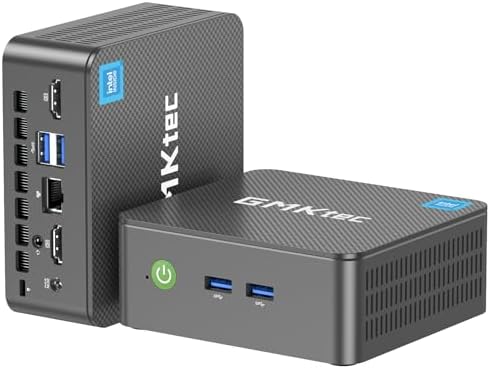
Beelink EQ14 Mini PC
Bottom line: Per its Amazon listing, the Beelink EQ14 Mini PC: beelink mini PC is equipped with 16GB DDR4 RAM and 500GB SSD; mini PC provides dual M.2 PCIe 3.0 slots (max 2*4TB).
As an Amazon Associate, SpecPicks earns from qualifying purchases. Full disclosure →
Pros & Cons
Pros
- ✓ Beelink mini PC is equipped with 16GB DDR4 RAM and 500GB SSD
- ✓ Mini PC provides dual M.2 PCIe 3.0 slots (max 2*4TB)
- ✓ Backed by Beelink's warranty and support channels
Cons
- ✗ Check the listed dimensions, connectors and platform compatibility against your setup before ordering
- ✗ Price, stock, shipping and returns are set by the retailer and may have changed since this page was last updated
SpecPicks Verdict
SpecPicks has no buyer-rating or benchmark data for Beelink EQ14 Mini PC, so this read rests on the manufacturer's listed specs (how we evaluate). Compare with similarly-priced alternatives in the home ai / computer lab category before committing. Judge it on the specification table and the price rather than on sentiment: check the figures that decide your use case, then put it side-by-side with two or three close alternatives in the Compare tool before clicking through.
Before ordering, check the listed dimensions, ports, power requirements and supported devices or systems in the spec table below against how you plan to use it, and confirm them on the retailer's listing. Prices and stock are set by the retailer and may have moved since this page was last updated.
Key Features
Quoted from the manufacturer's listing. Where it differs from the pros and cons above, those note the conditions the listing leaves out.
- 🌈【Powerful & Smooth Multitasking】Beelink EQ14 mini PC is equipped with Intel N150 Core Processor (4C/4T, up to 3.6GHz), delivering 10%-15% better performance than the previous N100 generation. Beelink mini PC is equipped with 16GB DDR4 RAM and 500GB SSD. Mini PC provides dual M.2 PCIe 3.0 slots (max 2*4TB). It can ensure seamless daily work, web browsing, video conferencing and video streaming, with no lag.
- 🌈【Rich Interfaces & Wireless connection】Beelink EQ14 N150 comes with 2×HDMI (4K@60Hz), 3×USB3.2 Gen2 (10Gbps), 1×USB-C, 1×USB2.0(480Gbps), 2×2.5G LAN and 1×3.5mm Audio Jack. Beelink mini PC supports dual 2.5G LAN, WiFi 6 and Bluetooth 5.2, offering you high-speed data transfer and lag-free experiences in live streaming and file downloading.
- 🌈【Intel Graphics & 4K@60Hz Dual Display】Beelink EQ14 N150 mini pc is powered by integrated Intel UHD Graphics(24 EUs, up to 1000 MHz). This mini PC also supports dual HDMI ports with native 4K@60Hz output, delivering sharp, high-definition images, vibrant colors, and fluid motion for movies, streaming content, and digital displays.
- 🌈【Low Noise & Ultra-Compact Design】Beelink mini PC employs cooling fins and heat pipes technology, operating almost noiselessly. Measuring just 126×126×39mm and weighing less than 500g, this mini PC features a built-in power supply and only requires one power cord to keep your desktop tidy.
- 🌈【Reliable Lifetime Service】All Beelink mini PC are supported by a 3-year warranty for worry-free after-sales service, making them suitable for home users, students, remote workers and small businesses. The accessories for this mini PC include 1 x User Manual, 1 x HDMI Cable and 1 x Power Adapter, and all our products have obtained CE, FCC and RoHS certifications. If you have any product-related questions, please feel free to contact us.
Full Specifications
| Full listing title | Beelink EQ14 Mini PC, Intel Twin Lake N150 16GB DDR4 500GB SSD | Mini Computer 4C/4T, Up to 3.6GHz, Desktop PC Dual HDMI 4K 60Hz/Dual 2.5G LAN/WiFi6/BT5.2/WOL, W11 Home for Business |
|---|
Ready to buy?
Beelink EQ14 Mini PC, Intel Twin Lake N150 16GB DDR4 500GB SSD | Mini Computer 4C/4T, Up to 3.6GHz, Desktop PC Dual HDMI 4K 60Hz/Dual 2.5G LAN/WiFi6/BT5.2/WOL, W11 Home for Business is listed on Amazon. Price, availability, shipping and returns are set by Amazon and its sellers — check the listing for current terms. SpecPicks earns a small commission on qualifying purchases — thank you for supporting independent review work.
Related Home AI / Computer Lab


More guides & deep dives from the SpecPicks archive
Browse all articles & guides →- The Complete Voodoo5 5500 AGP Driver Guide (2026 Edition)
- Emulation Hardware in 2026: FPGA, Software, and Cart-Reader Ecosystems
- Best Retro Handhelds in 2026: Pocket, Mid-Tier and FPGA Picks
- How to Build a Windows 98 Retro PC in 2026
- Best 1440p Gaming GPUs in 2026
- RTX 4070 Super vs RX 7800 XT — Which to Buy in 2026
- Best Budget Gaming PC Build 2026 — ~$1,000 Parts List
More reviews from the SpecPicks archive
Browse all reviews →- Best AM4 Upgrade Parts Under $100 Each in 2026
- Imaging Vintage IDE Drives with a CompactFlash + USB Adapter
- Imaging Vintage IDE Drives in 2026: A CompactFlash + USB Adapter Workflow
- Black Friday Gaming Peripheral Deals: 5 Headset, Keyboard, Mouse and Webcam Picks
- Black Friday Standing Desk & Monitor Arm Deals: 5 Picks
- Build a Self-Hosted Security Camera on a Raspberry Pi 4 8GB in 2026
- Dual RTX 3090 Setup Guide 2026: PSU, NVLink, Cooling
- Intel Core Ultra 5 250K Plus vs Ryzen 5 7600X3D: The Mid-Range Faceoff
- GLM-5.2 on an RTX 3060 12GB: Can the New Open-Weights Leader Run Local?
- Late 2000s Windows XP Gaming PC Build: Parts & Setup Guide
- 1440p Gaming PC Build 2026: Cost, Parts, FPS
- Best Budget GPU for Local Stable Diffusion and ComfyUI in 2026
- Sound Blaster Audigy 2 ZS vs Audigy FX for Windows XP Gaming (2026)
- Raspberry Pi LLM Projects: What Actually Runs in 2026
- ROG Ally X vs Steam Deck OLED: Specs, Battery, Price (2026)
- Cerebras Running GPT-5.4 and GPT-5.5 Internally: What the CFO's Slip Tells Us About Wafer-Scale Inference
- Prebuilt Gaming PCs 2026: RTX 5060 vs 5060 Ti vs 5070
- Best Parts for a Local RAG Document-QA Workstation in 2026
- GLM-5.2 on 12GB VRAM: Quantization and Speed on the RTX 3060
- Tencent Hunyuan-MT 440MB On-Device Translator: Which Phones and SBCs Can Actually Run It?
- Claude Fable 5 Tops the Intelligence Index: What Frontier Cloud AI Means for Local Rig Builders
- Can a Local RTX 3060 12GB LLM Debug Linux Boot Like Gemini?
- Pushing a 6GB VRAM Laptop to Its Limits With Qwen3.6-35B-A3B
- Using LLMs to Install Vintage GPU Drivers on Win98 and WinXP: A Field Report from Our Retro-Agent Fleet
Earliest SpecPicks reviews
Browse full archive →- Best GPU for Llama 3.1 8B (2026)
- Best GPU for Qwen 3 14B (2026)
- Best GPU for Qwen 3 32B (2026)
- Best GPU for Llama 3.1 70B (2026)
- Best GPU for DeepSeek-R1 32B (2026)
- Best GPU for Llama 3.1 405B (2026)
- How to run Llama 3.1 8B on NVIDIA GeForce RTX 5090
- How to run Qwen 3 14B on NVIDIA GeForce RTX 5090
- How to run Qwen 3 32B on NVIDIA GeForce RTX 5090
- How to run Llama 3.1 70B on NVIDIA GeForce RTX 5090
- How to run DeepSeek-R1 32B on NVIDIA GeForce RTX 5090
- How to run Llama 3.1 8B on NVIDIA GeForce RTX 4090