

Tangkula
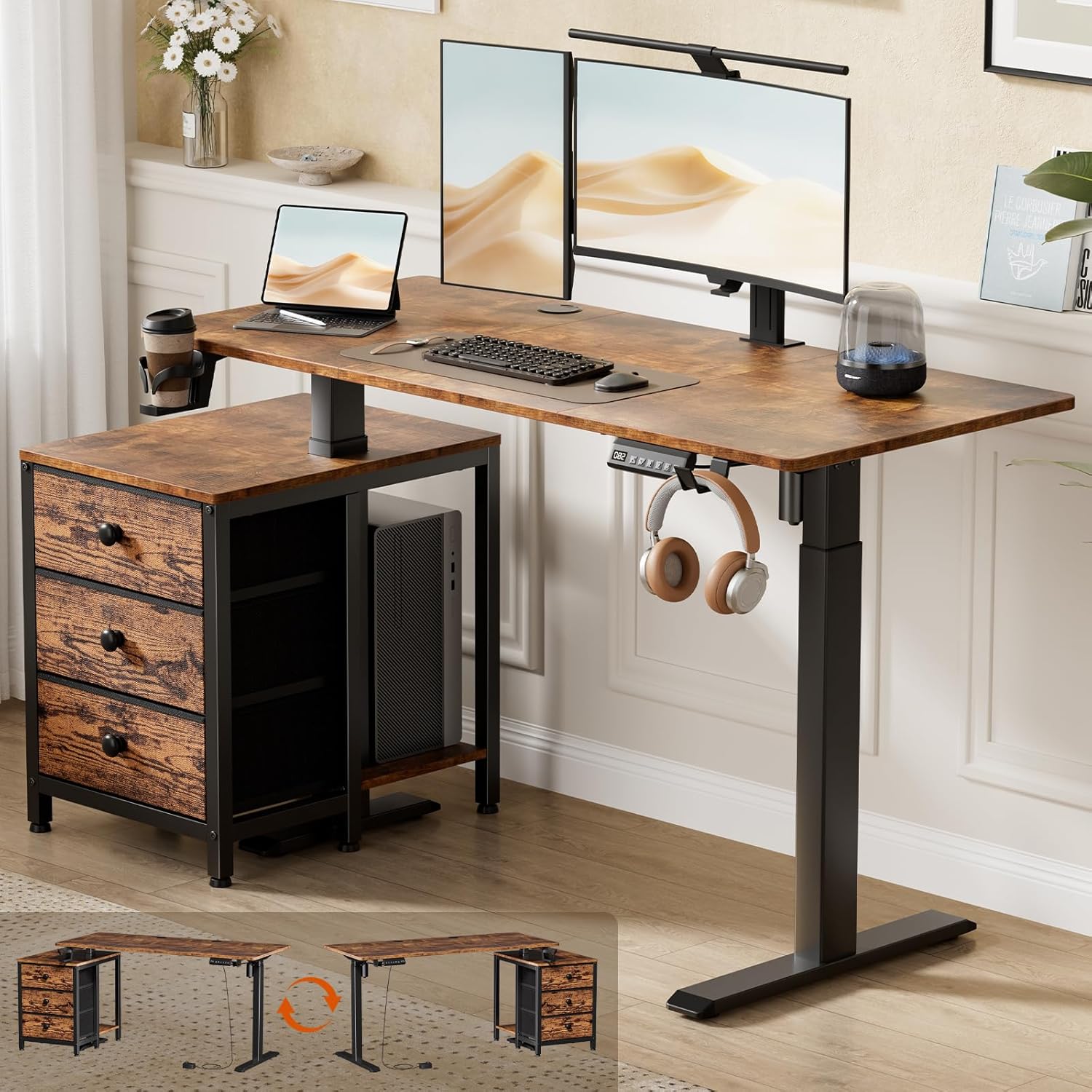
Tangkula L-Shaped Computer Desk with Power Outlets
Bottom line: The Tangkula L-Shaped Computer Desk with Power Outlets: Converts between L-shaped corner layout and a 95-inch straight 2-person desk; main trade-off: two cable holes only; no included tray for routing a full dual-PC setup.
As an Amazon Associate, SpecPicks earns from qualifying purchases. Full disclosure →
Pros & Cons
Pros
- ✓ Converts between L-shaped corner layout and a 95-inch straight 2-person desk
- ✓ Built-in charging station: 2 AC outlets plus USB-A and USB-C ports
- ✓ Removable monitor shelf mounts on top or below as a CPU stand
- ✓ Cross-braced heavy-duty metal frame rated to 420 lbs total
Cons
- ✗ Two cable holes only; no included tray for routing a full dual-PC setup
- ✗ Monitor shelf raises height on one fixed riser, not adjustable per user
- ✗ Fixed desktop height with no sit-stand or leg-height adjustment listed
- ✗ 420 lb rating is the whole desk, split across a 95-inch two-person span
SpecPicks Verdict
SpecPicks has no buyer-rating or benchmark data for Tangkula L-Shaped Computer Desk with Power Outlets, so this read rests on the manufacturer's listed specs (how we evaluate). Compare with similarly-priced alternatives in the gaming desks category before committing. On the listing's own facts, the case for it is "Converts between L-shaped corner layout and a 95-inch straight 2-person desk"; the main trade-off is "Two cable holes only; no included tray for routing a full dual-PC setup". If those two points fit how you will use it, put it beside one or two close alternatives in the Compare tool to confirm the price.
Common buyer scenarios for gaming desks: matching surface dimensions to the room footprint and monitor count, checking height-adjustment range for sit-stand setups, verifying cable-management channels for a clean multi-monitor build, and confirming weight capacity for a full tower + dual-monitor load. Review the spec sheet for assembly difficulty before ordering.
Key Features
Quoted from the manufacturer's listing. Where it differs from the pros and cons above, those note the conditions the listing leaves out.
- Flexible Installation Options: This computer desk can be easily configured in 2 ways. It can be set up as an L-shaped corner desk, making the most of the room’s corner space. Alternatively, it can be assembled into a 95” long 2-person desk, accommodating multiple users at once.
- Versatile Monitor Shelf: The corner desk features a removable monitor shelf that allows you to elevate your monitor to an optimal viewing height for enhanced comfort and ergonomics. This shelf can be conveniently placed either on top of the desk or underneath it, serving as a CPU stand when positioned below.
- Built-in Charging Station: Equipped with a practical built-in charging station, the office desk provides 2 AC outlets, a USB-A port, and a USB-C port catered to all your charging needs. Additionally, it has 2 built-in cable holes that enable tidy wire management, keeping your workspace clutter-free and organized.
- Heavy-Duty Metal Frame: Constructed with a robust heavy-duty metal frame, the L-shaped gaming desk boasts a cross-shaped reinforced structure to ensure a solid foundation. The tight connections and adjustable foot pads for added stability, allowing it to support a total weight of up to 420 lbs.
- Versatile Usage: The spacious work surface of this L-shaped computer desk is perfect for working, gaming, and writing. Its design makes it highly suitable for both office and home environments, offering an efficient workspace for various tasks and hobbies.
Full Specifications
| Base | Metal |
|---|---|
| Size | Large |
| Brand | Tangkula |
| Color | Rustic Brown |
| Shape | L-Shape |
| Style | Gaming |
| Set Name | L-shaped, 2-person desk |
| Base Type | Leg |
| Room Type | Dormitory |
| Top Color | Rustic Brown |
| Base Color | Rustic Brown |
| Item Depth | 59 inches |
| Model Name | 10786-CB-TA |
| Style Name | Gaming |
| Desk Design | Computer Desk |
| Desk design | Computer Desk |
| Drawer Type | No Drawer |
| Finish Type | Powder Coated |
| Connectivity | USB-C |
| Finish Types | Powder Coated |
| Full listing title | Tangkula L-Shaped Computer Desk with Power Outlets, 95” Long 2-Person Desk with Monitor Shelf, Modern Corner Desk Gaming Table with USB Ports for Home Office |
Ready to buy?
Tangkula L-Shaped Computer Desk with Power Outlets, 95” Long 2-Person Desk with Monitor Shelf, Modern Corner Desk Gaming Table with USB Ports for Home Office is listed on Amazon. Price, availability, shipping and returns are set by Amazon and its sellers — check the listing for current terms. SpecPicks earns a small commission on qualifying purchases — thank you for supporting independent review work.
Related Gaming Desks




More guides & deep dives from the SpecPicks archive
Browse all articles & guides →- RTX 4070 Super vs RX 7800 XT — Which to Buy in 2026
- How to Build a Windows 98 Retro PC in 2026
- Best Budget Gaming PC Build 2026 — ~$1,000 Parts List
- Emulation Hardware in 2026: FPGA, Software, and Cart-Reader Ecosystems
- Best Retro Handhelds in 2026: Pocket, Mid-Tier and FPGA Picks
- The Complete Voodoo5 5500 AGP Driver Guide (2026 Edition)
- Best 1440p Gaming GPUs in 2026
More reviews from the SpecPicks archive
Browse all reviews →- Building a Budget Local-AI Box: Ryzen 7 5800X + RTX 3060 12GB
- Best Budget Gaming Laptops of 2026: Buyer's Guide
- AI-Driven Win98 Voodoo Driver Install: A Repeatable Vision-LLM Playbook for the Sound Blaster Audigy FX
- SteamDSXL Yay or Nay? Dual-Screen Steam Deck Dock Review
- Best Sim Racing Wheel for Beginners on PS5 & PC (2026)
- ComfyUI on an RTX 3060 12GB: What Image Models Actually Run Well
- Local PDF-to-Audiobook on a Raspberry Pi 5: Kokoro 82M + Qwen + llama.cpp
- Best Gaming Monitor for 2026: 5 Picks from 1440p to 4K
- Anthropic's 2GW AMD Deal: What It Means for Local-vs-Cloud Builders
- Ryzen 5 5600G vs Ryzen 7 5700X for a Budget 1080p Gaming + Local-AI Build
- Open WebUI on a Raspberry Pi 4: A Self-Hosted LLM Front-End That Sips Power
- Best SSD and Controller Pairing for a Living-Room Gaming PC
- Amstrad CPC Emulator Now Runs on the Raspberry Pi Pico 2
- Best Webcam for Streaming and Remote Work (2026)
- HyperX QuadCast 2 vs Blue Yeti: Best Streaming Mic in 2026
- GameSir G7 SE vs DualSense for PC Emulation in 2026
- Period-Correct 1999 LAN Rig: Pentium III, Voodoo3 3000, Sound Blaster
- Best Controllers for Steam Deck and PC in 2026
- Best Sim Racing Wheel Setup 2026: G920 vs HORI vs TH8A
- Best Streaming Microphone for Twitch and YouTube in 2026
- OG NeoGeo Stick vs 8BitDo SN30 Pro: Which Feels More Period-Correct for Fighting Games in 2026?
- FIDECO vs Unitek SATA/IDE-to-USB Adapters: Imaging and Rescuing Vintage Drives in 2026
- Best CPU for Streaming and Gaming Under $300 (2026)
- Samsung's 360Hz 4K QD-OLED vs Budget 4K Gaming Monitors: Is the Premium Worth It?
Earliest SpecPicks reviews
Browse full archive →- Best GPU for Llama 3.1 8B (2026)
- Best GPU for Qwen 3 14B (2026)
- Best GPU for Qwen 3 32B (2026)
- Best GPU for Llama 3.1 70B (2026)
- Best GPU for DeepSeek-R1 32B (2026)
- Best GPU for Llama 3.1 405B (2026)
- How to run Llama 3.1 8B on NVIDIA GeForce RTX 5090
- How to run Qwen 3 14B on NVIDIA GeForce RTX 5090
- How to run Qwen 3 32B on NVIDIA GeForce RTX 5090
- How to run Llama 3.1 70B on NVIDIA GeForce RTX 5090
- How to run DeepSeek-R1 32B on NVIDIA GeForce RTX 5090
- How to run Llama 3.1 8B on NVIDIA GeForce RTX 4090