

ORICO
ORICO C5 256GB External SSD up to 460MB/s
Bottom line: The ORICO C5 256GB External SSD up to 460MB/s ($80.74 on Amazon as of 2026-11-22 05:28 UTC): Up to 460MB/s over USB 3.2 Gen 1 moves 1GB in seconds; main trade-off: 256GB fills fast if you store 4K video or game libraries.
As an Amazon Associate, SpecPicks earns from qualifying purchases. Full disclosure →
*Price sourced from Amazon.com. Last updated 2026-11-22. Product prices and availability are accurate as of the date/time indicated and are subject to change. Any price and availability information displayed on Amazon.com at the time of purchase will apply to the purchase of this product.
Pros & Cons
Pros
- ✓ Up to 460MB/s over USB 3.2 Gen 1 moves 1GB in seconds
- ✓ Weighs just 0.22 lb at 5.19 x 1.33 x 0.74 inches
- ✓ Hanging hole clips to belts, backpacks, or bag straps
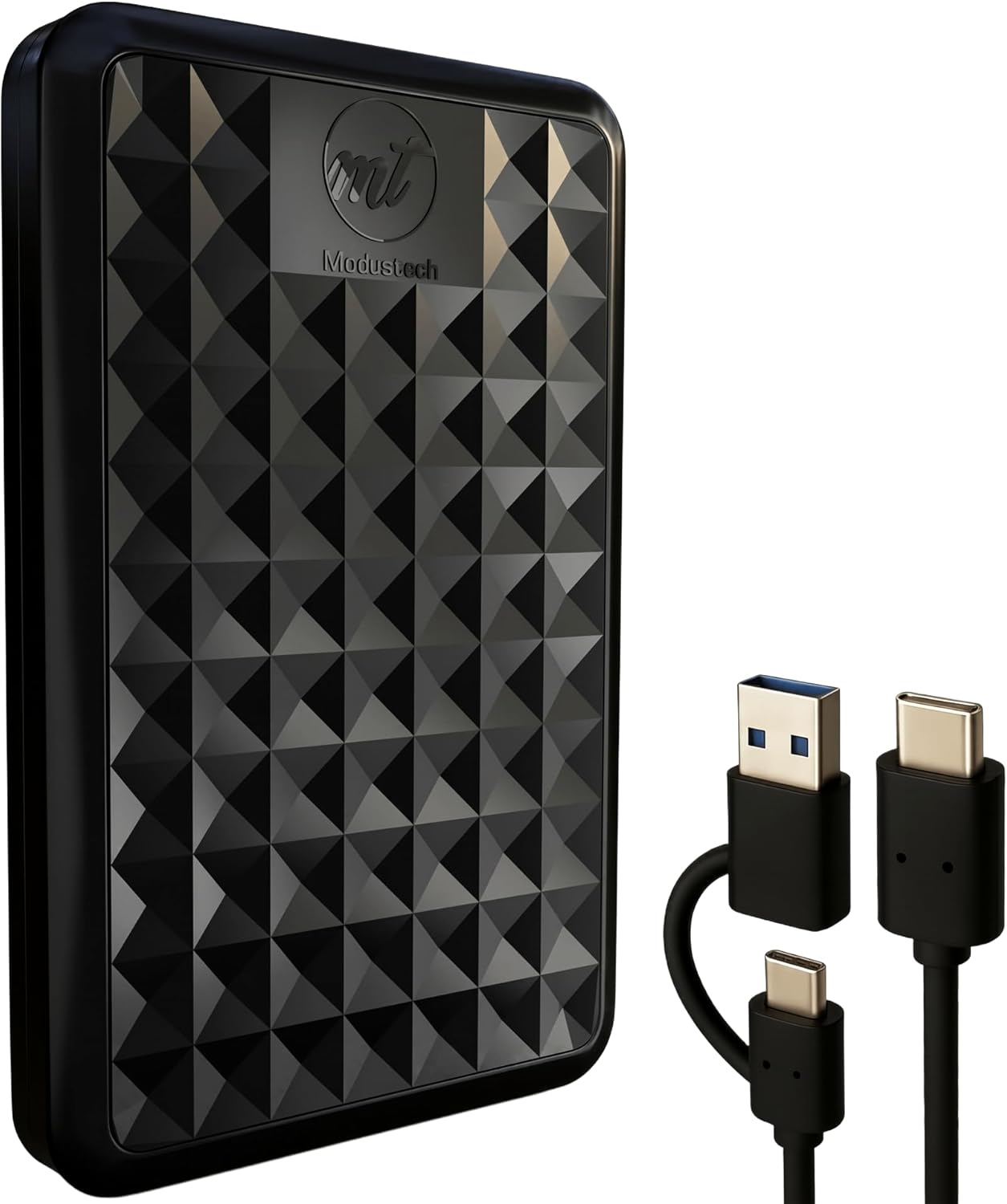
- ✓ 2-in-1 USB-C and USB-A cable included, no adapter needed
- ✓ Aluminum alloy shell resists drops, dust, and daily wear
Cons
- ✗ 256GB fills fast if you store 4K video or game libraries
- ✗ USB 3.2 Gen 1 caps speed well below Gen 2 or NVMe enclosures
- ✗ 460MB/s is a peak figure, not a sustained write guarantee
- ✗ No stated hardware encryption or bundled backup software
Manufacturer description
The ORICO C5 puts 256GB of pocketable storage behind a USB 3.2 Gen 1 connection rated at up to 460MB/s, so moving a 1GB project folder off your laptop takes seconds rather than minutes. The aluminum alloy shell measures 5.19 x 1.33 x 0.74 inches and weighs 0.22 lb, which is small enough to disappear into a jacket pocket, and ORICO adds a hanging hole so you can clip the drive to a belt loop, backpack strap, or camera bag instead of burying it in a side pouch. The included 2-in-1 cable terminates in both USB-C and USB-A, so the same drive plugs into a Type-C Android phone, an iPad, a MacBook…
SpecPicks Verdict
SpecPicks has no buyer-rating or benchmark data for ORICO C5 256GB External SSD up to 460MB/s, so this read rests on the manufacturer's listed specs and the current price in the external storage category (how we evaluate). Compare with similarly-priced alternatives in the external storage category before committing. On the listing's own facts, the case for it is "Up to 460MB/s over USB 3.2 Gen 1 moves 1GB in seconds"; the main trade-off is "256GB fills fast if you store 4K video or game libraries". If those two points fit how you will use it, put it beside one or two close alternatives in the Compare tool to confirm the price.
Before ordering, check the listed dimensions, ports, power requirements and supported devices or systems in the spec table below against how you plan to use it, and confirm them on the retailer's listing. Prices and stock are set by the retailer and may have moved since this page was last updated.
Frequently Asked Questions
How fast is the ORICO C5 256GB SSD in real use?
ORICO rates it at up to 460MB/s over USB 3.2 Gen 1, which the listing describes as moving 1GB of data in seconds. Actual speed depends on your port, cable, and file sizes.
Will it work with my Android phone or iPhone?
Yes. The included 2-in-1 USB-C and USB-A cable supports Android, iOS, macOS, and Windows devices, and the drive is plug and play with no software install.
How big and heavy is it to carry every day?
It measures 5.19 x 1.33 x 0.74 inches and weighs 0.22 lb. There is also a hanging hook so you can attach it to a belt, backpack, or bag rather than carry it loose.
Is 256GB enough storage for my files?
256GB comfortably handles documents, photo libraries, and routine backups. If you regularly move 4K video or large game installs, consider a higher-capacity model.
How well does this drive hold up to travel?
The enclosure is premium aluminum alloy, which ORICO says stands up to drops, dust, and everyday wear. Check the product listing for current warranty terms.
Key Features
Quoted from the manufacturer's listing. Where it differs from the pros and cons above, those note the conditions the listing leaves out.
- Massive Capacity on the Go: With 256GB of storage, the ORICO C5 portable SSD makes it easy to carry everything you need—whether it’s work files, media libraries, or daily backups—in a slim and lightweight design.
- Compact & Travel-Ready: Designed with portability in mind, the external ssd includes a convenient hanging hook for belts, backpacks, or bags. At just 5.19 x 1.33 x 0.74 inches and weighing only 0.22 lb, it’s the ultimate pocket-sized companion.
- Lightning-Fast Transfers: Experience blazing-fast performance with the ORICO 256GB external hard drive, delivering transfer speeds of up to 460MB/s. Move 1GB of data in just seconds via USB 3.2 Gen 1, making backups, media transfers, and file sharing effortless and seamless.
- Durable & Reliable: Built from premium aluminum alloy, this portable SSD stands up to drops, dust, and everyday wear, ensuring your data stays safe no matter where you go.
- Universal Connectivity: The solid state external hard drive included 2-in-1 USB-C & A cable ensures wide compatibility across smartphones, tablets, laptops, and PCs. Enjoy true plug-and-play convenience on Android, iOS, macOS, and Windows devices.
Full Specifications
| Brand | ORICO |
|---|---|
| Weight | 0.22 lb |
| Dimensions | 5.19 x 1.33 x 0.74 inch |
| Read Speed | 460 megabytes_per_second |
| Connectivity | USB-C |
| Compatibility | Android, iOS, Mac |
| Built-In Media | 2 in 1 USB C&A Cable, ORICO C5 External SSD |
| Number of Items | 1 |
| Special Feature | Backward Compatible, LED Light, Portable |
| Installation Type | External Hard Drive |
| Compatible Devices | Camera, Desktop, Laptop, Smartphone, Tablet |
| Data Transfer Rate | 460 megabytes_per_second |
| Additional Features | Backward Compatible, LED Light, Portable |
| Included Components | 2 in 1 USB C&A Cable, ORICO C5 External SSD |
| Warranty Description | 3 Years Manufacture |
| Hard Disk Description | Solid State Drive |
| Connectivity Technology | USB |
| Digital Storage Capacity | 256 GB |
| Specific Uses For Product | Business, Gaming, Personal |
| Full listing title | ORICO C5 256GB External SSD up to 460MB/s,USB 3.2 Gen1,Hanging Hole Design | Plug & Play, Metal Portable SSD, USB-C & A 2-in-1 Cable, Reliable Storage for Type-C Smartphones, Tablets, Laptops |
Ready to buy?
ORICO C5 256GB External SSD up to 460MB/s,USB 3.2 Gen1,Hanging Hole Design | Plug & Play, Metal Portable SSD, USB-C & A 2-in-1 Cable, Reliable Storage for Type-C Smartphones, Tablets, Laptops is listed on Amazon. Price, availability, shipping and returns are set by Amazon and its sellers — check the listing for current terms. SpecPicks earns a small commission on qualifying purchases — thank you for supporting independent review work.
*Price sourced from Amazon.com. Last updated 2026-11-22. Product prices and availability are accurate as of the date/time indicated and are subject to change. Any price and availability information displayed on Amazon.com at the time of purchase will apply to the purchase of this product.
Related External Storage


More guides & deep dives from the SpecPicks archive
Browse all articles & guides →- RTX 4070 Super vs RX 7800 XT — Which to Buy in 2026
- The Complete Voodoo5 5500 AGP Driver Guide (2026 Edition)
- Emulation Hardware in 2026: FPGA, Software, and Cart-Reader Ecosystems
- Best Retro Handhelds in 2026: Pocket, Mid-Tier and FPGA Picks
- How to Build a Windows 98 Retro PC in 2026
- Best Budget Gaming PC Build 2026 — ~$1,000 Parts List
- Best 1440p Gaming GPUs in 2026
More reviews from the SpecPicks archive
Browse all reviews →- Kimi K2.7 Code: 12x Cheaper Than GPT-5.5, But Can You Run It Locally?
- How Companies Name Their Monitors: Brand-by-Brand Guide
- RTX 5080 vs RTX 4090: Is the Future-Proofing Worth It?
- Qwen 3.8 Open Weights: What Fits on a 12GB GPU
- Period-Correct Windows 95 Pentium MMX Build Guide: 3dfx Voodoo 1, AWE32, and Authentic 1996 Gaming
- Best Raspberry Pi Alternative for Home Assistant (2026)
- Can the Ryzen 5 5600G Run Local LLMs Without a GPU?
- GPT-5.6 Sol Ships Under Government Access OpenAI Calls Unsustainable
- Revive an Old Payphone with a Raspberry Pi Zero 2W
- Best GPU for Running Llama 3.1 8B Locally on a Budget (2026)
- Best Raspberry Pi 5 Projects and Kits for 2026
- How to run Llama 3.1 70B on NVIDIA GeForce RTX 5080
- Ryzen 5 2600 vs Ryzen 7 5800X: Is the AM4 Upgrade Worth It?
- Running Local LLMs on a Raspberry Pi 5 in 2026: What Works, What Doesn't
- Steam Deck LCD 6TB Man-Cave Setup: Storage & One-Cable Dock
- Leanstral 1.5 on an RTX 3060 12GB: Local Math + Bug-Finding Benchmarks
- Raspberry Pi Projects for Home Automation in 2025
- Claude Opus 4.8 vs Local LLM on RTX 3060 12GB: Honest 2026 Benchmarks
- Self-Host Immich on a Ryzen 5 5600G Mini-PC: Power, Storage, Real Throughput
- Wired Headset vs Bluetooth Earbuds for Competitive FPS: The Latency Math
- Best Single-Board Computer Project Kits for Beginners (2026)
- AI-Driven Driver Recovery for SB Live! and Audigy on Win98: How an LLM Watches the Installer
- GPT-5.6 Deleted a User's Files: Why Local, Sandboxed Agents Matter
- Best USB Microphones for Streaming and Podcasting (2026)
Earliest SpecPicks reviews
Browse full archive →- Best GPU for Llama 3.1 8B (2026)
- Best GPU for Qwen 3 14B (2026)
- Best GPU for Qwen 3 32B (2026)
- Best GPU for Llama 3.1 70B (2026)
- Best GPU for DeepSeek-R1 32B (2026)
- Best GPU for Llama 3.1 405B (2026)
- How to run Llama 3.1 8B on NVIDIA GeForce RTX 5090
- How to run Qwen 3 14B on NVIDIA GeForce RTX 5090
- How to run Qwen 3 32B on NVIDIA GeForce RTX 5090
- How to run Llama 3.1 70B on NVIDIA GeForce RTX 5090
- How to run DeepSeek-R1 32B on NVIDIA GeForce RTX 5090
- How to run Llama 3.1 8B on NVIDIA GeForce RTX 4090