

ElectroCookie
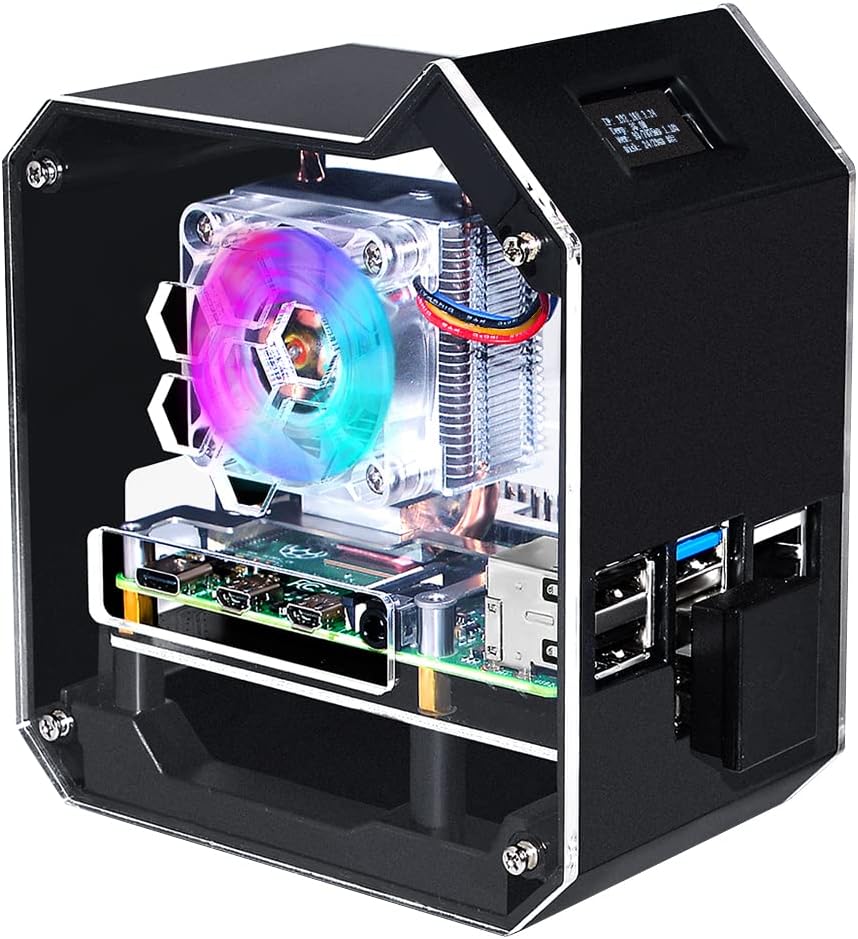
ElectroCookie Mini PC Case
Bottom line: The ElectroCookie Mini PC Case ($31.99 on Amazon as of 2026-11-22 17:22 UTC): M.2 slot takes 2230/2242 NVMe drives for SSD boot speeds on the Pi 5; main trade-off: only 2230 and 2242 NVMe drives fit, despite the 2260/2280 shield mounting points.
As an Amazon Associate, SpecPicks earns from qualifying purchases. Full disclosure →
*Price sourced from Amazon.com. Last updated 2026-11-22. Product prices and availability are accurate as of the date/time indicated and are subject to change. Any price and availability information displayed on Amazon.com at the time of purchase will apply to the purchase of this product.
Pros & Cons
Pros
- ✓ M.2 slot takes 2230/2242 NVMe drives for SSD boot speeds on the Pi 5
- ✓ Tinted side door opens for GPIO access and SSD swaps without full disassembly
- ✓ PWM fan ramps with CPU temperature instead of running at one fixed speed
- ✓ External side button wires to the Pi 5's own power button for on/off outside the case
- ✓ Swappable front panel accepts 1.6-3mm acrylic, wood, or PCB for a custom build
Cons
- ✗ Only 2230 and 2242 NVMe drives fit, despite the 2260/2280 shield mounting points
- ✗ RGB lighting is fixed, with no software control or color programming
- ✗ Fan can spin nonstop when no bootable OS is present to manage it
- ✗ SSD compatibility is drive-dependent; some controllers are not recognized by the Pi 5
Manufacturer description
Raspberry Pi 5 NVMe SSD HAT – Compatibility Notice This NVMe SSD HAT for Raspberry Pi 5 shares the same circuit design as widely adopted M.2 HATs, featuring a PCB layout that’s been minimally customized to fit our case dimensions. As with the official Raspberry Pi Foundation M.2 HAT, it supports only 2230 and 2242 NVMe SSDs. If your SSD is not recognized or fails to boot with the Raspberry Pi 5, it is most likely due to incompatibility between the SSD and the Raspberry Pi 5. The HAT simply acts as a signal and power bridge and does not affect SSD compatibility. SSD controllers known to cause…
SpecPicks Verdict
SpecPicks has no buyer-rating or benchmark data for ElectroCookie Mini PC Case, so this read rests on the manufacturer's listed specs and the current price in the single-board computers category (how we evaluate). Compare with similarly-priced alternatives in the single-board computers category before committing. On the listing's own facts, the case for it is "M.2 slot takes 2230/2242 NVMe drives for SSD boot speeds on the Pi 5"; the main trade-off is "Only 2230 and 2242 NVMe drives fit, despite the 2260/2280 shield mounting points". If those two points fit how you will use it, put it beside one or two close alternatives in the Compare tool to confirm the price.
Before ordering, check the listed dimensions, ports, power requirements and supported devices or systems in the spec table below against how you plan to use it, and confirm them on the retailer's listing. Prices and stock are set by the retailer and may have moved since this page was last updated.
Key Features
Quoted from the manufacturer's listing. Where it differs from the pros and cons above, those note the conditions the listing leaves out.
- Miniature PC-Style Case for Raspberry Pi 5, featuring an NVMe M.2 SSD shield compatible with 2230, 2242, 2260, and 2280 sizes, providing expanded storage and ultra-fast responsiveness.
- **SSD Compatibility & Setup Info Please check SSD compatibility in the product description or by searching “Pi Benchmark” online. Boot drive setup instructions are also provided in the product description below, or you can follow official Raspberry Pi documentation and online tutorials.
- Enjoy easy access to GPIO pins and quick SSD swaps with the tinted side door, which also beautifully showcases internal RGB lighting to combine style with functionality.
- Equipped with an RGB-lit PWM fan that turns on with system power and automatically adjusts its speed based on CPU temperature (*Note The lighting is not programmable, and the fan may not spin when the CPU is cool, or may run continuously if no OS or bootable drive is available to control it.).
- Easily power your Raspberry Pi 5 on or off from outside the case using the convenient side power button, directly connected to the Raspberry Pi 5's power button.
- Create a unique case by customizing front panels; the frame is designed to support various materials like 1/16–1/8 inch(1.6–3mm) acrylic, wood, and PCB board for a personalized style.
Full Specifications
| ASIN | B0DWMKSBWT |
|---|---|
| Brand | ElectroCookie |
| Color | Matte Black |
| Material | Plastic |
| Case Type | Raspberry Pi |
| Model Name | X1001 |
| Unit Count | 1.0 Count |
| Light Color | green |
| Manufacturer | ElectroCookie |
| Model Number | X1001 |
| Cooling Method | Air |
| Antenna Location | Allgemeine Zwecke |
| Compatible Devices | Raspberry Pi 5 |
| Enclosure Material | Plastic |
| Total USB 3.0 Ports | 2 |
| Warranty Description | Warranted |
| Hard Disk Form Factor | 22 Millimeters |
| Number of USB 3 Ports | 2 |
| Supported Motherboard | Mini ITX |
| Internal Bays Quantity | 1 |
| Full listing title | ElectroCookie Mini PC Case for Raspberry Pi 5 with M.2 NVMe SSD PCIe HAT and Active RGB Lighting Cooler (Black Case + M.2 HAT[X1001]) |
Ready to buy?
ElectroCookie Mini PC Case for Raspberry Pi 5 with M.2 NVMe SSD PCIe HAT and Active RGB Lighting Cooler (Black Case + M.2 HAT[X1001]) is listed on Amazon. Price, availability, shipping and returns are set by Amazon and its sellers — check the listing for current terms. SpecPicks earns a small commission on qualifying purchases — thank you for supporting independent review work.
*Price sourced from Amazon.com. Last updated 2026-11-22. Product prices and availability are accurate as of the date/time indicated and are subject to change. Any price and availability information displayed on Amazon.com at the time of purchase will apply to the purchase of this product.
Related Single-Board Computers




More guides & deep dives from the SpecPicks archive
Browse all articles & guides →- Best 1440p Gaming GPUs in 2026
- RTX 4070 Super vs RX 7800 XT — Which to Buy in 2026
- The Complete Voodoo5 5500 AGP Driver Guide (2026 Edition)
- Best Budget Gaming PC Build 2026 — ~$1,000 Parts List
- Emulation Hardware in 2026: FPGA, Software, and Cart-Reader Ecosystems
- Best Retro Handhelds in 2026: Pocket, Mid-Tier and FPGA Picks
- How to Build a Windows 98 Retro PC in 2026
More reviews from the SpecPicks archive
Browse all reviews →- Rescue a Dying Retro PC: Image Your IDE Drive to CompactFlash First
- Best Wireless Controller for a Couch-Gaming Living-Room PC in 2026
- Best Budget Gaming SSDs Under $100 in 2026
- gpt-oss 20B vs Phi-4 14B on a 12 GB GPU: Which One Actually Fits?
- Build an Always-On Raspberry Pi Zero W Project: 24/7 FM Radio and More
- Running Windows XP Off a 2.5-inch SATA SSD via an IDE Adapter (2026 Guide)
- Raspberry Pi 4 8GB as a Local LLM Box: What Models Actually Run?
- Best 27-inch 4K Monitor for PC and Console: Odyssey vs KOORUI
- Qwen2.5 7B on a Budget: RTX 3060 12GB vs Ryzen 5 5600G iGPU (2026)
- NVIDIA Cosmos 3 vs Ideogram 4.0: Which Open Image Model to Run on 12GB
- MAYFLASH F300 vs GameSir G7 SE: Best Controller for PC Fighting Games (2026)
- Stable Diffusion vs Flux — which open image model wins in 2026?
- Acer Nitro 65 Review: Solid Gaming, Connectivity Caveats
- Apple Intelligence Gets a Second Shot With Google and Nvidia Help
- HyperX QuadCast 2 vs Blue Yeti for Streaming in an Untreated Room
- Best SSD for a PS4 Pro Upgrade in 2026: 870 EVO vs BX500
- Baidu Unlimited OCR Runs Locally: Document AI on an RTX 3060 12GB
- Modern PC Builds vs Period-Correct Retro Rigs: A 2026 Comparison
- Best SATA SSDs for Console and Retro PC Upgrades in 2026
- 48GB vs 64GB DDR5 for Gaming and AI: Worth It?
- Best Budget 4K Gaming Monitor for an RTX 3060: KOORUI vs Samsung Odyssey
- GLM-5.2 Review: Running the Top Open-Weights LLM on an RTX 3060
- Watching a Z80 Live From a Raspberry Pi RP2350
- Best Cooling for AMD Ryzen Overclocking in 2026
Earliest SpecPicks reviews
Browse full archive →- Best GPU for Llama 3.1 8B (2026)
- Best GPU for Qwen 3 14B (2026)
- Best GPU for Qwen 3 32B (2026)
- Best GPU for Llama 3.1 70B (2026)
- Best GPU for DeepSeek-R1 32B (2026)
- Best GPU for Llama 3.1 405B (2026)
- How to run Llama 3.1 8B on NVIDIA GeForce RTX 5090
- How to run Qwen 3 14B on NVIDIA GeForce RTX 5090
- How to run Qwen 3 32B on NVIDIA GeForce RTX 5090
- How to run Llama 3.1 70B on NVIDIA GeForce RTX 5090
- How to run DeepSeek-R1 32B on NVIDIA GeForce RTX 5090
- How to run Llama 3.1 8B on NVIDIA GeForce RTX 4090