

StarTech.com
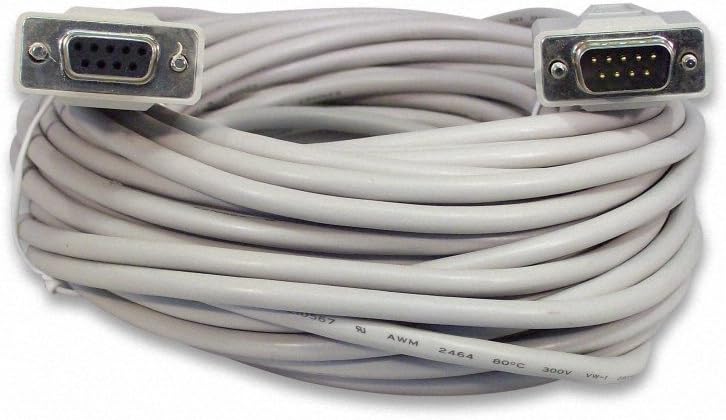
StarTech.com StarTech 2m DB9 RS232 Serial Null Modem Cable
Bottom line: The StarTech.com StarTech 2m DB9 RS232 Serial Null Modem Cable: Cross-wired null modem pinout works DTE-to-DTE with no extra adapter; main trade-off: 2 m fixed length only; no shorter or longer option in this SKU.
As an Amazon Associate, SpecPicks earns from qualifying purchases. Full disclosure →
Pros & Cons
Pros
- ✓ Cross-wired null modem pinout works DTE-to-DTE with no extra adapter
- ✓ Backed by StarTech.com lifetime warranty
- ✓ Shielded against EMI for stable console and PLC sessions
- ✓ Molded connectors with strain relief survive repeated re-seating
Cons
- ✗ 2 m fixed length only; no shorter or longer option in this SKU
- ✗ Female-to-female only, so male DB9 ports need a gender changer
- ✗ No USB; your PC needs a real RS232 port or USB-serial adapter
- ✗ Null modem wiring is wrong for modems and other DCE devices
Manufacturer description
The StarTech.com SCNM9FF2MBK is a 2 m DB9 RS232 null modem cable wired female-to-female, built for the job legacy serial gear still demands: talking to a switch console port, flashing a PLC, driving a CNC controller, or moving files directly between two PCs over their 9-pin serial ports. The crossover (null modem) wiring swaps the transmit and receive lines internally, so you get a working DTE-to-DTE link without an adapter or a hand-soldered pinout. StarTech.com shields the cable against EMI and molds the connectors with integrated strain relief, which matters on a bench where the cable…
SpecPicks Verdict
SpecPicks has no buyer-rating or benchmark data for StarTech.com StarTech 2m DB9 RS232 Serial Null Modem Cable, so this read rests on the manufacturer's listed specs (how we evaluate). Compare with similarly-priced alternatives in the cables & connectors category before committing. On the listing's own facts, the case for it is "Cross-wired null modem pinout works DTE-to-DTE with no extra adapter"; the main trade-off is "2 m fixed length only; no shorter or longer option in this SKU". If those two points fit how you will use it, put it beside one or two close alternatives in the Compare tool to confirm the price.
Before ordering, check the listed dimensions, ports, power requirements and supported devices or systems in the spec table below against how you plan to use it, and confirm them on the retailer's listing. Prices and stock are set by the retailer and may have moved since this page was last updated.
Frequently Asked Questions
What is the difference between a null modem cable and a straight-through serial cable?
A null modem cable is cross-wired: transmit and receive lines are swapped internally so two DTE devices, such as two PCs, can talk directly. A straight-through cable passes pins one-to-one and is meant for DTE-to-DCE links like a PC to a modem. The SCNM9FF2MBK is the cross-wired null modem type.
Will this cable work for a Cisco or switch console port?
It terminates in DB-9 female on both ends with null modem crossover wiring, which is the standard arrangement for many RS232 console connections. Confirm your device's console port is DB-9 male and expects a null modem pinout; if it uses RJ45 or a male-to-female run, you'll need a different cable or an adapter.
How long is it, and how much does it weigh?
The cable is 2 m (about 6.6 ft). Shipping specs list the package at 7.04 x 4.92 x 0.74 inches and 0.264 pounds, so it ships as a light, compact coil.
Is there a warranty on this StarTech.com cable?
Yes. StarTech.com backs this RS232 null modem cable with a lifetime warranty. Check the product listing for the current warranty terms and claim process that apply to your region.
Can I use it to transfer files between two old PCs?
Yes, direct PC-to-PC file transfer over a serial connection is one of its stated uses. Both machines need a 9-pin RS232 port (or a USB-to-serial adapter) plus file-transfer software such as a terminal program with a Z-modem or Kermit transfer, since the cable itself only provides the physical link.
Key Features
Quoted from the manufacturer's listing. Where it differs from the pros and cons above, those note the conditions the listing leaves out.
- Connect your serial devices and transfer your files
- 2m DB9 Null Modem Cable
- DB9 Female to Female Cable
- RS232 Null Modem Cable
- 9 pin Null Modem Cable
- 2 m Black Female to Female Null Modem Cable
Full Specifications
| Brand | StarTech.com |
|---|---|
| Color | Black |
| Gauge | 28.0 |
| Model | SCNM9FF2MBK |
| Cable Type | Serial |
| Item Shape | Round |
| Model Name | SCNM9FF2MBK |
| Unit Count | 1.0 Count |
| Item Length | 6.6 Feet |
| Part Number | SCNM9FF2MBK |
| Connector Type | Serial |
| Item Type Name | Data Transfer Cable |
| Number of Pins | 9 |
| Outer Material | Polyvinyl Chloride (PVC) |
| Connection Type | Wired |
| Number of Items | 1 |
| Special Feature | Data Transfer |
| Connector Gender | Female-to-Female |
| Item Part Number | SCNM9FF2MBK |
| Compatible Devices | Modem, PC |
| Full listing title | StarTech 2m DB9 RS232 Serial Null Modem Cable, Black (SCNM9FF2MBK) | 9 pin RS232 Null Modem Cable, Cross Wired, DB-9 (F) to DB-9 (F), Female to Female |
Ready to buy?
StarTech 2m DB9 RS232 Serial Null Modem Cable, Black (SCNM9FF2MBK) | 9 pin RS232 Null Modem Cable, Cross Wired, DB-9 (F) to DB-9 (F), Female to Female is listed on Amazon. Price, availability, shipping and returns are set by Amazon and its sellers — check the listing for current terms. SpecPicks earns a small commission on qualifying purchases — thank you for supporting independent review work.
Related Cables & Connectors


More guides & deep dives from the SpecPicks archive
Browse all articles & guides →- Best 1440p Gaming GPUs in 2026
- How to Build a Windows 98 Retro PC in 2026
- Best Retro Handhelds in 2026: Pocket, Mid-Tier and FPGA Picks
- RTX 4070 Super vs RX 7800 XT — Which to Buy in 2026
- Best Budget Gaming PC Build 2026 — ~$1,000 Parts List
- The Complete Voodoo5 5500 AGP Driver Guide (2026 Edition)
- Emulation Hardware in 2026: FPGA, Software, and Cart-Reader Ecosystems
More reviews from the SpecPicks archive
Browse all reviews →- Cursor Launches Its Own AI Model and Git Platform: What Changes
- Best 12GB GPU for Local LLMs in 2026
- Local LLM vs Claude in 2026: When On-Device Beats the API
- RTX 5090 AI Models: Performance, VRAM, Power
- Anthropic: AI Builds Working Exploits in Hours, Not Weeks
- Best Gaming Monitor for 2026: 5 Picks from 1440p to 4K
- Best CPU Coolers for Ryzen and Intel Builds in 2026
- Best GPU for the Ryzen 7 5800X3D in 2026: No-Bottleneck Picks
- Best Controller for Fighting Games on PC in 2026: HORI HORIPAD vs 8BitDo Pro 2 vs DualSense
- Bezos-Backed Prometheus Raises $12B at $41B: The Local-vs-Cloud Question
- Best GPU for Gaming in 2026: Top 5 Picks by Budget
- Ideogram 4.0 Open Weights: Running It Locally on an RTX 3060 12GB
- Ryzen 7 5800X + RTX 5060 Bundle Drops to $439 With a Free CPU Cooler
- Qwen-Image-3.0 on an RTX 3060 12GB: Local Text-in-Image Gen
- Intel Arc Pro B60 24GB: The Cheapest 24GB Inference Card Yet?
- Build a Sub-$60 Air Quality Monitor on a Raspberry Pi 4 (CO₂, PM2.5, VOC)
- GeForce FX 5900 Ultra vs Radeon 9800 Pro: The 2003 DirectX 9 Showdown Revisited
- Asus Prime Z890-P WiFi Review: Built for Core Ultra 200S
- Sound Blaster Audigy FX vs Sound BlasterX G6: Picking a Card for Retro and Modern Dual-Boot
- Best GPU for Local LLMs by VRAM: 2026 Reddit Consensus
- How to run Llama 3.1 70B on NVIDIA GeForce RTX 4090
- Intel Arc Pro B70 vs RTX 3060 12GB: Budget AI + 1440p in 2026
- Forza Horizon 6 Boots in 4 Seconds with Advanced Shader Delivery
- RX 7900 XTX 24GB vs RTX 4080 16GB for Local LLM Inference (2026)
Earliest SpecPicks reviews
Browse full archive →- Best GPU for Llama 3.1 8B (2026)
- Best GPU for Qwen 3 14B (2026)
- Best GPU for Qwen 3 32B (2026)
- Best GPU for Llama 3.1 70B (2026)
- Best GPU for DeepSeek-R1 32B (2026)
- Best GPU for Llama 3.1 405B (2026)
- How to run Llama 3.1 8B on NVIDIA GeForce RTX 5090
- How to run Qwen 3 14B on NVIDIA GeForce RTX 5090
- How to run Qwen 3 32B on NVIDIA GeForce RTX 5090
- How to run Llama 3.1 70B on NVIDIA GeForce RTX 5090
- How to run DeepSeek-R1 32B on NVIDIA GeForce RTX 5090
- How to run Llama 3.1 8B on NVIDIA GeForce RTX 4090