
NETGEAR
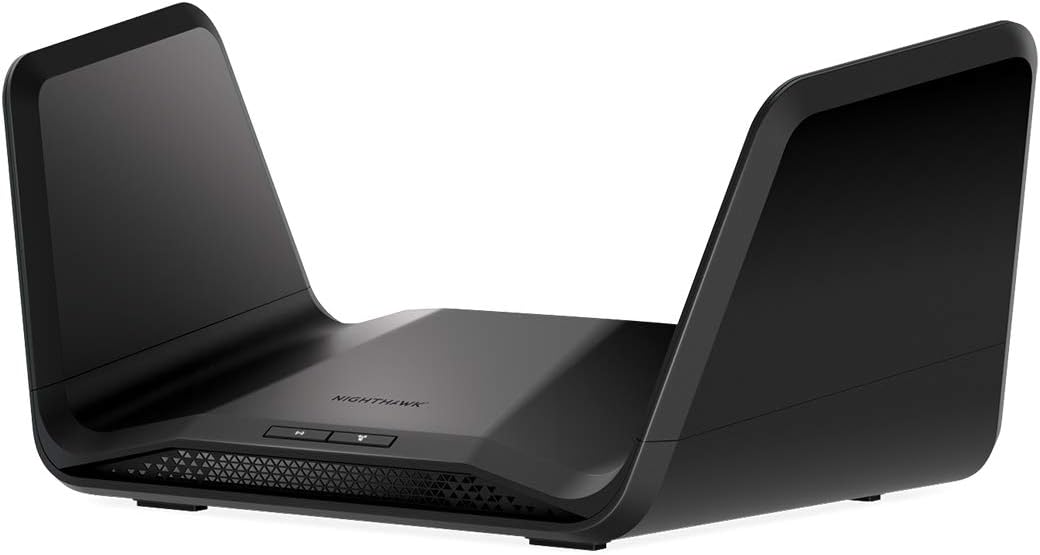
NETGEAR Nighthawk 8-Stream WiFi 6 Router (RAX70)
Bottom line: The NETGEAR Nighthawk 8-Stream WiFi 6 Router: AX6600 tri-band, 8 streams — dedicated 5GHz band keeps 4K streams off the crowded band; main trade-off: router only — you still need a separate modem or ISP gateway in bridge mode.
As an Amazon Associate, SpecPicks earns from qualifying purchases. Full disclosure →
Pros & Cons
Pros
- ✓ AX6600 tri-band, 8 streams — dedicated 5GHz band keeps 4K streams off the crowded band
- ✓ Quad-core 1.5GHz CPU handles 40 devices across 2,500 sq. ft. without choking
- ✓ 160MHz channel support doubles throughput vs 80MHz on compatible clients
- ✓ 4 Gigabit LAN ports plus USB 3.0 for consoles, NAS drives and wired desktops
Cons
- ✗ Router only — you still need a separate modem or ISP gateway in bridge mode
- ✗ NETGEAR Armor security suite is a 30-day trial, then a paid subscription
- ✗ No 2.5Gb WAN port; the 1Gig ports cap you below the claimed 2Gbps ISP support
- ✗ U.S.-only model — no international power or regulatory support
Manufacturer description
NETGEAR Nighthawk Tri-Band AX8 WiFi Router with a powerful quad-core 1.5GHz processor provides ultra-fast wireless speeds. 8 WiFi streams mean more available bandwidth and less congestion for your devices on the network. Tri-band WiFi ensures best wireless performance for high-bandwidth applications such as UHD video streaming, massive file transfers, or torrent downloads. Enjoy streaming even more with ultra-fast WiFi speeds to compatible smartphones, laptops and more. 160MHz channel support doubles the speeds as offered by 80MHz channels to provide Gigabit speeds to compatible devices. The…
SpecPicks Verdict
SpecPicks has no buyer-rating or benchmark data for NETGEAR Nighthawk 8-Stream WiFi 6 Router, so this read rests on the manufacturer's listed specs (how we evaluate). Compare with similarly-priced alternatives in the networking category before committing. On the listing's own facts, the case for it is "AX6600 tri-band, 8 streams — dedicated 5GHz band keeps 4K streams off the crowded band"; the main trade-off is "Router only — you still need a separate modem or ISP gateway in bridge mode". If those two points fit how you will use it, put it beside one or two close alternatives in the Compare tool to confirm the price.
Before ordering, check the listed dimensions, ports, power requirements and supported devices or systems in the spec table below against how you plan to use it, and confirm them on the retailer's listing. Prices and stock are set by the retailer and may have moved since this page was last updated.
Key Features
Quoted from the manufacturer's listing. Where it differs from the pros and cons above, those note the conditions the listing leaves out.
- Coverage up to 2,500 sq. ft. and 40 devices
- Fast AX6600 Gigabit speed with WiFi 6 technology for uninterrupted streaming, HD video gaming, and web conferencing
- NETGEAR devices come with security measures built in as well as enhanced safety features and updates designed to help protect you and your family
- Replace your existing WiFi Router (separate modem or modem router required). Compatible with any Internet Service Provider up to 2Gbps including cable, satellite, fiber, DSL and more
- 4 x 1 Gig Ethernet ports and 1 USB 3.0 port for computers, game consoles, streaming players, storage drive, and other wired devices
- NETGEAR Armor provides a powerful suite of tools to help keep you safe online, including enhanced protection against hackers, malware and identity theft, at home or on the go. Includes 30-day trial
Full Specifications
| Brand | NETGEAR |
|---|---|
| Color | Black |
| Voltage | 100240 volts |
| Coverage | Up to 2,500 sq. ft. |
| Frequency | 5 GHz |
| Model Name | RAX70-100NAS |
| Unit Count | 1 Count |
| Antenna Type | Internal |
| Connectivity | Wireless, USB, WiFi |
| Model Number | RAX70-100NAS |
| Built-In Media | Nighthawk AX8/8-stream AX6600 Tri-Band WiFi Router (RAX70), Ethernet cable, Quick start guide, Power adapter |
| Control Method | Voice |
| Item Type Name | Wireless Router |
| Connection Type | Wired |
| Controller Type | Amazon Alexa, Google Assistant |
| Mfr Part Number | RAX70-100NAS |
| Number of Items | 1 |
| Number of Packs | 1 |
| Number of Ports | 5 |
| Special Feature | Alexa Compatible, Parental Control, Access Point Mode, Beamforming, Guest Mode, Internet Security, QoS |
| Full listing title | NETGEAR Nighthawk 8-Stream WiFi 6 Router (RAX70) - Security Features, AX6600 Tri-Band Wireless Speed (up to 6.6 Gbps) - Coverage up to 2,500 sq. ft., 40 Devices |
Ready to buy?
NETGEAR Nighthawk 8-Stream WiFi 6 Router (RAX70) - Security Features, AX6600 Tri-Band Wireless Speed (up to 6.6 Gbps) - Coverage up to 2,500 sq. ft., 40 Devices is listed on Amazon. Price, availability, shipping and returns are set by Amazon and its sellers — check the listing for current terms. SpecPicks earns a small commission on qualifying purchases — thank you for supporting independent review work.
Related Networking



More guides & deep dives from the SpecPicks archive
Browse all articles & guides →- Best 1440p Gaming GPUs in 2026
- Best Retro Handhelds in 2026: Pocket, Mid-Tier and FPGA Picks
- How to Build a Windows 98 Retro PC in 2026
- Emulation Hardware in 2026: FPGA, Software, and Cart-Reader Ecosystems
- Best Budget Gaming PC Build 2026 — ~$1,000 Parts List
- RTX 4070 Super vs RX 7800 XT — Which to Buy in 2026
- The Complete Voodoo5 5500 AGP Driver Guide (2026 Edition)
More reviews from the SpecPicks archive
Browse all reviews →- 3D Printed Glow-Spike Bracelet: Adafruit Builder's Guide 2026
- Retro Console on a Modern TV: Fix the Blur (2026 Guide)
- Can a Ryzen AI Max+ 395 Mini-PC With 128GB Run Big LLMs? The r/LocalLLaMA Question
- Cloudflare CEO: The Web's Future Is 'Pay to Crawl' as Bots Overtake Humans
- Genesis Mini vs SNES Classic vs a Pi RetroPie in 2026
- Qwen 3.6 35B-A3B KV Cache Deep Dive: Memory, PPL, and Quantization Tradeoffs
- T9 Keyboard for Your Smartphone: 2026 Maker's Guide
- llama.cpp vs vLLM for Single-User Local Chat in 2026: Which Wins on a 12GB GPU?
- How to Build a Fully Declarative Homelab Stack
- Best Gaming CPUs Under $400 for 2026: Ryzen, X3D, and Intel Picks
- Best SSD for PS5 and Console-PC Hybrid Setups in 2026
- DeepSeek on the US Entity List: What It Means for Local Inference
- AOOSTAR MACO 6850H as a Proxmox 9 Home Server
- Best CPU Cooler for AMD Ryzen in 2026
- Best Webcam for Streaming Under $200 (2026)
- Can the Ryzen 5 5600G Run Local LLMs Without a GPU?
- Two GTX 1050 Ti 4GB vs One RTX 3060 12GB for 8B Local LLMs
- Qwen3.6-35B-A3B vs Gemma 4 26B-A4B: MoE Showdown on Consumer GPUs
- ComfyUI on a 12GB RTX 3060: Install + Stable Diffusion Throughput 2026
- Why LLM Reasoning Still Happens in Words, Not Vectors
- Local LLM Autocomplete + Agentic Coding on 16GB VRAM
- Data Center CPU Demand Surge: AI Agents and the GPU Ratio Shift
- Jan.ai vs LM Studio vs Ollama: Easiest Local-LLM App for a 12GB Card in 2026
- RTX 3060 12GB vs RTX 3060 Ti 8GB for Local LLMs: VRAM Beats Bandwidth Every Time
Earliest SpecPicks reviews
Browse full archive →- Best GPU for Llama 3.1 8B (2026)
- Best GPU for Qwen 3 14B (2026)
- Best GPU for Qwen 3 32B (2026)
- Best GPU for Llama 3.1 70B (2026)
- Best GPU for DeepSeek-R1 32B (2026)
- Best GPU for Llama 3.1 405B (2026)
- How to run Llama 3.1 8B on NVIDIA GeForce RTX 5090
- How to run Qwen 3 14B on NVIDIA GeForce RTX 5090
- How to run Qwen 3 32B on NVIDIA GeForce RTX 5090
- How to run Llama 3.1 70B on NVIDIA GeForce RTX 5090
- How to run DeepSeek-R1 32B on NVIDIA GeForce RTX 5090
- How to run Llama 3.1 8B on NVIDIA GeForce RTX 4090