
NETGEAR
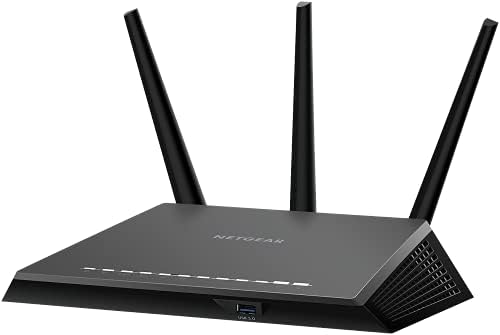
NETGEAR Nighthawk Modem Router Combo (CAX30S) DOCSIS 3.1 Cable Modem and WiFi 6 Router
Bottom line: The NETGEAR Nighthawk Modem Router Combo: Replaces both a rented cable modem and a separate WiFi router in one box; main trade-off: incompatible with Verizon, AT&T, CenturyLink, DSL, DirecTV, and DISH service.
As an Amazon Associate, SpecPicks earns from qualifying purchases. Full disclosure →
Pros & Cons
Pros
- ✓ Replaces both a rented cable modem and a separate WiFi router in one box
- ✓ DOCSIS 3.1 with 32x8 channel bonding supports cable plans up to 1Gbps
- ✓ Four Gigabit Ethernet ports with port aggregation for wired PCs and consoles
- ✓ USB 3.0 port for attaching a shared storage drive to the network
- ✓ WPA3 support plus a 90-day NETGEAR Armor trial for malware protection
Cons
- ✗ Incompatible with Verizon, AT&T, CenturyLink, DSL, DirecTV, and DISH service
- ✗ Will not work on any cable plan bundled with voice service
- ✗ AX2700 is a mid-tier WiFi 6 rating, not a flagship AX6000-class spec
- ✗ 2,000 sq. ft. coverage may leave dead zones in larger multi-story homes
Manufacturer description
The NETGEAR Nighthawk CAX30S combines a DOCSIS 3.1 cable modem and a WiFi 6 router in one unit, so you can retire your ISP's rental box and the separate router sitting next to it. Rated AX2700 across dual bands, it covers up to 2,000 square feet and handles as many as 25 concurrent devices, which is enough headroom for a household mixing 4K streaming, online gaming, and video calls at the same time. The 32x8 channel bonding and DOCSIS 3.1 support let it work with plans up to 1Gbps on Xfinity, Spectrum, Cox, and other cable providers. On the back you get four Gigabit Ethernet ports with port…
SpecPicks Verdict
SpecPicks has no buyer-rating or benchmark data for NETGEAR Nighthawk Modem Router Combo (CAX30S) DOCSIS 3.1 Cable Modem…, so this read rests on the manufacturer's listed specs (how we evaluate). Compare with similarly-priced alternatives in the networking category before committing. On the listing's own facts, the case for it is "Replaces both a rented cable modem and a separate WiFi router in one box"; the main trade-off is "Incompatible with Verizon, AT&T, CenturyLink, DSL, DirecTV, and DISH service". If those two points fit how you will use it, put it beside one or two close alternatives in the Compare tool to confirm the price.
Before ordering, check the listed dimensions, ports, power requirements and supported devices or systems in the spec table below against how you plan to use it, and confirm them on the retailer's listing. Prices and stock are set by the retailer and may have moved since this page was last updated.
Frequently Asked Questions
Will the CAX30S work with my internet provider?
It is compatible with major cable providers including Xfinity, Spectrum, and Cox. It is not compatible with Verizon, AT&T, CenturyLink, DSL providers, DirecTV, DISH, or any plan bundled with voice service.
Do I still need to rent a modem from my cable company?
No. The CAX30S has a DOCSIS 3.1 cable modem built in and replaces both your rented modem and your WiFi router, so one device handles both jobs.
How much area and how many devices does it cover?
NETGEAR rates it for up to 2,000 square feet and 25 concurrent devices using dual-band WiFi 6 at AX2700 speeds.
What internet speeds can this modem router handle?
The built-in modem uses DOCSIS 3.1 with 32x8 channel bonding and supports cable plans up to 1Gbps. Your real-world speed depends on the tier you subscribe to.
Is NETGEAR Armor included or is it a paid subscription?
A 90-day NETGEAR Armor trial subscription is included. After the trial ends, continued Armor coverage requires a paid subscription; check the product listing for current pricing.
Key Features
Quoted from the manufacturer's listing. Where it differs from the pros and cons above, those note the conditions the listing leaves out.
- Compatible with major cable internet providers including Xfinity, Spectrum, Cox and more. NOT compatible with Verizon, AT&T, CenturyLink, DSL providers, DirecTV, DISH and any bundled voice service.
- Coverage up to 2,000 sq. ft. and 25 concurrent devices with dual-band WiFi 6 (AX2700) speed
- NETGEAR devices come with security measures built in as well as enhanced safety features and updates designed to help protect you and your family
- 4 X 1 Gig Ethernet ports (supports port aggregation) and 1 USB 3.0 port for computers, game consoles, streaming players, storage drive, and other wired devices
- Replaces your cable modem and WiFi router
- DOCSIS 3.1 and 32x8 channel bonding
Full Specifications
| Brand | NETGEAR |
|---|---|
| Color | Black |
| Coverage | 2000 square feet |
| Frequency | 120 |
| Model Name | CAX30S-100NAS |
| Unit Count | 1.0 Count |
| Antenna Type | Internal |
| Connectivity | Wireless, USB, WiFi |
| Model Number | CAX30S-100NAS |
| Built-In Media | Nighthawk AX6/6 Stream WiFi 6 Cable Modem Router, Ethernet cable, Quick start guide, Power adapt |
| Control Method | App |
| Connection Type | Wired |
| Controller Type | App Control |
| Mfr Part Number | CAX30S-100NAS |
| Number of Ports | 3 |
| Special Feature | Internet Security |
| Antenna Location | Home |
| Wi-Fi Generation | Wi-Fi 6 |
| Security Protocol | WPA2-PSK |
| Compatible Devices | Personal Computer |
| Full listing title | NETGEAR Nighthawk Modem Router Combo (CAX30S) DOCSIS 3.1 Cable Modem and WiFi 6 Router - AX2700 6.0 Gbps - Compatible with Xfinity, Spectrum, Cox, and More - Gigabit Wireless Internet - NETGEAR Armor |
Ready to buy?
NETGEAR Nighthawk Modem Router Combo (CAX30S) DOCSIS 3.1 Cable Modem and WiFi 6 Router - AX2700 6.0 Gbps - Compatible with Xfinity, Spectrum, Cox, and More - Gigabit Wireless Internet - NETGEAR Armor is listed on Amazon. Price, availability, shipping and returns are set by Amazon and its sellers — check the listing for current terms. SpecPicks earns a small commission on qualifying purchases — thank you for supporting independent review work.
Related Networking


More guides & deep dives from the SpecPicks archive
Browse all articles & guides →- Best Budget Gaming PC Build 2026 — ~$1,000 Parts List
- Best Retro Handhelds in 2026: Pocket, Mid-Tier and FPGA Picks
- RTX 4070 Super vs RX 7800 XT — Which to Buy in 2026
- The Complete Voodoo5 5500 AGP Driver Guide (2026 Edition)
- How to Build a Windows 98 Retro PC in 2026
- Emulation Hardware in 2026: FPGA, Software, and Cart-Reader Ecosystems
- Best 1440p Gaming GPUs in 2026
More reviews from the SpecPicks archive
Browse all reviews →- Intel Arc B580 for Local LLMs in 2026: 12GB for Under $300
- Raycast FPS in COBOL: Can a 60-Year-Old Language Render 3D?
- Custom Steam Controller Startup: Reviving OG Big Picture Mode
- How to run Qwen 3 32B on NVIDIA GeForce RTX 5090
- Best Wired Gaming Headset Under $50 for PC and Console in 2026
- Best CPU Cooler for Ryzen 7 5800X and 5700X in 2026
- Can a Raspberry Pi 4 Run a Local LLM? Ollama tok/s Tested
- OpenAI Launches ChatGPT Work: An Agent for Whole Workflows
- Ryzen 7 5800X vs 5800X3D for 1440p Gaming: Which Should You Buy?
- Local LLMs on Refurb M4 Max vs New M5 Max: What the LocalLLaMA Numbers Show
- Hailo-8 vs Hailo-8L vs Coral TPU: Which AI Accelerator Wins on Raspberry Pi 5?
- Best 1TB SATA SSDs for PC Builds and Retro Upgrades
- Best PC Gaming Controllers in 2026: 5 Picks for Every Budget
- Logitech G29 vs HORI vs Thrustmaster: Best Sim Racing Wheel for Beginners
- Best Budget Streaming Mic + Capture Setup: Blue Yeti vs HyperX QuadCast 2 S
- Intel LLM-Scaler vLLM 1.4 on Arc Pro B70: What the Latest Driver Stack Means for Local Inference
- Retro Nintendo Switch 2 Dock Channels the N64 and Holds Six Game Cards
- GLM-5.2 vs DeepSeek V4 on a 12GB RTX 3060: Which Open-Weights Model Wins?
- Gemma 4 12B Fits Multimodal AI Into 16GB of RAM
- Best Dorm Room Gaming Setup in 2026: 5 Picks That Fit One Desk
- Retro Console Modding Services: What to Expect in 2026
- AMD Ryzen 7 5800X3D Re-Review Shows DDR4 Still Has Gaming Legs in 2026
- Best Gaming Room Lighting in 2026: LED Strips and Ring Lights
- Is My GPU Dying? 5 Warning Signs to Check Now
Earliest SpecPicks reviews
Browse full archive →- Best GPU for Llama 3.1 8B (2026)
- Best GPU for Qwen 3 14B (2026)
- Best GPU for Qwen 3 32B (2026)
- Best GPU for Llama 3.1 70B (2026)
- Best GPU for DeepSeek-R1 32B (2026)
- Best GPU for Llama 3.1 405B (2026)
- How to run Llama 3.1 8B on NVIDIA GeForce RTX 5090
- How to run Qwen 3 14B on NVIDIA GeForce RTX 5090
- How to run Qwen 3 32B on NVIDIA GeForce RTX 5090
- How to run Llama 3.1 70B on NVIDIA GeForce RTX 5090
- How to run DeepSeek-R1 32B on NVIDIA GeForce RTX 5090
- How to run Llama 3.1 8B on NVIDIA GeForce RTX 4090