

WayPonDEV
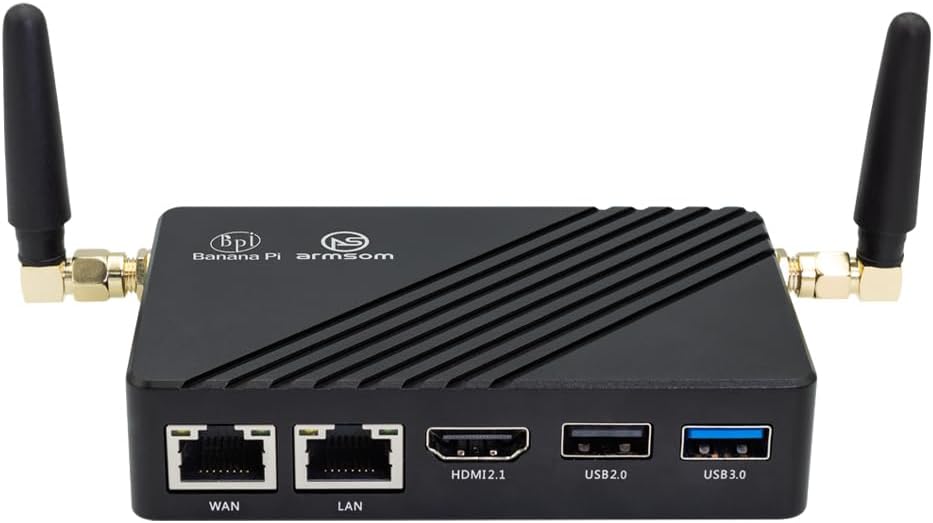
Banana Pi M2 Berry Open Source Single Board Computer Allwinner A40i Soc Onboard WiFi Module Bluetooth 4.0 with 1G LPDDR3 RAM Support Android Linux GPIO Compatible with Raspberry Pi 3 Run Raspbian
Bottom line: Per its Amazon listing, the Banana Pi M2 Berry Open Source Single Board Computer Allwinner A40i ($34.99 on Amazon as of 2026-11-22 17:22 UTC): with 1GB LPDDR3 memory; GPU dual-core MALI-400 MP2 and runs at 500MHz.
As an Amazon Associate, SpecPicks earns from qualifying purchases. Full disclosure →
*Price sourced from Amazon.com. Last updated 2026-11-22. Product prices and availability are accurate as of the date/time indicated and are subject to change. Any price and availability information displayed on Amazon.com at the time of purchase will apply to the purchase of this product.
Pros & Cons
Pros
- ✓ With 1GB LPDDR3 memory
- ✓ GPU dual-core MALI-400 MP2 and runs at 500MHz
- ✓ Backed by WayPonDEV's warranty and support channels
Cons
- ✗ Check the listed dimensions, connectors and platform compatibility against your setup before ordering
- ✗ Price, stock, shipping and returns are set by the retailer and may have changed since this page was last updated
Manufacturer description
-Specification-Soc:Allwinner V40CPU:quad-core cortex -A7,the most power efficient CPU core ARM's ever developmentGPU:dual-core MALI-400 MP2 and runs at 500MHz, capable of 1.1 Gpixel/s throughput. Graphics capabilities are slightly higher than the original Xbox’s level of performance. The GPU provides OpenGL ES 2.0, hardware-accelerated OpenVG, 1080p45 H.264 high-profile encode and decode.SDRAM:1GB DDR3 with 733MHz(shared with GPU)SATA:suppoort SATA interfaceGPIO:40 Pins Header, 28×GPIO, some of which can be used for specific functions including UART, I2C, SPI, PWM, I2S.On board…
SpecPicks Verdict
SpecPicks has no buyer-rating or benchmark data for Banana Pi M2 Berry Open Source Single Board Computer Allwinner A40i…, so this read rests on the manufacturer's listed specs and the current price in the single-board computers category (how we evaluate). Compare with similarly-priced alternatives in the single-board computers category before committing. Judge it on the specification table and the price rather than on sentiment: check the figures that decide your use case, then put it side-by-side with two or three close alternatives in the Compare tool before clicking through.
Before ordering, check the listed dimensions, ports, power requirements and supported devices or systems in the spec table below against how you plan to use it, and confirm them on the retailer's listing. Prices and stock are set by the retailer and may have moved since this page was last updated.
Key Features
Quoted from the manufacturer's listing. Where it differs from the pros and cons above, those note the conditions the listing leaves out.
- [Allwinner V40 SoC] Banana Pi BPI-M2 Berry quad-core single board computer is developed with Allwinner R40/V40 chip. With 1GB LPDDR3 memory, quad-core cortex -A7 CPU, the most power efficient CPU core ARM's ever development. GPU dual-core MALI-400 MP2 and runs at 500MHz.
- [Powerful function] Banana PI BPI-M2 Berry Single Board Computer has a Gigabit Ethernet port (Realtek RTL8211E/D), 4 x USB ports, 4 x USB 2.0 ports, MIPI DSI display port, CSI camera port; support onboard Wifi and Bluetooth; Support SATA interface, can be directly connected to the hard disk. There is an SD card socket on the board, and the system image can be booted from the SD card.
- [OS Support] Banana PI BPI-M2 Berry open source single board computer has strong compatibility and can run Android system, Debian linux, Ubuntu linux, Raspberry Pi system and Allwinner TinaLinux system.
- [GPIO Compatible with rasbian] Banana PI BPI-M2 Berry is exactly the same size as Raspberry Pi 3, and can directly use the case of Raspberry Pi 3. GPIO is compatible with Raspberry Pi 3 and can run rasbian system.
- [OS Address] SDK document:" download.banana-pi.dev/d/ca025d76afd448aabc63/?p=%2FImages%2FBPI-M2U&mode=list "
Full Specifications
| ASIN | B0BP1ZPSYS |
|---|---|
| Brand | WayPonDEV |
| CPU Model | Cortex A7 |
| CPU Speed | 1.2E+3 MHz |
| Model Name | Banana Pi M2 Berry Allwinner A40i Open Source SBC |
| Unit Count | 1.0 Count |
| Manufacturer | WayPonDEV |
| Model Number | Banana Pi M2 Berry Allwinner A40i SBC |
| Built-In Media | 1x Banana Pi BPI-M2 Berry 1GB Single Board Computer |
| Item Type Name | 1GB LPDDR3 RAM, quad-core cortex -A7 CPU |
| Processor Brand | Allwinner |
| Processor Count | 2 |
| Processor Speed | 1.2E+3 MHz |
| Total Usb Ports | 8 |
| Compatible Devices | Raspberry Pi 3 |
| RAM Memory Installed | 1 GB |
| Wireless Compability | 802.11a/b/g/n |
| RAM Memory Technology | LPDDR3 |
| Connectivity Technology | Bluetooth, GPIO, USB, Wi-Fi |
| Item Dimensions L x W x H | 3.35"L x 2.2"W x 0.39"H |
Ready to buy?
Banana Pi M2 Berry Open Source Single Board Computer Allwinner A40i Soc Onboard WiFi Module Bluetooth 4.0 with 1G LPDDR3 RAM Support Android Linux GPIO Compatible with Raspberry Pi 3 Run Raspbian is listed on Amazon. Price, availability, shipping and returns are set by Amazon and its sellers — check the listing for current terms. SpecPicks earns a small commission on qualifying purchases — thank you for supporting independent review work.
*Price sourced from Amazon.com. Last updated 2026-11-22. Product prices and availability are accurate as of the date/time indicated and are subject to change. Any price and availability information displayed on Amazon.com at the time of purchase will apply to the purchase of this product.
Related Single-Board Computers

More guides & deep dives from the SpecPicks archive
Browse all articles & guides →- Best Retro Handhelds in 2026: Pocket, Mid-Tier and FPGA Picks
- Best Budget Gaming PC Build 2026 — ~$1,000 Parts List
- Emulation Hardware in 2026: FPGA, Software, and Cart-Reader Ecosystems
- How to Build a Windows 98 Retro PC in 2026
- Best 1440p Gaming GPUs in 2026
- RTX 4070 Super vs RX 7800 XT — Which to Buy in 2026
- The Complete Voodoo5 5500 AGP Driver Guide (2026 Edition)
More reviews from the SpecPicks archive
Browse all reviews →- Ryzen 7 9800X3D vs 7800X3D upgrade guide
- AI-Driven Driver Hunting on WinXP: Using Vision LLMs to Install Audigy 2 ZS Without Internet
- Ex-Sega Engineer's 'Super Realistic' CRT Emulator — What It Means for Retro Mini-Consoles
- Intel llm-scaler-vLLM 1.4 with Arc Pro B70: Local Inference vs RTX 3060 12GB
- Athlon XP + Radeon 9800 Pro AGP Build Guide: 2003 Period-Correct Rig
- Does Dual-Channel RAM Matter for Local LLM Inference?
- How to run Qwen 3 32B on Apple M3 Ultra
- ComfyUI on an RTX 3060 12GB: Local Image Generation Setup
- Self-Hosted Home Assistant on a Raspberry Pi 4 8GB (2026 Build)
- Best Plug-and-Play Retro Gaming Consoles to Buy in 2026
- Claude Opus 4.8 vs Local LLM on RTX 3060 12GB: Honest 2026 Benchmarks
- Local LLM as a Quake 3 / UT99 Demo Coach: Ollama on Ryzen 7 5800X + RTX 3060 (2026)
- Best Streaming Mic for Console Gaming in 2026: HyperX QuadCast 2 vs Blue Yeti
- Open WebUI vs LM Studio: Best Local Chat Front-End for a 12GB GPU
- Sound Blaster Audigy 2 ZS vs Sound Blaster Live! on Windows 98: Which Wins for Late-90s Gaming?
- Genesis Mini vs SNES Classic vs a Pi RetroPie in 2026
- Ryzen 5 5600G vs Ryzen 7 5700X for a Budget 1080p Gaming + Local-AI Build
- Forza Horizon 6 Cuts Load Times to 4 Seconds With Advanced Shader Delivery
- Crucial BX500 vs Samsung 870 EVO: Best Budget 1TB SATA SSD for Gaming in 2026
- Best Wired Headset for PlayStation Cross-Play Cross-Platform Voice Chat (2026)
- Jellyfin on a Raspberry Pi 4 8GB: What It Can and Can't Transcode
- Moonshot AI Targets $30B: Can You Run a Kimi-Class Open Model on a 12GB GPU?
- Raspberry Pi 5 IOMMU Driver Heads to the Mainline Linux Kernel
- 8BitDo Sn30 Pro vs Pro 2: Best Bluetooth Controller for Raspberry Pi 4 Emulation
Earliest SpecPicks reviews
Browse full archive →- Best GPU for Llama 3.1 8B (2026)
- Best GPU for Qwen 3 14B (2026)
- Best GPU for Qwen 3 32B (2026)
- Best GPU for Llama 3.1 70B (2026)
- Best GPU for DeepSeek-R1 32B (2026)
- Best GPU for Llama 3.1 405B (2026)
- How to run Llama 3.1 8B on NVIDIA GeForce RTX 5090
- How to run Qwen 3 14B on NVIDIA GeForce RTX 5090
- How to run Qwen 3 32B on NVIDIA GeForce RTX 5090
- How to run Llama 3.1 70B on NVIDIA GeForce RTX 5090
- How to run DeepSeek-R1 32B on NVIDIA GeForce RTX 5090
- How to run Llama 3.1 8B on NVIDIA GeForce RTX 4090