

Serounder
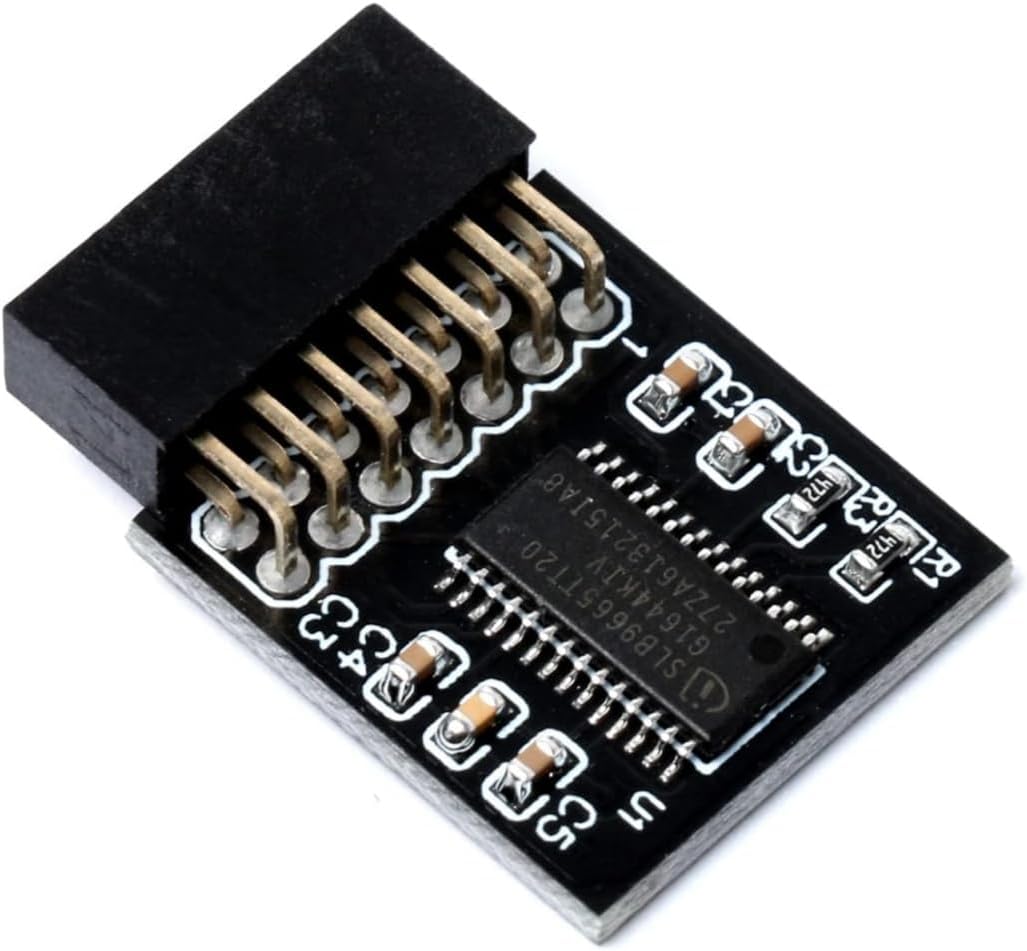
TPM 2.0 Module, 14 Pin Security Chip for Desktop Motherboard
Bottom line: Per its Amazon listing, the Serounder TPM 2.0 Module: SPEC: Replacement TPM 2.0 module chip 2.0mm pitch, 14 pin security module for motherboards.
As an Amazon Associate, SpecPicks earns from qualifying purchases. Full disclosure →
Pros & Cons
Pros
- ✓ SPEC: Replacement TPM 2.0 module chip 2.0mm pitch, 14 pin security module for motherboards
- ✓ Backed by Serounder's warranty and support channels
Cons
- ✗ Confirm socket / form-factor / power-rating compatibility against your build before ordering
- ✗ Price, stock, shipping and returns are set by the retailer and may have changed since this page was last updated
SpecPicks Verdict
SpecPicks has no buyer-rating or benchmark data for Serounder TPM 2.0 Module, so this read rests on the manufacturer's listed specs (how we evaluate). Compare with similarly-priced alternatives in the retro motherboards category before committing. Judge it on the specification table and the price rather than on sentiment: check the figures that decide your use case, then put it side-by-side with two or three close alternatives in the Compare tool before clicking through.
Common buyer scenarios for retro motherboards of this kind: matching it to an existing build, replacing a failing part, or upgrading from a previous-generation equivalent. Check the spec table below against your current setup — particularly socket / form-factor / power-rating fields — and confirm compatibility on the retailer's listing before purchase. Prices and stock are set by the retailer and may have moved since this page was last updated.
Key Features
Quoted from the manufacturer's listing. Where it differs from the pros and cons above, those note the conditions the listing leaves out.
- SPEC: Replacement TPM 2.0 module chip 2.0mm pitch, 14 pin security module for motherboards. Built in support for memory modules higher than DDR3!
- Applicable Systems: TPM2.0 encrypted security module is available for for 11 motherboards. Some motherboards require the TPM module to be inserted or updated to the latest BIOS to enable the TPM option.
- Encryption Processor: The TPM is a standalone encryption processor that is connected to a Sub board attached to the motherboard. The TPM securely stores an encryption key that can be created using encryption software such as for BitLocker. Without this key, the content on the user's PC will remain encrypted and protected from unauthorised access.
- Support: Supports for 7 64 bit, for 8.1 32 64 bit, for 10 64 bit. Advertised performance is based on the maximum theoretical interface value for each chipset vendor or organization that defines the interface specification. Actual performance may vary depending on your system configuration.
- Standard PC Architecture: A certain amount of memory is set aside for system use, so the actual memory size will be less than the specified amount. Functionality is the same as the original version. Supported states may vary depending on motherboard specifications.
Full Specifications
| SPEC | Replacement TPM 2.0 module chip 2.0mm pitch, 14 pin security module for motherboards. Built in support for memory modules higher than DDR3! |
|---|---|
| Brand | Serounder |
| Compatibility | PC |
| Package Dimensions | 3.15 x 1.97 x 0.79 inches |
Benchmark data for other processors
Ready to buy?
TPM 2.0 Module, 14 Pin Security Chip for Desktop Motherboard is listed on Amazon. Price, availability, shipping and returns are set by Amazon and its sellers — check the listing for current terms. SpecPicks earns a small commission on qualifying purchases — thank you for supporting independent review work.
Related Retro Motherboards



More guides & deep dives from the SpecPicks archive
Browse all articles & guides →- Best 1440p Gaming GPUs in 2026
- Best Budget Gaming PC Build 2026 — ~$1,000 Parts List
- RTX 4070 Super vs RX 7800 XT — Which to Buy in 2026
- The Complete Voodoo5 5500 AGP Driver Guide (2026 Edition)
- Emulation Hardware in 2026: FPGA, Software, and Cart-Reader Ecosystems
- How to Build a Windows 98 Retro PC in 2026
- Best Retro Handhelds in 2026: Pocket, Mid-Tier and FPGA Picks
More reviews from the SpecPicks archive
Browse all reviews →- Modern CRT Monitor for Retro Gaming: The 2025 Reality Check
- Anthropic Tightens Claude Fable 5 Limits — Why Builders Are Eyeing Local Rigs
- Steam Deck Randomly Awakens? Causes & Fixes (2026)
- Hailo-10H AI Accelerator on Raspberry Pi 5: Real Tok/s for On-Device LLMs
- Cactus Hybrid Router: Gemma4-2B Local + Gemini Fallback
- Build a 3D-Printed Cyberdeck Music Workstation on a Raspberry Pi 4
- Best SSD for PS4 Pro Upgrade in 2026: SATA Picks That Actually Cut Load Times
- Raspberry Pi 4 8GB vs a Used Mini PC for a 2026 Beginner Homelab
- Best Work-From-Home Kit for Gamers in 2026
- DIY NVIDIA 3D Vision Emitter: Building One with an RP2040
- Best Raspberry Pi for a Touchscreen Home Dashboard in 2026
- Best Budget 4K Gaming Monitor Under $400 in 2026: SANSUI vs KOORUI Mini-LED
- Intel Arc Pro B60 Price: Is $999 Worth It in 2025?
- RetroPie Handheld Case Comparison 2025: Top Picks
- Best Gaming Headsets for PS5 and PC in 2026
- Claude Code Telemetry Flap: Why a Local RTX 3060 Rig Is the Privacy Play
- Building a DualSense PC Adapter with a Raspberry Pi for $20 (2026)
- Gemma 4 31B on a 16GB GPU: RTX 5060 Ti vs RX 9060 XT vs Arc A770 Quant Table (2026)
- On-Device AI Keyboards: Can an RTX 3060 12GB Train the Model?
- Best Noctua Cooling Products in 2026: A Brand Buying Guide
- Best SATA SSD for Gaming and Everyday Upgrades in 2026
- Microsoft's Copilot Super App vs a Local RTX 3060 Ollama Box in 2026
- Stable Diffusion vs Flux — which open image model wins in 2026?
- Best Gaming Mouse Pad for Esports FPS in 2026
Earliest SpecPicks reviews
Browse full archive →- Best GPU for Llama 3.1 8B (2026)
- Best GPU for Qwen 3 14B (2026)
- Best GPU for Qwen 3 32B (2026)
- Best GPU for Llama 3.1 70B (2026)
- Best GPU for DeepSeek-R1 32B (2026)
- Best GPU for Llama 3.1 405B (2026)
- How to run Llama 3.1 8B on NVIDIA GeForce RTX 5090
- How to run Qwen 3 14B on NVIDIA GeForce RTX 5090
- How to run Qwen 3 32B on NVIDIA GeForce RTX 5090
- How to run Llama 3.1 70B on NVIDIA GeForce RTX 5090
- How to run DeepSeek-R1 32B on NVIDIA GeForce RTX 5090
- How to run Llama 3.1 8B on NVIDIA GeForce RTX 4090