
NETGEAR
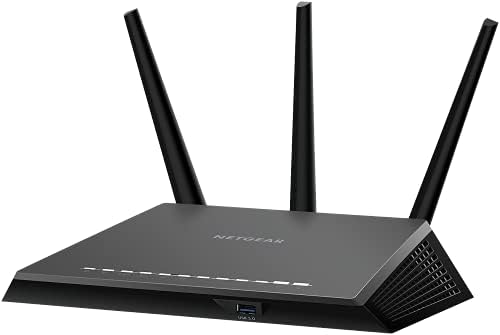
NETGEAR Nighthawk Tri-Band WiFi 7 Router (RS700S)
Bottom line: The NETGEAR Nighthawk Tri-Band WiFi 7 Router ($469.19 on Amazon as of 2026-11-23 05:45 UTC): 10 Gig WAN port handles multi-gig fiber plans most WiFi 7 routers cap out below; main trade-off: router only, no built-in modem, so cable subscribers must buy one separately.
As an Amazon Associate, SpecPicks earns from qualifying purchases. Full disclosure →
*Price sourced from Amazon.com. Last updated 2026-11-23. Product prices and availability are accurate as of the date/time indicated and are subject to change. Any price and availability information displayed on Amazon.com at the time of purchase will apply to the purchase of this product.
Pros & Cons
Pros
- ✓ 10 Gig WAN port handles multi-gig fiber plans most WiFi 7 routers cap out below
- ✓ BE19000 tri-band rating, up to 19 Gbps combined across the three bands
- ✓ 320 MHz channels deliver the 2.4x-over-WiFi-6 gain NETGEAR advertises
- ✓ Covers up to 3,500 sq. ft. on a single unit, no mesh node required
- ✓ Includes 1 year of NETGEAR Armor plus free expert setup help
Cons
- ✗ Router only, no built-in modem, so cable subscribers must buy one separately
- ✗ 4 LAN ports are 1 Gig, so wired clients cannot use the multi-gig headroom
- ✗ 549.99 USD puts it well above entry-level WiFi 7 routers
- ✗ WiFi 7 gains require WiFi 7 clients, older phones and laptops see no jump
Manufacturer description
The NETGEAR Nighthawk RS700S is a tri-band WiFi 7 router built for households that have outgrown WiFi 6. It advertises BE19000 combined throughput up to 19 Gbps and uses 320 MHz channels, which NETGEAR rates at 2.4x faster than WiFi 6 across connected devices. Coverage is specified at up to 3,500 sq. ft. with a 360-degree 3D antenna design, packed into a taller, narrower body than earlier Nighthawk towers. The wired side is the reason most buyers pick this NETGEAR router over cheaper WiFi 7 gear: a 10 Gig internet port for multi-gig fiber or cable plans, plus 4 x 1 Gig LAN ports for wired…
SpecPicks Verdict
SpecPicks has no buyer-rating or benchmark data for NETGEAR Nighthawk Tri-Band WiFi 7 Router, so this read rests on the manufacturer's listed specs and the current price in the networking category (how we evaluate). Compare with similarly-priced alternatives in the networking category before committing. On the listing's own facts, the case for it is "10 Gig WAN port handles multi-gig fiber plans most WiFi 7 routers cap out below"; the main trade-off is "Router only, no built-in modem, so cable subscribers must buy one separately". If those two points fit how you will use it, put it beside one or two close alternatives in the Compare tool to confirm the price.
Before ordering, check the listed dimensions, ports, power requirements and supported devices or systems in the spec table below against how you plan to use it, and confirm them on the retailer's listing. Prices and stock are set by the retailer and may have moved since this page was last updated.
Frequently Asked Questions
Does the Nighthawk RS700S include a modem?
No. NETGEAR lists it as router only, with no built-in cable modem. If your ISP needs a coax connection, you must supply a separate cable modem. Fiber and DSL setups typically connect through the 10 Gig internet port using your provider's existing gateway or ONT.
How much area does the RS700S cover?
NETGEAR rates coverage at up to 3,500 sq. ft. using its 3D antenna design for 360-degree distribution. Real-world range depends on wall construction, floor count, and interference, so treat that figure as a ceiling rather than a guarantee.
What ports does it have?
One 10 Gig internet (WAN) port and four 1 Gig LAN ports. The 10 Gig port is what lets the router keep up with multi-gig internet plans; the four LAN ports handle wired desktops, consoles, and NAS devices at gigabit speeds.
Is it actually faster than a WiFi 6 router?
NETGEAR rates the RS700S at BE19000 with speeds up to 19 Gbps and states WiFi 7 delivers 2.4x faster speeds than WiFi 6, driven largely by 320 MHz channels. You need WiFi 7 client devices to see that gain; WiFi 6 and older hardware connects at its own maximum.
Key Features
Quoted from the manufacturer's listing. Where it differs from the pros and cons above, those note the conditions the listing leaves out.
- The most powerful Nighthawk router ever. Unrivaled WiFi 7 speeds up to 19Gbps for real-time gaming, 4K/8K streaming, UHD video conferencing, and AR/VR entertainment
- WiFi 7 delivers 2.4x faster speeds than WiFi 6 to maximize performance across all devices. This is a WiFi Router not a Cable Modem (separate unit)
- This router does not include a built-in cable modem. A separate cable modem (with coax inputs) is required for internet service.
- Sleek new body and high-performance antenna design leverages over 25 years of NETGEAR engineering expertise for a significantly smaller footprint and up to 3,500 sq. ft. of 360-degree WiFi coverage
- Compatable with any internet service provider, a separate modem may be needed for your cable or internet service. 10 Gig internet port unleashes the fastest download speeds of today & tomorrow. 1 x 10 Gig and 4 x 1 Gig LAN ports for connection to your cable modem, separate unit
Full Specifications
| Brand | NETGEAR |
|---|---|
| Color | Black |
| Voltage | 19 volts |
| Coverage | Up to 3,500 sq. ft. |
| Frequency | 320 |
| Model Name | RS700S-100NAS |
| Unit Count | 1 Count |
| Antenna Type | Fixed |
| Connectivity | Wireless, WiFi |
| Model Number | RS700S-100NAS |
| Built-In Media | One (1) 19V/3.16A power adapter, One (1) 2m Ethernet cable, One (1) WiFi 7 Tri-Band Router (RS700S), Quick start guide |
| Control Method | Touch |
| Connection Type | Wireless |
| Mfr Part Number | RS700S-100NAS |
| Number of Ports | 5 |
| Special Feature | WPS |
| Antenna Location | Business |
| Wi-Fi Generation | WiFi 7 |
| Security Protocol | WPA3 |
| Compatible Devices | Personal Computer |
| Full listing title | NETGEAR Nighthawk Tri-Band WiFi 7 Router (RS700S) - Router Only- BE19000 Wireless Speed (up to 19 Gbps) – 10 Gig Internet Port - Covers up to 3,500 sq. ft. – 1-Year Armor & Free Expert Help |
Ready to buy?
NETGEAR Nighthawk Tri-Band WiFi 7 Router (RS700S) - Router Only- BE19000 Wireless Speed (up to 19 Gbps) – 10 Gig Internet Port - Covers up to 3,500 sq. ft. – 1-Year Armor & Free Expert Help is listed on Amazon. Price, availability, shipping and returns are set by Amazon and its sellers — check the listing for current terms. SpecPicks earns a small commission on qualifying purchases — thank you for supporting independent review work.
*Price sourced from Amazon.com. Last updated 2026-11-23. Product prices and availability are accurate as of the date/time indicated and are subject to change. Any price and availability information displayed on Amazon.com at the time of purchase will apply to the purchase of this product.
Related Networking


More guides & deep dives from the SpecPicks archive
Browse all articles & guides →- Best Budget Gaming PC Build 2026 — ~$1,000 Parts List
- How to Build a Windows 98 Retro PC in 2026
- Emulation Hardware in 2026: FPGA, Software, and Cart-Reader Ecosystems
- The Complete Voodoo5 5500 AGP Driver Guide (2026 Edition)
- Best 1440p Gaming GPUs in 2026
- RTX 4070 Super vs RX 7800 XT — Which to Buy in 2026
- Best Retro Handhelds in 2026: Pocket, Mid-Tier and FPGA Picks
More reviews from the SpecPicks archive
Browse all reviews →- RTX 3060 vs Arc B580 for 1440p Gaming: Which 12GB Card Wins?
- LEGO Batman: Legacy of the Dark Knight Runs Well on Steam Deck
- Best GPU for Local LLMs by VRAM: 2026 Reddit Consensus
- Best Cooler for the Ryzen 7 5800X: Noctua vs DeepCool vs CoolerMaster
- 1440p 500Hz QD-OLED Monitors: 2025 Round-Up
- Logitech G29 / G920 Not Detected on Windows 11: Step-by-Step Driver Fix Guide (2026)
- ComfyUI on an RTX 3060 12GB: Stable Diffusion Throughput and VRAM Limits in 2026
- Gemma 4 31B Creative-Writing Finetunes on RTX 3060 12GB
- Local LLM Image Generators: Best AMD GPUs in 2025
- Best Sim Racing Wheel for Beginners on PS5 & PC (2026)
- DIY Pinball Controller for Retro Gaming: Build Guide
- Best Budget SSD for Gaming in 2026: 5 Tested Picks Ranked
- DeepSeek 4 Flash on 128GB MacBook: Local Inference Throughput Reality Check
- $100 CPU Shootout: Ryzen 5 5500 vs Core i3-14100F vs i3-12100F
- Best CPU Cooler for a Ryzen 7 5800X (AM4) in 2026
- Best USB Microphone for Streaming and Podcasting (2026)
- Best CPU for Streaming and Gaming on a Single PC in 2026
- Sound Blaster Audigy 2 ZS vs Audigy FX for Windows XP Gaming (2026)
- Best SSD for a PS4 Pro Upgrade in 2026
- How Secure Is My Homelab Compared to Big Companies?
- Adafruit's 2026 I2S Microphone Guide Brings Real-Time Audio to CircuitPython
- Run Qwen 3.6 27B Locally: What Fits on 12GB in 2026
- Gaming PC Build 2026: The Reddit-Consensus Parts List
- Build a Budget Self-Hosted Game Server on a Ryzen 5 5600G in 2026
Earliest SpecPicks reviews
Browse full archive →- Best GPU for Llama 3.1 8B (2026)
- Best GPU for Qwen 3 14B (2026)
- Best GPU for Qwen 3 32B (2026)
- Best GPU for Llama 3.1 70B (2026)
- Best GPU for DeepSeek-R1 32B (2026)
- Best GPU for Llama 3.1 405B (2026)
- How to run Llama 3.1 8B on NVIDIA GeForce RTX 5090
- How to run Qwen 3 14B on NVIDIA GeForce RTX 5090
- How to run Qwen 3 32B on NVIDIA GeForce RTX 5090
- How to run Llama 3.1 70B on NVIDIA GeForce RTX 5090
- How to run DeepSeek-R1 32B on NVIDIA GeForce RTX 5090
- How to run Llama 3.1 8B on NVIDIA GeForce RTX 4090