
UPOSOJA
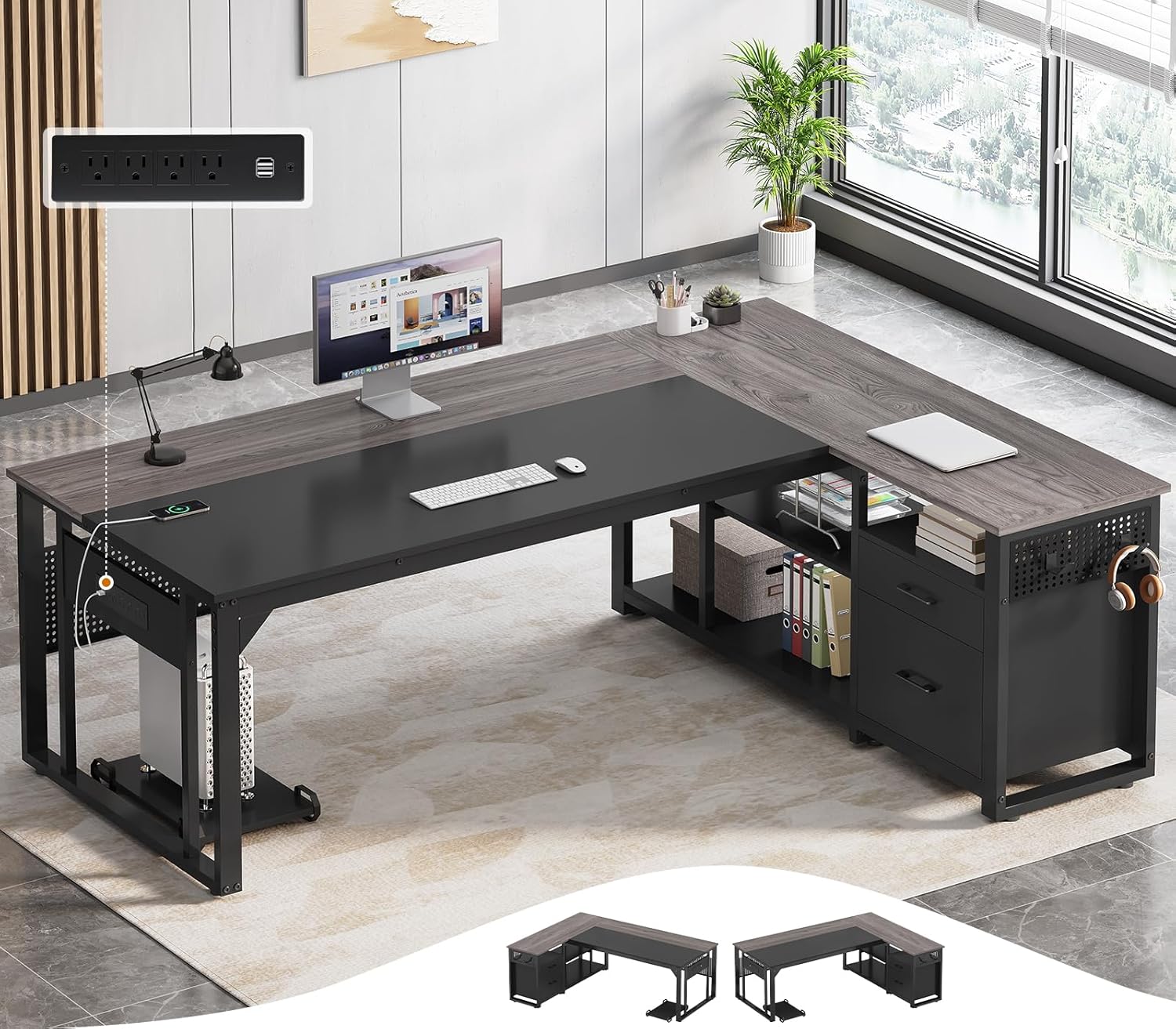
UPOSOJA 71 in Executive Desk with Power Outlets
Bottom line: The UPOSOJA 71 in Executive Desk with Power Outlets: 71 x 53 in L shaped surface fits multiple monitors plus a laptop or printer; main trade-off: fixed 29.9 in height with no sit-stand or height adjustment.
As an Amazon Associate, SpecPicks earns from qualifying purchases. Full disclosure →
Pros & Cons
Pros
- ✓ 71 x 53 in L shaped surface fits multiple monitors plus a laptop or printer
- ✓ Built-in power: 4 AC outlets and 2 USB ports charge up to 6 devices at once
- ✓ Reversible layout sets up as a left or right corner desk
- ✓ Mobile CPU stand keeps your tower off the floor and easy to reach
- ✓ File drawer fits Letter/A4, plus pegboard, hooks, shelves and a cabinet
Cons
- ✗ Fixed 29.9 in height with no sit-stand or height adjustment
- ✗ 71 x 53 in footprint needs a sizable corner to fit
- ✗ No weight capacity listed in the product specs
- ✗ Outlet wattage rating and surge protection not specified
Manufacturer description
The UPOSOJA 71 in Executive Desk is an L shaped computer desk built for a multi-monitor setup that also needs storage. The desktop measures 71 in long by 53 in wide, so a dual-monitor gaming rig can sit on one wing and a laptop, printer or tablet on the other. The 29.9 in height leaves open legroom underneath. The built-in power station has 4 AC outlets and 2 USB ports, so you can charge up to 6 devices without running a power strip across the floor. Storage includes a file drawer sized for Letter and A4 documents, a smaller drawer, open shelves, a storage cabinet, a printer space, and a…
SpecPicks Verdict
SpecPicks has no buyer-rating or benchmark data for UPOSOJA 71 in Executive Desk with Power Outlets, so this read rests on the manufacturer's listed specs (how we evaluate). Compare with similarly-priced alternatives in the gaming desks category before committing. On the listing's own facts, the case for it is "71 x 53 in L shaped surface fits multiple monitors plus a laptop or printer"; the main trade-off is "Fixed 29.9 in height with no sit-stand or height adjustment". If those two points fit how you will use it, put it beside one or two close alternatives in the Compare tool to confirm the price.
Common buyer scenarios for gaming desks: matching surface dimensions to the room footprint and monitor count, checking height-adjustment range for sit-stand setups, verifying cable-management channels for a clean multi-monitor build, and confirming weight capacity for a full tower + dual-monitor load. Review the spec sheet for assembly difficulty before ordering.
Frequently Asked Questions
How big is the UPOSOJA 71 in L shaped desk?
The desktop measures 71 in long and 53 in wide, and the desk stands 29.9 in tall. Measure your corner before you order, because the L shape needs room along both walls.
Can I set this desk up as a left or right corner desk?
Yes. The desk is reversible, so you can assemble the return on either the left or the right side to fit your room layout.
How many devices can the built-in power outlet charge?
The power station has 4 AC plug outlets and 2 USB ports, so it can power up to 6 devices at once, such as phones, laptops and a printer. The listing does not give a wattage rating or say whether it has surge protection, so check the product listing before you plug in high-draw gear.
Will the file drawer hold standard documents?
Yes. The larger file drawer is sized for Letter and A4 documents. A smaller drawer, open shelves, a storage cabinet, a printer space, and a pegboard with hooks hold the rest of your gear.
Is the desk hard to assemble, and what warranty does it have?
The accessories are numbered and come with detailed instructions, so you don't need professional assembly skills. UPOSOJA says it responds to questions within 24 hours, but the listing does not state warranty terms. Check the product listing or contact the seller for current coverage.
Key Features
Quoted from the manufacturer's listing. Where it differs from the pros and cons above, those note the conditions the listing leaves out.
- 【Built-in Power Outlet 】The executive desk is equipped with 4 plug outlets and 2 USB ports to provide power for up to 6 devices simultaneously, including mobile phones, printers, laptops and other electronic devices, suitable for a variety of scenarios such as work, study, etc.
- 【Ample Storage Space】The decent layout L shaped computer desk provides a variety of storage space, including a storage cabinet, printer space, pegboard, storage shelves and hooks. The larger file drawer is ideal for Letter or A4 size documents, while small drawer and open shelves are great for storing odds and ends.
- 【Extra Large Working Space】The office desk features an extra large desktop measuring 71 ” L and 53 " W that provides enough space to place multiple monitors and tablets and other office supplies, while the 29.9 " height gives you comfortable and free legroom, making it more pleasant and relaxing when working, studying or playing games.
- 【Sturdy & Durable Design】The computer desk has a stable, thick metal frame, providing a stable support for your work, study, or gaming needs. The textured desktop is waterproof and wear-resistant, easy to Clean. With its unique stitching design, the executive desk is ideal for creating a beautiful office/study space.
- 【Reversible Desk with CPU Stand】The computer desk with a reversible design, which can set as a left or right corner desk according to your needs. This L shaped desk is designed with a mobile CPU stand that makes it easy to place your CPU. Help you organize the space under the table and enjoy a pleasant experience!
- 【Easy Assembly & Service】The writing table desk is accompanied by detailed instructions numbering accessories, making it easy to assemble without professional assembly skills. If you have any questions, whether before or after sales, we will respond to you within 24 hours.
Full Specifications
| Base | Metal |
|---|---|
| Size | 2 Drawers |
| Brand | UPOSOJA |
| Color | Grey |
| Shape | L-Shape |
| Style | Modern |
| Base Type | Wood with Metal Frame |
| Top Color | Grey |
| Item Depth | 53.1 inches |
| Model Name | Executive Desk 71 |
| Style Name | Modern |
| Unit Count | 1.0 Count |
| Desk Design | Computer Desk, Executive Desk |
| Desk design | Computer Desk, Executive Desk |
| Drawer Type | File Drawer |
| Finish Type | Painted |
| Connectivity | USB |
| Finish Types | Painted |
| Model Number | Executive Desk 71 |
| Base Material | Metal |
| Full listing title | UPOSOJA 71 in Executive Desk with Power Outlets, Reversible L Shaped Computer Desk with File Drawers & Storage Shelves, Large Office Desk with Pegboard, Mobile CPU Stand, Modern Corner Desk (Grey) |
Ready to buy?
UPOSOJA 71 in Executive Desk with Power Outlets, Reversible L Shaped Computer Desk with File Drawers & Storage Shelves, Large Office Desk with Pegboard, Mobile CPU Stand, Modern Corner Desk (Grey) is listed on Amazon. Price, availability, shipping and returns are set by Amazon and its sellers — check the listing for current terms. SpecPicks earns a small commission on qualifying purchases — thank you for supporting independent review work.
Related Gaming Desks


More guides & deep dives from the SpecPicks archive
Browse all articles & guides →- Best Retro Handhelds in 2026: Pocket, Mid-Tier and FPGA Picks
- How to Build a Windows 98 Retro PC in 2026
- Best Budget Gaming PC Build 2026 — ~$1,000 Parts List
- Best 1440p Gaming GPUs in 2026
- The Complete Voodoo5 5500 AGP Driver Guide (2026 Edition)
- RTX 4070 Super vs RX 7800 XT — Which to Buy in 2026
- Emulation Hardware in 2026: FPGA, Software, and Cart-Reader Ecosystems
More reviews from the SpecPicks archive
Browse all reviews →- Cursor vs Cline vs Aider for Local-First AI Coding in 2026
- Best Budget Gaming Mouse + Mousepad Combo Under $80 in 2026
- Best SSD to Upgrade a PS4 in 2026
- How to run Qwen 3 32B on NVIDIA GeForce RTX 4090
- AMD Ryzen AI Max+ PRO 495 192GB: What the PassMark Leak Tells Us
- Building multi-agent AI orchestrators — LangGraph, DSPy, n8n, and picking the right one
- Add AI Vision to a Raspberry Pi 4 8GB with an AI Accelerator (2026)
- Best CPU Cooler for Ryzen 9 3900X Overclocking in 2026
- 32GB of DDR5 Drops to $240 in New Newegg Build Bundles
- Ryzen 7 5800X + RTX 3060 12GB: Best 1440p AM4 Build
- ComfyUI on an RTX 3060 12GB: Stable Diffusion Setup and Real tok-per-image Math
- Best Budget NVMe SSD for a Big Steam Library: WD Blue SN550 vs SATA
- AutomationBench Cost Gap: What DeepSeek V4's 5-Cent Task Means for Local Agent Rigs
- GeForce FX 5900 Won't POST or Crashes in WinXP: Troubleshooting Guide
- Sound Blaster Audigy 2 ZS vs Sound Blaster Live! on Windows 98: Which Wins for Late-90s Gaming?
- Turtle Beach Recon 50 vs BERIBES: Best Budget Gaming Headset Under $40?
- Ryzen 7 5700X + RTX 3060 12GB: A Balanced 1440p Build in 2026
- Qwen3 4B on Raspberry Pi 4 8GB vs Ryzen 5 5600G: Which Cheap Always-On Box Wins?
- Build a Retro Emulation Cabinet Brain on a Pi 4 8GB in 2026
- Building a 2001 LAN Party Rig in 2026: GeForce 3, Pentium III, and Period-Correct Peripherals
- Best Gaming SSD in 2026: 5 Picks for PS5, Steam Deck, and Custom Builds
- In Brief: Best Buy Cuts $1,000 Off RTX 5070 OLED Gaming Laptop with Core Ultra 9 275HX
- Intel Arc B50 for Stable Diffusion: Setup & Performance
- Voodoo 5 6000 Benchmarks: Quake III at Five Resolutions
Earliest SpecPicks reviews
Browse full archive →- Best GPU for Llama 3.1 8B (2026)
- Best GPU for Qwen 3 14B (2026)
- Best GPU for Qwen 3 32B (2026)
- Best GPU for Llama 3.1 70B (2026)
- Best GPU for DeepSeek-R1 32B (2026)
- Best GPU for Llama 3.1 405B (2026)
- How to run Llama 3.1 8B on NVIDIA GeForce RTX 5090
- How to run Qwen 3 14B on NVIDIA GeForce RTX 5090
- How to run Qwen 3 32B on NVIDIA GeForce RTX 5090
- How to run Llama 3.1 70B on NVIDIA GeForce RTX 5090
- How to run DeepSeek-R1 32B on NVIDIA GeForce RTX 5090
- How to run Llama 3.1 8B on NVIDIA GeForce RTX 4090