
PRAISUN
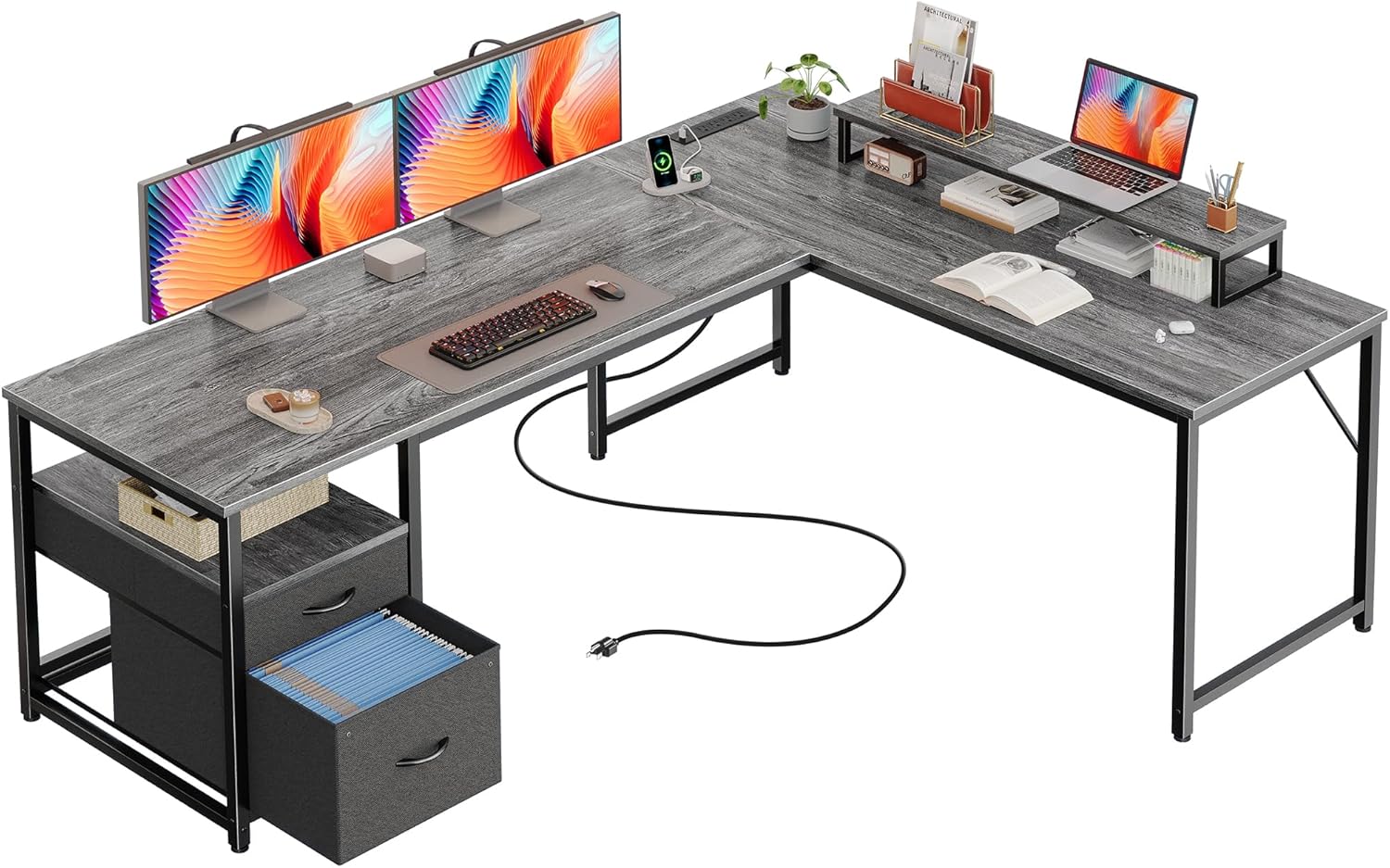
PRAISUN 63 Inch L Shaped Desk with Power Outlets and USB-C Port
Bottom line: The PRAISUN 63 Inch L Shaped Desk with Power Outlets and USB-C Port: Built-in power strip: 4 AC outlets, 1 USB-C and 1 USB-A port; main trade-off: particle board build, not solid wood.
As an Amazon Associate, SpecPicks earns from qualifying purchases. Full disclosure →
Pros & Cons
Pros
- ✓ Built-in power strip: 4 AC outlets, 1 USB-C and 1 USB-A port
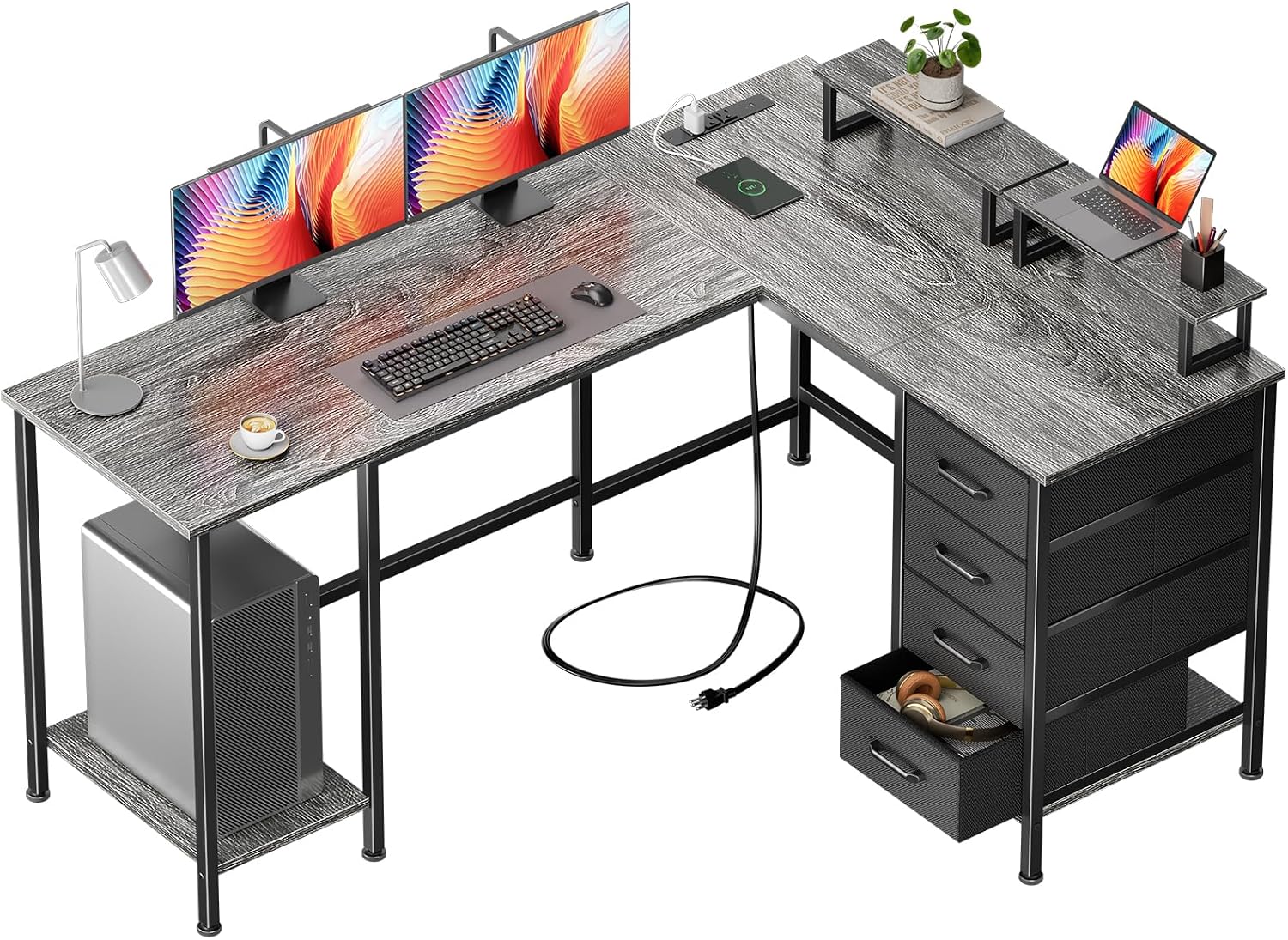
- ✓ Reversible L layout fits either a left or right corner
- ✓ Movable monitor stand works on the main desk or the side table
- ✓ File hanging bar in one drawer holds A4 or letter-size folders
- ✓ Steel tubing frame with a rear crossbar for added stability
Cons
- ✗ Particle board build, not solid wood
- ✗ Fabric drawers are less rigid than wood or metal drawers
- ✗ 18.9-inch main desk depth is shallow for large or ultrawide monitors
- ✗ Weight capacity is not listed in the product details
Manufacturer description
The PRAISUN 63 Inch L Shaped Desk gives you a corner workstation with power built in, so your laptop, phone, tablet and desk lamp can charge without an extension cord. The integrated power strip has 4 AC outlets, 1 USB-C port and 1 USB-A port. The main desk is 18.9 inches deep and joins a side table to form the L. The layout is reversible, so you can fit the desk into either corner of the room. The movable monitor stand sits on either the main desk or the side table. It raises your screen toward eye level for long video calls, editing sessions or gaming, and the space underneath gives you…
SpecPicks Verdict
SpecPicks has no buyer-rating or benchmark data for PRAISUN 63 Inch L Shaped Desk with Power Outlets and USB-C Port, so this read rests on the manufacturer's listed specs (how we evaluate). Compare with similarly-priced alternatives in the gaming desks category before committing. On the listing's own facts, the case for it is "Built-in power strip: 4 AC outlets, 1 USB-C and 1 USB-A port"; the main trade-off is "Particle board build, not solid wood". If those two points fit how you will use it, put it beside one or two close alternatives in the Compare tool to confirm the price.
Common buyer scenarios for gaming desks: matching surface dimensions to the room footprint and monitor count, checking height-adjustment range for sit-stand setups, verifying cable-management channels for a clean multi-monitor build, and confirming weight capacity for a full tower + dual-monitor load. Review the spec sheet for assembly difficulty before ordering.
Frequently Asked Questions
What can I plug into the built-in charging station?
The power strip has 4 AC outlets, 1 USB-C port and 1 USB-A port. That covers a laptop, tablet, phone and smart lamp at the same time, and the USB-C port charges newer devices directly.
Can I set the L shape up for a left or right corner?
Yes. The desk is reversible, so the side table can attach on either side of the 18.9-inch-deep main desk to fit a left or right corner.
Does the monitor stand have to stay in one place?
No. The elevated monitor stand is movable, so you can place it on the main desk or on the side table. It raises your screen toward eye level and adds storage underneath.
Will the drawers hold hanging file folders?
One of the 2 large fabric drawers has a file hanging bar for A4 or letter-size folders. There is also an open shelf for other items.
How hard is the desk to assemble?
The parts are numbered, and the box includes detailed instructions and a full tool kit. For the exact weight capacity and warranty terms, check the manufacturer's product listing.
Key Features
Quoted from the manufacturer's listing. Where it differs from the pros and cons above, those note the conditions the listing leaves out.
- 【Computer Desk with Charging Station】This large office desk features a built-in power strip with 4 AC outlets, 1 USB-C port, and a USB-A port, perfect for powering your laptop, tablet, phone, or smart lamp without messy extension cords. The USB-C port is convenient for charging newer devices
- 【Reversible L Desk with Movable Monitor Stand】The 18.9-inch deep main desk and side table form a spacious L-shape, giving you spacious zones for work, study, or gaming. The elevated monitor shelf can be set up on the main or side desktop and helps store more and reduce neck strain by raising your screen to eye level, ideal for long hours of Zoom calls or editing work
- 【Fabric Drawer and File Drawer】Declutter your workspace with 2 large fabric drawers and an open shelf. One drawer comes with a file hanging bar, so you can neatly store A4 or letter-size folders, keeping your important documents close at hand. This work desk for home office is great for freelancers, teachers, or anyone working from home
- 【Solid Construction for Everyday Use】Made with durable particle board and reinforced steel tubing, this large desk withstands long time. The crossbar on the back adds extra stability, while the open space beneath the side desk gives your legs room to stretch, or even place a small pet bed for your furry coworker. The desktop is made of FSC-Certified wood
- 【Easy Assembly with Clear Instructions】Worried about setup? Don’t be. This computer desk with storage comes with numbered parts, detailed instructions, and a full tool kit to help your assembly
Full Specifications
| Base | Metal |
|---|---|
| Size | 63 inch |
| Brand | PRAISUN |
| Color | Grey |
| Shape | L-Shape |
| Style | Modern |
| Set Name | L-Shape |
| Base Type | Leg |
| Room Type | Bedroom, Office, Study Room |
| Top Color | Grey |
| Base Color | Black |
| Item Depth | 18.9 inches |
| Style Name | Modern |
| Unit Count | 1 Count |
| Desk Design | Computer Desk |
| Desk design | Computer Desk |
| Drawer Type | File Drawer |
| Finish Type | Powder Coated |
| Connectivity | USB-C |
| Finish Types | Powder Coated |
| Full listing title | PRAISUN 63 Inch L Shaped Desk with Power Outlets and USB-C Port, Computer Corner Home Office Desk with File Fabric Drawers and Movable Monitor Stand, Larger Storage, Gaming, Writing, Work, Grey |
Ready to buy?
PRAISUN 63 Inch L Shaped Desk with Power Outlets and USB-C Port, Computer Corner Home Office Desk with File Fabric Drawers and Movable Monitor Stand, Larger Storage, Gaming, Writing, Work, Grey is listed on Amazon. Price, availability, shipping and returns are set by Amazon and its sellers — check the listing for current terms. SpecPicks earns a small commission on qualifying purchases — thank you for supporting independent review work.
Related Gaming Desks




More guides & deep dives from the SpecPicks archive
Browse all articles & guides →- Emulation Hardware in 2026: FPGA, Software, and Cart-Reader Ecosystems
- Best Retro Handhelds in 2026: Pocket, Mid-Tier and FPGA Picks
- How to Build a Windows 98 Retro PC in 2026
- Best 1440p Gaming GPUs in 2026
- RTX 4070 Super vs RX 7800 XT — Which to Buy in 2026
- The Complete Voodoo5 5500 AGP Driver Guide (2026 Edition)
- Best Budget Gaming PC Build 2026 — ~$1,000 Parts List
More reviews from the SpecPicks archive
Browse all reviews →- AI-Driven Driver Install on WinXP: Vision LLM Walks the Audigy FX Setup
- Building a Period-Correct 2002 GeForce 4 Ti + Pentium 4 Northwood Win98/XP Dual-Boot
- CompactFlash to IDE Adapter Workflow: Imaging, Cloning, and Reviving Win98 Drives in 2026
- Building a CompactFlash Boot Drive for a Windows 98 Retro PC
- Kimi K2.7 Code on an RTX 3060 12GB: Can a $300 GPU Run It?
- Best Budget Gaming CPU in 2026: 5 AM4 and Entry Picks Ranked
- Intel Arc for Stable Diffusion: ComfyUI + A1111 setup (2026)
- Best SSDs and Storage Adapters for Retro PC Builds in 2026
- How to run Llama 3.1 70B on AMD Radeon RX 7900 XTX
- MSI RTX 3060 Ventus 2X vs ZOTAC RTX 3060 Twin Edge: Which $300 1080p GPU Wins in 2026?
- How to Run a Public Website on a $10 ESP32 Without Servers
- gpt-oss 20B on Surface Laptop Ultra (RTX Spark) vs DGX Spark: tok/s by Config
- Is the Logitech G502 Hero Still the Best FPS Mouse in 2026?
- Jellyfin NVENC Transcodes + a Local LLM on One RTX 3060 12GB
- Pentium II/III LAN Party Build Brand Profile: Why Creative and 3dfx Defined the Era
- Building a Local AI-Agent Eval Rig After AISI's Benchmark Warning
- Windows XP Gaming Laptops in 2026: A Realistic Buying Guide
- Fix Windows 98 SE on 1GB+ RAM: The Vcache Gotcha
- How to run Qwen 3 14B on Apple M4
- Best CPU Cooler for AMD Ryzen Builds in 2026
- CPU Cooler Bracket Fix: How to Secure Your CPU When It Fails
- RTX 5070 Ti vs RTX 5080: Is the $250 MSRP Step-Up Worth It at 1440p and 4K?
- How to run Qwen 3 32B on NVIDIA GeForce RTX 5080
- Best Controller for RetroPie & Pi Emulation: SN30 Pro vs DualSense
Earliest SpecPicks reviews
Browse full archive →- Best GPU for Llama 3.1 8B (2026)
- Best GPU for Qwen 3 14B (2026)
- Best GPU for Qwen 3 32B (2026)
- Best GPU for Llama 3.1 70B (2026)
- Best GPU for DeepSeek-R1 32B (2026)
- Best GPU for Llama 3.1 405B (2026)
- How to run Llama 3.1 8B on NVIDIA GeForce RTX 5090
- How to run Qwen 3 14B on NVIDIA GeForce RTX 5090
- How to run Qwen 3 32B on NVIDIA GeForce RTX 5090
- How to run Llama 3.1 70B on NVIDIA GeForce RTX 5090
- How to run DeepSeek-R1 32B on NVIDIA GeForce RTX 5090
- How to run Llama 3.1 8B on NVIDIA GeForce RTX 4090