

Monomi
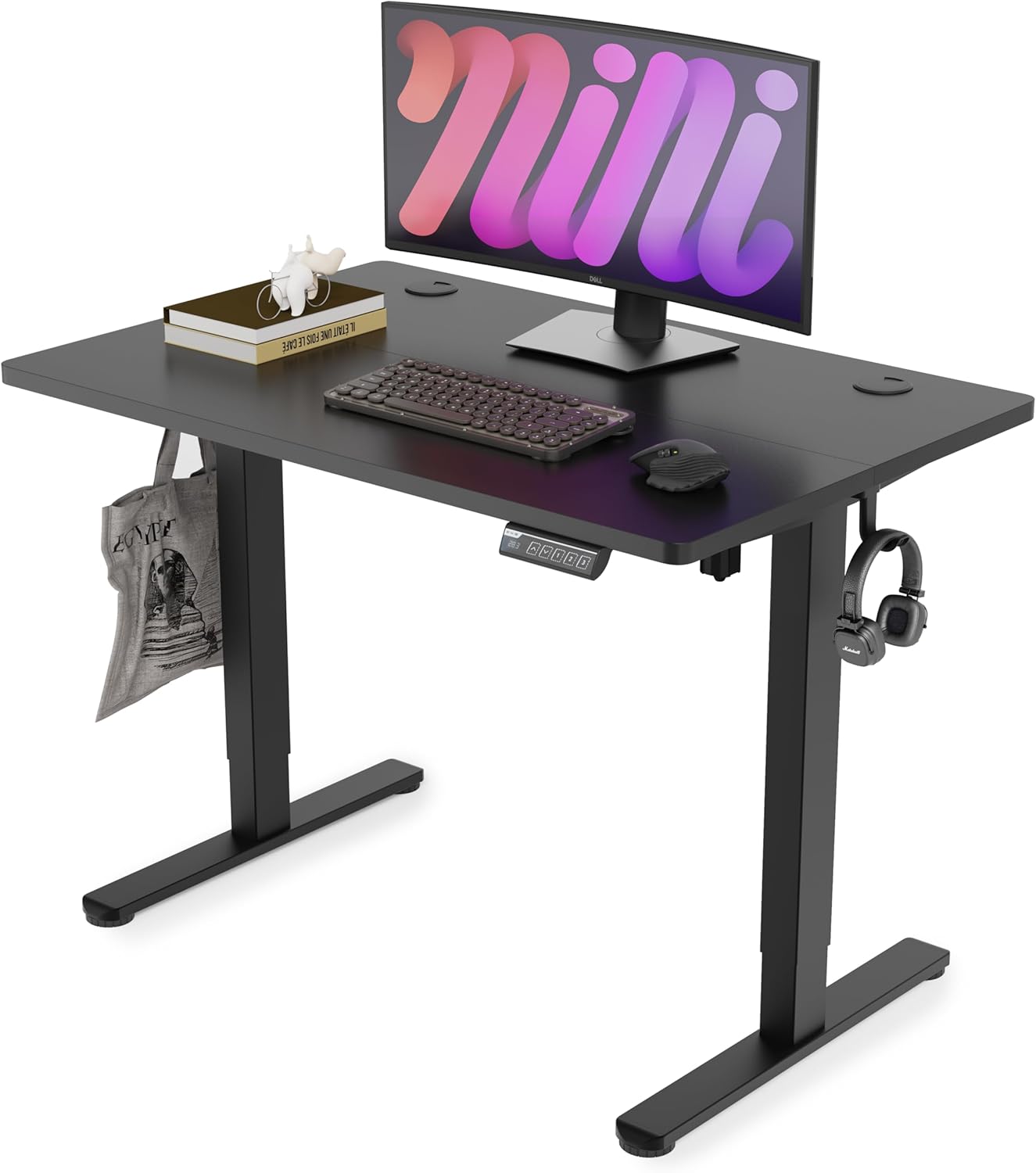
Monomi 59" Electric Standing Desk
Bottom line: The Monomi 59" Electric Standing Desk: 59-inch top fits dual monitors plus a laptop without crowding; main trade-off: 176 lb capacity is modest for heavy multi-monitor arms and a tower.
As an Amazon Associate, SpecPicks earns from qualifying purchases. Full disclosure →
Pros & Cons
Pros
- ✓ 59-inch top fits dual monitors plus a laptop without crowding
- ✓ Dual-motor lift runs under 50 dB, quiet enough for calls
- ✓ Three height presets recall sit and stand positions in one touch
- ✓ Anti-collision stops and reverses descent to protect gear and pets
Cons
- ✗ 176 lb capacity is modest for heavy multi-monitor arms and a tower
- ✗ Only three memory presets if several people share the desk
- ✗ No listed cable tray, so routing is on you
- ✗ Anti-collision guards descent, not upward travel into a shelf
Manufacturer description
The Monomi 59" Electric Standing Desk gives you a 59-inch work surface wide enough for dual monitors, a laptop, and the peripherals that usually end up on the floor. A dual-motor lift system raises and lowers the black steel frame quietly, rated under 50 dB, and holds up to 176 lbs of gear, so a full gaming setup or a two-monitor workstation stays stable through every transition. Three programmable memory presets let you jump to your exact sitting and standing heights with one touch, which matters if more than one person shares the desk. The built-in anti-collision system stops and reverses…
SpecPicks Verdict
SpecPicks has no buyer-rating or benchmark data for Monomi 59" Electric Standing Desk, so this read rests on the manufacturer's listed specs (how we evaluate). Compare with similarly-priced alternatives in the gaming desks category before committing. On the listing's own facts, the case for it is "59-inch top fits dual monitors plus a laptop without crowding"; the main trade-off is "176 lb capacity is modest for heavy multi-monitor arms and a tower". If those two points fit how you will use it, put it beside one or two close alternatives in the Compare tool to confirm the price.
Common buyer scenarios for gaming desks: matching surface dimensions to the room footprint and monitor count, checking height-adjustment range for sit-stand setups, verifying cable-management channels for a clean multi-monitor build, and confirming weight capacity for a full tower + dual-monitor load. Review the spec sheet for assembly difficulty before ordering.
Frequently Asked Questions
How much weight can the Monomi standing desk hold?
The dual-motor lift system and reinforced steel frame support up to 176 lbs, which covers dual monitors, a desktop tower, and peripherals.
Will a 59-inch desk fit two monitors and a laptop?
Yes. Monomi sizes the 59-inch surface specifically for dual monitors plus a laptop and accessories, with room left for a keyboard and mouse.
Is the motor loud when the desk moves?
Monomi rates the dual-motor lift at under 50 dB, so height changes should not interrupt a call or a recording in the same room.
How many height presets does it save?
Three programmable memory presets. One touch recalls each stored height, which helps when two people share the same desk.
How long does assembly take and are tools included?
All necessary tools are included along with a step-by-step manual, labeled parts, and pre-installed screw holes. Monomi states most users finish in under 30 minutes.
Key Features
Quoted from the manufacturer's listing. Where it differs from the pros and cons above, those note the conditions the listing leaves out.
- 【Spacious & Ergonomic 59-Inch Workstation】Enjoy ample room to spread out with this expansive 59-inch electric standing desk. Designed to comfortably fit dual monitors, a laptop, and all your essential work tools, it creates an organized, clutter-free workspace that adapts to both focused tasks and creative projects.
- 【Smart 3-Height Memory & Effortless Adjustability】Customize your perfect sitting and standing positions with three programmable memory presets. With just one touch, instantly recall your preferred heights for different tasks or family members, making healthy posture transitions seamless throughout your workday.
- 【Advanced Safety with Anti-Collision Protection】Move and adjust with confidence. The built-in intelligent anti-collision system automatically stops and reverses direction if an obstacle is detected during descent, safeguarding your equipment, pets, and children while preventing desk damage.
- 【Quiet, Durable Motor & Robust Construction】Engineered with a high-performance dual-motor lift system and a reinforced steel frame, this desk operates quietly under 50 dB while supporting up to 176 lbs. Tested over thousands of cycles, it delivers smooth, stable, and reliable height adjustment year after year.
- 【Tool-Included, Hassle-Free Assembly】Get set up quickly and easily. With clearly labeled parts, pre-installed screw holes, a step-by-step manual, and all necessary tools included, most users can assemble their desk in under 30 minutes—so you can start working healthier right away.
Full Specifications
| Base | Alloy Steel |
|---|---|
| Size | 59x24 |
| Brand | Monomi |
| Color | Black |
| Shape | Rectangular |
| Style | Modern |
| Base Type | Leg |
| Room Type | Classroom, Dormitory, Living Room, Office, Study Room |
| Top Color | Black |
| Base Color | Black |
| Style Name | Modern |
| Desk Design | Computer Desk, Standing Desk |
| Desk design | Computer Desk, Standing Desk |
| Finish Type | Black |
| Finish Types | Black |
| Base Material | Alloy Steel |
| Material Type | Alloy Steel, Engineered Wood |
| Item Dimensions | 24 x 59 x 46 inches |
| Special Feature | Adjustable Height, Electric, Ergonomic |
| Lifting Mechanism | Electric |
| Full listing title | Monomi 59" Electric Standing Desk,Adjustable Height Sit Stand Up Desk,Black | Ergonomic Home office Computer Desk Workstation,Gaming Desk with Memory Height,Headphone Hooks,Anti-Collision |
Ready to buy?
Monomi 59" Electric Standing Desk,Adjustable Height Sit Stand Up Desk,Black | Ergonomic Home office Computer Desk Workstation,Gaming Desk with Memory Height,Headphone Hooks,Anti-Collision is listed on Amazon. Price, availability, shipping and returns are set by Amazon and its sellers — check the listing for current terms. SpecPicks earns a small commission on qualifying purchases — thank you for supporting independent review work.
Related Gaming Desks



More guides & deep dives from the SpecPicks archive
Browse all articles & guides →- The Complete Voodoo5 5500 AGP Driver Guide (2026 Edition)
- Best 1440p Gaming GPUs in 2026
- How to Build a Windows 98 Retro PC in 2026
- Emulation Hardware in 2026: FPGA, Software, and Cart-Reader Ecosystems
- RTX 4070 Super vs RX 7800 XT — Which to Buy in 2026
- Best Retro Handhelds in 2026: Pocket, Mid-Tier and FPGA Picks
- Best Budget Gaming PC Build 2026 — ~$1,000 Parts List
More reviews from the SpecPicks archive
Browse all reviews →- How to run Qwen 3 32B on NVIDIA GeForce RTX 5090
- RTX 5080 vs RX 9070 XT: Benchmarks and Nov 2026 Prices
- Intel Arc Pro B70 (BMG-G31) Posts Strong Linux Gaming Numbers — How It Stacks Up Against an RTX 3060
- How to Image and Preserve a Vintage IDE Hard Drive in 2026 (CompactFlash + USB Adapter Workflow)
- Best Controller for Retro Emulation on PC: 8BitDo, GameSir, DualSense
- $1,200 Gaming PC Build 2026: Parts, Cost, 1440p FPS
- Raspberry Pi OS Moves to Linux 6.18 LTS: What Changes for Pi Builders
- Jetson Orin Nano Super vs Hailo-8 AI HAT+: Which Edge-AI Path Is Right for You?
- OpenAI Just Beat Every Human at AtCoder — Can You Run a Coding LLM Locally?
- xAI Open-Sources Grok-Build: Can You Run It Locally?
- Ryzen 5 5600G vs Ryzen 7 5700X for a Budget 1080p Gaming + Local-AI Build
- Samsung 256GB microSD Drops to $47.99 — 40% Off Storage Deal
- Best SSD for Steam Deck and Handheld PCs in 2026
- Logitech Prime Day Peripheral Deals Hit 47% Off — What Is Actually Worth Buying
- ZOTAC RTX 3060 Twin Edge vs MSI RTX 3060 Ventus 3X: Which 12GB Card?
- Noctua NH-U12S vs DeepCool AK620 for Ryzen Overclocking: Air-Cooler Showdown
- SATA vs NVMe for a Ryzen 5800X Gaming Build: Does It Matter?
- Mount a 90s Big-Box CD-ROM ISO on Win98 Without a CD Drive
- Best Budget NVMe SSD for a Big Steam Library: WD Blue SN550 vs SATA
- Raycast FPS in COBOL: Can a 60-Year-Old Language Render 3D?
- NES Graphics Upgrade Mod Gains Community Traction
- Ideogram 4.0 Open Weights: Running Text-to-Image on a 12GB GPU
- AI-Driven Driver Recovery for SB Live! and Audigy on Win98: How an LLM Watches the Installer
- Logitech G29 vs HORI Force Feedback Wheel — Which First Wheel Is Right?
Earliest SpecPicks reviews
Browse full archive →- Best GPU for Llama 3.1 8B (2026)
- Best GPU for Qwen 3 14B (2026)
- Best GPU for Qwen 3 32B (2026)
- Best GPU for Llama 3.1 70B (2026)
- Best GPU for DeepSeek-R1 32B (2026)
- Best GPU for Llama 3.1 405B (2026)
- How to run Llama 3.1 8B on NVIDIA GeForce RTX 5090
- How to run Qwen 3 14B on NVIDIA GeForce RTX 5090
- How to run Qwen 3 32B on NVIDIA GeForce RTX 5090
- How to run Llama 3.1 70B on NVIDIA GeForce RTX 5090
- How to run DeepSeek-R1 32B on NVIDIA GeForce RTX 5090
- How to run Llama 3.1 8B on NVIDIA GeForce RTX 4090