
ELUTENG
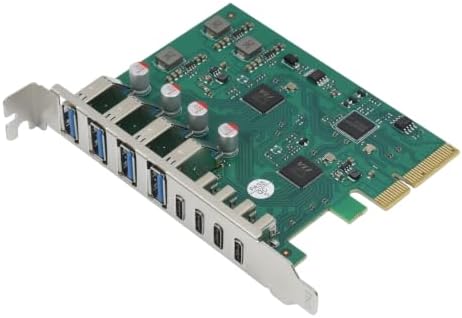
ELUTENG PCIE USB 3.1 Expansion Card 8 Ports 20Gbps Bandwidth PCI Express USB Cards
Bottom line: Per its Amazon listing, the ELUTENG PCIE USB 3.1 Expansion Card 8 Ports 20Gbps Bandwidth PCI: 2-in-1 Design: This pcie usb expansion card equipped with 4 USB-A and 4 USB-C ports.
As an Amazon Associate, SpecPicks earns from qualifying purchases. Full disclosure →
Pros & Cons
Pros
- ✓ 2-in-1 Design: This pcie usb expansion card equipped with 4 USB-A and 4 USB-C ports
- ✓ Backed by ELUTENG's warranty and support channels
Cons
- ✗ Needs a free PCIe slot — check which of your board's slots are wired for it
Manufacturer description
PCIE USB 3.1 Expansion Card
SpecPicks Verdict
SpecPicks has no buyer-rating or benchmark data for ELUTENG PCIE USB 3.1 Expansion Card 8 Ports 20Gbps Bandwidth PCI…, so this read rests on the manufacturer's listed specs (how we evaluate). Compare with similarly-priced alternatives in the expansion cards category before committing. Judge it on the specification table and the price rather than on sentiment: check the figures that decide your use case, then put it side-by-side with two or three close alternatives in the Compare tool before clicking through.
Before ordering, confirm the board side: this card needs a free PCIe slot of the width the card uses. Your motherboard manual lists which slots share lanes with M.2 sockets or other slots. Prices and stock are set by the retailer and may have moved since this page was last updated.
Key Features
Quoted from the manufacturer's listing. Where it differs from the pros and cons above, those note the conditions the listing leaves out.
- High-Speed Data Transfer: This usb pcie card features USB 3.1 Gen 2 specifications, with a single-port transfer rate of up to 10 Gbps and a total bus bandwidth of up to 20 Gbps. It maintains stable, high-speed performance even when multiple devices are connected simultaneously.
- 2-in-1 Design: This pcie usb expansion card equipped with 4 USB-A and 4 USB-C ports, 8 high-speed ports in total. Connect external hard drives, card readers, phones, keyboards and mice at the same time to fix desktop port shortage issues.
- Dual-Chip Solution: This pci usb card utilizes a combination of the ASM3142 and VL820 professional controller chips, featuring excellent hardware optimization, balanced data flow, and strong compatibility, providing reliable support for simultaneous operation of multiple devices.
- Wide Compatibility: This pci express usb card features a standard PCIe x4 interface, making it compatible with mainstream desktop computers. It works seamlessly with Windows 11, 10, 8, 7, XP, Vista, and other operating systems.
- Easy Installation: The internal usb port cards includes mounting screws, a dedicated screwdriver, and a driver CD, eliminating the need for additional accessories. Installation is simple and secure, making it ideal for home, office, entertainment, design, and other scenarios.
Full Specifications
| Brand | ELUTENG |
|---|---|
| Unit Count | 1 Count |
| Connectivity | USB-C |
| Number of Items | 1 |
| Compatible Devices | Desktop, Laptop, External Hard Drive, Card Reader, Smartphone, Keyboard, Mouse |
| Hardware Interface | USB |
| Warranty Description | 1 YEAR |
| Full listing title | ELUTENG PCIE USB 3.1 Expansion Card 8 Ports 20Gbps Bandwidth PCI Express USB Cards with ASM3142 & VL820 Chipset PCI-E Hub Controller Adapter 4 USB-A & 4 USB-C for Windows 11/10/8/7/XP/Vista |
Ready to buy?
ELUTENG PCIE USB 3.1 Expansion Card 8 Ports 20Gbps Bandwidth PCI Express USB Cards with ASM3142 & VL820 Chipset PCI-E Hub Controller Adapter 4 USB-A & 4 USB-C for Windows 11/10/8/7/XP/Vista is listed on Amazon. Price, availability, shipping and returns are set by Amazon and its sellers — check the listing for current terms. SpecPicks earns a small commission on qualifying purchases — thank you for supporting independent review work.
Related Expansion Cards


More guides & deep dives from the SpecPicks archive
Browse all articles & guides →- Best Budget Gaming PC Build 2026 — ~$1,000 Parts List
- Emulation Hardware in 2026: FPGA, Software, and Cart-Reader Ecosystems
- RTX 4070 Super vs RX 7800 XT — Which to Buy in 2026
- How to Build a Windows 98 Retro PC in 2026
- Best 1440p Gaming GPUs in 2026
- The Complete Voodoo5 5500 AGP Driver Guide (2026 Edition)
- Best Retro Handhelds in 2026: Pocket, Mid-Tier and FPGA Picks
More reviews from the SpecPicks archive
Browse all reviews →- Intel Arc Pro B60 vs RTX 3060 12GB for Local LLM
- Claude Sonnet 5 Closes the Opus Gap: When Local Still Wins
- Best 4K Monitor for PS5 (4K/120Hz) in 2026
- MicroPython Now Runs on the Super Nintendo — On Real Hardware
- Best Budget FPS Mouse + Pad Combo: G502 Hero & QcK 2026
- Best SATA SSDs Under $100 in 2026: 5 Picks for Boot Drives, Upgrades, and Retro PCs
- Qwen 3.6 27B with MTP: 2.5x Throughput on Local Hardware (Real Benchmarks)
- RTX 4000 SFF Ada vs RTX PRO 4000 SFF Blackwell for Local LLMs: 20GB vs 24GB at 70W
- Using LLMs to Install Vintage GPU Drivers on Win98 and WinXP: A Field Report from Our Retro-Agent Fleet
- Best Raspberry Pi Alternative in 2025: Full Buying Guide
- Best Parts for a Local Coding-Agent Rig in 2026
- How to run Qwen 3 32B on NVIDIA GeForce RTX 4090
- Building a MAME Fighting Setup: Fight Stick + CF Storage for an Arcade Corner
- Gemini 3.5 Live Translate Goes Cloud-First — The Local, Private Path on a Raspberry Pi
- The $500M Claude Bill: What Local LLM Inference Actually Costs
- Best SSD for a Raspberry Pi 4 Media Server in 2026
- Qwen3.6-35B-A3B vs Gemma4-26B-A4B: Which MoE Fits a 12GB RTX 3060
- Best SSD for Retro PC IDE-to-SATA Builds (Win98, WinXP) in 2026
- Microsoft + Nvidia Agent PCs: Hardware to Run Agents Locally
- Mistral Medium 3.5 Dense Local Inference: Hardware Tiers from 24GB to 192GB
- 3dfx Voodoo5 5500 AGP Install Guide: Glide, 4-Sample FSAA, and the Last Great 3dfx Driver Stack for Win98SE
- Step 3.7 Flash vs Gemma 4 12B: Which Local Model Wins on a 12GB GPU?
- Best CRT Monitor for Retro Gaming: 2026 Buying Guide
- Build a Self-Hosted Security Camera on a Raspberry Pi 4 8GB in 2026
Earliest SpecPicks reviews
Browse full archive →- Best GPU for Llama 3.1 8B (2026)
- Best GPU for Qwen 3 14B (2026)
- Best GPU for Qwen 3 32B (2026)
- Best GPU for Llama 3.1 70B (2026)
- Best GPU for DeepSeek-R1 32B (2026)
- Best GPU for Llama 3.1 405B (2026)
- How to run Llama 3.1 8B on NVIDIA GeForce RTX 5090
- How to run Qwen 3 14B on NVIDIA GeForce RTX 5090
- How to run Qwen 3 32B on NVIDIA GeForce RTX 5090
- How to run Llama 3.1 70B on NVIDIA GeForce RTX 5090
- How to run DeepSeek-R1 32B on NVIDIA GeForce RTX 5090
- How to run Llama 3.1 8B on NVIDIA GeForce RTX 4090