
Verizon
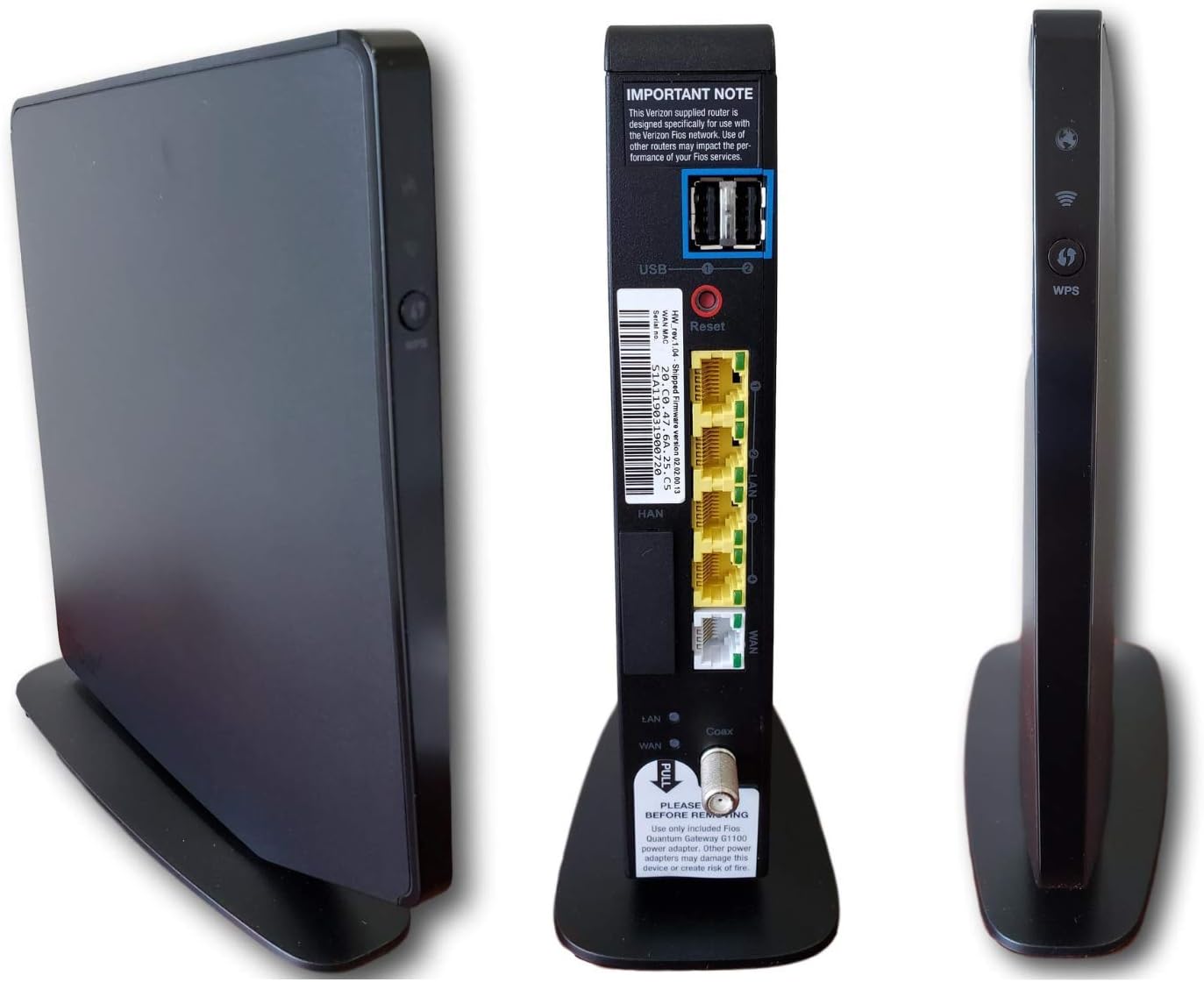
Verizon Fios G1100
Bottom line: The Verizon Fios G1100 ($147.97 on Amazon as of 2026-11-22 17:19 UTC): Built for Verizon Fios Internet plans; main trade-off: designed around Fios, so it's a weaker fit for other ISPs.
As an Amazon Associate, SpecPicks earns from qualifying purchases. Full disclosure →
*Price sourced from Amazon.com. Last updated 2026-11-22. Product prices and availability are accurate as of the date/time indicated and are subject to change. Any price and availability information displayed on Amazon.com at the time of purchase will apply to the purchase of this product.
Pros & Cons
Pros
- ✓ Built for Verizon Fios Internet plans
- ✓ AC1750 dual-band WiFi splits traffic across two bands
- ✓ Six available ports for wired consoles, PCs and streamers
- ✓ Internal antennas keep a clean, compact footprint
- ✓ App interface for setup and network management
Cons
- ✗ Designed around Fios, so it's a weaker fit for other ISPs
- ✗ AC1750 is WiFi 5 (802.11ac), not WiFi 6 or 6E
- ✗ Internal antennas can't be repositioned or upgraded
- ✗ 2019 hardware revision of an older gateway design
Manufacturer description
The Verizon Fios G1100 Quantum Gateway router (updated 2019 version) is an AC1750 dual-band gateway built for Verizon Fios Internet plans. If you want a router designed around your Fios service instead of a generic third-party box, this is that hardware. AC1750 dual-band WiFi spreads traffic across two bands. You can keep a streaming or gaming session on one band while phones, laptops and smart-home gear share the other. Six available ports leave room to hardwire a desktop, console, streaming box or network drive when you want the steadiest connection. The antennas are internal, so the G1100…
SpecPicks Verdict
SpecPicks has no buyer-rating or benchmark data for Verizon Fios G1100, so this read rests on the manufacturer's listed specs and the current price in the networking category (how we evaluate). Compare with similarly-priced alternatives in the networking category before committing. On the listing's own facts, the case for it is "Built for Verizon Fios Internet plans"; the main trade-off is "Designed around Fios, so it's a weaker fit for other ISPs". If those two points fit how you will use it, put it beside one or two close alternatives in the Compare tool to confirm the price.
Before ordering, check the listed dimensions, ports, power requirements and supported devices or systems in the spec table below against how you plan to use it, and confirm them on the retailer's listing. Prices and stock are set by the retailer and may have moved since this page was last updated.
Frequently Asked Questions
Does the Verizon Fios G1100 work with my Fios Internet plan?
Yes. The G1100 Quantum Gateway is built for Verizon Fios Internet plans. This listing is the updated 2019 version.
Can I use the G1100 with an internet provider other than Verizon Fios?
The G1100 is built for Fios service, and the product details don't confirm it works with other providers. Check with your ISP and the product listing before you buy it for a non-Fios connection.
Is the G1100 a WiFi 6 router?
No. The G1100 is an AC1750 dual-band router, which means it uses the 802.11ac (WiFi 5) standard. If you need WiFi 6 or 6E features, look at a newer router.
How many ports does the G1100 have for wired devices?
The G1100 has six available ports, so you can hardwire devices like a desktop, game console or streaming box. Check the product listing for the exact port types.
Does the G1100 have external antennas I need to adjust?
No. The G1100 uses internal antennas, so there is nothing to aim. For the best coverage, place it in a central, open spot rather than inside a closed cabinet.
Full Specifications
| Brand | Verizon |
|---|---|
| Color | Black |
| Coverage | Whole Home |
| Frequency | 5 GHz |
| Model Name | AC1750 |
| Unit Count | 1 Count |
| Antenna Type | Internal |
| Connectivity | WiFi |
| Model Number | AC1750 |
| Built-In Media | Power adapter, Ethernet cable |
| Control Method | App |
| Controller Type | App Control |
| Number of Ports | 6 |
| Special Feature | WPS |
| Antenna Location | Home |
| Wi-Fi Generation | Wi-Fi 5 |
| Security Protocol | WPA2-PSK |
| Compatible Devices | Personal Computer |
| Data Transfer Rate | 800 megabits_per_second |
| Included Components | Power adapter, Ethernet cable |
| Full listing title | Verizon Fios G1100 | Updated 2019 Version | AC1750 WiFi G-1100 Quantum Gateway Router for Verizon Fios Internet Plans |
Ready to buy?
Verizon Fios G1100 | Updated 2019 Version | AC1750 WiFi G-1100 Quantum Gateway Router for Verizon Fios Internet Plans is listed on Amazon. Price, availability, shipping and returns are set by Amazon and its sellers — check the listing for current terms. SpecPicks earns a small commission on qualifying purchases — thank you for supporting independent review work.
*Price sourced from Amazon.com. Last updated 2026-11-22. Product prices and availability are accurate as of the date/time indicated and are subject to change. Any price and availability information displayed on Amazon.com at the time of purchase will apply to the purchase of this product.
Related Networking


More guides & deep dives from the SpecPicks archive
Browse all articles & guides →- The Complete Voodoo5 5500 AGP Driver Guide (2026 Edition)
- Emulation Hardware in 2026: FPGA, Software, and Cart-Reader Ecosystems
- Best Budget Gaming PC Build 2026 — ~$1,000 Parts List
- RTX 4070 Super vs RX 7800 XT — Which to Buy in 2026
- Best 1440p Gaming GPUs in 2026
- Best Retro Handhelds in 2026: Pocket, Mid-Tier and FPGA Picks
- How to Build a Windows 98 Retro PC in 2026
More reviews from the SpecPicks archive
Browse all reviews →- Best Handheld Gaming PC Under $300 in 2026
- Self-Hosting Jellyfin on a Raspberry Pi 4 8GB: What It Can Really Do
- Best Retro PC Upgrade Kit 2026: Sound & Storage
- How to run DeepSeek-R1 32B on NVIDIA GeForce RTX 5080
- 1080p Gaming PC Build 2026: Cost, Parts, FPS
- Samsung Winds Down Memory Output Before 18-Day Strike — SSD Price Watch
- Best 4K Gaming Monitor in 2026: 5 Picks From Budget to Premium
- Using LLMs to Install Vintage GPU Drivers on Win98 and WinXP: A Field Report from Our Retro-Agent Fleet
- Best NVMe SSD for PC Gaming Builds in 2026
- Sega's $5M Bet Saved Nvidia in 1996 — Jensen Heads to Tokyo
- Best Gaming Mouse for Warzone & FPS Esports in 2026
- AMD Ryzen AI Max+ 'Gorgon Halo' 192GB: What 192GB Unified Memory Means for Local LLMs
- BOSGAME VTA-439: A Linux-Friendly Ryzen AI Mini PC
- Claude Sonnet 5 Closes the Opus Gap: When Local Still Wins
- MSI MPG 322UR QD-OLED X24: 4K 240Hz Performance Analyzed
- Best Esports Club Practice Room Gear in 2026
- NVMe vs SATA for a Steam Library: 970 EVO Plus vs BX500
- NVMe vs SATA SSD for Local LLM Model Libraries in 2026
- Intel Arc Pro B60 Review 2025: Xe2 Workstation GPU Guide
- CompactFlash as an IDE Hard Drive for Your Win98 Retro Build
- Minecraft on Raspberry Pi via Vulkan: 2026 Setup Guide
- Datacenter GPU in a Gaming PC for £200: Is It Worth It?
- Best Gaming Controller for PC and Console in 2026: 5 Picks Compared
- 3dfx Voodoo2 SLI in 2026: Building a Period-Correct Windows 98 Glide Rig
Earliest SpecPicks reviews
Browse full archive →- Best GPU for Llama 3.1 8B (2026)
- Best GPU for Qwen 3 14B (2026)
- Best GPU for Qwen 3 32B (2026)
- Best GPU for Llama 3.1 70B (2026)
- Best GPU for DeepSeek-R1 32B (2026)
- Best GPU for Llama 3.1 405B (2026)
- How to run Llama 3.1 8B on NVIDIA GeForce RTX 5090
- How to run Qwen 3 14B on NVIDIA GeForce RTX 5090
- How to run Qwen 3 32B on NVIDIA GeForce RTX 5090
- How to run Llama 3.1 70B on NVIDIA GeForce RTX 5090
- How to run DeepSeek-R1 32B on NVIDIA GeForce RTX 5090
- How to run Llama 3.1 8B on NVIDIA GeForce RTX 4090