
PRAISUN
PRAISUN 55 X 24 Inch Computer Desk with Deeper Desktop
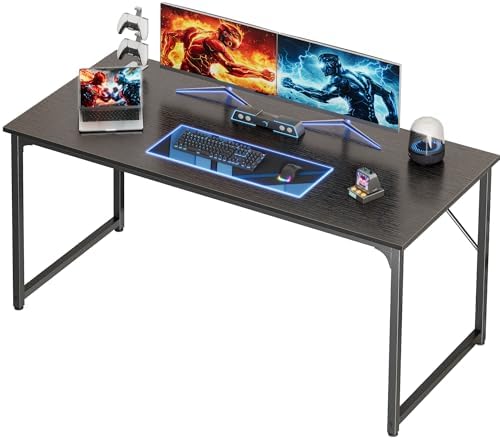
Bottom line: The PRAISUN 55 X 24 Inch Computer Desk with Deeper Desktop: 55 x 23.6 in top fits a laptop, lamp, planner and a second monitor; main trade-off: no drawers, shelves or built-in storage.
As an Amazon Associate, SpecPicks earns from qualifying purchases. Full disclosure →
Pros & Cons
Pros
- ✓ 55 x 23.6 in top fits a laptop, lamp, planner and a second monitor
- ✓ Thick steel tubes and support bars keep the monitor steady while typing
- ✓ Adjustable feet level the desk on hardwood, carpet or tile
- ✓ Open underside gives tall users legroom and fits storage bins
- ✓ Labeled parts; maker says one person can assemble it in under 40 minutes
Cons
- ✗ No drawers, shelves or built-in storage
- ✗ No cable tray or grommets mentioned in the listing
- ✗ Fixed height; not a sit-stand desk
- ✗ Weight capacity not stated in the product listing
Manufacturer description
The PRAISUN 55 x 24 inch computer desk gives you a 55 x 23.6 inch work surface. That depth leaves room for a laptop, desk lamp and planner, with space for a second monitor. You get a deeper desk without adding drawers or shelves, which suits remote work, online classes or a gaming setup where screen distance matters. The frame uses thick steel tubes and support bars, with adjustable feet that level the desk on hardwood, carpet or tile. That keeps your monitor from wobbling while you type and keeps drinks steady during long gaming sessions. The desktop is made from FSC-certified wood and…
SpecPicks Verdict
SpecPicks has no buyer-rating or benchmark data for PRAISUN 55 X 24 Inch Computer Desk with Deeper Desktop, so this read rests on the manufacturer's listed specs (how we evaluate). Compare with similarly-priced alternatives in the gaming desks category before committing. On the listing's own facts, the case for it is "55 x 23.6 in top fits a laptop, lamp, planner and a second monitor"; the main trade-off is "No drawers, shelves or built-in storage". If those two points fit how you will use it, put it beside one or two close alternatives in the Compare tool to confirm the price.
Common buyer scenarios for gaming desks: matching surface dimensions to the room footprint and monitor count, checking height-adjustment range for sit-stand setups, verifying cable-management channels for a clean multi-monitor build, and confirming weight capacity for a full tower + dual-monitor load. Review the spec sheet for assembly difficulty before ordering.
Frequently Asked Questions
What are the exact desktop dimensions of the PRAISUN computer desk?
The desktop measures 55 x 23.6 inches. The product title rounds this to 55 x 24 inches. Check the product listing for overall height.
Can this desk hold two monitors?
PRAISUN says the 55 x 23.6 inch top fits a laptop, lamp, planner and a second monitor. The listing does not state a weight capacity, so check your monitors' combined weight against the manufacturer's specs.
Will the desk wobble on carpet or an uneven floor?
The frame uses thick steel tubes with support bars, and the adjustable feet let you level it on hardwood, carpet or tile.
How long does assembly take, and can one person do it?
PRAISUN says one person can assemble the desk in under 40 minutes using the labeled parts and step-by-step instructions.
Does the desk have storage or room for my legs underneath?
It has no drawers or shelves. The open underside leaves legroom for tall users and space for storage bins. Check the product listing for current warranty terms.
Key Features
Quoted from the manufacturer's listing. Where it differs from the pros and cons above, those note the conditions the listing leaves out.
- 【Deeper Desktop for Daily Needs】Measuring 55''x23.6'', this deeper desktop of the laptop desk fits your laptop, lamp, planner, and even a second monitor, ideal for working from home, attending online classes, or organizing your study zone without clutter
- 【Versatile for Any Room】Whether it’s a dedicated work desk, a dorm study desk, a teen’s bedroom desk, or a minimalist vanity desk, this sleek studio desk fits any decor and function, perfect for students, remote workers, or gamers
- 【Reinforced Frame for Steady Use】Built with thick steel tubes, support bars, and adjustable feet, this game desk stays rock-solid on hardwood, carpet, or tile, so your monitor won’t shake during typing, and your coffee won’t spill during intense gameplay. The desktop is made of FSC-Certified wood
- 【Comfortable Legroom All Day Long】The open bottom design of the simple desk gives your legs room to move, stretch, or even cross comfortably, this great for tall users, or pairing with storage bins underneath
- 【Simple Assembly & Small Package】Simple structure, labeled parts, and step-by-step instructions make this home desk easy for anyone to assemble solo in under 40 minutes, ideal for first apartments, student housing, or quick home office setups
Full Specifications
| Base | Metal |
|---|---|
| Size | 55*23.6inch |
| Brand | PRAISUN |
| Color | Black |
| Shape | Rectangular |
| Style | Modern |
| Set Name | PRAISUN Computer Desk |
| Base Type | Leg |
| Room Type | Office, Study Room |
| Top Color | Black |
| Item Depth | 23.6 inches |
| Style Name | Modern |
| Unit Count | 1 Count |
| Desk Design | Computer Desk |
| Desk design | Computer Desk |
| Finish Type | Powder Coated |
| Finish Types | Powder Coated |
| Base Material | Metal |
| Material Type | Engineered Wood |
| Mounting Type | Freestanding |
| Full listing title | 55 X 24 Inch Computer Desk with Deeper Desktop, Gaming Office Writing Work Desk for Home Office, Study, Bedroom, Work from Home, Metal Frame, Black |
Ready to buy?
55 X 24 Inch Computer Desk with Deeper Desktop, Gaming Office Writing Work Desk for Home Office, Study, Bedroom, Work from Home, Metal Frame, Black is listed on Amazon. Price, availability, shipping and returns are set by Amazon and its sellers — check the listing for current terms. SpecPicks earns a small commission on qualifying purchases — thank you for supporting independent review work.
Related Gaming Desks


More guides & deep dives from the SpecPicks archive
Browse all articles & guides →- Best Retro Handhelds in 2026: Pocket, Mid-Tier and FPGA Picks
- Best Budget Gaming PC Build 2026 — ~$1,000 Parts List
- RTX 4070 Super vs RX 7800 XT — Which to Buy in 2026
- The Complete Voodoo5 5500 AGP Driver Guide (2026 Edition)
- Emulation Hardware in 2026: FPGA, Software, and Cart-Reader Ecosystems
- How to Build a Windows 98 Retro PC in 2026
- Best 1440p Gaming GPUs in 2026
More reviews from the SpecPicks archive
Browse all reviews →- llama.cpp Vulkan vs CUDA on a 12GB RTX 3060: Which Backend Wins?
- Best Gaming CPU for 1440p Builds in 2026
- Intel Arc A770 for Local LLMs: 2026 Benchmark Guide
- Intel Arc Pro B60 AI: 24GB VRAM for Local LLMs in 2026
- Best SSD for a Local AI / LLM Workstation in 2026
- Run DeepSeek & Qwen Locally on an RTX 3060 12GB (2026 Guide)
- Imaging Vintage IDE & SATA Drives in 2026: USB Adapters
- Raspberry Pi OS Moves to the Linux 6.18 LTS Kernel With an Updated LabWC Compositor
- Best GPU for Running Llama 8B Under $300 in 2026
- Local AI and Gaming Setup Picks 2026: 5 Buys With Price Anchors
- Best Streaming Setup for Sim Racing in 2026: Cam, Mic, Light
- RTX 3060 12GB vs RTX 5060: Best Value for 1080p Gaming + Local AI
- Stable Diffusion WebUI Forge in 2026: Faster Inference on the RTX 3060 12GB
- Raspberry Pi 500 Plus: The Real Lineup vs. the Rumors
- GeForce 4 Ti 4600 Won't Boot Past POST: AGP Voltage and BIOS Field Guide
- Open WebUI — self-hosted ChatGPT for your local models
- MSI RTX 3060 Ventus vs ZOTAC RTX 3060 Twin Edge: Which 12GB Card to Buy
- Ryzen 7 5800X vs 5700X for Streaming and Gaming in 2026
- ComfyUI on an RTX 3060 12GB: Local Image Generation Setup
- AMD Ryzen AI Max+ PRO 495 192GB: What the PassMark Leak Tells Us
- Mystery N64 Cartridge Found in the Woods Boots Up
- Laguna XS.2 Lands in llama.cpp: What the Tiny Hybrid Model Means for Local Inference
- Best Budget Gaming Peripherals Under $50 in 2026
- Use a Raspberry Pi 4 as a Second Monitor or KVM in 2026
Earliest SpecPicks reviews
Browse full archive →- Best GPU for Llama 3.1 8B (2026)
- Best GPU for Qwen 3 14B (2026)
- Best GPU for Qwen 3 32B (2026)
- Best GPU for Llama 3.1 70B (2026)
- Best GPU for DeepSeek-R1 32B (2026)
- Best GPU for Llama 3.1 405B (2026)
- How to run Llama 3.1 8B on NVIDIA GeForce RTX 5090
- How to run Qwen 3 14B on NVIDIA GeForce RTX 5090
- How to run Qwen 3 32B on NVIDIA GeForce RTX 5090
- How to run Llama 3.1 70B on NVIDIA GeForce RTX 5090
- How to run DeepSeek-R1 32B on NVIDIA GeForce RTX 5090
- How to run Llama 3.1 8B on NVIDIA GeForce RTX 4090