

Wisoqu
Wisoqu Computer Motherboard with X79 Chipset (1866MHz)
Bottom line: Per its Amazon listing, the Wisoqu Computer Motherboard with X79 Chipset: 2 channel design, support overclocking, maximum capacity 128GB; support 1066, 1333, 1600, 1866MHz effective frequency.
As an Amazon Associate, SpecPicks earns from qualifying purchases. Full disclosure →
Pros & Cons
Pros
- ✓ 2 channel design, support overclocking, maximum capacity 128GB
- ✓ Support 1066, 1333, 1600, 1866MHz effective frequency
- ✓ Backed by Wisoqu's warranty and support channels
Cons
- ✗ Confirm socket / form-factor / power-rating compatibility against your build before ordering
- ✗ Price, stock, shipping and returns are set by the retailer and may have changed since this page was last updated
Manufacturer description
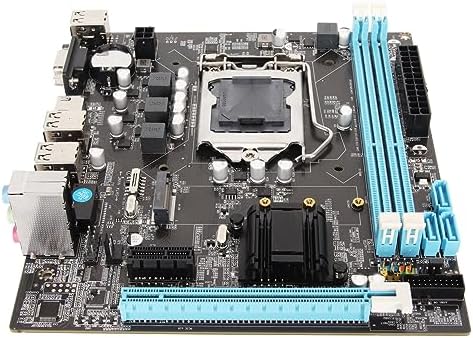
Specification:Item Type: X79-VG2 Computer MotherboardMaterial: Metal, PCBMemory Slots: 4 x DDR3, Support 1066, 1333, 1600, 1866MHz, Maximum Capacity 128GBUSB Ports: 6 x USB2.0Serial ATA Ports: 4 x Serial ATA2.0Ethernet: Gigabit EthernetExpansion Slots: 1 x PCIEx1, 1 x M.2Built in Battery: 1 x CR2032 240mahM.2 Slot: 1 x M.2 Nvme ( PCI-E 3.0 X4 )/ M.2 NGFF ( Serial ATA2.0 ) 2280Graphics Slot: 1 x PCI-E3.0x16How to Use:Install and usePackage List:1 x Computer Motherboard1 x Metal Plate1 x Connecting Wire
SpecPicks Verdict
SpecPicks has no buyer-rating or benchmark data for Wisoqu Computer Motherboard with X79 Chipset, so this read rests on the manufacturer's listed specs (how we evaluate). Compare with similarly-priced alternatives in the retro motherboards category before committing. Judge it on the specification table and the price rather than on sentiment: check the figures that decide your use case, then put it side-by-side with two or three close alternatives in the Compare tool before clicking through.
Common buyer scenarios for retro motherboards of this kind: matching it to an existing build, replacing a failing part, or upgrading from a previous-generation equivalent. Check the spec table below against your current setup — particularly socket / form-factor / power-rating fields — and confirm compatibility on the retailer's listing before purchase. Prices and stock are set by the retailer and may have moved since this page was last updated.
Key Features
Quoted from the manufacturer's listing. Where it differs from the pros and cons above, those note the conditions the listing leaves out.
- For LGA 2011 Socket: The computer pc motherboard is equipped with X79 chipset, which can support for E5 V1, V2 and 3th 4th Gen for Core i7- processors. (E.g for E5-1650, for E5-2650 v2, for E5-2660 v2, for E5-2670 v2, for Core i7-3820, for Core for Core etc)
- 2 Channel DDR3 Ram Slot: This motherboard supports DDR3 SDRAM and DDR3 ECC SDRAM. 2 channel design, support overclocking, maximum capacity 128GB. Support 1066, 1333, 1600, 1866MHz effective frequency. (If you use less than 4 rams, fill the orange slots first)
- Premium Performance Components: This motherboard is made of 4 layer PCB material, 7 phase enhanced power supply, fully enclosed R80 inductor and solid capacitor design. The copper aluminum alloy heat sink can provide a strong heat dissipation effect for the chip. The buzzer on board can detect all motherboard problems
- More Expansion Interfaces: The motherboard has strong expandability, including 6xUSB 2.0 (with 2 front interfaces), 1xUSB 3.0 (front), 3xSerial ATA 2.0, 1xSerial ATA 3.0, 2xPS/2, 1 x PCIEx16 and 1 x PCIEx1 slots
- Installation Tips: Before purchasing this ddr3 motherboard, make sure you can install it yourself. After the motherboard is installed normally, if there is no display, no boot, no picture, no network card, no sound card, etc. It is recommended that customers restore factory settings, reset CMOS, or use an eraser to erase the metal pins on the memory, CPU, or graphics card
Full Specifications
| Brand | Wisoqu |
|---|---|
| Compatibility | PC |
| Package Dimensions | 10.24 x 9.06 x 2.36 inches |
| Full listing title | Computer Motherboard with X79 Chipset, 4 DDR3 RAM Slot, 128GB Capacity, for E5 V1 V2, for i7 3th 4th Gen Processors, PC Gaming Motherboard Support 1066, 1333, 1600, 1866MHz |
Benchmark data for other processors
Ready to buy?
Computer Motherboard with X79 Chipset, 4 DDR3 RAM Slot, 128GB Capacity, for E5 V1 V2, for i7 3th 4th Gen Processors, PC Gaming Motherboard Support 1066, 1333, 1600, 1866MHz is listed on Amazon. Price, availability, shipping and returns are set by Amazon and its sellers — check the listing for current terms. SpecPicks earns a small commission on qualifying purchases — thank you for supporting independent review work.
Related Retro Motherboards



More guides & deep dives from the SpecPicks archive
Browse all articles & guides →- Best Retro Handhelds in 2026: Pocket, Mid-Tier and FPGA Picks
- Best Budget Gaming PC Build 2026 — ~$1,000 Parts List
- Best 1440p Gaming GPUs in 2026
- How to Build a Windows 98 Retro PC in 2026
- RTX 4070 Super vs RX 7800 XT — Which to Buy in 2026
- Emulation Hardware in 2026: FPGA, Software, and Cart-Reader Ecosystems
- The Complete Voodoo5 5500 AGP Driver Guide (2026 Edition)
More reviews from the SpecPicks archive
Browse all reviews →- Intel Optane DIMMs Run 1-Trillion-Parameter LLM on One Workstation
- Handheld Gaming PC Comparison: 2024's Top Picks
- Noctua NH-U12S vs ML240L RGB on a Ryzen 7 5800X
- Raspberry Pi 4 8GB Cyberdeck Build: A Practical 2026 Parts Guide
- Intel Arc LLM Support: What Works in 2026
- MiniMax-M3 Tops Open-Weight Models at Intelligence Index 55
- Best USB Microphone for a Raspberry Pi Project YouTube Channel (2026)
- Can a 12GB RTX 3060 Run a 70B LLM? The Offload Reality Check
- vLLM 0.21 Adds Intel GPU Support: What It Means for Budget AI Rigs
- Gemma 4 31B Abliterated on a Single RTX 3060 12GB: Quantization, VRAM, and Real Tok/s
- Irtysh 32-Core CPU: Is the 30+ FPS Witcher 3 Claim Real?
- Best Raspberry Pi 5 Alternatives in 2025
- GLM-5.2 on an RTX 3060 12GB: Can a Budget Card Run Long-Horizon Agents?
- Best AMD Ryzen 5000 CPUs for AM4 in 2026
- Black Friday Controller Deals: 5 PC & Switch Gamepads Worth Buying
- Cosmos3-Super on an RTX 3060 12GB: Can the #1 Open-Weights Image Model Run Local?
- Best NVMe SSD for a Compact Gaming PC: WD_BLACK SN770 in 2026
- Qwen3.6-35B-A3B VRAM Optimization: Why Bigger Quants Win
- How to run Llama 3.1 8B on Apple M4 Max
- Raspberry Pi 5 8GB Review: Specs, Price & Use Cases (2025)
- Best Esports Club Practice Room Gear in 2026
- Best Sim Racing Setup for 2026: Wheels, Shifters and Pedals
- Best SSD for PS5 and Console-PC Hybrid Setups in 2026
- How to Find and Join Active Retro Multiplayer Servers in 2026 (Quake 3, UT99, CS 1.6, Diablo II)
Earliest SpecPicks reviews
Browse full archive →- Best GPU for Llama 3.1 8B (2026)
- Best GPU for Qwen 3 14B (2026)
- Best GPU for Qwen 3 32B (2026)
- Best GPU for Llama 3.1 70B (2026)
- Best GPU for DeepSeek-R1 32B (2026)
- Best GPU for Llama 3.1 405B (2026)
- How to run Llama 3.1 8B on NVIDIA GeForce RTX 5090
- How to run Qwen 3 14B on NVIDIA GeForce RTX 5090
- How to run Qwen 3 32B on NVIDIA GeForce RTX 5090
- How to run Llama 3.1 70B on NVIDIA GeForce RTX 5090
- How to run DeepSeek-R1 32B on NVIDIA GeForce RTX 5090
- How to run Llama 3.1 8B on NVIDIA GeForce RTX 4090