
QUASIO
QUASIO Large Print Backlit Keyboard with 7-Color Backlit
Bottom line: The QUASIO Large Print Backlit Keyboard with 7-Color Backlit ($17.09 on Amazon as of 2026-11-22 17:18 UTC): Letters printed 4x larger than standard keys for easy at-a-glance typing; main trade-off: wired USB only, no wireless or Bluetooth option.
As an Amazon Associate, SpecPicks earns from qualifying purchases. Full disclosure →
*Price sourced from Amazon.com. Last updated 2026-11-22. Product prices and availability are accurate as of the date/time indicated and are subject to change. Any price and availability information displayed on Amazon.com at the time of purchase will apply to the purchase of this product.
Pros & Cons
Pros
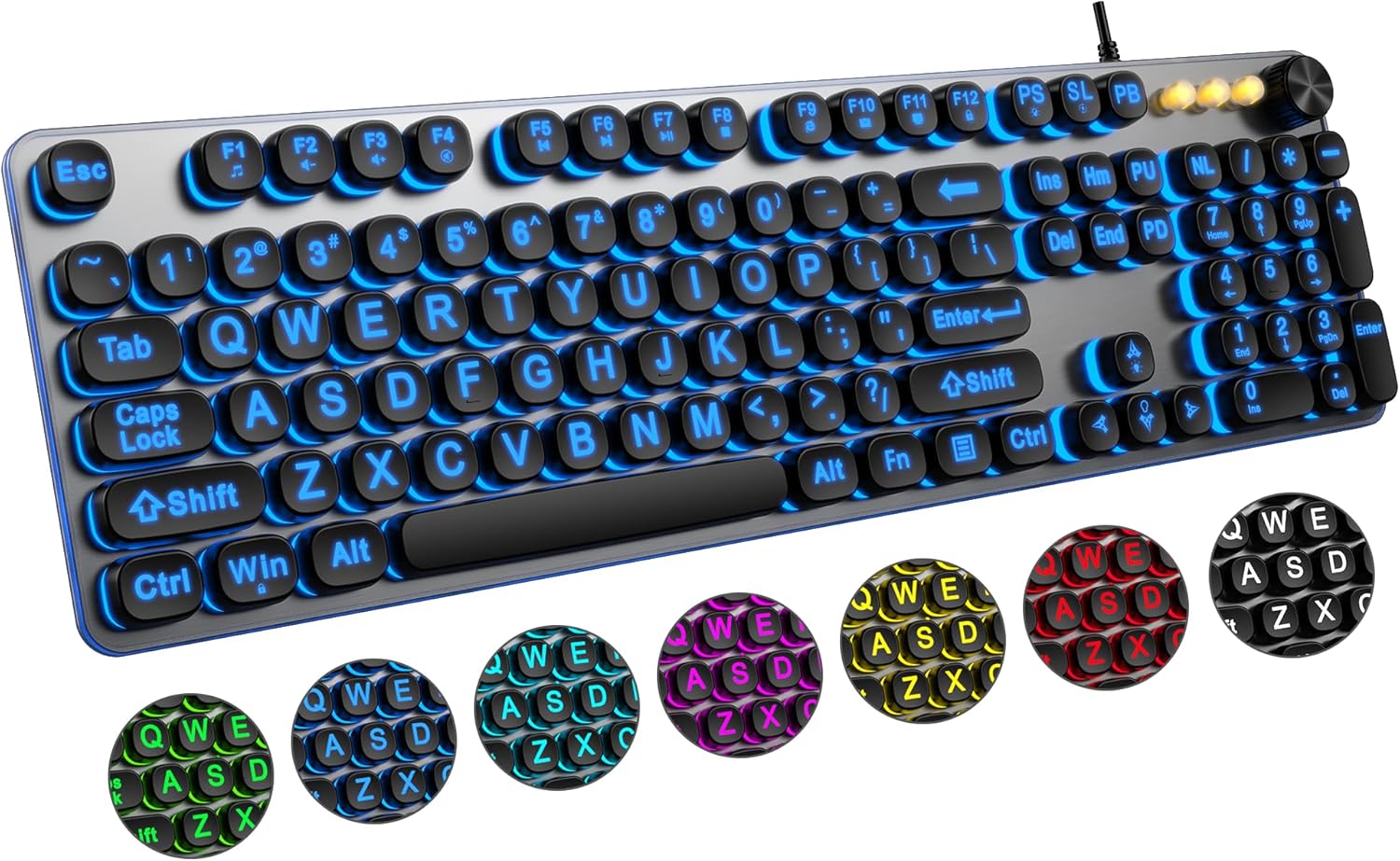
- ✓ Letters printed 4x larger than standard keys for easy at-a-glance typing
- ✓ 7 backlight colors with 4 brightness levels for low-light typing
- ✓ Full-size layout with numeric keypad, no relearning required
- ✓ Multimedia knob twists for volume, presses to play/pause
- ✓ Plug-and-play USB, no drivers; works on Windows and Mac
Cons
- ✗ Wired USB only, no wireless or Bluetooth option
- ✗ Silent membrane-style keys lack mechanical tactile feedback
- ✗ Only 7 preset colors, no per-key RGB or software customization
- ✗ Cable tether limits placement and desk flexibility
SpecPicks Verdict
SpecPicks has no buyer-rating or benchmark data for QUASIO Large Print Backlit Keyboard with 7-Color Backlit, so this read rests on the manufacturer's listed specs and the current price in the gaming peripherals category (how we evaluate). Compare with similarly-priced alternatives in the gaming peripherals category before committing. On the listing's own facts, the case for it is "Letters printed 4x larger than standard keys for easy at-a-glance typing"; the main trade-off is "Wired USB only, no wireless or Bluetooth option". If those two points fit how you will use it, put it beside one or two close alternatives in the Compare tool to confirm the price.
Before ordering, check the listed dimensions, ports, power requirements and supported devices or systems in the spec table below against how you plan to use it, and confirm them on the retailer's listing. Prices and stock are set by the retailer and may have moved since this page was last updated.
Key Features
Quoted from the manufacturer's listing. Where it differs from the pros and cons above, those note the conditions the listing leaves out.
- ▶【Large Print Backlit Keyboard】: Effortlessly locate any key on our large key backlit keyboard. It is designed with print 4x larger than on traditional keyboards to help you type confidently. Ideal for seniors, students, office workers, elderly, the visually impaired, schools, special needs departments and libraries, as well as companies.
- ▶【7 Color Backlight Keyboard】The backlit keyboard has 4 levels of brightness, 7 different colors, Backlit can choose to turn on/off and adjust brightness, making it more convenient to type in low-light environments. Bright and evenly distributed backlit keys, easy typing in lower light environment.
- ▶【Full Size & Ergonomics Design】:Full Size light up keyboard layout with numeric keypad, Large Print keys provides superior comfort without forcing you to relearn how to type. Ergonomic keyboard layout reduces wrist fatigue and discomfort during prolonged use.
- ▶【Blending Retro With Multimedia Control Knob Keyboard】: Equipped with a convenient multimedia control knob, this backlit keyboard lets you easily adjust volume with a simple twist. Press the button to play or pause music and videos instantly. A sleek, modern design with round raised keycaps and spill-resistant technology, this typewriter light up keyboard helps you stand out in the office.
- ▶【Plug and Play & Wide Compatibility】: This USB light up keyboard takes away the hassle of power charging or swapping out batteries and is easy to setup.No drivers required.Our keyboard compatible with windows XP/Vista/7/8/10/X,Mac and other operating system. Computer keyboards works well with desktops, Chrome-book, PC, Laptop, Computer and more
- ▶【Comfortable Typing & Silent Click 】: The keyboard effortless crater mechanism under each key makes typing more comfortable. The computer keyboard are almost silent, don't worry about disturbing others.
Full Specifications
| Brand | QUASIO |
|---|---|
| Material | Silicone |
| Unit Count | 1 Count |
| Switch Type | Tactile |
| Connectivity | USB |
| Power Source | USB Powered |
| Compatibility | PC, Mac |
| Built-In Media | Keyboard, Mouse |
| Number of Keys | 104 |
| Connection Type | Wired |
| Keyboard Layout | QWERTY |
| Number of Items | 1 |
| Number of Packs | 1 |
| Special Feature | Ergonomic |
| Antenna Location | Everyday Use |
| Hand Orientation | Ambidextrous |
| Compatible Devices | Laptop |
| Enclosure Material | Silicone |
| Additional Features | Ergonomic |
| Included Components | Keyboard, Mouse |
| Full listing title | QUASIO Large Print Backlit Keyboard with 7-Color Backlit, Wired USB Lighted Computer Keyboards Oversize Letters Keys Easy to See, Illuminated Keyboard for PC, Laptop,Windows Desktop |
Ready to buy?
QUASIO Large Print Backlit Keyboard with 7-Color Backlit, Wired USB Lighted Computer Keyboards Oversize Letters Keys Easy to See, Illuminated Keyboard for PC, Laptop,Windows Desktop is listed on Amazon. Price, availability, shipping and returns are set by Amazon and its sellers — check the listing for current terms. SpecPicks earns a small commission on qualifying purchases — thank you for supporting independent review work.
*Price sourced from Amazon.com. Last updated 2026-11-22. Product prices and availability are accurate as of the date/time indicated and are subject to change. Any price and availability information displayed on Amazon.com at the time of purchase will apply to the purchase of this product.
Related Gaming Peripherals


More guides & deep dives from the SpecPicks archive
Browse all articles & guides →- Best Retro Handhelds in 2026: Pocket, Mid-Tier and FPGA Picks
- Best Budget Gaming PC Build 2026 — ~$1,000 Parts List
- Best 1440p Gaming GPUs in 2026
- RTX 4070 Super vs RX 7800 XT — Which to Buy in 2026
- The Complete Voodoo5 5500 AGP Driver Guide (2026 Edition)
- Emulation Hardware in 2026: FPGA, Software, and Cart-Reader Ecosystems
- How to Build a Windows 98 Retro PC in 2026
More reviews from the SpecPicks archive
Browse all reviews →- Gemini 3.5 Flash Can Drive Your Screen — Build a Local Agent Rig Instead
- Which Ryzen CPU Is Better? 2026 Buying Guide
- Intel Arc AI Inference: 2025 Performance & Setup Guide
- Best Peripherals for a Modern Retro-PC LAN Party (2026)
- The Sound Blaster Monopoly: How Creative Owned Every PC — and What to Buy Now
- Best Gaming PC Build Components for 2026
- Best Plug-and-Play Retro Console to Buy in 2026
- Cloudflare CEO: The Web's Future Is 'Pay to Crawl' as Bots Overtake Humans
- Best SSD to Upgrade a PS4 in 2026
- 2000s LAN Party, Modern Build: Period-Correct Hardware That Still Boots in 2026
- RTX 5070 vs 5080: Which GPU Fits Your Build?
- Wooden CPU Cooler: How to Build One and What to Expect
- Raspberry Pi 5 Price Guide: What You'll Actually Pay
- Best CPU cooler for the Ryzen 7 5800X in 2026
- Retro Gear Cables Melting Into Cases: Causes and Fixes
- Building a Budget Sim Racing Setup: Logitech G920 vs Thrustmaster TH8A Shifter
- Raspberry Pi 4 8GB as a 2026 Home Server: What Actually Runs Well
- Imaging Vintage IDE Drives with a CompactFlash + USB Adapter
- Steam Deck OLED vs ROG Xbox Ally X: Which Handheld Wins?
- Retro Game Emulators for iPhone: What Works in 2026
- AMD Radeon RX 9070 GRE Linux Performance 2026
- Ryzen 5 5600X vs Ryzen 5 5600G for CPU-Only Gemma 3 12B
- Best Gaming Controllers for PC and Emulation in 2026
- Best Parts for a Budget Ryzen + RTX 3060 Gaming PC Build in 2026
Earliest SpecPicks reviews
Browse full archive →- Best GPU for Llama 3.1 8B (2026)
- Best GPU for Qwen 3 14B (2026)
- Best GPU for Qwen 3 32B (2026)
- Best GPU for Llama 3.1 70B (2026)
- Best GPU for DeepSeek-R1 32B (2026)
- Best GPU for Llama 3.1 405B (2026)
- How to run Llama 3.1 8B on NVIDIA GeForce RTX 5090
- How to run Qwen 3 14B on NVIDIA GeForce RTX 5090
- How to run Qwen 3 32B on NVIDIA GeForce RTX 5090
- How to run Llama 3.1 70B on NVIDIA GeForce RTX 5090
- How to run DeepSeek-R1 32B on NVIDIA GeForce RTX 5090
- How to run Llama 3.1 8B on NVIDIA GeForce RTX 4090