
neculogy
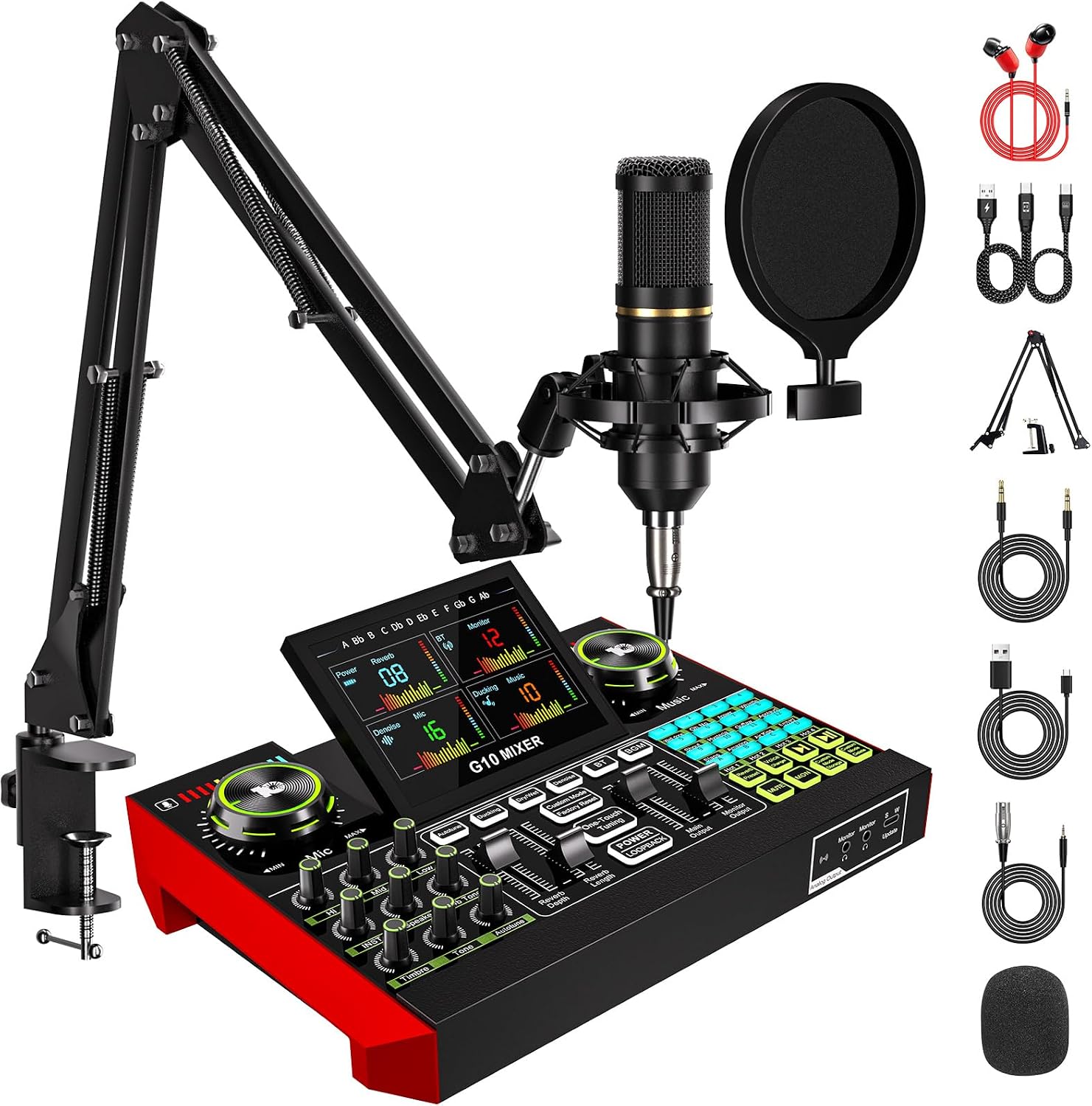
Neculogy Audio Interface Podcast Equipment Bundle with 3.5mm Condenser Microphone
Bottom line: The Neculogy Audio Interface Podcast Equipment Bundle: All-in-one G10 bundle: interface, 3.5mm condenser mic, boom arm, accessories; main trade-off: 3.5mm bundled mic is a step below the XLR input the G10 supports.
As an Amazon Associate, SpecPicks earns from qualifying purchases. Full disclosure →
Pros & Cons
Pros
- ✓ All-in-one G10 bundle: interface, 3.5mm condenser mic, boom arm, accessories
- ✓ XLR input with 48V phantom power supports condenser and dynamic mic upgrades
- ✓ 4 programmable sound pads trigger custom intros, memes, and applause
- ✓ Built-in voice changer offers female, deep, baby, and magical presets
- ✓ USB-C plug and play across PC, Mac, phone, and tablet
Cons
- ✗ 3.5mm bundled mic is a step below the XLR input the G10 supports
- ✗ No stated bit depth, sample rate, or preamp gain specs
- ✗ Sound pads must be recorded by you; no preloaded effects library
- ✗ Bluetooth is for accompaniment playback, not wireless mic input
SpecPicks Verdict
SpecPicks has no buyer-rating or benchmark data for Neculogy Audio Interface Podcast Equipment Bundle, so this read rests on the manufacturer's listed specs (how we evaluate). Compare with similarly-priced alternatives in the streaming gear category before committing. On the listing's own facts, the case for it is "All-in-one G10 bundle: interface, 3.5mm condenser mic, boom arm, accessories"; the main trade-off is "3.5mm bundled mic is a step below the XLR input the G10 supports". If those two points fit how you will use it, put it beside one or two close alternatives in the Compare tool to confirm the price.
Before ordering, check the listed dimensions, ports, power requirements and supported devices or systems in the spec table below against how you plan to use it, and confirm them on the retailer's listing. Prices and stock are set by the retailer and may have moved since this page was last updated.
Key Features
Quoted from the manufacturer's listing. Where it differs from the pros and cons above, those note the conditions the listing leaves out.
- 🎙 Professional Podcast Equipment Bundle – The Neculogy G10 includes an audio interface, 3.5mm condenser microphone, adjustable boom arm, and all essential accessories for podcasting, live streaming, gaming, singing, voice-over, and content creation. Simply connect and start creating with studio-quality sound.
- 🎤 Upgrade Your Audio with XLR & 48V Phantom Power – Equipped with an XLR microphone input and 48V phantom power, the G10 supports both condenser and dynamic microphones, giving you the flexibility to upgrade your recording setup as your content grows. Perfect for beginners and professional creators alike.
- 🎛 Create Unique Content with Custom Sound Pads – Record your own intros, memes, reactions, applause, or sound effects using the 4 programmable sound pads, then trigger them instantly with one touch. Combined with built-in voice changer effects, every livestream, podcast, or gaming session becomes more interactive and entertaining.
- 🔊 Studio-Quality Sound with Noise Reduction – Advanced noise reduction minimizes background noise while preserving natural vocals. Fine-tune bass, treble, reverb, pitch, and other audio effects to create the perfect sound for podcasts, streaming, music recording, karaoke, and online meetings.
- 【Voice Changer for Fun & Creative Streams】Switch up your sound with the built-in Voice Changer. Transform your voice into a female, deep, baby, or magical voice—perfect for adding some fun and creativity to your streams or podcasts. Customize the sound with bass and reverb adjustments to make it uniquely yours.
- 【Noise Reduction】Equipped with noise reduction, the G10 Audio Mixer ensures your voice comes through crystal clear, ideal for podcasts, voiceovers, and live streaming with minimal background noise.
Full Specifications
| Brand | neculogy |
|---|---|
| Voltage | 5 volts |
| Frequency | 60 hertz |
| Audio Input | XLR |
| Connectivity | Bluetooth, USB-C |
| Model Number | G10-BM800XB |
| Power Source | Battery Powered |
| Compatibility | PC, Switch, Mac |
| Number of Channels | 2 |
| Warranty Description | 1 year. |
| Output Connector Type | XLR |
| Connectivity Technology | Bluetooth, USB, XLR |
| Manufacturer Part Number | G10-BM800XB |
| Item Dimensions D x W x H | 10.47"D x 2.08"W x 6.3"H |
| Full listing title | Neculogy Audio Interface Podcast Equipment Bundle with 3.5mm Condenser Microphone, Audio Mixer for PC, Mac & Phone, Voice Changer, Noise Reduction for Streaming, Gaming & Recording |
Ready to buy?
Neculogy Audio Interface Podcast Equipment Bundle with 3.5mm Condenser Microphone, Audio Mixer for PC, Mac & Phone, Voice Changer, Noise Reduction for Streaming, Gaming & Recording is listed on Amazon. Price, availability, shipping and returns are set by Amazon and its sellers — check the listing for current terms. SpecPicks earns a small commission on qualifying purchases — thank you for supporting independent review work.
Related Streaming Gear


More guides & deep dives from the SpecPicks archive
Browse all articles & guides →- RTX 4070 Super vs RX 7800 XT — Which to Buy in 2026
- Best 1440p Gaming GPUs in 2026
- Best Retro Handhelds in 2026: Pocket, Mid-Tier and FPGA Picks
- How to Build a Windows 98 Retro PC in 2026
- The Complete Voodoo5 5500 AGP Driver Guide (2026 Edition)
- Best Budget Gaming PC Build 2026 — ~$1,000 Parts List
- Emulation Hardware in 2026: FPGA, Software, and Cart-Reader Ecosystems
More reviews from the SpecPicks archive
Browse all reviews →- RetroArch PS2 Emulation: Setup, BIOS & Performance Guide
- Turtle Beach Recon 50 in 2026: Is the $40 Gaming Headset Still Worth It?
- Raspberry Pi 5 Projects Worth Building in 2026
- OpenAI Says GPT-5.5-Cyber Beats Anthropic's Mythos on Security
- BIOS Says Resize BAR Is On But Nvidia Disagrees
- Building a Retro PC Server Farm with AI: Hosting Quake 3, UT99 & OpenArena in 2026
- Inside the Intel 8087: Decapping a 1980 Math Coprocessor's Microcode
- GameNative Unlocks Up to 100 FPS PC Gaming on Android
- Best GPU for Local Stable Diffusion at 1080p/1440p in 2026
- Steam Deck OLED vs ROG Xbox Ally: 2026 Comparison
- Best Budget Gaming Mouse + Mousepad Combo Under $80 in 2026
- Corsair LL120 RGB vs Noctua NH-U12S: Cooling a 5800X for All-Day Gaming
- Raspberry Pi LLM GPU Guide: What Actually Works in 2026
- Best Budget GPU for Local LLM Inference in 2026
- GeForce 4 Ti 4600 Won't Boot Past POST: AGP Voltage and BIOS Field Guide
- Best Storage for a Windows 98 Retro PC: CompactFlash vs IDE-to-USB SSD Adapters
- TCL 27R944K Review: 165Hz Mini LED Gaming Monitor
- Can You Game While Ollama Runs? RTX 3060 12GB VRAM Contention
- Dual RTX 3090 LLM Training: 2026 Benchmarks & Build Guide
- Self-Hosting Jellyfin on a Raspberry Pi 4 8GB: What It Can Really Do
- Microsoft's SkillOpt Boosts Models With Just a Markdown File — What It Means for Your Local RTX 3060 Rig
- IDE-to-USB and CompactFlash Adapters for Retro PCs: FIDECO vs Unitek vs Vantec
- Best PC and Emulation Controllers in 2026
- Qwen3.6-27B at 80 TPS on RTX 5090: Is the Claim Real?
Earliest SpecPicks reviews
Browse full archive →- Best GPU for Llama 3.1 8B (2026)
- Best GPU for Qwen 3 14B (2026)
- Best GPU for Qwen 3 32B (2026)
- Best GPU for Llama 3.1 70B (2026)
- Best GPU for DeepSeek-R1 32B (2026)
- Best GPU for Llama 3.1 405B (2026)
- How to run Llama 3.1 8B on NVIDIA GeForce RTX 5090
- How to run Qwen 3 14B on NVIDIA GeForce RTX 5090
- How to run Qwen 3 32B on NVIDIA GeForce RTX 5090
- How to run Llama 3.1 70B on NVIDIA GeForce RTX 5090
- How to run DeepSeek-R1 32B on NVIDIA GeForce RTX 5090
- How to run Llama 3.1 8B on NVIDIA GeForce RTX 4090