
EPOMAKER
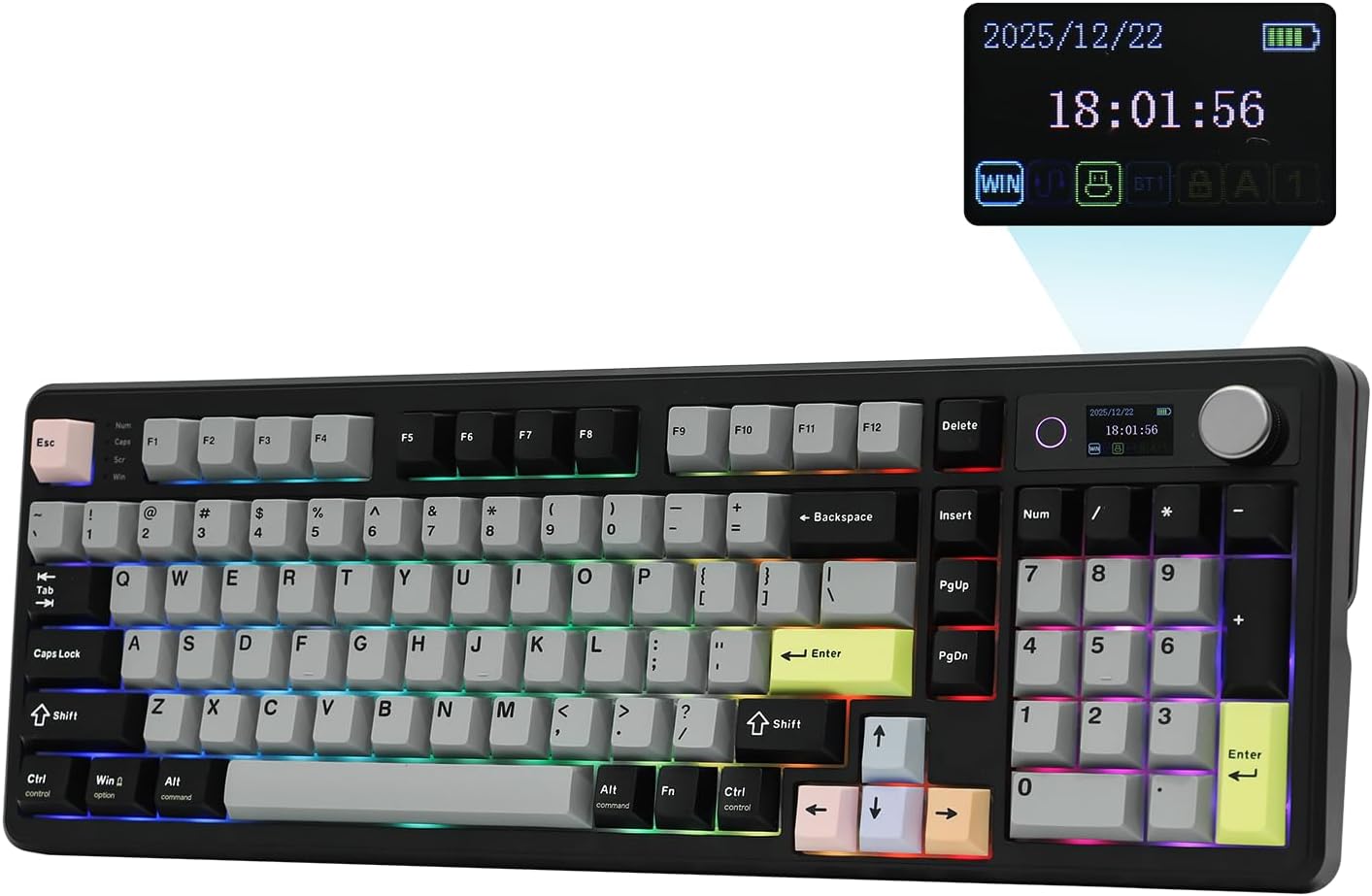
EPOMAKER TH99 PRO 96% Mechanical Keyboard with Screen & Knob
Bottom line: The EPOMAKER TH99 PRO 96% Mechanical Keyboard with Screen & Knob ($71.99 on Amazon as of 2026-11-22 11:31 UTC): 10,000mAh battery: 150-200 hrs with RGB off, 40+ hrs with RGB and screen on; main trade-off: 1.2kg+ weight makes it a poor fit for travel or bag carry.
As an Amazon Associate, SpecPicks earns from qualifying purchases. Full disclosure →
*Price sourced from Amazon.com. Last updated 2026-11-22. Product prices and availability are accurate as of the date/time indicated and are subject to change. Any price and availability information displayed on Amazon.com at the time of purchase will apply to the purchase of this product.
Pros & Cons
Pros
- ✓ 10,000mAh battery: 150-200 hrs with RGB off, 40+ hrs with RGB and screen on
- ✓ Glass screen shows battery, time, GIFs plus an RGB control panel
- ✓ Volume knob adjusts audio mid-game without alt-tabbing
- ✓ 96% 98-key 1800 layout keeps the numpad but frees mouse space
- ✓ Hot-swap sockets take linear, tactile, clicky or silent switches
Cons
- ✗ 1.2kg+ weight makes it a poor fit for travel or bag carry
- ✗ RGB plus screen cuts runtime from 150-200 hrs to about 40
- ✗ Chrome-based driver instead of a native desktop app
- ✗ Only two stock switch options: Creamy Jade or Sea Salt Silent
SpecPicks Verdict
SpecPicks has no buyer-rating or benchmark data for EPOMAKER TH99 PRO 96% Mechanical Keyboard with Screen & Knob, so this read rests on the manufacturer's listed specs and the current price in the gaming peripherals category (how we evaluate). Compare with similarly-priced alternatives in the gaming peripherals category before committing. On the listing's own facts, the case for it is "10,000mAh battery: 150-200 hrs with RGB off, 40+ hrs with RGB and screen on"; the main trade-off is "1.2kg+ weight makes it a poor fit for travel or bag carry". If those two points fit how you will use it, put it beside one or two close alternatives in the Compare tool to confirm the price.
Before ordering, check the listed dimensions, ports, power requirements and supported devices or systems in the spec table below against how you plan to use it, and confirm them on the retailer's listing. Prices and stock are set by the retailer and may have moved since this page was last updated.
Key Features
Quoted from the manufacturer's listing. Where it differs from the pros and cons above, those note the conditions the listing leaves out.
- PRO with Screen, Functional Design: Experience the EPOMAKER TH99 PRO custom keyboard, the fully programmable extension of your workflow and playstyle. The precision-engineered volume knob provides instant auditory control, allowing mid-game toggle without ever alt-tabbing; while the stunning glass screen, with Infor page for keyboard status, battery and time monitor, serves as your digital command center with GIF display and RGB control panel. The Chrome-based software, available online and offline, empowers you to remap every key and record complex macros to automate repetitive Excel strings or multi-hit game combo with a single tap.
- Gaming Keyboard with 10000mah Battery: Image a workspace where one keyboard rules every screen without the clutter of wires? The TH99 PRO combines reliability and limitless mobility. Equipped with a massive 10,000mAh battery, this tri-mode gaming keyboard offers 150-200 hours of high-performance use on a single charge (RGB OFF). Or, leave the RGB lighting on full blast with 40 plus hours of intense uses including screen display. The versatile connectivity allows seamless switch from a high-stakes competitive match on your PC to responding to a text on your Android phone, and then jump straight into a creative project on your Mac laptop with just a quick shortcut.
- 96% Layout Keyboard with PBT Keycap: Get the full-size utility without the bulk with the TH99 PRO 1800 layout keyboard, weight over 1.2kg with adjustable kickstand that stays anchored to your desk even during intense, high-stakes typing or frantic gaming. This 96% gaming keyboard, with full numpad but compact in size for extra "swipe room" needed for low-DPI flick shots in game or micro adjustment in work, consist of 98 keys with premium PBT keycaps that keeps your setup looking brand new without grease up and dust-proof lubed switches. Crunching numbers in a spreadsheet or clutching a 1v5, this everyday use keyboard combines heavy-duty stability, and long-term durability.
- Creamy Keyboard in Thocky Gasket: Built with a sophisticated multi-layer sound-optimized design including PORON, Latex, IXPE and silicones, the TH99 PRO gasket keyboard acts as a shock absorber for your fingers, filtering out harsh vibrations and metallic ping to deliver a soft, cushioned typing feel that reduces fatigue during marathon coding sessions or intense gaming raids. The thocky melody of Creamy Jade or the tranquil silence of Sea Salt Silent switches, this hot-swappable keyboard comes in two switch options but allows more room for future customization, whether you prefer linear, tactile, clicky or quiet.
- RGB Backlit Custom Keyboard: Dive into a symphony of light and step up your gaming ambience with the TH99 PRO backlit keyboard, featuring adjustable RGB illumination. Seamlessly locate macro bindings or dedicated keys in dimly lit gaming dens, with a dynamic effect that lights up as movement goes, minimising mis clicks with intuitive visual signs; personalise your battle station to reflect your individual style and mood, with the color, effect, brightness and speed adjustable backlight of the TH99 PRO RGB keyboard, creating a visually stunning centerpiece that complements your high-performance rig.
Full Specifications
| Brand | EPOMAKER |
|---|---|
| Color | Black |
| Style | Contemporary |
| Weight | 1.2kg |
| Model Name | TH99 PRO |
| Style Name | Contemporary |
| Switch Type | Linear, Silent Linear |
| Connectivity | Wireless, 2.4GHz |
| Model Number | TH99 PRO |
| Compatibility | PC, Switch, Android, Mac |
| Built-In Media | A 2-in-1 Switch-and-Keycap Puller, A Multilingual Manual and A LOGO Card, A USB A-to-C Cable, A Wireless 2.4Ghz Receiver (stored under the left kick-stand), Some Extra Switches |
| Number of Keys | 98 |
| Button Quantity | 98 |
| Connection Type | Wireless |
| Keyboard Layout | QWERTY |
| Special Feature | Backlit, Ergonomic, Hot-Swappable, Rechargeable, Smart Screen&Metal Knob |
| Antenna Location | Business, Education, Everyday Use, Gaming, Multimedia, Personal, Photo Editing, Programming, Student, Video Editing |
| Compatible Devices | Gaming Console, Laptop, PC, Smartphone, Tablet |
| Enclosure Material | Plastic |
| Additional Features | Backlit, Ergonomic, Hot-Swappable, Rechargeable, Smart Screen&Metal Knob |
| Full listing title | EPOMAKER TH99 PRO 96% Mechanical Keyboard with Screen & Knob, 10000mAh, 2.4Ghz/BT, Hot Swap, Custom Driver, RGB Backlight, PBT Keycap, Wireless Gaming Keyboard for PC/Mac (Black, Creamy Jade) |
Ready to buy?
EPOMAKER TH99 PRO 96% Mechanical Keyboard with Screen & Knob, 10000mAh, 2.4Ghz/BT, Hot Swap, Custom Driver, RGB Backlight, PBT Keycap, Wireless Gaming Keyboard for PC/Mac (Black, Creamy Jade) is listed on Amazon. Price, availability, shipping and returns are set by Amazon and its sellers — check the listing for current terms. SpecPicks earns a small commission on qualifying purchases — thank you for supporting independent review work.
*Price sourced from Amazon.com. Last updated 2026-11-22. Product prices and availability are accurate as of the date/time indicated and are subject to change. Any price and availability information displayed on Amazon.com at the time of purchase will apply to the purchase of this product.
Related Gaming Peripherals


More guides & deep dives from the SpecPicks archive
Browse all articles & guides →- Emulation Hardware in 2026: FPGA, Software, and Cart-Reader Ecosystems
- RTX 4070 Super vs RX 7800 XT — Which to Buy in 2026
- Best Budget Gaming PC Build 2026 — ~$1,000 Parts List
- How to Build a Windows 98 Retro PC in 2026
- Best Retro Handhelds in 2026: Pocket, Mid-Tier and FPGA Picks
- Best 1440p Gaming GPUs in 2026
- The Complete Voodoo5 5500 AGP Driver Guide (2026 Edition)
More reviews from the SpecPicks archive
Browse all reviews →- Local LLM Inference on the RTX 3060 12GB: 2026 Quantization Playbook
- Local LLM vs Claude in 2026: When On-Device Beats the API
- 256GB Samsung microSD Drops to $32 — Storage Prices Slide
- Best GPU for 1080p Gaming in 2026: Where the RTX 3060 12GB Lands
- Intel llm-scaler-vllm 1.4: What Arc Pro B70 Support Means for Sub-$1500 Local Inference
- How to run Llama 3.1 8B on Apple M4 Max
- Claude Limits Cut: Why a Local Fallback Rig Just Got Cheaper
- Run Text-to-SQL Locally on a 12GB GPU After Gemini-SQL2
- Corsair LL120 RGB vs Noctua NH-U12S: Cooling a 5800X for All-Day Gaming
- Ryzen 7 5700X vs 5800X for a 2026 Gaming and Streaming Build
- RTX 3060 Drop-In vs AM4 Rebuild for an i7-9700K in 2026
- RX 9060 XT 16GB vs RTX 3060 12GB for Local LLMs: 4GB More VRAM, Which Wins?
- OpenAI Says GPT-5.5-Cyber Beats Anthropic's Mythos on Security
- 2026 Homelab Stack: OPNsense + Proxmox + TrueNAS + 10GbE
- Ex-Sega Engineer's 'Super Realistic' CRT Emulator — What It Means for Retro Mini-Consoles
- Aider vs Cline vs Continue.dev on a Local RTX 3060 (2026)
- Claude Code Artifacts Just Shipped: What It Adds, and the Local Aider Alternative
- A Red Hat Engineer Went Back to AMD Ryzen for His Linux Desktop
- SATA vs NVMe for a Ryzen 5800X Gaming Build: Does It Matter?
- Build a Home NAS on a Raspberry Pi 4 8GB in 2026
- Best Gaming GPUs for 1080p High-Refresh Rate (2026)
- Raspberry Pi 4 8GB vs Pi 5 for a 2026 Homelab: Is the Pi 4 Still Worth It?
- Gaming Desk Deals 2026: 5 L-Shaped and Standing Desks for a Tower + Multi-Monitor Setup
- Best Plug-and-Play Retro Console to Buy in 2026
Earliest SpecPicks reviews
Browse full archive →- Best GPU for Llama 3.1 8B (2026)
- Best GPU for Qwen 3 14B (2026)
- Best GPU for Qwen 3 32B (2026)
- Best GPU for Llama 3.1 70B (2026)
- Best GPU for DeepSeek-R1 32B (2026)
- Best GPU for Llama 3.1 405B (2026)
- How to run Llama 3.1 8B on NVIDIA GeForce RTX 5090
- How to run Qwen 3 14B on NVIDIA GeForce RTX 5090
- How to run Qwen 3 32B on NVIDIA GeForce RTX 5090
- How to run Llama 3.1 70B on NVIDIA GeForce RTX 5090
- How to run DeepSeek-R1 32B on NVIDIA GeForce RTX 5090
- How to run Llama 3.1 8B on NVIDIA GeForce RTX 4090