
Eightwood
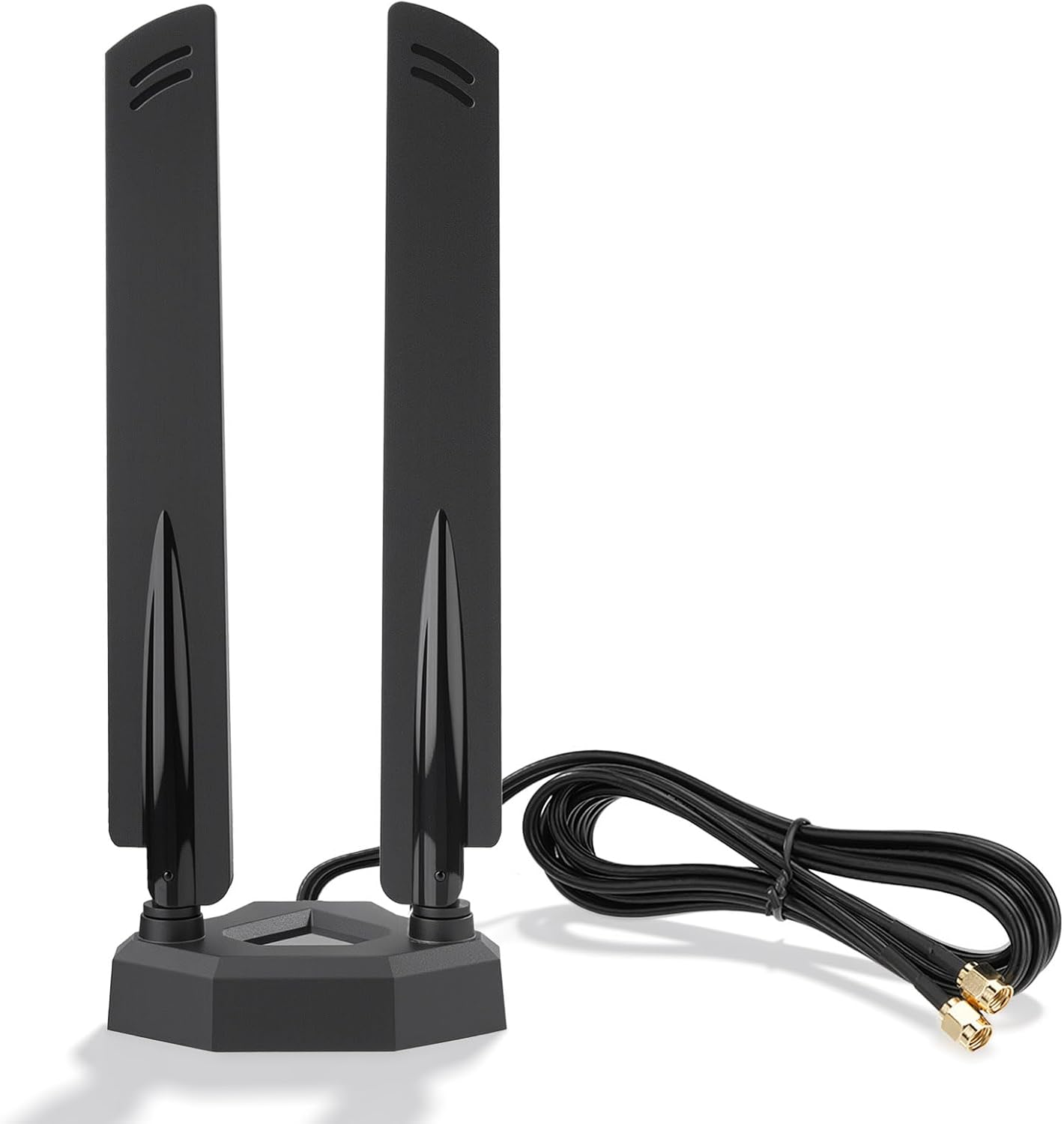
Eightwood WiFi 7 Antenna Tri-Band 6GHz 5GHz 2.4GHz RP-SMA Antenna
Bottom line: Per its Amazon listing, the Eightwood WiFi 7 Antenna Tri-Band 6GHz 5GHz 2.4GHz RP-SMA Antenna: tri-Band WiFi 7 Connectivity: Supports 2.4GHz (2400–2500 MHz).
As an Amazon Associate, SpecPicks earns from qualifying purchases. Full disclosure →
Pros & Cons
Pros
- ✓ Package Includes: 1 x Tri-Band RP-SMA WiFi 7 WiFi 6E Antenna
- ✓ Backed by Eightwood's warranty and support channels
Cons
- ✗ Check the listed dimensions, connectors and platform compatibility against your setup before ordering
- ✗ Price, stock, shipping and returns are set by the retailer and may have changed since this page was last updated
SpecPicks Verdict
SpecPicks has no buyer-rating or benchmark data for Eightwood WiFi 7 Antenna Tri-Band 6GHz 5GHz 2.4GHz RP-SMA Antenna, so this read rests on the manufacturer's listed specs (how we evaluate). Compare with similarly-priced alternatives in the networking category before committing. Judge it on the specification table and the price rather than on sentiment: check the figures that decide your use case, then put it side-by-side with two or three close alternatives in the Compare tool before clicking through.
Before ordering, check the listed dimensions, ports, power requirements and supported devices or systems in the spec table below against how you plan to use it, and confirm them on the retailer's listing. Prices and stock are set by the retailer and may have moved since this page was last updated.
Key Features
Quoted from the manufacturer's listing. Where it differs from the pros and cons above, those note the conditions the listing leaves out.
- Important Compatibility Notice: This antenna uses standard RP-SMA (threaded screw-on) connectors. It is NOT compatible with motherboards that use newer non-threaded push-on WiFi antenna connectors (such as ASUS Q-Antenna, GIGABYTE Wi-Fi EZ-Plug, and MSI EZ Antenna). Please verify your device has threaded RP-SMA ports before purchasing.
- Tri-Band WiFi 7 Connectivity: Supports 2.4GHz (2400–2500 MHz), 5GHz (5150–5850 MHz), 6GHz (5900–7125 MHz) bands. Compatible with 802.11 b/g/n/ac/ax/be devices, including WiFi 6, WiFi 6E and WiFi 7
- Wide Compatibility: Ideal external antenna upgrade for WiFi routers, modems, PCIe WiFi/Bluetooth cards, desktop PCs, gaming motherboards, wireless access points, range extenders, security IP cameras, etc
- Improve Signal Strength: Enhances WiFi and Bluetooth reception to deliver faster speeds, stronger stability and lower latency, helping you get the most out of your WiFi 7/6E setup
- Flexible Placement: The 6.5ft low-loss cable provides the flexibility to position the antenna in the optimal signal location, while the built-in magnetic base attaches easily to metal surfaces for clean, stable installation
- Package Includes: 1 x Tri-Band RP-SMA WiFi 7 WiFi 6E Antenna
Full Specifications
| Brand | Eightwood |
|---|---|
| Color | Black |
| Antenna | wifi 7 antenna |
| Impedance | 50 ohm |
| Unit Count | 1 Count |
| Connectivity | Bluetooth, WiFi, 2.4GHz |
| Model Number | EWAN0114 |
| Compatibility | PC |
| Maximum Range | 200 feet |
| Connection Type | Wireless |
| Mfr Part Number | EWAN0114 |
| Number of Items | 1 |
| Number of Packs | 1 |
| Package Includes | 1 x Tri-Band RP-SMA WiFi 7 WiFi 6E Antenna |
| AntennaDescription | wifi 7 antenna |
| Number of Channels | 5 |
| Warranty Description | 12 Month Manufacturer |
| Full listing title | Eightwood WiFi 7 Antenna Tri-Band 6GHz 5GHz 2.4GHz RP-SMA Antenna | Magnetic Base WiFi Antennae for PC Desktop Computer Gaming Motherboard, PCIe Bluetooth Card, WiFi 7 Router |
Ready to buy?
Eightwood WiFi 7 Antenna Tri-Band 6GHz 5GHz 2.4GHz RP-SMA Antenna | Magnetic Base WiFi Antennae for PC Desktop Computer Gaming Motherboard, PCIe Bluetooth Card, WiFi 7 Router is listed on Amazon. Price, availability, shipping and returns are set by Amazon and its sellers — check the listing for current terms. SpecPicks earns a small commission on qualifying purchases — thank you for supporting independent review work.
Related Networking


More guides & deep dives from the SpecPicks archive
Browse all articles & guides →- Best 1440p Gaming GPUs in 2026
- Best Retro Handhelds in 2026: Pocket, Mid-Tier and FPGA Picks
- Best Budget Gaming PC Build 2026 — ~$1,000 Parts List
- How to Build a Windows 98 Retro PC in 2026
- The Complete Voodoo5 5500 AGP Driver Guide (2026 Edition)
- Emulation Hardware in 2026: FPGA, Software, and Cart-Reader Ecosystems
- RTX 4070 Super vs RX 7800 XT — Which to Buy in 2026
More reviews from the SpecPicks archive
Browse all reviews →- Best Budget SATA SSD for Gaming and Boot Drives in 2026
- FIDECO vs Unitek vs Vantec: The Best IDE-to-USB Adapter for Rescuing Retro Drives in 2026
- Best GPU for AI image generation in 2026 — Flux, SDXL, SD 3.5
- LiteLLM as a Fallback Router: Keep Working When Limits Hit
- Ryzen 5 5600G vs Ryzen 7 5700X for a Budget 1080p Gaming Build
- Crucial BX500 vs Samsung 870 EVO: Best 2.5" SATA SSD for a Budget Build
- Forza Horizon 6 PC Benchmarks: What GPU Hits 60 FPS at 1440p?
- Claude Mythos: What Anthropic Found + Why Regulators Were Briefed
- Period-Correct Windows 95 Pentium MMX Build Guide: 3dfx Voodoo 1, AWE32, and Authentic 1996 Gaming
- If Your Steam Deck Broke, Would You Buy Another?
- Build a Jellyfin Home Media Server on a Raspberry Pi 4 (8GB) in 2026
- Why PSU Fans Aren't Built for Repairability
- Run Home Assistant on a Raspberry Pi 4 8GB in 2026 (SSD Boot)
- Dual RTX 3090 LLM Training: 2026 Benchmarks & Build Guide
- Patch-to-Exploit in Hours: Why a Local Security LLM Rig Now Makes Sense
- Best CPU Cooler for a Ryzen 7 5800X (AM4) in 2026
- Best Raspberry Pi 4 8GB Retro Emulation Setup in 2026
- Intel IPEX-LLM vs Ollama on AMD: AI Rig Guide 2025
- Intel's Bartlett Lake Core 9 273PQE Loses to a Four-Year-Old CPU
- Best Used Ryzen CPU for Budget AM4 Gaming Upgrades in 2026
- Cheapest 1440p GPU in 2026: Budget Buying Guide
- Jetson Orin Nano Super vs Raspberry Pi 5: Real Edge-AI Benchmarks (2026)
- AMD Ryzen 9 9950X3D2 Runs Faster on Linux Than Windows 11
- OpenAI Just Beat Every Human at AtCoder — Can You Run a Coding LLM Locally?
Earliest SpecPicks reviews
Browse full archive →- Best GPU for Llama 3.1 8B (2026)
- Best GPU for Qwen 3 14B (2026)
- Best GPU for Qwen 3 32B (2026)
- Best GPU for Llama 3.1 70B (2026)
- Best GPU for DeepSeek-R1 32B (2026)
- Best GPU for Llama 3.1 405B (2026)
- How to run Llama 3.1 8B on NVIDIA GeForce RTX 5090
- How to run Qwen 3 14B on NVIDIA GeForce RTX 5090
- How to run Qwen 3 32B on NVIDIA GeForce RTX 5090
- How to run Llama 3.1 70B on NVIDIA GeForce RTX 5090
- How to run DeepSeek-R1 32B on NVIDIA GeForce RTX 5090
- How to run Llama 3.1 8B on NVIDIA GeForce RTX 4090