

Qehi
Qehi Prebuilt Gaming Desktop PC,Ryzen 5 4500 16GB DDR4 RAM
Bottom line: The Qehi Ryzen 5 4500 / RX 560 prebuilt ($499.99 on Amazon as of 2026-11-25 11:20 UTC) has 4GB of graphics memory, 16GB of DDR4 RAM and a 256GB SSD; main trade-off: 4GB of video memory is a 1080p-class budget; some recent games at 1440p with high textures want more.
As an Amazon Associate, SpecPicks earns from qualifying purchases. Full disclosure →
*Price sourced from Amazon.com. Last updated 2026-11-25. Product prices and availability are accurate as of the date/time indicated and are subject to change. Any price and availability information displayed on Amazon.com at the time of purchase will apply to the purchase of this product.
Pros & Cons
Pros
- ✓ Pairs a Ryzen 5 4500 processor with Radeon RX 560 4GB graphics
Cons
- ✗ 4GB of video memory is a 1080p-class budget; some recent games at 1440p with high textures want more
- ✗ 16GB of DDR4 RAM covers most games but leaves little room for heavy multitasking
- ✗ AM4 / DDR4 platform: AMD's current CPUs use AM5 and DDR5, so a CPU upgrade later means a new motherboard and memory
- ✗ Price, stock, shipping and returns are set by the retailer and may have changed since this page was last updated
SpecPicks Verdict
SpecPicks scored Qehi Prebuilt Gaming Desktop PC,Ryzen 5 4500 16GB DDR4 RAM using a rating × review-volume × price-fit model applied to our editorial and benchmark analysis across the prebuilt gaming pcs category. Compare with similarly-priced alternatives in the prebuilt gaming pcs category before committing. On the listing's own facts, the case for it is "Pairs a Ryzen 5 4500 processor with Radeon RX 560 4GB graphics"; the main trade-off is "4GB of video memory is a 1080p-class budget; some recent games at 1440p with high textures want more". If those two points fit how you will use it, put it beside one or two close alternatives in the Compare tool to confirm the price.
Before ordering, check the listed dimensions, ports, power requirements and supported devices or systems in the spec table below against how you plan to use it, and confirm them on the retailer's listing. Prices and stock are set by the retailer and may have moved since this page was last updated.
Key Features
Quoted from the manufacturer's listing. Where it differs from the pros and cons above, those note the conditions the listing leaves out.
- 【Strong Daily Multitasking Performance】 Adopts Ryzen 5 4500 6-core 12-thread processor, offers stable and smooth running performance. It perfectly meets daily office work, online study, video streaming and daily multitasking demands, ensures fluent operation in daily use.
- 【Smooth Casual Gaming Experience】 Built-in RX 560 4GB dedicated graphics card, delivers clear and steady image output. It supports most mainstream casual games and daily video playback, also works well for simple picture editing, ideal for beginner game lovers and family daily entertainment.
- 【Large Memory & Fast Speed Storage】 Equipped with 16GB DDR4 high-speed memory, supports running multiple software and pages simultaneously without lag. 256GB solid state drive greatly speed up system boot and program loading, bring more efficient using experience.
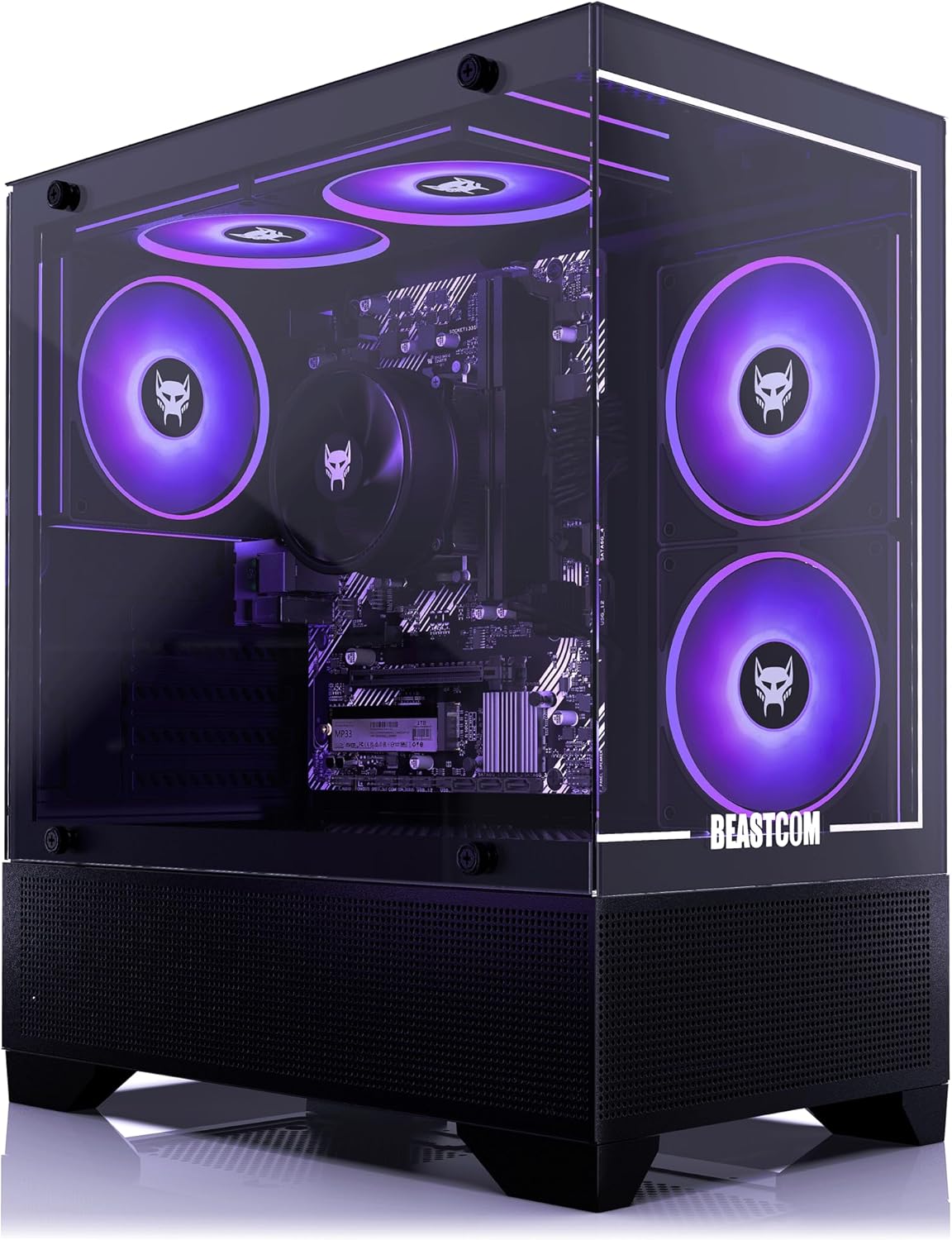
- 【Efficient Heat Dissipation & Fashion Appearance】 Equipped with 8 RGB cooling fans, accelerate internal air circulation, effectively lower operating temperature and keep the host stable after long hours of use. Elegant RGB lighting creates cool gaming style, practical and good-looking.
- 【WiFi 6 Wireless & Easy Plug And Play】 Built-in WiFi 6 module provides faster and more stable wireless network signal. Equipped with practical HDMI and VGA universal interfaces, easy to connect monitors and other external devices. No complex installation needed, ready to use directly, suitable for student, family and office users.
Full Specifications
| Brand | Qehi |
|---|---|
| Color | Black |
| Weight | 3.6g |
| RAM Type | DDR4 SDRAM |
| CPU Model | Ryzen 5 |
| CPU Speed | 3.6 GHz |
| Cache Size | 8 MB |
| Model Name | Qe500B |
| Unit Count | 1.0 Count |
| Screen Size | 75 Inches |
| Connectivity | Wireless, WiFi |
| Display Type | LED |
| Memory Speed | 3200 MHz |
| Model Number | Qe300A |
| Video Output | HDMI |
| Compatibility | PC |
| Built-In Media | Desktop computer |
| Cooling Method | Air |
| Connection Type | Wireless |
| Item Dimensions | 13.3 x 10.8 x 12.9 inches |
| Full listing title | Prebuilt Gaming Desktop PC,Ryzen 5 4500(6Core-3.6G Up to 4.1G) 16GB DDR4 RAM | 256GB SSD| RX560 4G GPU | Wi-Fi 6 | 8 RGB Fans,for Home Office Gaming Tower Computer |
Performance Data
View gaming FPS, AI inference throughput, and synthetic scores for the Ryzen 5 4500 — the core hardware component in this product. Benchmarks sourced from TechPowerUp, PassMark, and the r/LocalLLaMA community.
Ready to buy?
Prebuilt Gaming Desktop PC,Ryzen 5 4500(6Core-3.6G Up to 4.1G) 16GB DDR4 RAM | 256GB SSD| RX560 4G GPU | Wi-Fi 6 | 8 RGB Fans,for Home Office Gaming Tower Computer is listed on Amazon. Price, availability, shipping and returns are set by Amazon and its sellers — check the listing for current terms. SpecPicks earns a small commission on qualifying purchases — thank you for supporting independent review work.
*Price sourced from Amazon.com. Last updated 2026-11-25. Product prices and availability are accurate as of the date/time indicated and are subject to change. Any price and availability information displayed on Amazon.com at the time of purchase will apply to the purchase of this product.
Related Prebuilt Gaming PCs


More guides & deep dives from the SpecPicks archive
Browse all articles & guides →- Best Budget Gaming PC Build 2026 — ~$1,000 Parts List
- RTX 4070 Super vs RX 7800 XT — Which to Buy in 2026
- The Complete Voodoo5 5500 AGP Driver Guide (2026 Edition)
- Emulation Hardware in 2026: FPGA, Software, and Cart-Reader Ecosystems
- Best 1440p Gaming GPUs in 2026
- Best Retro Handhelds in 2026: Pocket, Mid-Tier and FPGA Picks
- How to Build a Windows 98 Retro PC in 2026
More reviews from the SpecPicks archive
Browse all reviews →- KOORUI 27" 4K vs Samsung Odyssey 27" 4K: Best 4K Monitor for Console & PC Gaming
- RX 9060 XT 16GB vs RTX 3060 12GB for Local LLMs: 4GB More VRAM, Which Wins?
- Troubleshooting Local LLM Inference on Raspberry Pi 4 8GB and Pi 5: OOM, Swap, Quantization Crashes, and…
- Imaging Vintage IDE Drives in 2026: The Retro-PC Backup Workflow
- Panther Lake NPU vs RTX 3060 12GB for Local LLM Inference
- AMD Instinct MI300X vs Consumer GPUs: What Local AI Builders Should Buy in 2026
- SteamOS Boots on Intel: Enthusiast Hack Breaks Valve's AMD-Only Grip
- Intel Arc GPU for Stable Diffusion: Setup & Benchmarks
- Steam Controller (2026) Scores 83/100 in Early Reviews
- Intel Arc for Stable Diffusion: ComfyUI + A1111 setup (2026)
- ComfyUI on an RTX 3060 12GB: Stable Diffusion Setup and Real tok-per-image Math
- Best USB Microphone for Streaming in 2026: HyperX QuadCast 2 vs Blue Yeti
- Run a Local Coding Agent on an RTX 3060 12GB (After Codex Went Autonomous)
- Rescue a Dying Retro PC: Image Your IDE Drive to CompactFlash First
- Moonshot Pauses Kimi K3 Signups After GPU Demand Maxes Out
- Local AI News You Missed in April 2026
- Best Retro Gaming Storage Adapters for Win98 and DOS PCs in 2026
- Intel llm-scaler-vllm PV 1.4 Adds Arc Pro B70 Support: What Local-LLM Builders Get
- Ryzen 7 5800X3D vs Intel Core i7-14700K for DDR4 Gaming
- Best 32-Inch 4K Gaming Monitor for PS5 + PC 2026
- Running a Local Coding Agent on a Small Model: What Actually Breaks (and How to Fix It)
- AI-Driven Driver Hunting on WinXP: Using Vision LLMs to Install Audigy 2 ZS Without Internet
- AI-Driven Win9x Driver Install: How Vision-LLMs Tame Vintage Installers (2026)
- Best Raspberry Pi Starter Kits for Beginners (2026)
Earliest SpecPicks reviews
Browse full archive →- Best GPU for Llama 3.1 8B (2026)
- Best GPU for Qwen 3 14B (2026)
- Best GPU for Qwen 3 32B (2026)
- Best GPU for Llama 3.1 70B (2026)
- Best GPU for DeepSeek-R1 32B (2026)
- Best GPU for Llama 3.1 405B (2026)
- How to run Llama 3.1 8B on NVIDIA GeForce RTX 5090
- How to run Qwen 3 14B on NVIDIA GeForce RTX 5090
- How to run Qwen 3 32B on NVIDIA GeForce RTX 5090
- How to run Llama 3.1 70B on NVIDIA GeForce RTX 5090
- How to run DeepSeek-R1 32B on NVIDIA GeForce RTX 5090
- How to run Llama 3.1 8B on NVIDIA GeForce RTX 4090