
ELECNEXUS
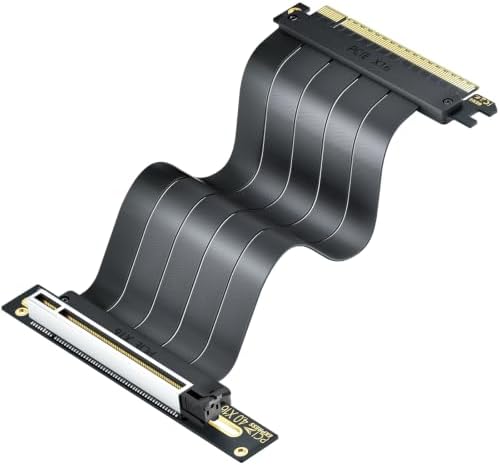
ELECNEXUS PCIe 4.0 x16 Riser Cable 300mm
Bottom line: Per its Amazon listing, the ELECNEXUS PCIe 4.0 x16 Riser Cable 300mm: full PCIe 4.0 Performance – Supports up to 64GB/s bidirectional bandwidth.
As an Amazon Associate, SpecPicks earns from qualifying purchases. Full disclosure →
Pros & Cons
Pros
- ✓ Full PCIe 4.0 Performance – Supports up to 64GB/s bidirectional bandwidth
- ✓ Backed by ELECNEXUS's warranty and support channels
Cons
- ✗ Needs a free PCIe 4.0 x16 slot to run at its rated link speed — check which of your board's slots are wired for it
SpecPicks Verdict
SpecPicks has no buyer-rating or benchmark data for ELECNEXUS PCIe 4.0 x16 Riser Cable 300mm, so this read rests on the manufacturer's listed specs (how we evaluate). Compare with similarly-priced alternatives in the expansion cards category before committing. Judge it on the specification table and the price rather than on sentiment: check the figures that decide your use case, then put it side-by-side with two or three close alternatives in the Compare tool before clicking through.
Before ordering, confirm the board side: this card needs a free PCIe 4.0 x16 slot. Your motherboard manual lists which slots share lanes with M.2 sockets or other slots. Prices and stock are set by the retailer and may have moved since this page was last updated.
Key Features
Quoted from the manufacturer's listing. Where it differs from the pros and cons above, those note the conditions the listing leaves out.
- Full PCIe 4.0 Performance – Supports up to 64GB/s bidirectional bandwidth, delivering stable high-speed data transfer for RTX 40/30 Series and RX 7000/6000 Series GPUs. Fully backward compatible with PCIe 3.0 systems.
- Perfect for Vertical GPU Mounts – Showcase your graphics card with a clean vertical installation while maintaining reliable PCIe 4.0 performance. Ideal for gaming PCs, custom builds, and showcase systems.
- Triple-Layer EMI Shielding – Built with a full-metal shield, aluminum foil shielding, and tinned copper braid to minimize electromagnetic interference, helping prevent signal degradation, black screens, and connection instability.
- Stable 75W Power Delivery – Engineered with a reinforced 40-pin connector and premium conductors to provide reliable power transmission for high-performance graphics cards under demanding workloads.
- Premium Construction – Features a thickened 6-layer PCB, gold-plated contacts, and an ultra-flexible flat cable design for improved durability, easy cable routing, and long-term signal integrity.
Full Specifications
| Brand | ELECNEXUS |
|---|---|
| Color | Black |
| Model | PCIE4-ALL |
| Cable Type | Riser Cable |
| Unit Count | 1 Count |
| Item Length | 15 inches |
| Part Number | PCIE4.0-ALL |
| Connector Type | Pcie |
| Number of Pins | 40 |
| Number of Items | 1 |
| Special Feature | Data Transfer |
| Connector Gender | Male-to-Female |
| Compatible Devices | RTX4090,RTX5090,RX7900XT,RX9070 |
| Data Transfer Rate | 64 gigabytes_per_second |
| Included Components | Riser Cable |
| Indoor Outdoor Usage | Indoor |
| Warranty Description | The warranty for this product is 12 months, along with a 30-day money back or replacement guarantee. |
| Customer Package Type | Standard Packaging |
| Recommended Uses For Product | Vertical GPU mounting, custom PC builds, showcase gaming rigs, professional workstations, compact chassis, and small-form-factor systems |
| Other Special Features of the Product | Data Transfer |
| Full listing title | PCIe 4.0 x16 Riser Cable 300mm, 64GB/s Shielded Flexible GPU Extension Cable for Vertical GPU Mount, Supports RTX 40/30 Series and RX 7000/6000 Series |
Ready to buy?
PCIe 4.0 x16 Riser Cable 300mm, 64GB/s Shielded Flexible GPU Extension Cable for Vertical GPU Mount, Supports RTX 40/30 Series and RX 7000/6000 Series is listed on Amazon. Price, availability, shipping and returns are set by Amazon and its sellers — check the listing for current terms. SpecPicks earns a small commission on qualifying purchases — thank you for supporting independent review work.
Related Expansion Cards


More guides & deep dives from the SpecPicks archive
Browse all articles & guides →- Best 1440p Gaming GPUs in 2026
- Best Retro Handhelds in 2026: Pocket, Mid-Tier and FPGA Picks
- Emulation Hardware in 2026: FPGA, Software, and Cart-Reader Ecosystems
- The Complete Voodoo5 5500 AGP Driver Guide (2026 Edition)
- How to Build a Windows 98 Retro PC in 2026
- RTX 4070 Super vs RX 7800 XT — Which to Buy in 2026
- Best Budget Gaming PC Build 2026 — ~$1,000 Parts List
More reviews from the SpecPicks archive
Browse all reviews →- Add AI Vision to a Raspberry Pi 4 8GB with an AI Accelerator (2026)
- Open-Weight Models Caught Up to Frontier: What to Run on a 12GB GPU
- News: ChatGPT Now Listens and Talks at Once
- Best Quiet CPU Cooler for Ryzen 7 3700X Silent Builds in 2026
- Black Friday Monitor Deals 2026: 5 Picks for Gaming and AI Desks
- Best GPU for 1080p Esports Under $400 in 2026: RTX 3060 Showdown
- CPU Fan Angled Left on a New Prebuilt: Normal or Not?
- Steam Deck Randomly Awakens? Causes & Fixes (2026)
- RTX 3060 12GB vs Ryzen 5 5600G iGPU for Entry Local LLM Inference
- Mistral Seeks €3B: What a Bigger European Lab Means for Local Rigs
- RTX 3060 12GB Showdown: ZOTAC Twin Edge vs MSI Ventus 2X (2026)
- Intel's Bartlett Lake Core 9 273PQE Loses to a 4-Year-Old CPU
- DeepSeek V3 VRAM Requirements: What 671B Really Needs
- Logitech G29 vs HORI Force Feedback Wheel: Which Entry Sim Racing Wheel Wins?
- Dumping and Imaging Vintage IDE and CompactFlash Drives in 2026: A Safe Workflow
- Best Game Controllers for PC and Emulation in 2026
- Raspberry Pi 5 IOMMU Support Lands in Mainline Linux: What It Means
- Running Local LLMs on a Raspberry Pi 5 in 2026: What Works, What Doesn't
- Acti Puts AI Agents in Your Keyboard: On-Device vs Local-GPU Inference
- Ollama on a 12GB RTX 3060: Best Models and tok/s in 2026
- Best Retro Gaming Storage Adapters for Win98 and DOS PCs in 2026
- Rescue Your Retro PC's Data Before the IDE or SATA Drive Dies
- HyperX QuadCast 2 S vs Blue Yeti for Streaming in 2026
- ASRock Phantom Gaming vs Steel Legend 360 LCD Review
Earliest SpecPicks reviews
Browse full archive →- Best GPU for Llama 3.1 8B (2026)
- Best GPU for Qwen 3 14B (2026)
- Best GPU for Qwen 3 32B (2026)
- Best GPU for Llama 3.1 70B (2026)
- Best GPU for DeepSeek-R1 32B (2026)
- Best GPU for Llama 3.1 405B (2026)
- How to run Llama 3.1 8B on NVIDIA GeForce RTX 5090
- How to run Qwen 3 14B on NVIDIA GeForce RTX 5090
- How to run Qwen 3 32B on NVIDIA GeForce RTX 5090
- How to run Llama 3.1 70B on NVIDIA GeForce RTX 5090
- How to run DeepSeek-R1 32B on NVIDIA GeForce RTX 5090
- How to run Llama 3.1 8B on NVIDIA GeForce RTX 4090