
BUFFALO
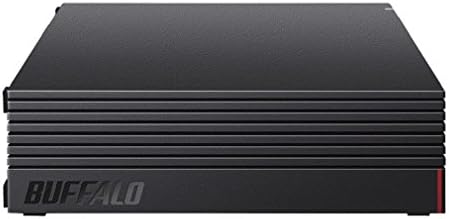
BUFFALO LinkStation 210 2TB 1-Bay NAS Network Attached Storage
Bottom line: The BUFFALO LinkStation 210 2TB 1-Bay NAS Network Attached Storage ($153.99 on Amazon as of 2026-11-22 13:45 UTC): 2TB hard drive included, no separate drive purchase; main trade-off: single-bay design means no RAID mirroring or drive redundancy.
As an Amazon Associate, SpecPicks earns from qualifying purchases. Full disclosure →
*Price sourced from Amazon.com. Last updated 2026-11-22. Product prices and availability are accurate as of the date/time indicated and are subject to change. Any price and availability information displayed on Amazon.com at the time of purchase will apply to the purchase of this product.
Pros & Cons
Pros
- ✓ 2TB hard drive included, no separate drive purchase
- ✓ Subscription-free personal cloud, zero monthly fees
- ✓ Folder-level access restrictions for shared family use
- ✓ 2-year warranty covers the enclosure and the drive
- ✓ 24/7 US-based phone support for setup walkthroughs
Cons
- ✗ Single-bay design means no RAID mirroring or drive redundancy
- ✗ No macOS 26 support; capped at Sequoia and earlier
- ✗ Closed system blocks third-party apps and Docker containers
- ✗ 2TB fixed capacity; expansion requires a different unit
Manufacturer description
The BUFFALO LinkStation 210 gives you a single-bay network attached storage device that ships with a 2TB hard drive already installed, so you plug it into your router and start sharing files across the house the same day. It works with Windows and macOS 15 (Sequoia) and earlier, and the included NAS Navigator utility plus PC backup software let you schedule automated backups from multiple computers to one central location instead of juggling a shelf of external drives. Because this LinkStation runs your own personal cloud, there is no monthly subscription attached to storing your photos…
SpecPicks Verdict
SpecPicks has no buyer-rating or benchmark data for BUFFALO LinkStation 210 2TB 1-Bay NAS Network Attached Storage, so this read rests on the manufacturer's listed specs and the current price in the external storage category (how we evaluate). Compare with similarly-priced alternatives in the external storage category before committing. On the listing's own facts, the case for it is "2TB hard drive included, no separate drive purchase"; the main trade-off is "Single-bay design means no RAID mirroring or drive redundancy". If those two points fit how you will use it, put it beside one or two close alternatives in the Compare tool to confirm the price.
Before ordering, check the listed dimensions, ports, power requirements and supported devices or systems in the spec table below against how you plan to use it, and confirm them on the retailer's listing. Prices and stock are set by the retailer and may have moved since this page was last updated.
Frequently Asked Questions
Does the BUFFALO LinkStation 210 come with a hard drive?
Yes. The 2TB model ships with the HDD already installed in its single drive bay, so no separate drive purchase is needed.
Will this NAS work with my Mac?
It supports macOS 15 (Sequoia) and earlier, along with Windows. NAS Navigator 2 is the macOS utility. For macOS 26, BUFFALO points buyers to the LS 700 series.
Do I have to pay a monthly subscription to access my files?
No. The LinkStation acts as a subscription-free personal cloud, so storing and retrieving your photos, music, and video carries no recurring fee.
Can I back up more than one computer to it?
Yes. The included NAS Navigator management utility and PC backup software let you set up automated backups from multiple computers to the same device.
What warranty and support come with it?
BUFFALO includes a 2-year warranty that covers the hard drives, plus 24/7 US-based support that will walk you through installation.
Key Features
Quoted from the manufacturer's listing. Where it differs from the pros and cons above, those note the conditions the listing leaves out.
- Value NAS with RAID for centralized storage and backup for all your devices. Check out the LS 700 for enhanced features, cloud capabilities, macOS 26, and up to 7x faster performance than the LS 200.
- Connect the LinkStation to your router and enjoy shared network storage for your devices. The NAS is compatible with Windows and macOS*, and Buffalo's US-based support is on-hand 24/7 for installation walkthroughs. *Only for macOS 15 (Sequoia) and earlier. For macOS 26, check out our LS 700 series.
- Subscription-Free Personal Cloud – Store, back up, and manage all your videos, music, and photos and access them anytime without paying any monthly fees.
- Storage Purpose-Built for Data Security – A NAS designed to keep your data safe, the LS200 features a closed system to reduce vulnerabilities from 3rd party apps and SSL encryption for secure file transfers.
- Back Up Multiple Computers & Devices – NAS Navigator management utility and PC backup software included. NAS Navigator 2 for macOS 15 and earlier. You can set up automated backups of data on your computers.
- Securely Share Files With Family & Friends – Configure individual access restrictions for folders to ensure your data remains private while securely share storage space or files with others.
Full Specifications
| Size | 2TB (1x2TB) |
|---|---|
| Brand | BUFFALO |
| Color | Black |
| Material | Metal |
| Model Number | LS210D0201 |
| Compatibility | PC, Mac |
| Built-In Media | AC adapter, Ethernet cable, LinkStation, Quick Start Guide, Setup CD-ROM, Warranty statement |
| Item Type Name | Network Attached Storage |
| Mfr Part Number | LS210D0201 |
| Compatible Devices | Desktop, Laptop |
| Enclosure Material | Metal |
| Warranty Description | 2 years |
| Global Trade Identification Number | 00747464127859 |
| EU Spare Part Availability Duration | 2 years |
| Full listing title | BUFFALO LinkStation 210 2TB 1-Bay NAS Network Attached Storage with HDD Hard Drives Included NAS Storage that Works as Home Cloud or Network Storage Device for Home |
Ready to buy?
BUFFALO LinkStation 210 2TB 1-Bay NAS Network Attached Storage with HDD Hard Drives Included NAS Storage that Works as Home Cloud or Network Storage Device for Home is listed on Amazon. Price, availability, shipping and returns are set by Amazon and its sellers — check the listing for current terms. SpecPicks earns a small commission on qualifying purchases — thank you for supporting independent review work.
*Price sourced from Amazon.com. Last updated 2026-11-22. Product prices and availability are accurate as of the date/time indicated and are subject to change. Any price and availability information displayed on Amazon.com at the time of purchase will apply to the purchase of this product.
Related External Storage


More guides & deep dives from the SpecPicks archive
Browse all articles & guides →- RTX 4070 Super vs RX 7800 XT — Which to Buy in 2026
- Best Retro Handhelds in 2026: Pocket, Mid-Tier and FPGA Picks
- Best 1440p Gaming GPUs in 2026
- Best Budget Gaming PC Build 2026 — ~$1,000 Parts List
- The Complete Voodoo5 5500 AGP Driver Guide (2026 Edition)
- How to Build a Windows 98 Retro PC in 2026
- Emulation Hardware in 2026: FPGA, Software, and Cart-Reader Ecosystems
More reviews from the SpecPicks archive
Browse all reviews →- Best Parts for a Local RAG Document-QA Workstation in 2026
- Microsoft Mirage Adds Persistent Spatial Memory: Can a 12GB GPU Run Local Video Gen?
- ChatGPT Full-Duplex Voice: What Real-Time Speech Needs on Your Desk
- Wired vs Bluetooth Headsets for Competitive FPS in 2026: The Latency Math
- Qwen3 4B on Raspberry Pi 4 8GB vs Ryzen 5 5600G: Which Cheap Always-On Box Wins?
- Claude Opus 4.8 Tops the Intelligence Index: Cloud vs Local on a 3060
- Run DeepSeek & Qwen Locally on an RTX 3060 12GB (2026 Guide)
- Raspberry Pi LLM GPU Guide: What Actually Works in 2026
- Modder Runs a Counter-Strike Clone at 60 FPS on the Original PSP
- Shared ChatGPT and Claude Chat Links Are Spreading Malware (And Local LLMs Fix It)
- Best Handheld Gaming PC Under $300 in 2026
- Intel Optane DIMMs Run 1-Trillion-Parameter LLM on One Workstation
- Ryzen AI Max+ 395 Review: Specs and What It's Really For
- Ryzen 5 5600G vs Ryzen 7 5700X for a No-GPU Home Server
- Gemma 4 and Larger Qwen 3.6: What Hardware You'll Actually Need
- The Greatest GPU Awards: A Decade of Standout Cards
- Crucial BX500 vs Samsung 870 EVO: Best 2.5" SATA SSD for a Budget Build
- AMD Ryzen AI Max+ 395: The 128GB Mini PC Running 70B LLMs Locally
- Best Local LLM Parts to Buy Before the 2026 Memory Spike
- Best Webcam and Mic Setup for Streaming Under $300 (2026)
- Qwen3.7-Plus Goes Agentic: Cloud Model vs Your Local 12GB Rig
- Best SSD Upgrade for PS4 Pro & PS4 Slim in 2026
- Best Retro Gaming Consoles and Controllers to Buy in 2026
- Best 4K Monitor for Console Gaming on a PS4 Pro in 2026
Earliest SpecPicks reviews
Browse full archive →- Best GPU for Llama 3.1 8B (2026)
- Best GPU for Qwen 3 14B (2026)
- Best GPU for Qwen 3 32B (2026)
- Best GPU for Llama 3.1 70B (2026)
- Best GPU for DeepSeek-R1 32B (2026)
- Best GPU for Llama 3.1 405B (2026)
- How to run Llama 3.1 8B on NVIDIA GeForce RTX 5090
- How to run Qwen 3 14B on NVIDIA GeForce RTX 5090
- How to run Qwen 3 32B on NVIDIA GeForce RTX 5090
- How to run Llama 3.1 70B on NVIDIA GeForce RTX 5090
- How to run DeepSeek-R1 32B on NVIDIA GeForce RTX 5090
- How to run Llama 3.1 8B on NVIDIA GeForce RTX 4090