
axGear
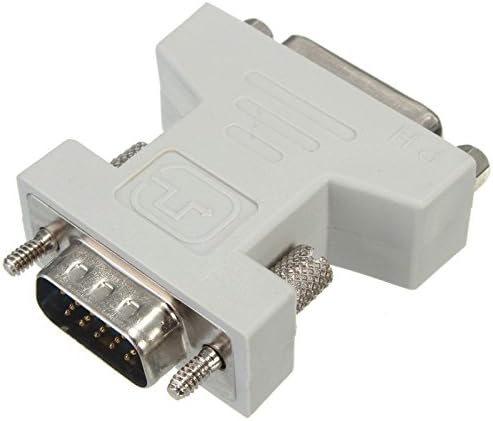
axGear DVI-I Female Analog 24+1 to VGA Male 15-pin Connector Adapter Converter
Bottom line: The axGear DVI-I Female Analog 24+1 to VGA Male 15-pin Connector Adapter: DVI-D 24+1 dual link female port fits standard dual-link DVI cables; main trade-off: works only with graphics cards that output an analog signal, per axGear.
As an Amazon Associate, SpecPicks earns from qualifying purchases. Full disclosure →
Pros & Cons
Pros
- ✓ DVI-D 24+1 dual link female port fits standard dual-link DVI cables
- ✓ 15-pin VGA male end plugs directly into legacy monitors and projectors
- ✓ Single-piece passive adapter: no drivers, software, or power brick to add
- ✓ Lets an analog-capable GPU drive VGA-only displays in retro PC builds
Cons
- ✗ Works only with graphics cards that output an analog signal, per axGear
- ✗ No active DVI-to-VGA conversion, so digital-only GPUs get no picture
- ✗ Title says DVI-I while the spec sheet says DVI-D 24+1; verify your port
- ✗ VGA end is male, so a male-terminated VGA cable needs a coupler
Manufacturer description
DVI-D 24+1 Dual Link Female to VGA Male 15 Pin AdapterDVI-D dual link 24+1 female to VGA maleThe DVI-D to VGA Converter connects computers with DVI-D connectors to VGA monitors or projectors. The converter changes your computer's DVI-D signal to analog graphic signal, so that VGA analog display devices can be connected to your computer with digital output easily and convenientlyHigh speed and safety data transferPackage Included:1 x DVI-D Female to VGA Male Adapter*This adapter will only work with graphic cards that are analog compatible
SpecPicks Verdict
SpecPicks has no buyer-rating or benchmark data for axGear DVI-I Female Analog 24+1 to VGA Male 15-pin Connector Adapter…, so this read rests on the manufacturer's listed specs (how we evaluate). Compare with similarly-priced alternatives in the retro video adapters & switches category before committing. On the listing's own facts, the case for it is "DVI-D 24+1 dual link female port fits standard dual-link DVI cables"; the main trade-off is "Works only with graphics cards that output an analog signal, per axGear". If those two points fit how you will use it, put it beside one or two close alternatives in the Compare tool to confirm the price.
Common buyer scenarios for retro video adapters & switches of this kind: matching it to an existing build, replacing a failing part, or upgrading from a previous-generation equivalent. Check the spec table below against your current setup — particularly socket / form-factor / power-rating fields — and confirm compatibility on the retailer's listing before purchase. Prices and stock are set by the retailer and may have moved since this page was last updated.
Key Features
Quoted from the manufacturer's listing. Where it differs from the pros and cons above, those note the conditions the listing leaves out.
- DVI-D dual link 24+1 female to VGA male
- The DVI-D to VGA Converter connects computers with DVI-D connectors to VGA monitors or projectors
- The converter changes your computer's DVI-D signal to analog graphic signal, so that VGA analog display devices can be connected to your computer with digital output easily and conveniently
- High speed and safety data transfer
- This adapter will only work with graphic cards that are analog compatible
Full Specifications
| Brand | axGear |
|---|---|
| Finish | Matte |
| Unit Count | 1 Count |
| Finish Type | Matte |
| Model Number | VGA-M-DVI-F-24+1 |
| Connector Type | DVI, VGA |
| Mfr Part Number | VGA-M-DVI-F-24+1 |
| Number of Items | 1 |
| Number of Ports | 2 |
| Power Plug Type | No Plug |
| Compatible Devices | Monitor |
Ready to buy?
axGear DVI-I Female Analog 24+1 to VGA Male 15-pin Connector Adapter Converter is listed on Amazon. Price, availability, shipping and returns are set by Amazon and its sellers — check the listing for current terms. SpecPicks earns a small commission on qualifying purchases — thank you for supporting independent review work.
Related Retro Video Adapters & Switches


More guides & deep dives from the SpecPicks archive
Browse all articles & guides →- The Complete Voodoo5 5500 AGP Driver Guide (2026 Edition)
- Best Retro Handhelds in 2026: Pocket, Mid-Tier and FPGA Picks
- RTX 4070 Super vs RX 7800 XT — Which to Buy in 2026
- Emulation Hardware in 2026: FPGA, Software, and Cart-Reader Ecosystems
- Best Budget Gaming PC Build 2026 — ~$1,000 Parts List
- Best 1440p Gaming GPUs in 2026
- How to Build a Windows 98 Retro PC in 2026
More reviews from the SpecPicks archive
Browse all reviews →- Unified RAM for LLMs: 2025-2026 Hardware Guide
- AI-Driven Win98 Voodoo3 Driver Recovery on a Raspberry Pi 5 Companion
- Logitech G29 vs HORI Force Feedback Wheel for Sim-Racing Beginners
- Claude Code Artifacts Just Shipped: What It Adds, and the Local Aider Alternative
- CompactFlash as Your IDE Hard Drive: A Silent, Reliable Retro PC Boot Disk
- Sega Genesis Mini vs Raspberry Pi Emulation in 2026: Which to Buy?
- Use a Raspberry Pi 4 as a Second Monitor or KVM in 2026
- Run Qwen 3.6 27B Locally: What Fits on 12GB in 2026
- Local LLM on Mac: The 2026 Setup Guide
- Best IDE & CompactFlash to USB Adapters for Retro PCs 2026
- GeForce 6800 Ultra AGP Install Guide: Drivers, Benchmarks, and the Last Great AGP Card
- ATI Radeon 9700 Pro Install Guide: Catalyst Versions, AGP 8x Compatibility, and Period-Correct Drivers
- Pentium III Tualatin Overclocking and Slotket Build Guide: The Forgotten King of Socket 370
- Local AI Image Generation: Best AMD GPUs for 2026
- Best SSD for Raspberry Pi Boot: USB SATA vs NVMe
- ZOTAC RTX 3060 Twin Edge vs MSI RTX 3060 Ventus 3X: Which 12GB Card?
- Ryzen 5 5600G vs Ryzen 7 5700X for a No-GPU Home Server
- Best Game Controller for PC in 2026: 5 Picks Tested Against Real Use
- MCL8080+ Squeezes an Intel 8080 Emulator into an ATtiny85
- How to run Llama 3.1 8B on NVIDIA GeForce RTX 3090
- Best Bluetooth Controller for Retro Emulation in 2026 (RetroPie, Batocera, PC)
- GeForce4 Ti 4600 tuning guide — ForceWare, Detonator, and XP/98 driver pairing
- Rescue a Dying Vintage IDE Drive by Cloning It to CompactFlash
- MacBook Neo Benchmarks 2026: Apple Silicon vs AMD
Earliest SpecPicks reviews
Browse full archive →- Best GPU for Llama 3.1 8B (2026)
- Best GPU for Qwen 3 14B (2026)
- Best GPU for Qwen 3 32B (2026)
- Best GPU for Llama 3.1 70B (2026)
- Best GPU for DeepSeek-R1 32B (2026)
- Best GPU for Llama 3.1 405B (2026)
- How to run Llama 3.1 8B on NVIDIA GeForce RTX 5090
- How to run Qwen 3 14B on NVIDIA GeForce RTX 5090
- How to run Qwen 3 32B on NVIDIA GeForce RTX 5090
- How to run Llama 3.1 70B on NVIDIA GeForce RTX 5090
- How to run DeepSeek-R1 32B on NVIDIA GeForce RTX 5090
- How to run Llama 3.1 8B on NVIDIA GeForce RTX 4090