

QYAJS
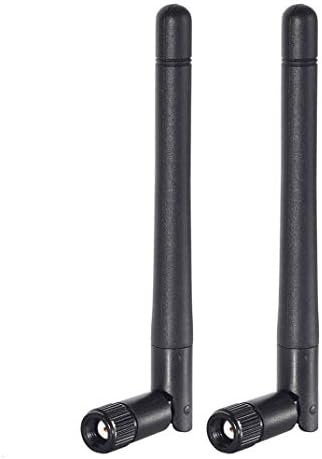
QYAJS WiFi Antenna Dual Band 2.4GHz 5.8GHz 10 DBI RP-SMA Router
Bottom line: The QYAJS WiFi Antenna Dual Band 2.4GHz 5.8GHz 10 DBI RP-SMA Router: Covers 2.4GHz (2400-2500 MHz) and 5.8GHz (4900-5900 MHz) in one antenna; main trade-off: antenna height and weight are not listed.
As an Amazon Associate, SpecPicks earns from qualifying purchases. Full disclosure →
Pros & Cons
Pros
- ✓ Covers 2.4GHz (2400-2500 MHz) and 5.8GHz (4900-5900 MHz) in one antenna
- ✓ 10dBi rated gain, omni pattern for whole-room coverage
- ✓ Two antennas per pack, fits a typical 2-port PCIe WiFi card
- ✓ Swivel RP-SMA joint lets you angle each antenna
- ✓ Listed as a replacement for ASUS RT-AC68U, RT-AC88U and USB-AC56 antennas
Cons
- ✗ Antenna height and weight are not listed
- ✗ Listing uses both SMA and RP-SMA labels; check your device port
- ✗ Omni pattern is not built for long point-to-point links
- ✗ Only two antennas; 3- or 4-port routers need a second pack
Manufacturer description
The QYAJS Dual Band WiFi Antenna 2-pack is an upgrade for routers, PCIe WiFi cards, USB wireless adapters and security IP cameras that use removable RP-SMA antennas. Each antenna covers 2.4GHz (2400-2500 MHz) and 5.8GHz (4900-5900 MHz), so one pair works on both bands of a dual-band device. You do not need separate antennas for each band. The rated gain is 10dBi with an omni-directional pattern. That means signal goes out all around the antenna instead of in one direction, which suits a router or desktop card that has to cover a whole room or floor. The RP-SMA male connector screws onto the…
SpecPicks Verdict
SpecPicks has no buyer-rating or benchmark data for QYAJS WiFi Antenna Dual Band 2.4GHz 5.8GHz 10 DBI RP-SMA Router, so this read rests on the manufacturer's listed specs (how we evaluate). Compare with similarly-priced alternatives in the networking category before committing. On the listing's own facts, the case for it is "Covers 2.4GHz (2400-2500 MHz) and 5.8GHz (4900-5900 MHz) in one antenna"; the main trade-off is "Antenna height and weight are not listed". If those two points fit how you will use it, put it beside one or two close alternatives in the Compare tool to confirm the price.
Before ordering, confirm the board side: this card needs a free PCIe slot of the width the card uses. Your motherboard manual lists which slots share lanes with M.2 sockets or other slots. Prices and stock are set by the retailer and may have moved since this page was last updated.
Frequently Asked Questions
Will these antennas fit my ASUS RT-AC68U router?
Yes. QYAJS lists the ASUS RT-AC68U and RT-AC88U routers as compatible, as well as the ASUS USB-AC56 adapter. They use an RP-SMA male screw-on connector to replace the original antennas.
Do they work on both 2.4GHz and 5GHz WiFi?
Yes. Each antenna is dual band, covering 2.4GHz (2400-2500 MHz) and 5.8GHz (4900-5900 MHz), so one antenna serves both bands on a dual-band router or card.
How many antennas come in the package?
The package includes two omni-directional antennas. That covers a typical two-port PCIe WiFi card or two ports on a router.
Is the connector SMA or RP-SMA?
The spec lists an RP-SMA male screw-on swivel connector, although one listing line says SMA. Before ordering, check that your router, card or camera has an RP-SMA female port.
Is this antenna directional or omni-directional?
It is omni-directional with a rated 10dBi gain. It sends signal all around the antenna instead of in one direction, which suits whole-room coverage from a router, PC card or IP camera.
Key Features
Quoted from the manufacturer's listing. Where it differs from the pros and cons above, those note the conditions the listing leaves out.
- Dual Band WiFi Antenna: 2.4GHz (2400 - 2500 MHz), 5.8GHz (4900 - 5900 MHz); Gain: 10dBi; Direction: Omni-directional; Antenna Connector: RP-SMA Male Connector
- Package includes: 2PCS of SMA interface omni-directional antenna
- RP-SMA Connector( Screw-On Swivel )
- Omni-directional 2.4Ghz/5.8Ghz Dual Band Antennas is Compatible With Most Wireless Devices
- Compatible with wireless router RT-AC68U AC88U, dual-band wireless routing USB-AC56 high-end dual-frequency network card original antenna.
Full Specifications
| Brand | QYAJS |
|---|---|
| Color | Wifi Antenna |
| Antenna | Dual-band WiFi, omni-directional antenna with RP-SMA connector |
| Impedance | 50 ohm |
| Unit Count | 2 Count |
| Connectivity | Wireless, USB, WiFi, 2.4GHz |
| Built-In Media | Antenna |
| Connection Type | Wireless |
| Number of Items | 1 |
| Number of Packs | 2 |
| Package includes | 2PCS of SMA interface omni-directional antenna |
| AntennaDescription | Dual-band WiFi, omni-directional antenna with RP-SMA connector |
| Number of Channels | 2 |
| Dual Band WiFi Antenna | 2.4GHz (2400 - 2500 MHz), 5.8GHz (4900 - 5900 MHz); Gain: 10dBi; Direction: Omni-directional; Antenna Connector: RP-SMA Male Connector |
| Item Dimensions L x W x H | 7.6"L x 7.6"W x 7.6"H |
| Full listing title | WiFi Antenna Dual Band 2.4GHz 5.8GHz 10 DBI RP-SMA Router for PCI-E WiFi Network Card USB Wireless Adapter Security IP Camera |
Ready to buy?
WiFi Antenna Dual Band 2.4GHz 5.8GHz 10 DBI RP-SMA Router for PCI-E WiFi Network Card USB Wireless Adapter Security IP Camera is listed on Amazon. Price, availability, shipping and returns are set by Amazon and its sellers — check the listing for current terms. SpecPicks earns a small commission on qualifying purchases — thank you for supporting independent review work.
Related Networking



More guides & deep dives from the SpecPicks archive
Browse all articles & guides →- Best Budget Gaming PC Build 2026 — ~$1,000 Parts List
- RTX 4070 Super vs RX 7800 XT — Which to Buy in 2026
- The Complete Voodoo5 5500 AGP Driver Guide (2026 Edition)
- Best Retro Handhelds in 2026: Pocket, Mid-Tier and FPGA Picks
- How to Build a Windows 98 Retro PC in 2026
- Best 1440p Gaming GPUs in 2026
- Emulation Hardware in 2026: FPGA, Software, and Cart-Reader Ecosystems
More reviews from the SpecPicks archive
Browse all reviews →- DualSense vs 8BitDo Pro 2 vs GameSir G7 SE: PC Sim Racing
- Ryzen 9 3900X vs Ryzen 5 5600G for CPU-Only Local LLM Inference (2026)
- Best Gaming Mouse for FPS Esports in 2026 (Tournament-Tested Picks)
- OpenAI Codex Now Drives Windows Autonomously: What It Means for Local AI Rigs
- How to Filter Steam Deck's 20K+ Games by FPS, Price, HLTB
- CRT vs LCD for Retro Gaming: Which Wins in 2026?
- Can an RTX 3060 12GB Drive a 27-Inch 4K Monitor in 2026?
- Ideogram 4.0 Open Weights: Running It Locally on an RTX 3060 12GB
- GTX 1050 Ti 4GB vs Ryzen 5 5600G iGPU: Which Actually Runs Qwen3 4B?
- Cactus Hybrid Router: Gemma4-2B Local + Gemini Fallback
- Best CPU for Streaming and Gaming on AM4 in 2026
- Reve 2.0 Debuts at #2: Can You Run Competitive Image Models on an RTX 3060 12GB?
- llama.cpp on Snapdragon Hexagon NPU: First Real Benchmarks and What Actually Works
- Active Quake 3 and OpenArena Servers in 2026: How to Find, Join, and Host
- Qwen-Image-3.0 on an RTX 3060 12GB: Local Text-in-Image Gen
- Best Wireless Productivity Keyboards for Home Office in 2026
- RTX 5090 AIO Cooler: Liquid Cooling Options in 2026
- Gemma 4 31B Creative-Writing Finetunes on RTX 3060 12GB
- Building a Silent Win98/XP Boot Drive: CompactFlash + IDE Adapter Setup
- Best CPU Cooler for the Ryzen 7 5800X: Air vs 120mm vs 240mm AIO
- CompactFlash as an IDE Boot Drive: The Definitive Win98 Storage Guide
- Best Beginner Racing Wheel 2026: Logitech G29 vs HORI FFB
- Halloween Talking Prop: Qwen3 4B on Jetson Orin Nano Super vs Raspberry Pi 5 16GB
- Gemini 3.6 Flash Shipped: Why Local Builders Still Reach for a 12GB GPU
Earliest SpecPicks reviews
Browse full archive →- Best GPU for Llama 3.1 8B (2026)
- Best GPU for Qwen 3 14B (2026)
- Best GPU for Qwen 3 32B (2026)
- Best GPU for Llama 3.1 70B (2026)
- Best GPU for DeepSeek-R1 32B (2026)
- Best GPU for Llama 3.1 405B (2026)
- How to run Llama 3.1 8B on NVIDIA GeForce RTX 5090
- How to run Qwen 3 14B on NVIDIA GeForce RTX 5090
- How to run Qwen 3 32B on NVIDIA GeForce RTX 5090
- How to run Llama 3.1 70B on NVIDIA GeForce RTX 5090
- How to run DeepSeek-R1 32B on NVIDIA GeForce RTX 5090
- How to run Llama 3.1 8B on NVIDIA GeForce RTX 4090