

ORICO
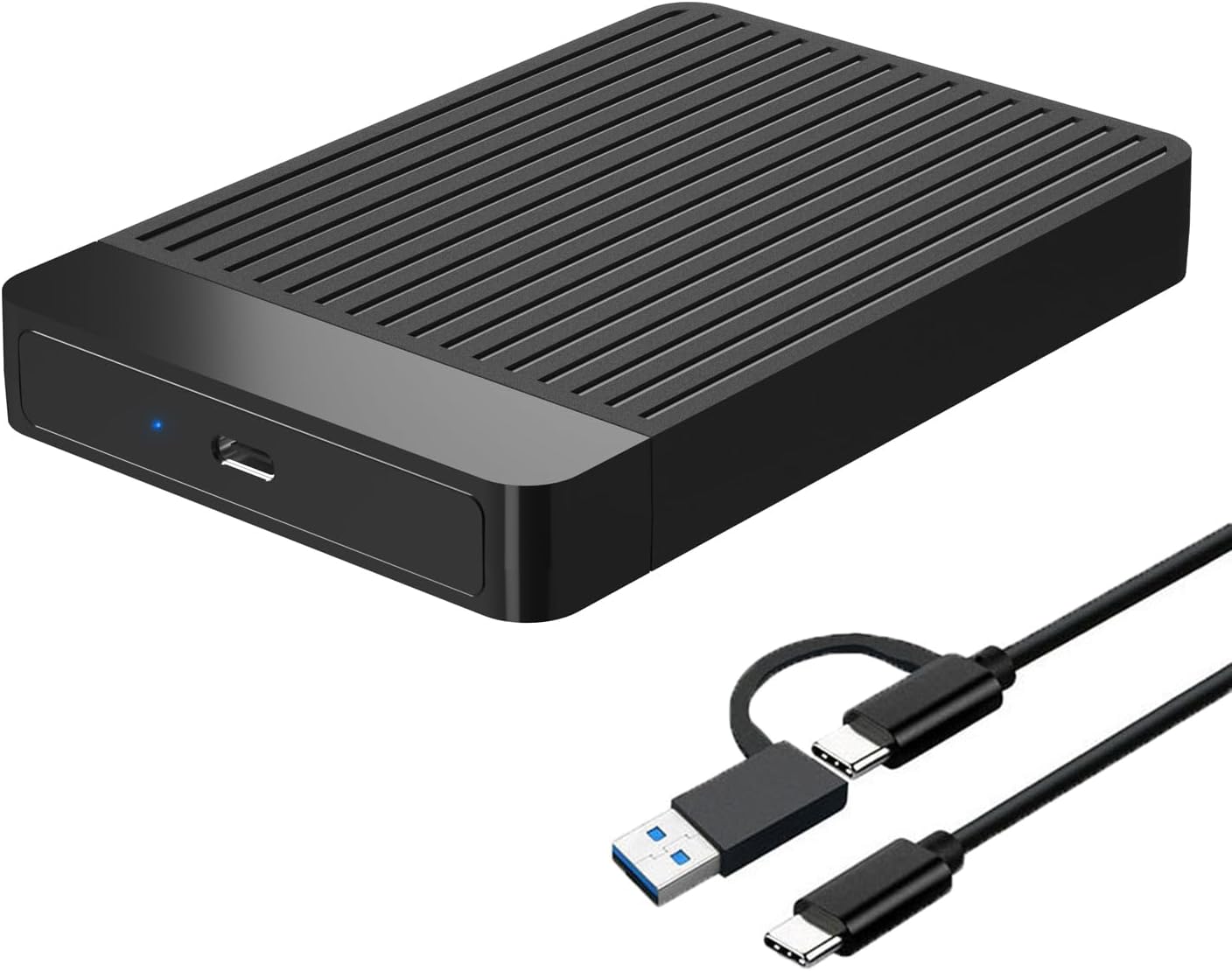
ORICO External Hard Drive Enclosure for 3.5 2.5 Inch SATA SSD HDD
Bottom line: The ORICO External Hard Drive Enclosure for 3.5 2.5 Inch SATA SSD HDD: Fits both 3.5in and 2.5in SATA drives in one enclosure; main trade-off: 5Gbps caps NVMe-class speeds; SATA-only, no M.2 support.
As an Amazon Associate, SpecPicks earns from qualifying purchases. Full disclosure →
Pros & Cons
Pros
- ✓ Fits both 3.5in and 2.5in SATA drives in one enclosure
- ✓ UASP and TRIM support; ORICO rates it 70% faster than plain USB 3.0
- ✓ USB 3.2 Gen 1 at 5Gbps rated transfer speed
- ✓ Supports drives up to 20TB for large backup or media libraries
- ✓ Tool-free 3-step install with hot-swap and an LED status light
Cons
- ✗ 5Gbps caps NVMe-class speeds; SATA-only, no M.2 support
- ✗ 20TB ceiling depends entirely on the drive you supply
- ✗ Drive not included, so budget separately for the HDD or SSD
- ✗ 3.5in drives need external power, adding a second cable to your desk
SpecPicks Verdict
SpecPicks has no buyer-rating or benchmark data for ORICO External Hard Drive Enclosure for 3.5 2.5 Inch SATA SSD HDD, so this read rests on the manufacturer's listed specs (how we evaluate). Compare with similarly-priced alternatives in the external storage category before committing. On the listing's own facts, the case for it is "Fits both 3.5in and 2.5in SATA drives in one enclosure"; the main trade-off is "5Gbps caps NVMe-class speeds; SATA-only, no M.2 support". If those two points fit how you will use it, put it beside one or two close alternatives in the Compare tool to confirm the price.
Before ordering, check the listed dimensions, ports, power requirements and supported devices or systems in the spec table below against how you plan to use it, and confirm them on the retailer's listing. Prices and stock are set by the retailer and may have moved since this page was last updated.
Key Features
Quoted from the manufacturer's listing. Where it differs from the pros and cons above, those note the conditions the listing leaves out.
- 3.5 Inch Hard Drive Enclosure: The 3.5 hard drive enclosure is also available for 2.5 SATA SSD HDD enclosure. This versatility allows you to use a wide range of hard disks with the same enclosure
- 5Gbps Transmission Speed with UASP: The 3.5" HDD enclosure is equipped with a premium chip with UASP/TRIM, which helps reducing CPU utilization, improving command queuing and enhancing error handling. It will be 70% Faster than conventional USB 3.0
- 20TB Large Capacity: With support for 3.5-inch hard drives, you can take advantage of higher storage capacities, making it suitable for storing large amounts of data, multimedia files, and backups. It offers the potential for up to 20TB of storage, depending on the hard drive used
- Tool Free Installation: No tools or drivers are required, just 3 simple steps, you can install your hard drive in this enclosure in just a few seconds. Support hot-swapping and the LED indicator will show the working status
- Universal Compatibility: Hard disk enclosure supports Windows, Mac, Linux Systems and PC, Laptops, Smart TVs, Smart Router, PS 4/5 Switch Devices. Compatible with Western Digital, Toshiba, Samsung, Seagate, Crucial, SanDisk, and more hard drivers
Full Specifications
| Brand | ORICO |
|---|---|
| Color | Black |
| Material | Acrylonitrile Butadiene Styrene (ABS), Aluminum |
| Unit Count | 1.0 Count |
| Connectivity | USB |
| Model Number | USB 3.2 Gen 1 Type-B |
| Compatibility | PC, Switch, Mac, Linux |
| Built-In Media | 1*12V/2A Adapter, 1*Instruction, 1*USB Cable, 1*hard drive enclosure |
| Mfr Part Number | ORICO-DDL35-U3-BK-BP-US |
| Hardware Platform | Laptop |
| Compatible Devices | Laptop, PC, PS4/5, Router |
| Data Transfer Rate | 5 Gigabits Per Second |
| Enclosure Material | Acrylonitrile Butadiene Styrene (ABS), Aluminum |
| Hardware Interface | USB 3.0, USB 3.0 Type B, USB 3.1 Type B, USB 3.2 Gen 1 |
| Warranty Description | 18 month manufacturer |
| Hard Disk Form Factor | 3.5 Inches |
| Connectivity Technology | USB |
| Memory Storage Capacity | 20 TB |
| Supported Devices Quantity | 1 |
| Full listing title | ORICO External Hard Drive Enclosure for 3.5 2.5 Inch SATA SSD HDD, up to 20TB Capacity, USB 3.2 Gen 1 High Transmission Speed, UASP and Trim Enabled, Compatible with WD Seagate Toshiba Samsung |
Ready to buy?
ORICO External Hard Drive Enclosure for 3.5 2.5 Inch SATA SSD HDD, up to 20TB Capacity, USB 3.2 Gen 1 High Transmission Speed, UASP and Trim Enabled, Compatible with WD Seagate Toshiba Samsung is listed on Amazon. Price, availability, shipping and returns are set by Amazon and its sellers — check the listing for current terms. SpecPicks earns a small commission on qualifying purchases — thank you for supporting independent review work.
Related External Storage


More guides & deep dives from the SpecPicks archive
Browse all articles & guides →- RTX 4070 Super vs RX 7800 XT — Which to Buy in 2026
- Best Retro Handhelds in 2026: Pocket, Mid-Tier and FPGA Picks
- Emulation Hardware in 2026: FPGA, Software, and Cart-Reader Ecosystems
- Best 1440p Gaming GPUs in 2026
- Best Budget Gaming PC Build 2026 — ~$1,000 Parts List
- How to Build a Windows 98 Retro PC in 2026
- The Complete Voodoo5 5500 AGP Driver Guide (2026 Edition)
More reviews from the SpecPicks archive
Browse all reviews →- Best CPU Cooler for AM4 Ryzen Overclocking in 2026
- Best CPU Cooler for AMD Ryzen in 2026
- Asus ROG Xreal R1: 240Hz AR gaming glasses land
- Voodoo5 5500 PCI Boots on Modern ASUS P8Z77-V Pro — A Look at Retro GPUs in 2026 Boards
- Simba 3.2 Tops the TTS Leaderboard: Run Local Text-to-Speech on an RTX 3060 12GB
- Mount a 90s Big-Box CD-ROM ISO on Win98 Without a CD Drive
- BENGOO G9000 vs Turtle Beach Recon 50: Best Sub-$40 Wired Headset
- KOORUI 27" QD-Mini LED vs Samsung Odyssey: Best 4K Pick
- What Fits in 12GB VRAM? RTX 3060 Local LLM Model Guide (2026)
- Best CompactFlash and SATA/IDE Adapter for a Retro PC Boot Drive in 2026
- AI coding assistants ranked — Claude Code, Cursor, GitHub Copilot, Aider
- Building a Silent Windows 98 PC with a CompactFlash Boot Drive
- Best Plug-and-Play Retro Gaming Consoles to Buy in 2026
- Self-Host Jellyfin on a Raspberry Pi 4 8GB in 2026: Setup and Real Transcode Limits
- DFlash Speculative Decoding on Qwen3.5-35B-A3B: How an RTX 2080 Super 8GB Hits 60+ tok/s
- Claude Fable 5 Launches at #1 on the Intelligence Index — What Local Builders Should Take Away
- Best Buy Cuts $900 Off an Asus 64GB Gaming Laptop — Is a Desktop Smarter?
- Intel Arc Pro B60 Gaming Performance: 2025 Benchmarks
- SNES Classic vs Raspberry Pi 4 RetroPie: Which Retro Console Wins in 2026?
- Razer Soma Chroma Gaming Chair Review: RGB vs. Adjustability
- Kimi K3 Costs $10.57 per Agentic Task: Is Local Cheaper?
- Best Amazon Workstation Parts for a Quiet Home Office in 2026
- How to Image and Preserve a Vintage IDE Hard Drive in 2026 (CompactFlash + USB Adapter Workflow)
- 8BitDo Pro 2 vs GameSir G7 SE for Raspberry Pi Emulation
Earliest SpecPicks reviews
Browse full archive →- Best GPU for Llama 3.1 8B (2026)
- Best GPU for Qwen 3 14B (2026)
- Best GPU for Qwen 3 32B (2026)
- Best GPU for Llama 3.1 70B (2026)
- Best GPU for DeepSeek-R1 32B (2026)
- Best GPU for Llama 3.1 405B (2026)
- How to run Llama 3.1 8B on NVIDIA GeForce RTX 5090
- How to run Qwen 3 14B on NVIDIA GeForce RTX 5090
- How to run Qwen 3 32B on NVIDIA GeForce RTX 5090
- How to run Llama 3.1 70B on NVIDIA GeForce RTX 5090
- How to run DeepSeek-R1 32B on NVIDIA GeForce RTX 5090
- How to run Llama 3.1 8B on NVIDIA GeForce RTX 4090