
Ubiquiti Networks
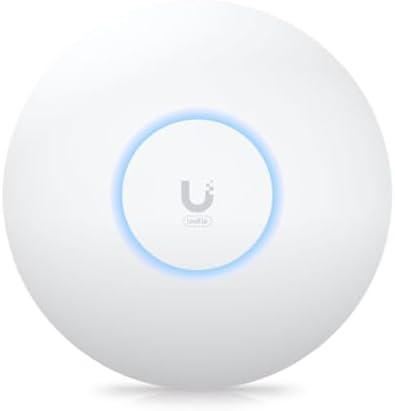
Ubiquiti U6+ Dual Band IEEE 802.11 a/b/g/n/ac/ax 3 Gbit/s Wireless Access Point
Bottom line: The Ubiquiti U6+ Dual Band IEEE 802.11 a/b/g/n/ac/ax 3 Gbit/s Wireless ($140.00 on Amazon as of 2026-11-23 05:45 UTC): Wi-Fi 6 (802.11ax) plus full a/b/g/n/ac fallback for older clients; main trade-off: only one Gigabit port, so no 2.5GbE uplink for multi-gig backhaul.
As an Amazon Associate, SpecPicks earns from qualifying purchases. Full disclosure →
*Price sourced from Amazon.com. Last updated 2026-11-23. Product prices and availability are accurate as of the date/time indicated and are subject to change. Any price and availability information displayed on Amazon.com at the time of purchase will apply to the purchase of this product.
Pros & Cons
Pros
- ✓ Wi-Fi 6 (802.11ax) plus full a/b/g/n/ac fallback for older clients
- ✓ PoE+ up to 25.5W means no outlet needed at the mount point
- ✓ Single Gigabit RJ-45 carries data and power on one cable
- ✓ Ships with both wall and ceiling mounting form factors
Cons
- ✗ Only one Gigabit port, so no 2.5GbE uplink for multi-gig backhaul
- ✗ Needs a PoE+ injector or switch, sold separately
- ✗ No 6 GHz band; this is Wi-Fi 6, not Wi-Fi 6E
- ✗ Access point only, not a router or gateway
Manufacturer description
The Ubiquiti U6+ is a Wi-Fi 6 access point built for small business and prosumer networks that have outgrown a consumer router. It runs dual-band on 2.4 GHz and 5 GHz with MIMO and supports the full 802.11 a/b/g/n/ac/ax standard set, so legacy laptops and printers stay connected while newer Wi-Fi 6 clients pull from the aggregate 3 Gbit/s wireless rate. A single Gigabit Ethernet RJ-45 port handles both data and power: the PoE+ input accepts up to 25.5W over one cable, which means you can mount the unit at a ceiling midpoint or high on a wall where no outlet exists. Typical draw is 9W…
SpecPicks Verdict
SpecPicks has no buyer-rating or benchmark data for Ubiquiti U6+ Dual Band IEEE 802.11 a/b/g/n/ac/ax 3 Gbit/s Wireless…, so this read rests on the manufacturer's listed specs and the current price in the networking category (how we evaluate). Compare with similarly-priced alternatives in the networking category before committing. On the listing's own facts, the case for it is "Wi-Fi 6 (802.11ax) plus full a/b/g/n/ac fallback for older clients"; the main trade-off is "Only one Gigabit port, so no 2.5GbE uplink for multi-gig backhaul". If those two points fit how you will use it, put it beside one or two close alternatives in the Compare tool to confirm the price.
Before ordering, check the listed dimensions, ports, power requirements and supported devices or systems in the spec table below against how you plan to use it, and confirm them on the retailer's listing. Prices and stock are set by the retailer and may have moved since this page was last updated.
Frequently Asked Questions
Does the Ubiquiti U6+ come with a PoE injector?
The listing summary does not list an included injector. The U6+ draws power over its PoE+ port at up to 25.5W with 9W typical consumption, so you will need a PoE+ switch or injector. Check the Amazon listing to confirm what is in the box.
Is the U6+ Wi-Fi 6 or Wi-Fi 6E?
Wi-Fi 6. It is a dual-band unit covering 2.40 GHz and 5 GHz with the 802.11ax standard. There is no 6 GHz radio, so Wi-Fi 6E clients connect at 5 GHz speeds.
Can I mount the U6+ on a ceiling?
Yes. Ubiquiti lists both wall-mountable and ceiling-mountable form factors for the U6+. PoE+ power over the single Ethernet run makes ceiling placement practical without running an outlet.
What does the 3 Gbit/s rating actually mean?
That is the combined theoretical wireless transmission rate across both bands, not per-client throughput. The unit has one Gigabit Ethernet RJ-45 uplink, so real wired-side throughput caps at 1 Gbit/s.
Key Features
Quoted from the manufacturer's listing. Where it differs from the pros and cons above, those note the conditions the listing leaves out.
- Create a reliable wireless business network with this wireless access point that features a high-speed data transfer rate
- 3 Gbit/s wireless transmission speed provides high and efficient communication with maximum efficiency
- IEEE 802.11 a/b/g/n/ac/ax wireless LAN standard ensures trouble-free and convenient connectivity
- Gigabit Ethernet port for ultra-fast wired network speeds
- PoE+ port to receive data and power of up to 25.5W through a single cable in places where a power outlet is not available
- Data Encryption feature effectively protects your precious and valuable data from unauthorized access
Full Specifications
| Brand | Ubiquiti Networks |
|---|---|
| Color | Information Not Available |
| Voltage | 48 volts_of_direct_current |
| Coverage | 140 m2 (1,500 ft2) |
| Frequency | 2.4 GHz |
| Model Name | U6+ |
| Unit Count | 1 Count |
| Antenna Type | Internal |
| Connectivity | Wireless |
| Model Number | U6US |
| Built-In Media | Access Point U6+, Wall/Ceiling |
| Control Method | Touch |
| Connection Type | Wired |
| Controller Type | Software |
| Mfr Part Number | U6+-US |
| Number of Ports | 1 |
| Special Feature | WPS |
| Antenna Location | Business |
| Wi-Fi Generation | Wi-Fi 6 |
| Security Protocol | WPS |
Ready to buy?
Ubiquiti U6+ Dual Band IEEE 802.11 a/b/g/n/ac/ax 3 Gbit/s Wireless Access Point is listed on Amazon. Price, availability, shipping and returns are set by Amazon and its sellers — check the listing for current terms. SpecPicks earns a small commission on qualifying purchases — thank you for supporting independent review work.
*Price sourced from Amazon.com. Last updated 2026-11-23. Product prices and availability are accurate as of the date/time indicated and are subject to change. Any price and availability information displayed on Amazon.com at the time of purchase will apply to the purchase of this product.
Related Networking


More guides & deep dives from the SpecPicks archive
Browse all articles & guides →- RTX 4070 Super vs RX 7800 XT — Which to Buy in 2026
- Best Retro Handhelds in 2026: Pocket, Mid-Tier and FPGA Picks
- How to Build a Windows 98 Retro PC in 2026
- Best Budget Gaming PC Build 2026 — ~$1,000 Parts List
- Emulation Hardware in 2026: FPGA, Software, and Cart-Reader Ecosystems
- Best 1440p Gaming GPUs in 2026
- The Complete Voodoo5 5500 AGP Driver Guide (2026 Edition)
More reviews from the SpecPicks archive
Browse all reviews →- Claude Fable 5: Anthropic Admits 'Wrong Tradeoff' on Throttling
- Intel Arc B580 for LLM Inference: What It Can Actually Do
- Retro Windows XP: SSD Upgrade via IDE Adapter (2026 Guide)
- vLLM vs llama.cpp on a 12GB GPU: Which Serves Local LLMs Faster?
- AMD Instinct MI300X vs Consumer GPUs: What Local AI Builders Should Buy in 2026
- Best Budget SATA SSD for a Steam Game Library in 2026
- Period-Correct 1999 Voodoo2 SLI + Pentium III LAN-Party Build Log (2026)
- KOORUI 4K QD-Mini LED vs Samsung Odyssey 4K: Best 27-Inch Gaming Monitor?
- Best DualSense and PC-Compatible Controller (2026)
- Ryzen AI Max Mini PC 128GB: Specs, Uses, Alternatives
- Qwen 3.6 35B-A3B on RTX Spark: Which Surface Laptop Ultra Memory Config to Buy
- Local LLM PC Build 2026: What 12GB of VRAM Really Runs
- ASUS ROG Zephyrus G1 OLED RTX 5070 Drops $575 This Week — Is It the Right Buy?
- This Retro Switch 2 Dock Looks Exactly Like an N64 — and Holds Six Cards
- Best Gaming PC Build 2026: 4K Ray Tracing Guide
- Small Form Factor Gaming PC Build Guide for 2024
- AMD Ryzen 7 7700X3D Review: 7800X3D's OEM-Only Rival
- Build a Local Voice Assistant on a Raspberry Pi 4 8GB in 2026: Full BOM and Real Limits
- CompactFlash Boot Drive for Windows 98: Transcend CF133 Setup and Benchmarks
- Best GPU for LLM Training and Inference in 2026
- GameSir G7 SE vs DualSense for PC Gaming: Which Controller Wins?
- ComfyUI on an RTX 3060 12GB: Stable Diffusion Setup and Real tok-per-image Math
- Network-Wide Ad Blocking with Pi-hole on a Raspberry Pi 4 8GB (2026 Setup)
- ComfyUI on a 12GB GPU: SDXL and Flux Setup, VRAM Limits, and Real Throughput
Earliest SpecPicks reviews
Browse full archive →- Best GPU for Llama 3.1 8B (2026)
- Best GPU for Qwen 3 14B (2026)
- Best GPU for Qwen 3 32B (2026)
- Best GPU for Llama 3.1 70B (2026)
- Best GPU for DeepSeek-R1 32B (2026)
- Best GPU for Llama 3.1 405B (2026)
- How to run Llama 3.1 8B on NVIDIA GeForce RTX 5090
- How to run Qwen 3 14B on NVIDIA GeForce RTX 5090
- How to run Qwen 3 32B on NVIDIA GeForce RTX 5090
- How to run Llama 3.1 70B on NVIDIA GeForce RTX 5090
- How to run DeepSeek-R1 32B on NVIDIA GeForce RTX 5090
- How to run Llama 3.1 8B on NVIDIA GeForce RTX 4090