

ASUS
ASUS ZenScreen MB169CK 15.6 Inch 1080p Portable Monito
Bottom line: The ASUS ZenScreen MB169CK 15.6 Inch 1080p Portable Monito ($89.00 on Amazon as of 2026-11-25 11:21 UTC): Single USB-C cable carries power and video, no separate adapter. Another in-stock pick with the same 15.6" 1080p monitor: the InnoView Portable Monitor, $46.99 on Amazon as of (price may vary).
As an Amazon Associate, SpecPicks earns from qualifying purchases. Full disclosure →
*Price sourced from Amazon.com. Last updated 2026-11-25. Product prices and availability are accurate as of the date/time indicated and are subject to change. Any price and availability information displayed on Amazon.com at the time of purchase will apply to the purchase of this product.
Pros & Cons
Pros
- ✓ Single USB-C cable carries power and video, no separate adapter
- ✓ 0.78kg and 11.8mm thin, fits a standard backpack with a laptop
- ✓ Mini-HDMI port covers devices without USB-C video output
- ✓ 360 kickstand plus tripod socket for angle and height control
- ✓ 3-year ASUS warranty with advanced replacement and repair
Cons
- ✗ Price, stock, shipping and returns are set by the retailer and may have changed since this page was last updated
Manufacturer description
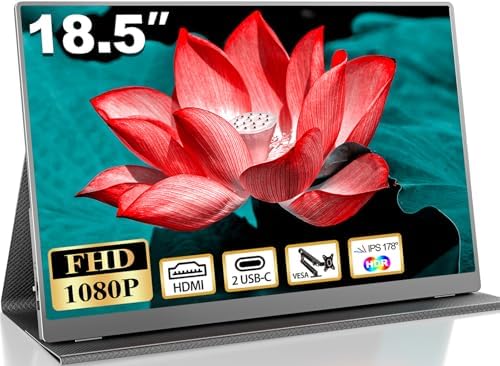
The ASUS ZenScreen MB169CK is a 15.6-inch 1080p portable monitor built for people who work away from a desk. Its anti-glare IPS panel keeps text readable in a bright cafe or a window seat, and dual USB-C means a single cable carries both power and video from your laptop, so a travel dual-monitor setup takes seconds to assemble. At 0.78kg and 11.8mm thin, this ZenScreen slides into a standard backpack alongside a laptop without adding meaningful weight, and a mini-HDMI port covers devices that will not output video over USB-C. The 360-degree kickstand lets you set a viewing angle on a hotel…
SpecPicks Verdict
SpecPicks has no buyer-rating or benchmark data for ASUS ZenScreen MB169CK 15.6 Inch 1080p Portable Monito, so this read rests on the manufacturer's listed specs and the current price in the portable monitors category (how we evaluate). Compare with similarly-priced alternatives in the portable monitors category before committing. Its clearest listed strength is "Single USB-C cable carries power and video, no separate adapter"; check that against the figure your use case actually depends on, then compare close alternatives in the Compare tool.
Before ordering, check the listed dimensions, ports, power requirements and supported devices or systems in the spec table below against how you plan to use it, and confirm them on the retailer's listing. Prices and stock are set by the retailer and may have moved since this page was last updated.
Frequently Asked Questions
Will the MB169CK work with just one cable from my MacBook?
Yes, if your MacBook's USB-C port supports DisplayPort Alt Mode. The MB169CK draws both power and video through a single USB-C connection, and ASUS lists MacBook and PC compatibility directly.
How heavy is it, and will it fit in a backpack?
It weighs 0.78kg and measures 11.8mm thick, so it slides into a standard backpack or briefcase sleeve alongside a 15-inch laptop.
Does it rotate to portrait mode for reading and coding?
Yes. The bundled DisplayWidget software auto-rotates between portrait and landscape, so you can flip it vertical for long documents or code without changing settings manually.
Can I mount it on a stand instead of using the kickstand?
Yes. It has a standard tripod socket, so it attaches to a tripod or portable monitor mount. The built-in 360 kickstand is the no-accessory option.
What warranty does ASUS include?
ASUS lists a 3-year warranty with advanced replacement and repair service. Check the product listing for current terms in your region.
Key Features
Quoted from the manufacturer's listing. Where it differs from the pros and cons above, those note the conditions the listing leaves out.
- 15.6" FHD IPS Anti-Glare Display: Enjoy crisp, vibrant visuals while working remotely from cafes or coworking spaces. This 15.6 inch portable monitor for laptop provides a flawless travel dual monitor setup without distracting screen reflections
- Single USB-C Connectivity: Declutter your desk instantly with seamless plug-and-play simplicity. A premium usb c portable monitor that delivers both power and video through one cable, creating a clean and efficient travel monitor setup
- 0.78kg Ultra-Slim Profile: Slip this monitor effortlessly into any standard backpack or briefcase for on-the-go freedom. At just 11.8mm thin, it is a lightweight travel monitor and portable screen for remote workers and digital nomads
- 360 Kickstand & Tripod Socket: Achieve the viewing angle you need on any hotel desk or kitchen table. Create an ergonomic dual monitor setup anywhere using the versatile kickstand or easily attach it to a standard portable monitor stand mount
- Auto-Rotate DisplayWidget Software: Read long documents or write code effortlessly without manually adjusting settings. Automatically switch between portrait and landscape modes on your portable screen for laptop to maximize your daily multitasking
- TV-Certified Eye Care Technology: Prevent eye strain and fatigue during intensive late-night project sessions. Advanced flicker-free and low blue light tech makes this a highly comfortable eye care monitor for daily extended use and heavy reading
Full Specifications
| Brand | ASUS |
|---|---|
| Color | BLACK |
| Shape | Rectangular |
| Weight | 0.78kg |
| Brightness | 300 nits |
| Model Name | MB169CK |
| Resolution | FHD 1080p |
| Color Gamut | 100 |
| Pixel Pitch | 0.17 |
| Screen Size | 16 inches |
| Aspect Ratio | 16:9 |
| Connectivity | USB-C |
| Display Type | LED |
| Model Number | MB169CK |
| Refresh Rate | 60 hertz |
| Adaptive Sync | FreeSync |
| Compatibility | PC, Switch |
| Mounting Type | Desk Mount |
| Response Time | 5 milliseconds |
| Screen Finish | Matte |
| Full listing title | ASUS ZenScreen MB169CK 15.6 Inch 1080p Portable Monito | Dual USB-C, 360 Kickstand, Anti-Glare IPS, Plug and Play, Laptop Screen Extender, Travel Display for MacBook and PC |
Ready to buy?
ASUS ZenScreen MB169CK 15.6 Inch 1080p Portable Monito | Dual USB-C, 360 Kickstand, Anti-Glare IPS, Plug and Play, Laptop Screen Extender, Travel Display for MacBook and PC is listed on Amazon. Price, availability, shipping and returns are set by Amazon and its sellers — check the listing for current terms. SpecPicks earns a small commission on qualifying purchases — thank you for supporting independent review work.
*Price sourced from Amazon.com. Last updated 2026-11-25. Product prices and availability are accurate as of the date/time indicated and are subject to change. Any price and availability information displayed on Amazon.com at the time of purchase will apply to the purchase of this product.
Read our analysis
SpecPicks coverage that features this Gaming Monitor.
Related Gaming Monitors



More guides & deep dives from the SpecPicks archive
Browse all articles & guides →- Best 1440p Gaming GPUs in 2026
- RTX 4070 Super vs RX 7800 XT — Which to Buy in 2026
- Best Budget Gaming PC Build 2026 — ~$1,000 Parts List
- Best Retro Handhelds in 2026: Pocket, Mid-Tier and FPGA Picks
- Emulation Hardware in 2026: FPGA, Software, and Cart-Reader Ecosystems
- How to Build a Windows 98 Retro PC in 2026
- The Complete Voodoo5 5500 AGP Driver Guide (2026 Edition)
More reviews from the SpecPicks archive
Browse all reviews →- Best Budget Gaming Keyboard Under $50 in 2026
- Best Controllers for Steam Deck and PC in 2026
- Self-Host Jellyfin on a Raspberry Pi 4 8GB in 2026: Setup and Real Transcode Limits
- LiteLLM as a Fallback Router: Keep Working When Limits Hit
- Best Budget GPU for Local LLMs Under $300 in 2026: Why the RTX 3060 12GB Still Wins
- Build a Self-Hosted Security Camera on a Raspberry Pi 4 8GB in 2026
- Best GPU for Qwen3 8B in 2026
- Best Sim Racing Setup for 2026: Wheels, Shifters and Pedals
- Best Travel Gaming Kit in 2026: 5 Picks for Hotels and Flights
- retrorecs.com: A New Retro Game Recommendation Engine
- Anthropic Keeps Supplying Claude to the NSA After Pentagon Supply-Chain Flag
- Best Budget Gaming Monitor in 2026: 5 Picks From 1440p to 4K
- A New Benchmark Says AI Fails at Real Knowledge Work — Does a Bigger Local Rig Help?
- SteamOS Boots on Intel Hardware After Community Port
- Ryzen AI Max vs RTX 40 Series: Which Wins for AI and Gaming?
- Best GPU for AI code generation in 2026
- Best SATA SSD to Upgrade a PlayStation 4 Pro in 2026
- Ryzen 7 5800X vs 5700X for a Dual-Duty Gaming and Local-LLM Build
- Best Budget Gaming CPU: Ryzen 5 5600G vs 5700X vs i7-9700K
- Moonshot AI Targets $30B: Can You Run a Kimi-Class Open Model on a 12GB GPU?
- Build a Wall-Mounted Raspberry Pi 4 Arcade Cabinet: 3D-Printed Case, SSD Boot, Real BOM
- Intelligence Index v4.1 Goes Agentic: Can a 12GB RTX 3060 Keep Up Locally?
- Razer Blade 16 (2026) Review: Gaming Performance and Endurance
- Raspberry Pi 4 8GB as a Headless Local-LLM Sidecar: llama.cpp Tuning, Quantization Matrix, and Real tok/s
Earliest SpecPicks reviews
Browse full archive →- Best GPU for Llama 3.1 8B (2026)
- Best GPU for Qwen 3 14B (2026)
- Best GPU for Qwen 3 32B (2026)
- Best GPU for Llama 3.1 70B (2026)
- Best GPU for DeepSeek-R1 32B (2026)
- Best GPU for Llama 3.1 405B (2026)
- How to run Llama 3.1 8B on NVIDIA GeForce RTX 5090
- How to run Qwen 3 14B on NVIDIA GeForce RTX 5090
- How to run Qwen 3 32B on NVIDIA GeForce RTX 5090
- How to run Llama 3.1 70B on NVIDIA GeForce RTX 5090
- How to run DeepSeek-R1 32B on NVIDIA GeForce RTX 5090
- How to run Llama 3.1 8B on NVIDIA GeForce RTX 4090