

Trotwei Blue
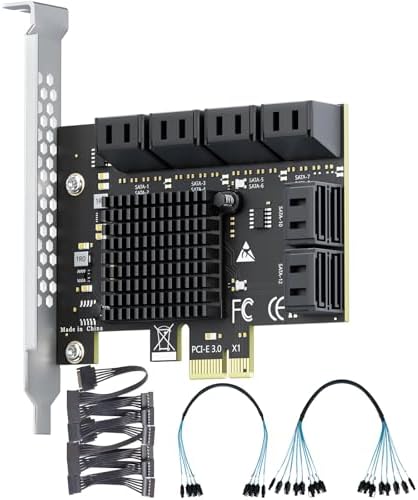
Trotwei Blue PCIE x1 SATA Card 20 Ports
Bottom line: Per its Amazon listing, the Trotwei Blue PCIE x1 SATA Card 20 Ports: the PCIe to 20-port SATA 3.0 expansion card provides additional SATA interfaces.
As an Amazon Associate, SpecPicks earns from qualifying purchases. Full disclosure →
Pros & Cons
Pros
- ✓ The PCIe to 20-port SATA 3.0 expansion card provides additional SATA interfaces
- ✓ Backed by Trotwei Blue's warranty and support channels
Cons
- ✗ Needs a free PCIe slot — check which of your board's slots are wired for it
SpecPicks Verdict
SpecPicks has no buyer-rating or benchmark data for Trotwei Blue PCIE x1 SATA Card 20 Ports, so this read rests on the manufacturer's listed specs (how we evaluate). Compare with similarly-priced alternatives in the expansion cards category before committing. Judge it on the specification table and the price rather than on sentiment: check the figures that decide your use case, then put it side-by-side with two or three close alternatives in the Compare tool before clicking through.
Before ordering, confirm the board side: this card needs a free PCIe slot of the width the card uses. Your motherboard manual lists which slots share lanes with M.2 sockets or other slots. Prices and stock are set by the retailer and may have moved since this page was last updated.
Key Features
Quoted from the manufacturer's listing. Where it differs from the pros and cons above, those note the conditions the listing leaves out.
- Expand Storage Capacity: When the number of SATA interfaces on the motherboard is limited, users may need to connect more hard disk drives or solid-state drives to expand storage capacity. The PCIe to 20-port SATA 3.0 expansion card provides additional SATA interfaces, enabling users to connect more storage devices and increase the overall storage capacity of the system.
- Streamlined Connection Wiring: Equipped with 2 sets of 8-port to 8-port and 1 set of 4-port to 4-port SATA bundle cables, it simplifies the connection process, allowing users to conveniently and neatly connect up to 20 SATA devices, streamlining the wiring layout.
- Plug-and-Play Capability: Designed with a driver-free installation, users can utilize the product without manually installing driver programs, enhancing plug-and-play functionality and reducing operational complexity.
- Real-time Status Monitoring: Featuring 20 status indicator lights, users can monitor the connection status of each SATA port in real-time. This facilitates prompt identification and resolution of disk connection or operational issues, providing an enhanced level of visual management.
- Extensive Compatibility: With chipset components including ASM1064 and 4x JMB575, it supports 99% of operating systems such as Windows, Linux, Ubuntu, ESXi, Synology, NAS, ensuring a high level of compatibility for diverse applications.
Full Specifications
| Brand | Trotwei Blue |
|---|---|
| Style | Classic |
| Style Name | Classic |
| Model Number | SU-20 |
| Compatibility | Linux |
| Mfr Part Number | SU-20 |
| Compatible Devices | Personal Computer, Laptop, Server |
| Hardware Interface | PCIE x 1 |
| Warranty Description | Amazon's vendor warranty policy |
| Item Dimensions L x W x H | 6.1"L x 4.7"W x 1"H |
| Full listing title | PCIE x1 SATA Card 20 Ports, PCI Express SATA3.0 6Gbps Controller Expansion Card with 20 inches SATA Bundle Cables,Without Raid, Boot as System Disk Support HDD or SSD |
Ready to buy?
PCIE x1 SATA Card 20 Ports, PCI Express SATA3.0 6Gbps Controller Expansion Card with 20 inches SATA Bundle Cables,Without Raid, Boot as System Disk Support HDD or SSD is listed on Amazon. Price, availability, shipping and returns are set by Amazon and its sellers — check the listing for current terms. SpecPicks earns a small commission on qualifying purchases — thank you for supporting independent review work.
Related Expansion Cards


More guides & deep dives from the SpecPicks archive
Browse all articles & guides →- The Complete Voodoo5 5500 AGP Driver Guide (2026 Edition)
- How to Build a Windows 98 Retro PC in 2026
- RTX 4070 Super vs RX 7800 XT — Which to Buy in 2026
- Best Budget Gaming PC Build 2026 — ~$1,000 Parts List
- Best 1440p Gaming GPUs in 2026
- Best Retro Handhelds in 2026: Pocket, Mid-Tier and FPGA Picks
- Emulation Hardware in 2026: FPGA, Software, and Cart-Reader Ecosystems
More reviews from the SpecPicks archive
Browse all reviews →- Raspberry Pi AI HAT+ (26 TOPS): What It Actually Runs in 2026
- IPEX-LLM + Ollama on Intel Arc: Setup, tok/s, and the RTX 3060 Reality Check
- What Does DPS Mean in Gaming? Damage Per Second Explained
- What Fits in 12GB VRAM? RTX 3060 Local LLM Model Guide (2026)
- GeForce 4 Ti 4600 Won't Boot Past POST: AGP Voltage and BIOS Field Guide
- Best SSD for a PS4 Pro Upgrade in 2026: 870 EVO vs BX500
- Logitech G29 vs HORI Force Feedback Wheel — Which First Wheel Is Right?
- How to run Llama 3.1 70B on NVIDIA GeForce RTX 4090
- Sound Blaster Audigy FX in a Period-Correct Win98 Gaming Build
- Pentium 4 + Radeon 9700 Pro Windows XP Build in 2026
- Double RTX 3070 VRAM: What's Actually Possible in 2026
- GeForce 4 Ti 4600 vs GeForce FX 5900: The Last Great AGP Cards Compared (2026)
- Best Streaming Gear for Game Streamers in 2026: 5 Picks
- Best GPU for 1080p Gaming in 2026: Where the RTX 3060 12GB Lands
- RTX 5060 8GB vs RTX 4070 12GB for Qwen3 14B: Does 8GB Fit? (2026)
- Build a Motion-Triggered Wildlife Camera on Raspberry Pi (2026)
- ASUS TUF VG27AQ vs Dell G3223Q: 1440p HDR or 4K 32-Inch in 2026
- Best Gaming Keyboard for Office and Gaming Crossover (2026)
- Noctua NH-U12S vs Cooler Master ML240L: Which Cools a 5800X?
- Hailo-10H AI Accelerator on Raspberry Pi 5: Real Tok/s for On-Device LLMs
- UT99 OldUnreal 469 Patch in 2026: Migrate Configs, Rejoin Modern Servers, and Tune Mouse Precision
- Best Gaming PC Build Components for 2026
- Best Budget GPU for Local LLMs in 2026: RTX 3060 12GB
- Best GPU for DeepSeek-R1 32B (2026)
Earliest SpecPicks reviews
Browse full archive →- Best GPU for Llama 3.1 8B (2026)
- Best GPU for Qwen 3 14B (2026)
- Best GPU for Qwen 3 32B (2026)
- Best GPU for Llama 3.1 70B (2026)
- Best GPU for DeepSeek-R1 32B (2026)
- Best GPU for Llama 3.1 405B (2026)
- How to run Llama 3.1 8B on NVIDIA GeForce RTX 5090
- How to run Qwen 3 14B on NVIDIA GeForce RTX 5090
- How to run Qwen 3 32B on NVIDIA GeForce RTX 5090
- How to run Llama 3.1 70B on NVIDIA GeForce RTX 5090
- How to run DeepSeek-R1 32B on NVIDIA GeForce RTX 5090
- How to run Llama 3.1 8B on NVIDIA GeForce RTX 4090