

Logitech Signature Plus M750 L Wireless Mouse
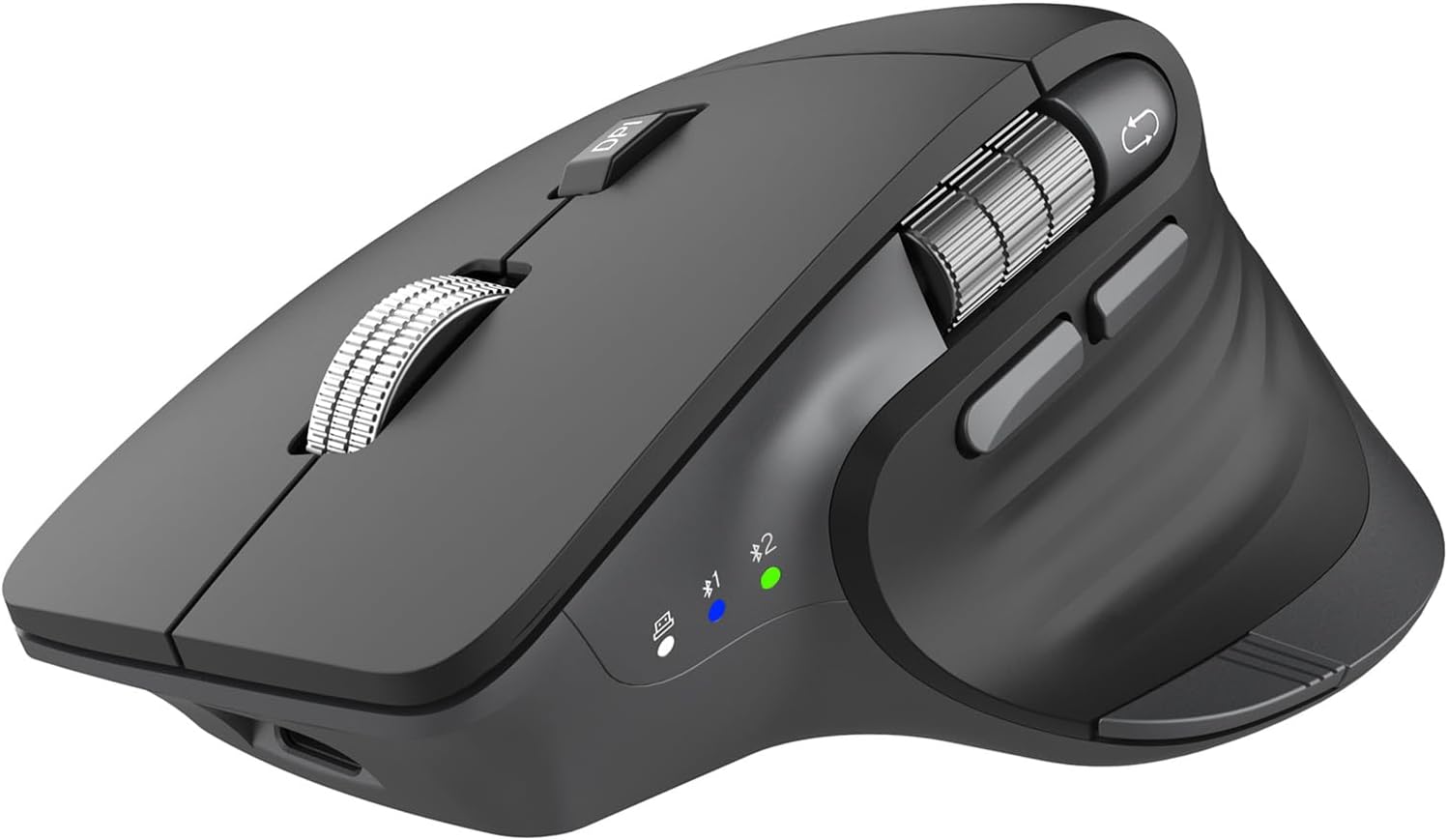
Bottom line: The Logitech Signature Plus M750 L Wireless Mouse ($44.99 on Amazon as of 2026-11-22 11:30 UTC): SmartWheel flicks between line-by-line precision and fast free-spin scrolling; main trade-off: large contoured shape too big for smaller hands.
As an Amazon Associate, SpecPicks earns from qualifying purchases. Full disclosure →
*Price sourced from Amazon.com. Last updated 2026-11-22. Product prices and availability are accurate as of the date/time indicated and are subject to change. Any price and availability information displayed on Amazon.com at the time of purchase will apply to the purchase of this product.
Pros & Cons
Pros
- ✓ SmartWheel flicks between line-by-line precision and fast free-spin scrolling
- ✓ 24-month battery life on a single included AA
- ✓ Easy-Switch pairs 3 Bluetooth devices; Flow moves files across Windows and macOS
- ✓ SilentTouch cuts click noise by 90 percent
- ✓ Side buttons remap to shortcuts via Logitech Options+ on Windows and macOS
Cons
- ✗ Large contoured shape too big for smaller hands
- ✗ Productivity focus, no high-DPI gaming sensor
- ✗ Button remapping needs the Options+ app installed
- ✗ AA cell isn't rechargeable; no USB-C wired fallback
Manufacturer description
Logitech Signature Plus M750 L Wireless Mouse Upgrade to smarter scrolling, better comfort and more productivity with Signature Plus M750 L. SmartWheel scrolling delivers precision or speed the moment you need it. A choice of sizes for smaller or larger hands truly makes Signature Plus M750 L a perfect fit for everyone. Easy-Switch lets you pair and switch between up to three Bluetooth devices, while the DPI switch means you can seamlessly customize your mouse settings. Silent clicks and the contoured shape keep you comfortable and focused hour after hour. Product details: Weight (with…
SpecPicks Verdict
SpecPicks has no buyer-rating or benchmark data for Logitech Signature Plus M750 L Wireless Mouse, so this read rests on the manufacturer's listed specs and the current price in the gaming peripherals category (how we evaluate). Compare with similarly-priced alternatives in the gaming peripherals category before committing. On the listing's own facts, the case for it is "SmartWheel flicks between line-by-line precision and fast free-spin scrolling"; the main trade-off is "Large contoured shape too big for smaller hands". If those two points fit how you will use it, put it beside one or two close alternatives in the Compare tool to confirm the price.
Before ordering, check the listed dimensions, ports, power requirements and supported devices or systems in the spec table below against how you plan to use it, and confirm them on the retailer's listing. Prices and stock are set by the retailer and may have moved since this page was last updated.
Key Features
Quoted from the manufacturer's listing. Where it differs from the pros and cons above, those note the conditions the listing leaves out.
- Scroll smarter: With Logitech Signature Plus M750 L Wireless Mouse you get line-by-line precision for documents and super-fast scrolling for long web pages; simply switch modes with a flick of the SmartWheel
- Upgrade your comfort: This mouse provides long hours of comfort thanks to its shape, soft thumb area and rubber side grips that keep your hand snug. Sizes and handedness available
- Easy-Switch and Flow enabled: Pair and switch between up to three Bluetooth devices and effortlessly transfer text, images, and files between Windows and macOS operating systems
- Less noise, more focus: Whether working at the office or at home, Logitech Signature Plus M750 L is a quiet mouse, allowing you to enjoy 90 percent less click noise with SilentTouch technology
- Customizable side buttons: Customize the side buttons on the computer mouse with Logitech Options plus , available on Windows and macOS, to your favorite shortcuts – like back/forward or copy/paste
- 24 month battery life: Work for up to 2 years on the single AA battery that comes with your multi-device mouse
Full Specifications
| Note | In case of Wireless mouse, the USB receiver will be provided inside or along with the mouse |
|---|---|
| Brand | Logitech |
| Color | Graphite |
| Range | 10 |
| Model Name | M750 |
| Style Name | Large Size |
| Unit Count | 1 Count |
| Connectivity | Bluetooth, USB |
| Model Number | 910-007508 |
| Power Source | Battery Powered |
| Compatibility | Switch, Android, Mac, Linux |
| Button Quantity | 6 |
| Connection Type | Wireless |
| Mfr Part Number | 910-007508 |
| Special Feature | Lightweight, Portable, Programmable Buttons, Soundless, Wireless |
| Antenna Location | Gaming, Office |
| Hand Orientation | Right |
| Hardware Platform | Linux, Mac, PC |
| Compatible Devices | Personal Computer |
| Enclosure Material | Plastic |
| Full listing title | Logitech Signature Plus M750 L Wireless Mouse - for Large Hands, SmartWheel, Bluetooth, Multi Device, 24-Month Battery, Silent Clicks, Customizable Side Buttons, Contoured Shape - Graphite |
Ready to buy?
Logitech Signature Plus M750 L Wireless Mouse - for Large Hands, SmartWheel, Bluetooth, Multi Device, 24-Month Battery, Silent Clicks, Customizable Side Buttons, Contoured Shape - Graphite is listed on Amazon. Price, availability, shipping and returns are set by Amazon and its sellers — check the listing for current terms. SpecPicks earns a small commission on qualifying purchases — thank you for supporting independent review work.
*Price sourced from Amazon.com. Last updated 2026-11-22. Product prices and availability are accurate as of the date/time indicated and are subject to change. Any price and availability information displayed on Amazon.com at the time of purchase will apply to the purchase of this product.
Related Gaming Peripherals



More guides & deep dives from the SpecPicks archive
Browse all articles & guides →- Best Budget Gaming PC Build 2026 — ~$1,000 Parts List
- RTX 4070 Super vs RX 7800 XT — Which to Buy in 2026
- How to Build a Windows 98 Retro PC in 2026
- Best 1440p Gaming GPUs in 2026
- The Complete Voodoo5 5500 AGP Driver Guide (2026 Edition)
- Emulation Hardware in 2026: FPGA, Software, and Cart-Reader Ecosystems
- Best Retro Handhelds in 2026: Pocket, Mid-Tier and FPGA Picks
More reviews from the SpecPicks archive
Browse all reviews →- Steam Deck OLED vs ROG Ally X vs Legion Go: 2026 Gaming Handheld Shootout
- Gemini 3.5 Flash vs Local LLM on RTX 3060 12GB: When Cloud Beats Self-Hosted
- Open WebUI + Ollama on an RTX 3060: The Self-Hosted ChatGPT Alternative for 2026
- Why Stock GPU Pastes Last Longer Than Aftermarket Ones
- Did Anyone Actually Ditch iCloud or Google One for Self-Hosting?
- Gemini Intelligence Hardware Requirements: What Google's Stack Tells Us About Local Inference
- Self-Host Jellyfin on a Ryzen 5 5600G Mini Build in 2026: Measured Power and Transcoding
- RTX 4000 SFF Ada vs RTX PRO 4000 SFF Blackwell for Local LLMs: 20GB vs 24GB at 70W
- Troubleshooting WinXP Audigy FX Install Failures in 2026
- OpenAI Codex Now Repeats Tasks From One Demo: Can a Local RTX 3060 Agent Match It?
- Ryzen 5 2600 vs Ryzen 7 5800X: Is the AM4 Upgrade Worth It?
- Llama.cpp Console Released: What Changes for Local LLM Operators on a 12GB GPU
- AMD Ryzen 7 7700X3D Review: 7800X3D's OEM-Only Rival
- GLM-5.2 vs DeepSeek V4 on a 12GB RTX 3060: Which Open-Weights Model Wins?
- Qwen 3.6 27B on 24GB VRAM: Backend, Quant + Settings Synthesis
- Intel-Scaler vLLM 0.21.0: What the New Release Changes for Intel GPU Inference
- HyperX QuadCast 2 vs Blue Yeti for Streaming & Podcasting (2026)
- Load Retro Games onto a Win98 IDE PC with a CompactFlash Adapter (2026)
- DGX Spark vs RTX 5090 vs M3 Ultra for Local LLMs
- How to run DeepSeek-R1 32B on Arc B580
- GeForce FX 5900 Ultra Period-Correct WinXP Build Guide: Driver Hunt, Half-Life 2 Mixed-Mode, and Doom 3…
- Best CPU for Streaming and Gaming Under $300: Ryzen 7 5800X vs 5700X vs 5600G
- Is the RTX 3060 12GB Still the Best Sub-$400 AI Card in 2026?
- Running a Local Coding Agent on a Small Model: What Actually Breaks (and How to Fix It)
Earliest SpecPicks reviews
Browse full archive →- Best GPU for Llama 3.1 8B (2026)
- Best GPU for Qwen 3 14B (2026)
- Best GPU for Qwen 3 32B (2026)
- Best GPU for Llama 3.1 70B (2026)
- Best GPU for DeepSeek-R1 32B (2026)
- Best GPU for Llama 3.1 405B (2026)
- How to run Llama 3.1 8B on NVIDIA GeForce RTX 5090
- How to run Qwen 3 14B on NVIDIA GeForce RTX 5090
- How to run Qwen 3 32B on NVIDIA GeForce RTX 5090
- How to run Llama 3.1 70B on NVIDIA GeForce RTX 5090
- How to run DeepSeek-R1 32B on NVIDIA GeForce RTX 5090
- How to run Llama 3.1 8B on NVIDIA GeForce RTX 4090