
Fockety
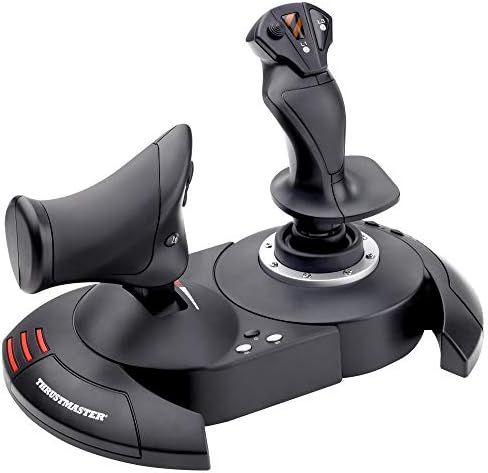
Fockety Flight Simulator Joystick
Bottom line: The Fockety Flight Simulator Joystick is a specs-and-price decision rather than a crowd-consensus one in the flight sim gear category. Check the specification table below against one or two close alternatives — on price and spec fit, not on star ratings.
As an Amazon Associate, SpecPicks earns from qualifying purchases. Full disclosure →
Before you buy
- Check the listed dimensions, connectors and platform compatibility against your setup before ordering
- Price, stock, shipping and returns are set by the retailer and may have changed since this page was last updated
Manufacturer description
1. [Vibration Function] The vibration engine can generate different vibration effects based on the game scene, if the vibration strength is less than 20%, you will hardly feel any vibration, please set it to 50% or higher.2. [Multi Functional Buttons] Equipped with quick trigger, 4 axes control, 8 way hat and 12 programmable buttons, while supporting various custom adjustments and keyboard mapping, allowing you to freely control the flight joystick.3. [Comfortable Grip] This USB joystick has a solid and smoothly feel, very comfortable to grip, with four strong suction cups at the bottom, can…
SpecPicks Verdict
SpecPicks has no buyer-rating or benchmark data for Fockety Flight Simulator Joystick, so this read rests on the manufacturer's listed specs (how we evaluate). Compare with similarly-priced alternatives in the flight sim gear category before committing. Judge it on the specification table and the price rather than on sentiment: check the figures that decide your use case, then put it side-by-side with two or three close alternatives in the Compare tool before clicking through.
Before ordering, check the listed dimensions, ports, power requirements and supported devices or systems in the spec table below against how you plan to use it, and confirm them on the retailer's listing. Prices and stock are set by the retailer and may have moved since this page was last updated.
Key Features
Quoted from the manufacturer's listing. Where it differs from the Before you buy notes above, those note the conditions the listing leaves out.
- [Vibration Function] The vibration engine can generate different vibration effects based on the game scene, if the vibration strength is less than 20%, you will hardly feel any vibration, please set it to 50% or higher.
- [Multi Functional Buttons] Equipped with quick trigger, 4 axes control, 8 way hat and 12 programmable buttons, while supporting various custom adjustments and keyboard mapping, allowing you to freely control the flight joystick.
- [Comfortable Grip] This USB joystick has a solid and smoothly feel, very comfortable to grip, with four strong suction cups at the bottom, can be firmly fixed on the table, precise throttle control, ergonomically designed, easy to control all functions with one hand.
- [Wide Compatibility] This flight stick is compatible with for 7 8 10 11 systems and various flight games such as for Ace , and more.
- [Easy Connection] Plug and play, no need to install drivers. If the device is not working, please download for driver and unzip it, then connect to the joystick, the computer will prompt for the discovery of new software and automatically complete the installation.
Full Specifications
| Brand | Fockety |
|---|---|
| Color | #311 |
| Model Name | Focketyw0xi1om5cz |
| Unit Count | 1 Count |
| Connectivity | USB |
| Model Number | Focketyw0xi1om5cz |
| Item Type Name | Flight Controls |
| Button Quantity | 1 |
| Controller Type | Hand Control |
| Item Dimensions | 9.84 x 8.66 x 7.48 inches |
| Vibration/Rumble | Yes |
| Hardware Platform | PC |
| Compatible Devices | Xbox One |
| Additional Features | Adjustable |
| Included Components | No |
| Connectivity Technology | Wireless |
| Manufacturer Part Number | Focketyw0xi1om5cz |
| External Testing Certification | Falso |
| Full listing title | Fockety Flight Simulator Joystick, Flight Control System with Vibration Function and Throttle, Comfortable Grip, Game Flight Joystick USB Flight Stick Compatible with 7 8 10 11 |
Ready to buy?
Fockety Flight Simulator Joystick, Flight Control System with Vibration Function and Throttle, Comfortable Grip, Game Flight Joystick USB Flight Stick Compatible with 7 8 10 11 is listed on Amazon. Price, availability, shipping and returns are set by Amazon and its sellers — check the listing for current terms. SpecPicks earns a small commission on qualifying purchases — thank you for supporting independent review work.
Related Flight Sim Gear


More guides & deep dives from the SpecPicks archive
Browse all articles & guides →- Best 1440p Gaming GPUs in 2026
- Best Retro Handhelds in 2026: Pocket, Mid-Tier and FPGA Picks
- The Complete Voodoo5 5500 AGP Driver Guide (2026 Edition)
- How to Build a Windows 98 Retro PC in 2026
- Emulation Hardware in 2026: FPGA, Software, and Cart-Reader Ecosystems
- Best Budget Gaming PC Build 2026 — ~$1,000 Parts List
- RTX 4070 Super vs RX 7800 XT — Which to Buy in 2026
More reviews from the SpecPicks archive
Browse all reviews →- Raspberry Pi AI Projects: A 2025 Builder's Guide
- SATA/IDE to USB Adapters in 2026: FIDECO vs Unitek vs Vantec for Retro PC Data Recovery
- Best Budget Gaming Laptops of 2026: Buyer's Guide
- Turtle Beach Recon 50 in 2026: Is the $40 Gaming Headset Still Worth It?
- Best CPU for AI Inference Workstations in 2026
- Open-Source NVIDIA NVK Vulkan Driver Adds DLSS Support: What It Means for RTX 3060 Owners
- Best Microphones for Streaming and Podcasting (2026)
- Qwen3.7-Plus vs Gemma 4 12B for Local Agents on a 12GB GPU
- AI-Driven Driver Hunting on WinXP: Using Vision LLMs to Install Audigy 2 ZS Without Internet
- Troubleshooting Ryzen 7 5800X Memory Training, Boot Loops, and Cold-Start Hangs on B550 in 2026
- Horse Riding Game Controller for PC/Mac: Buy or Build
- GameSir G7 SE vs HORIPAD Pro: Best Wired PC Controller
- Retro Game Emulator for TV: 2025 Setup & GPU Guide
- Qwen3.6 the Right Way: Run It Through a Pi Coding Agent
- Best Starter Kit for Learning Robotics on Raspberry Pi (2026)
- AI coding assistants ranked — Claude Code, Cursor, GitHub Copilot, Aider
- Intel IPEX-LLM vs Ollama on AMD: AI Rig Guide 2025
- Build a Raspberry Pi 4 AirPlay Receiver in 2026: Full Walkthrough
- Best Single-Board Computers for Home Lab in 2026
- GLM-5.2 Is Now the Most Intelligent Open-Weights Model — and the Most Verbose
- How to Decode Modern Monitor Names: A 2026 Buyer's Translation Guide
- Local 13B LLM Inference on a $700 Used Build: Ryzen 7 3700X + RTX 3060 12GB Benchmarked
- Best 8GB GPU for Local LLMs in 2026
- Troubleshooting Ryzen 5 5600X No-POST: Memory, BIOS, and Cooler Mount Fixes (2026)
Earliest SpecPicks reviews
Browse full archive →- Best GPU for Llama 3.1 8B (2026)
- Best GPU for Qwen 3 14B (2026)
- Best GPU for Qwen 3 32B (2026)
- Best GPU for Llama 3.1 70B (2026)
- Best GPU for DeepSeek-R1 32B (2026)
- Best GPU for Llama 3.1 405B (2026)
- How to run Llama 3.1 8B on NVIDIA GeForce RTX 5090
- How to run Qwen 3 14B on NVIDIA GeForce RTX 5090
- How to run Qwen 3 32B on NVIDIA GeForce RTX 5090
- How to run Llama 3.1 70B on NVIDIA GeForce RTX 5090
- How to run DeepSeek-R1 32B on NVIDIA GeForce RTX 5090
- How to run Llama 3.1 8B on NVIDIA GeForce RTX 4090