
NICGIGA
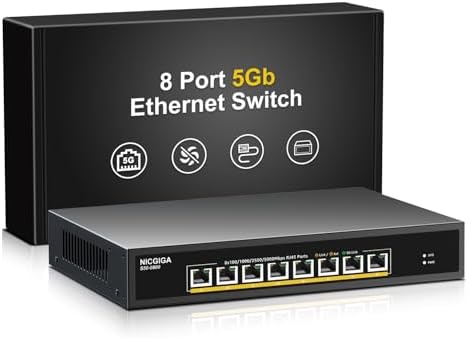
NICGIGA 5 Port 10G Ethernet Switch Unmanaged
Bottom line: The NICGIGA 5 Port 10G Ethernet Switch Unmanaged: Five 10Gb Base-T RJ45 ports, all at full 10G; main trade-off: unmanaged: no VLANs, QoS, link aggregation or port monitoring.
As an Amazon Associate, SpecPicks earns from qualifying purchases. Full disclosure →
Pros & Cons
Pros
- ✓ Five 10Gb Base-T RJ45 ports, all at full 10G
- ✓ Auto-negotiates 10G/5G/2.5G/1G/100M per port for mixed networks
- ✓ 100Gbps switching capacity with non-blocking forwarding
- ✓ Plug and play: no software, no setup, auto MDI/MDIX
- ✓ Desktop or 19-inch rack mounting in a metal case with 4KV surge protection
Cons
- ✗ Unmanaged: no VLANs, QoS, link aggregation or port monitoring
- ✗ No SFP+ ports for fiber or DAC uplinks
- ✗ Active 5000 RPM fan (24dB) means it is never fully silent
- ✗ Only five ports; growing networks will need a second switch
Manufacturer description
The NICGIGA 5 Port 10G Ethernet Switch gives your home lab, studio or small office five 10Gb Base-T RJ45 ports without any configuration. Each port auto-negotiates across five speeds (10G, 5G, 2.5G, 1000M and 100M), so a 10G NAS, a WiFi 7 router, a 2.5G gaming PC and an older gigabit device can all share one switch. Each port runs at the speed its device supports. Switching capacity is rated at 100Gbps with non-blocking forwarding, which leaves room for all five ports to move traffic at full 10G at once. That matters when you're pulling 8K video off a NAS while backups run in the background…
SpecPicks Verdict
SpecPicks has no buyer-rating or benchmark data for NICGIGA 5 Port 10G Ethernet Switch Unmanaged, so this read rests on the manufacturer's listed specs (how we evaluate). Compare with similarly-priced alternatives in the networking category before committing. On the listing's own facts, the case for it is "Five 10Gb Base-T RJ45 ports, all at full 10G"; the main trade-off is "Unmanaged: no VLANs, QoS, link aggregation or port monitoring". If those two points fit how you will use it, put it beside one or two close alternatives in the Compare tool to confirm the price.
Before ordering, check the listed dimensions, load rating and mounting or device compatibility in the spec table below against how you plan to use it, and confirm them on the retailer's listing. Prices and stock are set by the retailer and may have moved since this page was last updated.
Frequently Asked Questions
Will this switch work with my 2.5G and 1G devices?
Yes. Each port auto-negotiates between 10G, 5G, 2.5G, 1000M and 100M, so 2.5G PCs, gigabit devices and 10G NAS units can all connect at once at their own top speed.
Do I need to configure anything to set it up?
No. It is an unmanaged plug-and-play switch with automatic MDI/MDIX, so you connect your cables and it starts forwarding traffic. Because it is unmanaged, it has no VLAN or QoS settings.
Can I mount the NICGIGA 10G switch in a server rack?
Yes. It works on a desktop or in a standard 19-inch rack using rack ears. Check the product listing to confirm the rack ears are in the box.
How loud is the cooling fan?
It uses an industrial-grade 5000 RPM fan rated at 24dB, with cooling vents on both sides. The fan is always on, so you will hear a faint hum in a quiet room.
Does it have SFP+ ports, and what warranty does it include?
No. All five ports are 10Gb Base-T RJ45 copper, with no SFP+ slots. NICGIGA gives a one-year warranty plus lifetime technical support.
Key Features
Quoted from the manufacturer's listing. Where it differs from the pros and cons above, those note the conditions the listing leaves out.
- ⭐【5 Port 10Gbe Ethernet Switch】5*10G/5G/2.5G/1000M/100M RJ45 Ethernet ports, 100Gbps switching capacity to meet the broadband needs of more devices, build more stable and larger network.
- ⭐【Auto-Negotiation】Autonegotiation intelligently senses link speed and adjusts between 5 speeds (10G/5G/2.5G/1000M/100M) to provide compatibility and optimal performance for all your devices, including 10G NAS, WiFi7 Router,10G Adapter/NIC, Server, Gaming PC, 8K video, etc.
- ⭐【Plug and Play】Easy to use and simple to set up, no software or configuration required. Supports automatic MDI/MDIX and non-blocking data forwarding.Support Desktop/Rackmount(with 19-inch rack ear)
- ⭐【Widely Used】Durable Metal Case, 4KV Lightning Protection, Industrial Grade 5000 RPM Fan (24dB), Dual Side Cooling Holes, Qperating Temperature 0°C to 45°C (32°F to 113F), LED Indicator Lights, Stable Operation, Easily Maintain the Network Status.
- ⭐【After-Sale-Service】 Every NICGIGA switch is rigorously tested for reliability, quality and performance. We provide a one-year warranty and lifetime technical support for the entire product.
Full Specifications
| Brand | NICGIGA |
|---|---|
| Color | Black |
| Weight | 10g |
| Platform | Not Machine Specific |
| Interface | RJ45 |
| Switch Type | unmanaged |
| Connectivity | WiFi |
| Model Number | 5 Port | 5x 10G RJ45 |
| Compatibility | PC, Switch |
| Built-In Media | S100-0500T |
| Mfr Part Number | S100-0500T |
| Number of Items | 1 |
| Number of Ports | 5 |
| Compatible Devices | Desktop, Gaming Console, Laptop, Printer |
| Data Transfer Rate | 10 gigabits_per_second |
| Included Components | S100-0500T |
| Warranty Description | 1 Year Warranty |
| Full listing title | 5 Port 10G Ethernet Switch Unmanaged,with 5X 10Gb Base-T RJ45 Ports, NICGIGA 10Gbps Network Switch Easy for 10G NAS,PC,WiFi7 Router,10G Adapter/NIC. Desktop or 19-inch Rack Mount, Plug and Play. |
Ready to buy?
5 Port 10G Ethernet Switch Unmanaged,with 5X 10Gb Base-T RJ45 Ports, NICGIGA 10Gbps Network Switch Easy for 10G NAS,PC,WiFi7 Router,10G Adapter/NIC. Desktop or 19-inch Rack Mount, Plug and Play. is listed on Amazon. Price, availability, shipping and returns are set by Amazon and its sellers — check the listing for current terms. SpecPicks earns a small commission on qualifying purchases — thank you for supporting independent review work.
Related Networking


More guides & deep dives from the SpecPicks archive
Browse all articles & guides →- Best Budget Gaming PC Build 2026 — ~$1,000 Parts List
- Best 1440p Gaming GPUs in 2026
- How to Build a Windows 98 Retro PC in 2026
- Emulation Hardware in 2026: FPGA, Software, and Cart-Reader Ecosystems
- The Complete Voodoo5 5500 AGP Driver Guide (2026 Edition)
- Best Retro Handhelds in 2026: Pocket, Mid-Tier and FPGA Picks
- RTX 4070 Super vs RX 7800 XT — Which to Buy in 2026
More reviews from the SpecPicks archive
Browse all reviews →- Best GPU for Local Llama 3 8B Under $400: Why the RTX 3060 12GB Wins
- Stable Diffusion vs Flux — which open image model wins in 2026?
- Building a Period-Correct 2002 GeForce 4 Ti + Pentium 4 Northwood Win98/XP Dual-Boot
- Best GPU for Local LLMs Under $300: Why the RTX 3060 12GB Still Wins
- Playnix RX 9060 XT 16GB: A Steam Machine Rival at €1,140
- Active Unreal Tournament 99 Servers in 2026: Find, Join, Host
- After the Mythos Cyber-Ops Report, Why Run AI on an Air-Gapped Local Box
- A Practical Look at the PlayStation Architecture — and Why It Still Matters
- Best GPU for Ryzen 5 5500 in 2026 (Budget to 1440p)
- US Forces Anthropic to Disable Claude Fable 5: Local Fallbacks
- Raspberry Pi 5 Pinout Guide: The Full 40-Pin GPIO Breakdown
- Did Anyone Actually Ditch iCloud or Google One for Self-Hosting?
- How to run Llama 3.1 8B on NVIDIA GeForce RTX 5070
- Gemini 3.5 Live Translate Goes Cloud-First — The Local, Private Path on a Raspberry Pi
- Best Controller for Forza Horizon 6 on PC (2026)
- 2025 Local LLM Leaderboard: Best AMD GPUs Ranked
- Best Quiet PC Cooling Upgrades in 2026
- Blue Yeti vs HyperX QuadCast 2 S: Best USB Mic for Streaming
- GPT-5.6 Deleted a User's Files: Why Local, Sandboxed Agents Matter
- Jan.ai vs LM Studio vs Ollama: Easiest Local-LLM App for a 12GB Card in 2026
- Ryzen 7 5800X vs 5700X for a Dual-Duty Gaming and Local-LLM Build
- NVIDIA Cosmos 3 vs Ideogram 4.0: Which Open Image Model to Run on 12GB
- Imaging a vintage IDE hard drive with a USB adapter in 2026
- Best Budget PC Upgrades Under $250 in 2026
Earliest SpecPicks reviews
Browse full archive →- Best GPU for Llama 3.1 8B (2026)
- Best GPU for Qwen 3 14B (2026)
- Best GPU for Qwen 3 32B (2026)
- Best GPU for Llama 3.1 70B (2026)
- Best GPU for DeepSeek-R1 32B (2026)
- Best GPU for Llama 3.1 405B (2026)
- How to run Llama 3.1 8B on NVIDIA GeForce RTX 5090
- How to run Qwen 3 14B on NVIDIA GeForce RTX 5090
- How to run Qwen 3 32B on NVIDIA GeForce RTX 5090
- How to run Llama 3.1 70B on NVIDIA GeForce RTX 5090
- How to run DeepSeek-R1 32B on NVIDIA GeForce RTX 5090
- How to run Llama 3.1 8B on NVIDIA GeForce RTX 4090