

XIIXMASK
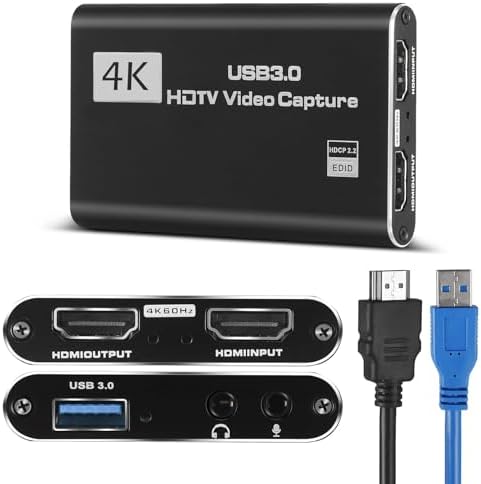
XIIXMASK USB 3.0 HDMI Capture Card
Bottom line: The XIIXMASK USB 3.0 HDMI Capture Card ($19.19 on Amazon as of 2026-11-26 03:16 UTC): 4K 60Hz HDMI pass-through keeps gameplay on your TV while you capture; main trade-off: no 4K recording; capture tops out at 1080p60 or 2K30.
As an Amazon Associate, SpecPicks earns from qualifying purchases. Full disclosure →
*Price sourced from Amazon.com. Last updated 2026-11-26. Product prices and availability are accurate as of the date/time indicated and are subject to change. Any price and availability information displayed on Amazon.com at the time of purchase will apply to the purchase of this product.
Pros & Cons
Pros
- ✓ 4K 60Hz HDMI pass-through keeps gameplay on your TV while you capture
- ✓ Records at 1080p 60fps or 2K 30fps over USB 3.0
- ✓ 3.5mm mic/headset port for live voice commentary
- ✓ USB 3.0 cable with USB-A and USB-C ends fits laptops, Macs and Android devices
- ✓ Supported in OBS Studio, VLC, Potplayer and Zoom
Cons
- ✗ No 4K recording; capture tops out at 1080p60 or 2K30
- ✗ 2K mode drops to 30fps, a weaker fit for fast-motion games
- ✗ Windows 11 is not in the maker's OS compatibility list
- ✗ OBS Studio needs a restart after audio setup before sound works
Manufacturer description
The XIIXMASK USB 3.0 HDMI capture card records and streams footage from a console or camera, so you don't need a separate capture PC. Plug your PS5, Switch, Xbox or DSLR into the HDMI input. The card passes the signal through to your TV or monitor at up to 4K 60Hz. At the same time, it sends a 1080p 60fps or 2K 30fps feed to your computer over USB 3.0. You keep playing on your main display while OBS Studio, VLC, Potplayer or Zoom handles the recording. A 3.5mm microphone/headset port lets you add voice commentary to the capture. That helps with Twitch, YouTube and Facebook streams…
SpecPicks Verdict
SpecPicks has no buyer-rating or benchmark data for XIIXMASK USB 3.0 HDMI Capture Card, so this read rests on the manufacturer's listed specs and the current price in the streaming gear category (how we evaluate). Compare with similarly-priced alternatives in the streaming gear category before committing. On the listing's own facts, the case for it is "4K 60Hz HDMI pass-through keeps gameplay on your TV while you capture"; the main trade-off is "No 4K recording; capture tops out at 1080p60 or 2K30". If those two points fit how you will use it, put it beside one or two close alternatives in the Compare tool to confirm the price.
Before ordering, check the listed dimensions, ports, power requirements and supported devices or systems in the spec table below against how you plan to use it, and confirm them on the retailer's listing. Prices and stock are set by the retailer and may have moved since this page was last updated.
Frequently Asked Questions
Can the XIIXMASK capture card record in 4K?
No. It takes a 4K 60Hz HDMI input and passes it through to your display at 4K 60Hz, but it records over USB 3.0 at up to 1080p 60fps or 2K 30fps.
Does it work with the Nintendo Switch 2, PS5 and Xbox?
The listing names Switch 1/2, PS4/PS5 and Xbox as compatible sources. Connect the console to the HDMI input and run the loop-out port to your TV so you can play on the TV while the card captures.
Can I use it with a Mac or a laptop that only has USB-C?
Yes. macOS is on the supported list, along with Windows 7/8/10, Linux and Android. The included USB 3.0 cable has both USB-A and USB-C ends.
Can I add my voice to the recording while I play?
Yes. The 3.5mm microphone/headset port mixes external audio into the capture, which works for game commentary, interviews or presentations.
Why don't I hear any sound in OBS Studio after setting it up?
The manufacturer says to restart OBS Studio after you finish the audio setup so sound output works. If it still doesn't work, contact the seller's customer service, which the listing says is available 24/7.
Key Features
Quoted from the manufacturer's listing. Where it differs from the pros and cons above, those note the conditions the listing leaves out.
- 【4K Loop-out & 2K30 Capture】This HDMI game capture card for Switch is equipped with 5 ports, offering faster transmission speeds to meet the demands of high-frame-rate video capture. It supports 4K 60Hz HDMI input and loop-out, along with USB 3.0 output at 1080P 60fps or 2K 30fps. Compatible with YUY2 format, it’s perfect for online streaming, real-time recording, virtual meetings, live gaming, and more
- 【Stable Performance, Ultra-Low Latency】Built with a premium aluminum alloy body for enhanced heat dissipation, this HDMI capture card ensures excellent stability and crystal-clear picture quality, minimizing blue screens and lag. The upgraded cable layout further improves performance. Effortlessly record HD video or high-quality audio and transfer it to your computer or streaming platform. Enjoy real-time previews and record videos directly at 60fps to your hard drive
- 【Mic-in Support for Commentary】With a 3.5mm microphone/headset port, this audio and video capture card lets you easily add voice commentary during live streams or recordings. It’s ideal for adding external audio in gaming, interviews, or presentations
- 【Broad Compatibility】Stream seamlessly to platforms like Facebook, YouTube, or Twitch. This HDMI to USB-C/USB 3.0 capture card is compatible with a wide range of devices and operating systems, including Windows 7/8/10, MacOS, Linux, and Android. It works with laptops, PS3/PS4/PS5, Switch, cameras, DSLRs, webcams, Steam Deck, TV boxes, and more. Popular software like OBS Studio, VLC, Potplayer, Zoom, and others are fully supported
- 【Package Contents & Important Notes】1 x HD Video Capture Card, 1 x USB 3.0 to USB-A/USB-C Cable, 1 x HDMI cable, 1 x English User Manual Important: After completing the audio setup, restart OBS Studio to ensure sound output works properly. If you encounter any issues, our customer service team is available 24/7 to assist you
Full Specifications
| Brand | XIIXMASK |
|---|---|
| Platform | Android, Linux, Mac OS X |
| AV Output | YUY2/ MJPEG |
| Connectivity | USB-C |
| Model Number | ffdd44e2-d73d-4ee9-a63a-715a61e69624 |
| Compatibility | PC, PS5, PS4, PS3, Xbox, Switch, Android, Mac, Linux |
| Built-In Media | 1 x Video Capture Card, 1 x USB 3.0 to USB-A/USB-C Cable, 1 x HDMI cable, 1 x English User Manual |
| Number of Items | 1 |
| Antenna Location | Video Recording |
| Compatible Devices | Camcorder, Camera, Gaming Console, Laptop, Personal Computer, Tablet, Television |
| Hardware Interface | USB 3.0 |
| Warranty Description | 2 Year Manufacturer |
| Video Capture Resolution | 1080p, 1440p |
| Minimum System Requirements | Operating System: Windows 7/8/8.1/10, MacOS, Linux, Android, and iPadOS 17+; USB 3.0 port |
| Recommended Uses For Product | Video Recording |
| Other Special Features of the Product | 4K Loop-out & 2K30 Capture, Ultra-Low Latency, Mic-in Support, Broad Compatibility |
| Full listing title | XIIXMASK USB 3.0 HDMI Capture Card, 4K Pass-Through, 1080P 60FPS Capture | Dual-port USB-A/USB-C Video Game Capture, Ultra-Low Latency 4K Pass-Through for PS4/PS5, Switch 1/2, Xbox, PC, Mac, Camera |
Ready to buy?
XIIXMASK USB 3.0 HDMI Capture Card, 4K Pass-Through, 1080P 60FPS Capture | Dual-port USB-A/USB-C Video Game Capture, Ultra-Low Latency 4K Pass-Through for PS4/PS5, Switch 1/2, Xbox, PC, Mac, Camera is listed on Amazon. Price, availability, shipping and returns are set by Amazon and its sellers — check the listing for current terms. SpecPicks earns a small commission on qualifying purchases — thank you for supporting independent review work.
*Price sourced from Amazon.com. Last updated 2026-11-26. Product prices and availability are accurate as of the date/time indicated and are subject to change. Any price and availability information displayed on Amazon.com at the time of purchase will apply to the purchase of this product.
Related Streaming Gear



More guides & deep dives from the SpecPicks archive
Browse all articles & guides →- Best Retro Handhelds in 2026: Pocket, Mid-Tier and FPGA Picks
- Emulation Hardware in 2026: FPGA, Software, and Cart-Reader Ecosystems
- RTX 4070 Super vs RX 7800 XT — Which to Buy in 2026
- The Complete Voodoo5 5500 AGP Driver Guide (2026 Edition)
- How to Build a Windows 98 Retro PC in 2026
- Best 1440p Gaming GPUs in 2026
- Best Budget Gaming PC Build 2026 — ~$1,000 Parts List
More reviews from the SpecPicks archive
Browse all reviews →- Claude Code + Fable 5 Ported Command & Conquer to iOS in Hours: What Local Coding Rigs Need
- Raspberry Pi Zero W vs Pi 4 for a 2026 Cyberdeck: Which Board Fits?
- Best 4K Gaming Monitors Under $600 in 2026
- Best SATA SSDs for Gaming and Retro PC Builds in 2026
- Self-Host a 24/7 FM Radio Station on a Raspberry Pi Zero 2W
- Best Budget AM4 Gaming Build Parts in 2026
- Logitech G502 Hero vs Modern FPS Mice: Is the Classic Still Worth It in 2026?
- Windows XP Gaming Setup Guide: Hardware & Drivers (2025)
- Qwen3.6-27B vs Coder-Next: Which Local Coding Model Wins?
- Apple Intelligence Ships in China on Alibaba's Qwen: What It Means
- Claude Mythos: What Anthropic Found + Why Regulators Were Briefed
- Building multi-agent AI orchestrators — LangGraph, DSPy, n8n, and picking the right one
- Best Budget Gaming Monitors Under $300 for 1080p in 2026
- Best SATA SSD for a Retro Windows XP or 98 Build (2026)
- Best 16GB GPU for Local LLM 2026
- Build a Raspberry Pi 4 8GB RetroPie Emulation Station in 2026
- Best Budget SSD for a Steam Library in 2026: SATA vs NVMe on a Tight Budget
- Best Budget Internal SSD for 2026: 5 Picks Tested by Value
- Best Storage Kit for Archiving a Physical Game Collection in 2026
- Coreboot + AMD openSIL: Windows 11 Works on MSI Ryzen
- Qwen3 0.6B: Raspberry Pi 4 8GB vs Ryzen 5 5600G for Tiny-Model Hosts (2026)
- Best 4K Gaming Monitor in 2026: 5 Picks From Budget to Premium
- Raspberry Pi 5 vs Pi 4 8GB for Homelab: Which Should You Buy?
- Best PlayStation 5 Controllers in 2026: 5 Picks for Every Player
Earliest SpecPicks reviews
Browse full archive →- Best GPU for Llama 3.1 8B (2026)
- Best GPU for Qwen 3 14B (2026)
- Best GPU for Qwen 3 32B (2026)
- Best GPU for Llama 3.1 70B (2026)
- Best GPU for DeepSeek-R1 32B (2026)
- Best GPU for Llama 3.1 405B (2026)
- How to run Llama 3.1 8B on NVIDIA GeForce RTX 5090
- How to run Qwen 3 14B on NVIDIA GeForce RTX 5090
- How to run Qwen 3 32B on NVIDIA GeForce RTX 5090
- How to run Llama 3.1 70B on NVIDIA GeForce RTX 5090
- How to run DeepSeek-R1 32B on NVIDIA GeForce RTX 5090
- How to run Llama 3.1 8B on NVIDIA GeForce RTX 4090