

Hagibis
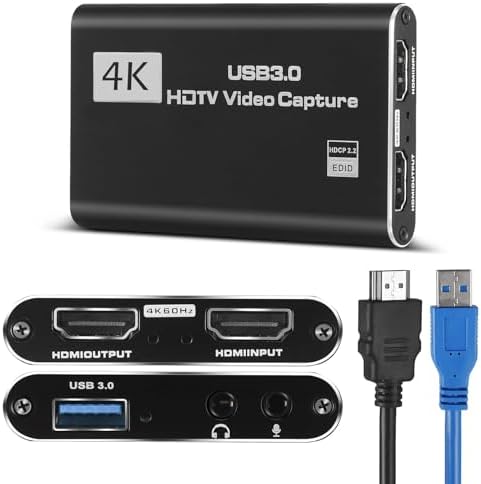
Hagibis USB3.0 Video Capture Card with 100W PD
Bottom line: The Hagibis USB3.0 Video Capture Card with 100W PD: USB-A and USB-C connectors on one cable for laptops, tablets, phones, and Meta Quest; main trade-off: recording tops out at 1080p60; no 4K capture despite 4K input support.
As an Amazon Associate, SpecPicks earns from qualifying purchases. Full disclosure →
Pros & Cons
Pros
- ✓ USB-A and USB-C connectors on one cable for laptops, tablets, phones, and Meta Quest
- ✓ 100W PD passthrough charging keeps a tablet or phone powered while you capture
- ✓ Driver-free plug and play on Windows, macOS, Linux, and iPadOS 17+
- ✓ Accepts up to 4K@60Hz HDMI input and records at 1920x1080@60fps
- ✓ MS2130 chip with YUY2 and MJPEG output, works in OBS, XSplit, AMCap, PotPlayer
Cons
- ✗ Recording tops out at 1080p60; no 4K capture despite 4K input support
- ✗ PS4, PS5, Xbox, and Switch must have HDCP turned off to capture
- ✗ HDMI input only; no DisplayPort, component, or composite sources
- ✗ No HDMI loop-out port listed, so playing lag-free on a separate TV isn't an option
Manufacturer description
The Hagibis USB3.0 Video Capture Card turns any HDMI source into a 1080p60 feed for your laptop, tablet, or phone. It is built on the MS2130 chip and outputs YUY2 and MJPEG. It accepts HDMI input up to 4K@60Hz and records at up to 1920x1080@60fps. That is enough for clean gameplay capture in OBS Studio, XSplit, AMCap, PotPlayer, or QuickTime Player. The cable ends in both USB-A and USB-C, so the same capture card works with older PCs, current laptops, iPads running iPadOS 17 or later, Android phones, and Meta Quest 3 and Quest 2 headsets. A built-in 100W Power Delivery port supports PD 3.0…
SpecPicks Verdict
SpecPicks has no buyer-rating or benchmark data for Hagibis USB3.0 Video Capture Card with 100W PD, so this read rests on the manufacturer's listed specs (how we evaluate). Compare with similarly-priced alternatives in the streaming gear category before committing. On the listing's own facts, the case for it is "USB-A and USB-C connectors on one cable for laptops, tablets, phones, and Meta Quest"; the main trade-off is "Recording tops out at 1080p60; no 4K capture despite 4K input support". If those two points fit how you will use it, put it beside one or two close alternatives in the Compare tool to confirm the price.
Before ordering, check the listed dimensions, ports, power requirements and supported devices or systems in the spec table below against how you plan to use it, and confirm them on the retailer's listing. Prices and stock are set by the retailer and may have moved since this page was last updated.
Frequently Asked Questions
Can this Hagibis capture card record in 4K?
No. It accepts HDMI input up to 4K@60Hz, but the maximum capture output is 1920x1080 at 60fps. Expect 1080p60 recordings and streams.
Will it work with my PS5 or Nintendo Switch 2?
Yes. It supports Switch, Switch 2, PS4, PS4 Pro, PS5, and Xbox Series X. On PlayStation and other consoles, turn off HDCP in the system settings first, or the feed will not come through.
Does it work with an iPad or Meta Quest 3?
Yes. The USB-C end connects to iPads running iPadOS 17 or later and to Meta Quest 3 and Quest 2 headsets. Older iPadOS versions are not supported.
Do I need to install drivers or plug in external power?
No. It is plug and play on Windows 11/10/8.1/7, macOS, and Linux, and it runs on USB bus power. The 100W PD port is optional and only charges the connected host device.
Which streaming and recording apps are compatible?
It shows up as a standard video and audio source in OBS Studio, XSplit, AMCap, VLC, PotPlayer, and QuickTime Player. It sends YUY2 and MJPEG formats, which you can select in the app's capture settings.
Key Features
Quoted from the manufacturer's listing. Where it differs from the pros and cons above, those note the conditions the listing leaves out.
- Dual interface design: The latest version of USB A/USB C dual interface design meets the connection needs of different devices, no longer worry about the problem of interface mismatch, and is compatible with most current laptops, tablets, mobile phones, VR glass such as Meta Quest 3 / Quest 2 and other devices. *Note: This capture card only supports HDMI input sources, as well as iPadOS devices need to be updated to 17 or higher to use it
- 100W High Speed Charging: Hagibis video capture card supports 100W PD fast charging , compatible for Power Delivery 3.0, Qualcomm Quick Charge 5.0 protocol(2.0/3.0/4+). Charging while using, that you don't need to worry about the tablet running out of power while playing games
- Plug & Play: As a no driver required portable 4K HDMI video capture card, it can be used without drivers and external power supply. so you can use the built-in functions of the current software to get a seamless experience. And the capture card is small size & easy to carry, no problem for outdoor and indoor live broadcasting
- Suitable for All Occasions: This video capture card adapter can capture video and audio simultaneously and transmit audio and video signals to computers or smartphones for preview and storage. Thus This video capture card is suitable for HD acquisition,teaching recording,game capture,live streaming,medical imaging, online meetings etc. Easy to carry,compact and portable, without external power supply.You can enjoy much clear video for your recording, live streaming etc
- True USB3.0 1080P 60Hz Video Recording: Hagibis video capture cards is up to 4K@60Hz High Definition Input, output max resolution 1920×1080@60Hz. Offer 1080P 60fps High Quality Recording and live steaming .The audio video capture card is very suitable for living games, Recording, editing and transferring games in high resolution of 1080p @ 60fps on OBS, AMCap, Xsplit, VCL and More
- Widely Use: This Video capture card can capture video and audio simultaneously and transmit audio and video signals to computers or smartphones for preview and storage. Supports Windows 11/10/8.1/7, MacOS, Linux, and phones/tablets. This capture card effortlessly livestreams gameplay from Switch, Switch 2, PS4/PS4 Pro/PS5 (Disable HDCP mode), Xbox Series X, and Meta Quest 3/2 directly to your iPad, laptop, or PC. Fully support OBS Studio, XSplit, PotPlayer, QuickTime Player. *Note: Switch / Xbox / PS5/ PS4 work fine when HDCP is turned off
Full Specifications
| Brand | Hagibis |
|---|---|
| Color | White |
| Finish | Hdmi |
| Unit Count | 1 Count |
| Finish Type | Hdmi |
| Connectivity | USB-C |
| Model Number | UHC10 |
| Compatibility | PC, PS5, PS4, Xbox, Switch, Mac, Linux |
| Built-In Media | Charging Cable *1, Video Capture Cable *1 |
| Connector Type | HDMI, USB Type C |
| Number of Items | 1 |
| Number of Ports | 2 |
| Power Plug Type | No Plug |
| Compatible Devices | Gaming Console, Personal Computer, Quest 3 2 Pro, Smartphone, Tablet |
| Warranty Description | 1 Year |
| Full listing title | Hagibis USB3.0 Video Capture Card with 100W PD, HDMI to USB A/USB C Capture Cable 1080P@60fps YUY2 MJPEG MS2130 for Quest 3 2 Pro VR Switch2 PS4/5 Live Broadcast, Gaming, Streaming, Recorder |
Ready to buy?
Hagibis USB3.0 Video Capture Card with 100W PD, HDMI to USB A/USB C Capture Cable 1080P@60fps YUY2 MJPEG MS2130 for Quest 3 2 Pro VR Switch2 PS4/5 Live Broadcast, Gaming, Streaming, Recorder is listed on Amazon. Price, availability, shipping and returns are set by Amazon and its sellers — check the listing for current terms. SpecPicks earns a small commission on qualifying purchases — thank you for supporting independent review work.
Related Streaming Gear




More guides & deep dives from the SpecPicks archive
Browse all articles & guides →- How to Build a Windows 98 Retro PC in 2026
- Best Retro Handhelds in 2026: Pocket, Mid-Tier and FPGA Picks
- RTX 4070 Super vs RX 7800 XT — Which to Buy in 2026
- Emulation Hardware in 2026: FPGA, Software, and Cart-Reader Ecosystems
- The Complete Voodoo5 5500 AGP Driver Guide (2026 Edition)
- Best Budget Gaming PC Build 2026 — ~$1,000 Parts List
- Best 1440p Gaming GPUs in 2026
More reviews from the SpecPicks archive
Browse all reviews →- Four Frontier Models in Eight Days: What a 12GB GPU Can Actually Run
- Best Budget Streaming Gear in 2026: 5 Picks to Go Live Cheap
- GLM-5.2's 37k-Token Reasoning Outputs and What They Mean for Local Rigs
- Steam Controller (2026) Scores 83/100 in Early Reviews
- Best Amazon Workstation Parts for a Quiet Home Office in 2026
- Best Budget Gaming Peripherals Under $50 in 2026
- $1,500 Gaming PC Build 2026: Parts, Cost, 1440p FPS
- CompactFlash as a Silent IDE Boot Drive: A 1998-Era Build Log
- Noctua-Style Pi 5 NAS Build Goes Viral — Here's the Parts List
- Best GPU for Local LLMs Under $400 in 2026
- GPU-Accelerated Autorouter Handles Monstrous PCB Designs
- Best CPU Cooler for AM5 Ryzen 9 Overclocking (2026)
- Glide vs OpenGL vs Direct3D: The API War That DirectX 9 Ended
- Asus Prime Z890-P WiFi Review: Built for Core Ultra 200S
- Budget Ollama Build Under $500: What Actually Runs in 2026
- Imaging Vintage IDE Drives to Preserve 90s Game CDs
- Ryzen 5 5600G vs Ryzen 7 5700X: Best Budget Build CPU 2026
- Best CPU Cooler for Ryzen 7 9800X3D in 2026
- Anthropic's 2GW AMD Deal: Should You Still Run Local?
- Running Your Own AI Guardrail Model on a 12GB GPU in 2026
- Best GPU for ComfyUI & Stable Diffusion Under $300 in 2026
- Can a Ryzen AI Max+ 395 Mini-PC With 128GB Run Big LLMs? The r/LocalLLaMA Question
- Replace a Dying IDE Drive With CompactFlash in a Win98 Retro PC
- Self-Host Jellyfin on a Ryzen 5 5600G Mini Build in 2026: Measured Power and Transcoding
Earliest SpecPicks reviews
Browse full archive →- Best GPU for Llama 3.1 8B (2026)
- Best GPU for Qwen 3 14B (2026)
- Best GPU for Qwen 3 32B (2026)
- Best GPU for Llama 3.1 70B (2026)
- Best GPU for DeepSeek-R1 32B (2026)
- Best GPU for Llama 3.1 405B (2026)
- How to run Llama 3.1 8B on NVIDIA GeForce RTX 5090
- How to run Qwen 3 14B on NVIDIA GeForce RTX 5090
- How to run Qwen 3 32B on NVIDIA GeForce RTX 5090
- How to run Llama 3.1 70B on NVIDIA GeForce RTX 5090
- How to run DeepSeek-R1 32B on NVIDIA GeForce RTX 5090
- How to run Llama 3.1 8B on NVIDIA GeForce RTX 4090