

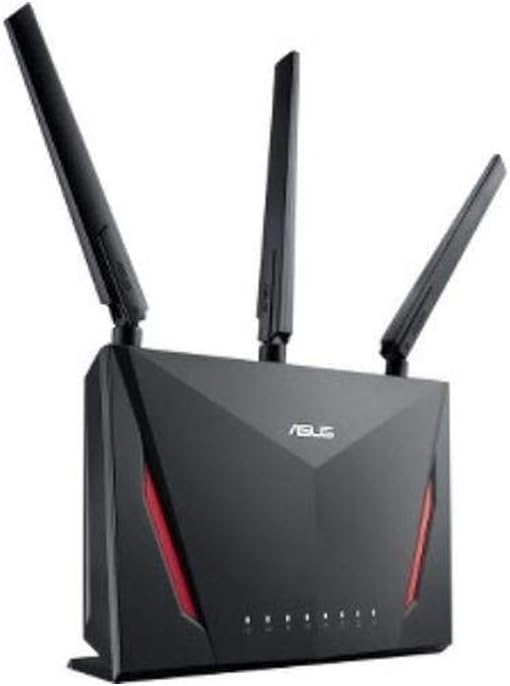
ASUS ROG Strix GS-BE12000 WiFi 7 Gaming Router - Tri-Band, 12Gbps, Mesh
Bottom line: The ASUS ROG Strix GS-BE12000 WiFi 7 Gaming Router ($269.97 on Amazon as of 2026-11-23 05:45 UTC): Tri-band WiFi 7 hits 12,000 Mbps using 320 MHz 6 GHz channels, MLO and 4K-QAM; main trade-off: 12,000 Mbps tri-band peak needs WiFi 7 client devices with 6 GHz and MLO support.
As an Amazon Associate, SpecPicks earns from qualifying purchases. Full disclosure →
*Price sourced from Amazon.com. Last updated 2026-11-23. Product prices and availability are accurate as of the date/time indicated and are subject to change. Any price and availability information displayed on Amazon.com at the time of purchase will apply to the purchase of this product.
Pros & Cons
Pros
- ✓ Tri-band WiFi 7 hits 12,000 Mbps using 320 MHz 6 GHz channels, MLO and 4K-QAM
- ✓ Seven 2.5G LAN ports plus a 2.5G WAN port for up to 20G of wired capacity
- ✓ Quad-core 2.0GHz CPU, 2GB RAM and eight internal antennas cover up to 3,000 sq. ft.
- ✓ ROG Gaming Network SSIDs enable Triple-Level Game Acceleration in one tap
- ✓ Smart Home Master isolates IoT and VPN traffic across up to 3 separate SSIDs
Cons
- ✗ 12,000 Mbps tri-band peak needs WiFi 7 client devices with 6 GHz and MLO support
- ✗ 320 MHz 6 GHz channels have shorter range than 5 GHz, so mesh nodes cost extra
- ✗ Eight internal antennas cannot be upgraded or re-aimed like external ones
- ✗ 3,000 sq. ft. rating assumes open layout; dense walls will need mesh expansion
Manufacturer description
The ROG Strix GS-BE12000 is a high-performance gaming router with tri-band WiFi 7, 12,000Mbps speeds, and 20G wired capacity. It features 4x4 MIMO, one-tap SSID game acceleration via the ROG Gaming Network, and Triple-Level Network Security for fast, low-latency, and secure gaming across all platforms.
SpecPicks Verdict
SpecPicks has no buyer-rating or benchmark data for ASUS ROG Strix GS-BE12000 WiFi 7 Gaming Router, so this read rests on the manufacturer's listed specs and the current price in the networking category (how we evaluate). Compare with similarly-priced alternatives in the networking category before committing. On the listing's own facts, the case for it is "Tri-band WiFi 7 hits 12,000 Mbps using 320 MHz 6 GHz channels, MLO and 4K-QAM"; the main trade-off is "12,000 Mbps tri-band peak needs WiFi 7 client devices with 6 GHz and MLO support". If those two points fit how you will use it, put it beside one or two close alternatives in the Compare tool to confirm the price.
Before ordering, check the listed dimensions, ports, power requirements and supported devices or systems in the spec table below against how you plan to use it, and confirm them on the retailer's listing. Prices and stock are set by the retailer and may have moved since this page was last updated.
Key Features
Quoted from the manufacturer's listing. Where it differs from the pros and cons above, those note the conditions the listing leaves out.
- Blazing-fast WiFi 7 boosts tri-band throughput up to 12000 Mbps with 320 MHz channels of 6 GHz band, Multi-Link Operation (MLO) and 4K-QAM
- Powerful wired network capacity of up to 20G with one 2.5G WAN port and seven 2.5G LAN ports.
- High-performance quad-core 2.0GHz CPU with robust cooling, 2GB RAM and eight internal antennas providing up to 3000 sq. ft. of range.
- Smart Home Master makes it easy to set up functional subnetwork (up to 3 SSIDs) for IoT devices and VPNs
- ROG-exclusive Gaming Network streamlines Triple-Level Game Acceleration setup and connections through convenient SSIDs
- Commercial-grade Triple-level Network Security from Internet to every device with AiProtection Pro.
Full Specifications
| Brand | ASUS |
|---|---|
| Color | BLACK |
| Weight | 20g |
| Coverage | 3000 sq. ft. |
| Frequency | 6 GHz |
| Model Name | GS-BE12000 |
| Unit Count | 1 Count |
| Connectivity | WiFi |
| Model Number | GS-BE12000 |
| Built-In Media | GS-BE18000 tri-band gaming router, Power adapter, Quick Start Guide, RJ-45 cable, Warranty card |
| Control Method | App, Push Button |
| Connection Type | Wired |
| Mfr Part Number | GS-BE12000 |
| Number of Ports | 8 |
| Antenna Location | Business, Gaming, Home |
| Wi-Fi Generation | WiFi 7 |
| Security Protocol | Let's Encrypt, DNS-over-TLS, SSH, Security Scan, WPS, AiProtection, VPN, Firewall, WiFi Encryption : WPA/WPA2/WPA3 Personal WPA/WPA2/WPA3 Enterprise Open System & OWE |
| Compatible Devices | Personal Computer |
| Connectivity Range | 3000 square_feet |
| Data Transfer Rate | 12000 megabits_per_second |
Ready to buy?
ASUS ROG Strix GS-BE12000 WiFi 7 Gaming Router - Tri-Band, 12Gbps, Mesh is listed on Amazon. Price, availability, shipping and returns are set by Amazon and its sellers — check the listing for current terms. SpecPicks earns a small commission on qualifying purchases — thank you for supporting independent review work.
*Price sourced from Amazon.com. Last updated 2026-11-23. Product prices and availability are accurate as of the date/time indicated and are subject to change. Any price and availability information displayed on Amazon.com at the time of purchase will apply to the purchase of this product.
Related Networking




More guides & deep dives from the SpecPicks archive
Browse all articles & guides →- Best 1440p Gaming GPUs in 2026
- Best Retro Handhelds in 2026: Pocket, Mid-Tier and FPGA Picks
- How to Build a Windows 98 Retro PC in 2026
- Emulation Hardware in 2026: FPGA, Software, and Cart-Reader Ecosystems
- RTX 4070 Super vs RX 7800 XT — Which to Buy in 2026
- Best Budget Gaming PC Build 2026 — ~$1,000 Parts List
- The Complete Voodoo5 5500 AGP Driver Guide (2026 Edition)
More reviews from the SpecPicks archive
Browse all reviews →- Best Mechanical Keyboard for Office and Gaming Crossover (2026)
- GPT-5.5 Instant Shipped: What an RTX 3060 12GB Local Stack Covers When OpenAI Retires a Model
- Best USB-C Capture and Streaming Gear for Console + PC Creators (2026)
- LattePanda Sigma Review (2026): The x86 SBC That Breaks the Pi Pattern
- LEGO Batman: Legacy of the Dark Knight Steam Deck FPS
- How Secure Is My Homelab Compared to Big Companies?
- Dual RTX 3090 Setup Guide 2026: PSU, NVLink, Cooling
- AI Technologies We'll Realistically See in Our Lifetimes
- Alienware Area-51 RTX 5090 Gets $2,580 Off — Worth It?
- Build or Buy a Gaming PC in 2026? The Real Tradeoffs
- Build a Jellyfin Media Server on a Raspberry Pi 4 8GB in 2026
- Dual Radeon AI PRO R9700 Workstation: 64 GB Local LLM Build
- Imaging Vintage IDE Drives to Preserve 90s Game CDs
- Asus Prime Z890-P WiFi Review: Built for Core Ultra 200S
- Build a PiKVM V3 Device for Remote Server Management (2026)
- GPU & CPU Upgrade ROI: Cost-per-FPS Calculator Guide
- AMD Ryzen AI Halo Mini PC: Open-Source Power Analyzed
- How Much VRAM Does 32k Context Use on an RTX 3060 12GB? (2026)
- Claude Opus 4.8 Tops GPT-5.5: What Runs Local on a 12GB GPU
- Best Mid-Range CPU for Streaming and Gaming in 2026: Ryzen 7 5800X vs 5700X vs 5600G
- Llama.cpp Console Released: What Changes for Local LLM Operators on a 12GB GPU
- Cheap 80s Keyboard Gets a Modern Brain Upgrade
- Best GPU for 1080p Esports in 2026: Why the RTX 3060 12GB Still Delivers
- Best Controller for PC Gaming in 2026: Wired vs Wireless Compared
Earliest SpecPicks reviews
Browse full archive →- Best GPU for Llama 3.1 8B (2026)
- Best GPU for Qwen 3 14B (2026)
- Best GPU for Qwen 3 32B (2026)
- Best GPU for Llama 3.1 70B (2026)
- Best GPU for DeepSeek-R1 32B (2026)
- Best GPU for Llama 3.1 405B (2026)
- How to run Llama 3.1 8B on NVIDIA GeForce RTX 5090
- How to run Qwen 3 14B on NVIDIA GeForce RTX 5090
- How to run Qwen 3 32B on NVIDIA GeForce RTX 5090
- How to run Llama 3.1 70B on NVIDIA GeForce RTX 5090
- How to run DeepSeek-R1 32B on NVIDIA GeForce RTX 5090
- How to run Llama 3.1 8B on NVIDIA GeForce RTX 4090