
ELECROW
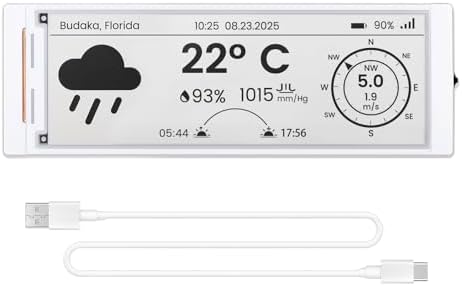
ELECROW ESP32 E-Ink Display 5.79 Inch E-Paper HMI Display Black/White Color
Bottom line: Per its Amazon listing, the ELECROW ESP32 E-Ink Display 5.79 Inch E-Paper HMI Display Black/White: rich Interfaces & Ready for Development - Includes BAT interface (2.2 V-3.7 V).
As an Amazon Associate, SpecPicks earns from qualifying purchases. Full disclosure →
Pros & Cons
Pros
- ✓ Rich Interfaces & Ready for Development - Includes BAT interface (2.2 V-3.7 V)
- ✓ Backed by ELECROW's warranty and support channels
Cons
- ✗ Check the listed dimensions, connectors and platform compatibility against your setup before ordering
- ✗ Price, stock, shipping and returns are set by the retailer and may have changed since this page was last updated
SpecPicks Verdict
SpecPicks has no buyer-rating or benchmark data for ELECROW ESP32 E-Ink Display 5.79 Inch E-Paper HMI Display…, so this read rests on the manufacturer's listed specs (how we evaluate). Compare with similarly-priced alternatives in the single board computers category before committing. Judge it on the specification table and the price rather than on sentiment: check the figures that decide your use case, then put it side-by-side with two or three close alternatives in the Compare tool before clicking through.
Before ordering, check the listed dimensions, ports, power requirements and supported devices or systems in the spec table below against how you plan to use it, and confirm them on the retailer's listing. Prices and stock are set by the retailer and may have moved since this page was last updated.
Key Features
Quoted from the manufacturer's listing. Where it differs from the pros and cons above, those note the conditions the listing leaves out.
- Built-in ESP32-S3 Controller & SPI Interface - Comes with ESP32-S3-WROOM-1-N8R8 as the main MCU (up to 240 MHz) and standard 3-/4-wire SPI (default 4-wire) for easy integration. Supports the classic e-ink reader feel and responsive development flow
- Ultra-Low Power & Power-Off Retention - This epaper display only consumes power during refresh. Static content stays visible without a continuous power supply — ideal for battery-powered devices, smart labels and always-on displays
- High-Resolution e-ink Display - This 5.79″ e-paper display with 272 × 792 resolution delivers sharp black/white contrast and a wide viewing angle. Provides crisp clarity and a paper-like reading experience for smart tags and DIY devices
- Reflective, Sunlight-Readable - The pure reflection mode means no backlight required; the content remains clearly readable even under strong sunlight. Hard-coated anti-glare surface ensures excellent visibility and durability
- Rich Interfaces & Ready for Development - Includes BAT interface (2.2 V-3.7 V), UART0, 2×10 pin GPIO header, back/menu/reset/boot buttons, hard-coated anti-glare surface. Compatible with Arduino IDE, and suitable for DIY makers alike
- Wide Application & Reliable Support - Whether you’re building an e-paper reader/e-ink reader, smart home dashboard, electronic shelf tag or wearable display, this e-paper/eink display delivers. Any questions, get back to us
Full Specifications
| Brand | ELECROW |
|---|---|
| CPU Speed | 240 MHz |
| Model Name | CrowPanel |
| Unit Count | 1 Count |
| Model Number | DIS08792E |
| Built-In Media | 1 x 5.79 inch E-Paper Display, 1 x USB Cable |
| Mfr Part Number | DIS08792E |
| Processor Brand | Espressif |
| Processor Count | 1 |
| Processor Speed | 240 MHz |
| Total Usb Ports | 1 |
| Compatible Devices | Arduino IDE |
| RAM Memory Installed | 8 MB |
| Warranty Description | 1 Year Manufacturer Warranty |
| RAM Memory Technology | PSRAM |
| Connectivity Technology | GPIO, USB |
| Memory Storage Capacity | 8 MB |
| Item Dimensions L x W x H | 6.61"L x 0.2"W x 2.24"H |
| Ram Memory Installed Size | 8 MB |
| Full listing title | ELECROW ESP32 E-Ink Display 5.79 Inch E-Paper HMI Display Black/White Color | CrowPanel E Ink Screen with 272x792 Resolution Compatible with Arduino IDE, Driven by SPI Interface |
Ready to buy?
ELECROW ESP32 E-Ink Display 5.79 Inch E-Paper HMI Display Black/White Color | CrowPanel E Ink Screen with 272x792 Resolution Compatible with Arduino IDE, Driven by SPI Interface is listed on Amazon. Price, availability, shipping and returns are set by Amazon and its sellers — check the listing for current terms. SpecPicks earns a small commission on qualifying purchases — thank you for supporting independent review work.
Related Single Board Computers


More guides & deep dives from the SpecPicks archive
Browse all articles & guides →- Best Budget Gaming PC Build 2026 — ~$1,000 Parts List
- The Complete Voodoo5 5500 AGP Driver Guide (2026 Edition)
- Best Retro Handhelds in 2026: Pocket, Mid-Tier and FPGA Picks
- Emulation Hardware in 2026: FPGA, Software, and Cart-Reader Ecosystems
- How to Build a Windows 98 Retro PC in 2026
- Best 1440p Gaming GPUs in 2026
- RTX 4070 Super vs RX 7800 XT — Which to Buy in 2026
More reviews from the SpecPicks archive
Browse all reviews →- Best Wireless Controller for PC Gaming in 2026
- GLM-5.2 With CPU Offload: Ryzen 7 5800X + RTX 3060 12GB Tested
- ROG Ally X vs Steam Deck OLED: Specs, Battery, Price (2026)
- Build a Home NAS on a Raspberry Pi 4 8GB in 2026
- Build a Self-Updating 24/7 FM Radio Station on a Raspberry Pi Zero W
- Fable 5 as Manager: The Delegate-to-Sonnet-5 Cost Pattern
- Ryzen 5 5600X vs Ryzen 7 5800X: CPU-Only Qwen2.5 14B (2026)
- Build a Plex Media Server on a Raspberry Pi 4 8GB in 2026
- KOORUI vs Samsung Odyssey: Best 27-inch 4K Gaming Monitor in 2026
- Is Your First Homelab Right? A 2026 Hardware Sanity Check on a Ryzen 5 5600G
- 768GB Intel Optane DIMM Rigs: Can Cheap Persistent Memory Really Run a 1T-Parameter LLM?
- How to Fix a Raspberry Pi 5 That Won't Boot: Power, microSD, and Display Diagnostics
- LattePanda Sigma vs Raspberry Pi 4 8GB: x86 Windows SBC vs ARM Linux for Edge AI Workloads in 2026
- Add NVMe Boot and Active Cooling to a Raspberry Pi 5 in 2026
- Best Gaming Monitor for Console and PC Hybrid Setups Under $300 in 2026
- Best PlayStation Controllers for PC Gaming in 2026
- Run Home Assistant on a Raspberry Pi 4 8GB in 2026 (SSD Boot)
- Asus ROG Harpe II Extreme Brings a 65K-DPI Sensor — and a Gold Price Tag
- Ryzen AI Max for Local LLMs: What the Hardware Enables
- Mouse Wheel Scrolling Wrong Direction? Here's the Fix
- Iris-mini vs Iris-pro on an RTX 3060 12GB: Which Open-Weight Search Agent Fits 12 GB VRAM
- Which GPU for Which Model: A Per-LLM VRAM Picker for Local Rigs (2026)
- Best Gaming PC Build 2026: 4K Ray Tracing Guide
- DeepSeek Hits the US Entity List: What It Means for Local Inference
Earliest SpecPicks reviews
Browse full archive →- Best GPU for Llama 3.1 8B (2026)
- Best GPU for Qwen 3 14B (2026)
- Best GPU for Qwen 3 32B (2026)
- Best GPU for Llama 3.1 70B (2026)
- Best GPU for DeepSeek-R1 32B (2026)
- Best GPU for Llama 3.1 405B (2026)
- How to run Llama 3.1 8B on NVIDIA GeForce RTX 5090
- How to run Qwen 3 14B on NVIDIA GeForce RTX 5090
- How to run Qwen 3 32B on NVIDIA GeForce RTX 5090
- How to run Llama 3.1 70B on NVIDIA GeForce RTX 5090
- How to run DeepSeek-R1 32B on NVIDIA GeForce RTX 5090
- How to run Llama 3.1 8B on NVIDIA GeForce RTX 4090