
SainSmart
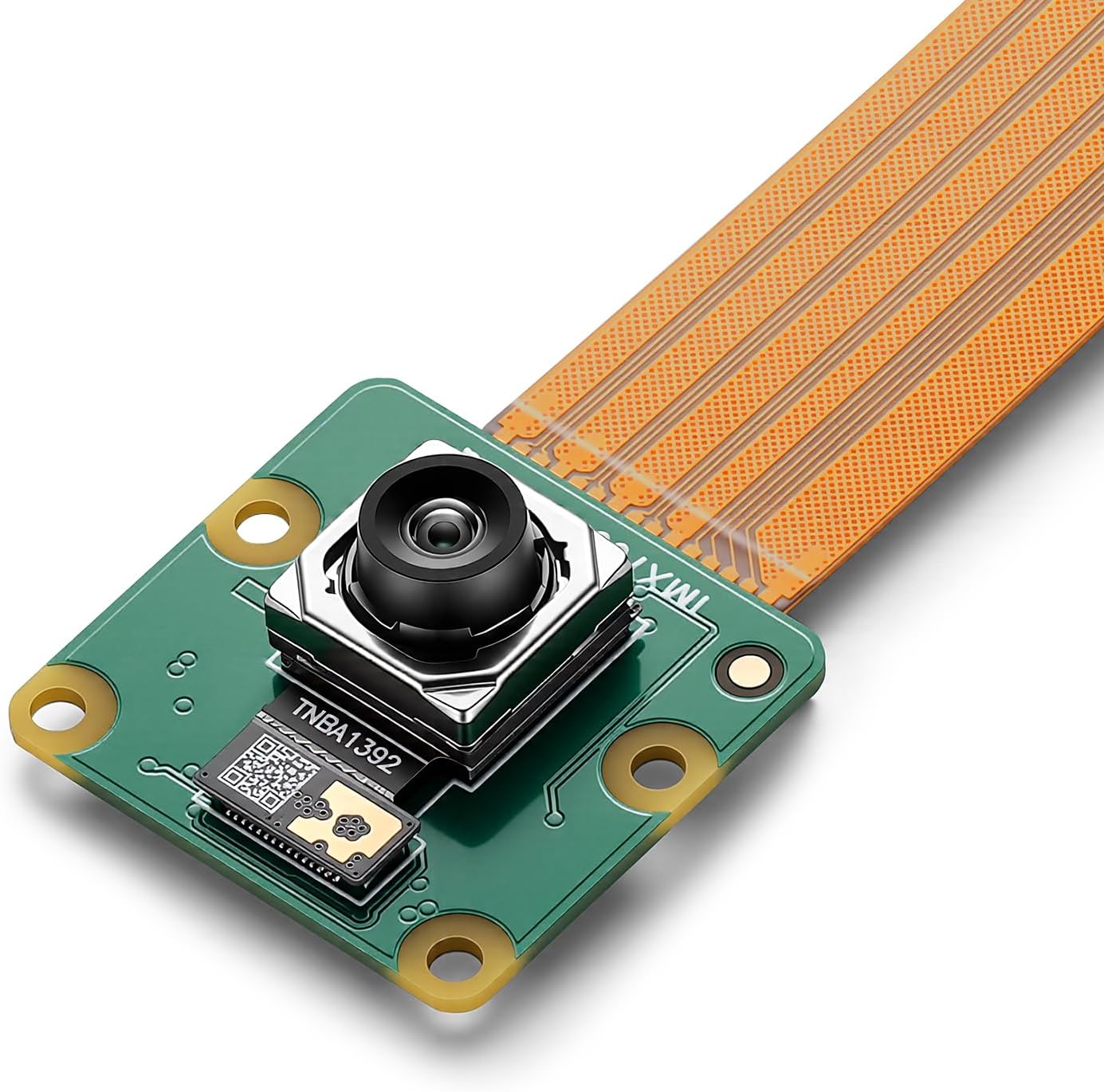
SainSmart for Raspberry Pi Camera Module 3
Bottom line: Per its Amazon listing, the SainSmart for Raspberry Pi Camera Module 3 ($28.79 on Amazon as of 2026-11-22 11:27 UTC): 120° (D) AF Edition with Phase Detection Autofocus (PDAF) for dynamic tracking 2; features 25 × 23.7 mm PCB dimensions with identical M2 mounting layout.
As an Amazon Associate, SpecPicks earns from qualifying purchases. Full disclosure →
*Price sourced from Amazon.com. Last updated 2026-11-22. Product prices and availability are accurate as of the date/time indicated and are subject to change. Any price and availability information displayed on Amazon.com at the time of purchase will apply to the purchase of this product.
Pros & Cons
Pros
- ✓ 120° (D) AF Edition with Phase Detection Autofocus (PDAF) for dynamic tracking 2
- ✓ Features 25 × 23.7 mm PCB dimensions with identical M2 mounting layout
- ✓ Backed by SainSmart's warranty and support channels
Cons
- ✗ Check the listed dimensions, connectors and platform compatibility against your setup before ordering
- ✗ Price, stock, shipping and returns are set by the retailer and may have changed since this page was last updated
Manufacturer description
About this item [12MP IMX708 Sensor with Dual Lens Options] Powered by the 12MP IMX708 sensor, available in two configurations: 1. 120° (D) AF Edition with Phase Detection Autofocus (PDAF) for dynamic tracking 2. 152° (D) Ultra-Wide Edition (Fixed Focus) for full-scene monitoring and environmental awareness [High-Speed Video for Machine Vision Applications] Supports 1080p@50fps, 720p@100fps, and 480p@120fps, delivering smooth, low-latency output. Optimized for OpenCV, robotics, object tracking, and real-time AI processing, reducing motion blur in fast-moving scenarios [Standard V1/V2 Drop-In…
SpecPicks Verdict
SpecPicks has no buyer-rating or benchmark data for SainSmart for Raspberry Pi Camera Module 3, so this read rests on the manufacturer's listed specs and the current price in the single-board computers category (how we evaluate). Compare with similarly-priced alternatives in the single-board computers category before committing. Judge it on the specification table and the price rather than on sentiment: check the figures that decide your use case, then put it side-by-side with two or three close alternatives in the Compare tool before clicking through.
Before ordering, check the listed dimensions, ports, power requirements and supported devices or systems in the spec table below against how you plan to use it, and confirm them on the retailer's listing. Prices and stock are set by the retailer and may have moved since this page was last updated.
Key Features
Quoted from the manufacturer's listing. Where it differs from the pros and cons above, those note the conditions the listing leaves out.
- [12MP IMX708 Sensor with Dual Lens Options] Powered by the 12MP IMX708 sensor, available in two configurations 1. 120° (D) AF Edition with Phase Detection Autofocus (PDAF) for dynamic tracking 2. 152° (D) Ultra-Wide Edition (Fixed Focus) for full-scene monitoring and environmental awareness
- [High-Speed Video for Machine Vision Applications] Supports 1080p@50fps, 720p@100fps, and 480p@120fps, delivering smooth, low-latency output. Optimized for OpenCV, robotics, object tracking, and real-time AI processing, reducing motion blur in fast-moving scenarios
- [Standard V1/V2 Drop-In Replacement Design] Features 25 × 23.7 mm PCB dimensions with identical M2 mounting layout. Direct replacement for Raspberry Pi Camera V1/V2 modules—no mechanical modification required for existing mounts or enclosures
- [Native libcamera Support & Pi 5 Dual-Cam Ready] Fully compatible with the libcamera stack. Supports Raspberry Pi 4B, Zero, and Pi 5, enabling dual-camera synchronization on Pi 5 for stereoscopic vision and advanced AI applications
- [Complete Kit for Flexible Integration] Includes 1x 25 × 24 × 11.5 mm IMX708 Camera Module, 1x Standard 15-pin FPC cable (for Pi 4B), and 1x 15-pin to 22-pin FPC cable (for Pi 5 / Zero). Both cables are 150mm in length (To initialize the camera, you must manually add the dtoverlay command to your /boot/firmware/config.txt file)
Full Specifications
| UPC | 810168148779 |
|---|---|
| ASIN | B0GS5MNHJB |
| Brand | SainSmart |
| Model Name | 120° Raspberry Pi Camera Module 3 |
| Unit Count | 1.0 Count |
| Manufacturer | SainSmart |
| Model Number | RCA3-120 |
| Built-In Media | camera body |
| Mfr Part Number | RCA3-120 |
| Compatible Devices | Raspberry Pi 4B, Raspberry Pi 5B, Raspberry Pi Zero |
| Included Components | camera body |
| Warranty Description | 1 Year |
| Connectivity Technology | IMX708 |
| Smart Home Compatibility | Not Smart Home Compatible |
| Full listing title | SainSmart for Raspberry Pi Camera Module 3, 12MP IMX708, 120° (D) Wide FOV, PD Autofocus, HDR, RAW10, Compatible with Pi 5, Pi 4B, Pi Zero |
Ready to buy?
SainSmart for Raspberry Pi Camera Module 3, 12MP IMX708, 120° (D) Wide FOV, PD Autofocus, HDR, RAW10, Compatible with Pi 5, Pi 4B, Pi Zero is listed on Amazon. Price, availability, shipping and returns are set by Amazon and its sellers — check the listing for current terms. SpecPicks earns a small commission on qualifying purchases — thank you for supporting independent review work.
*Price sourced from Amazon.com. Last updated 2026-11-22. Product prices and availability are accurate as of the date/time indicated and are subject to change. Any price and availability information displayed on Amazon.com at the time of purchase will apply to the purchase of this product.
Related Single-Board Computers


More guides & deep dives from the SpecPicks archive
Browse all articles & guides →- How to Build a Windows 98 Retro PC in 2026
- Best Retro Handhelds in 2026: Pocket, Mid-Tier and FPGA Picks
- Best Budget Gaming PC Build 2026 — ~$1,000 Parts List
- Best 1440p Gaming GPUs in 2026
- The Complete Voodoo5 5500 AGP Driver Guide (2026 Edition)
- Emulation Hardware in 2026: FPGA, Software, and Cart-Reader Ecosystems
- RTX 4070 Super vs RX 7800 XT — Which to Buy in 2026
More reviews from the SpecPicks archive
Browse all reviews →- FIDECO vs Unitek vs Vantec: Best IDE/SATA-to-USB Adapter for Retro PCs
- Best SSDs and Cloning Tools to Upgrade an Aging Gaming PC or Console in 2026
- Best Streaming Gear for Starting a Channel in 2026
- Best Streaming Gear for New Creators in 2026
- Build a Raspberry Pi 4 NAS with a Crucial BX500 SSD in 2026
- Running a Local Coding Agent on a Small Model: What Actually Breaks (and How to Fix It)
- Asus ProArt PA27USD 27-Inch OLED Review: Color Meets Gaming Speed
- AMD Ryzen Buying Guide 2026: Every Tier Compared
- Why a Game Boy Clone Ran Too Fast — and the DIY Fix Makers Are Building
- Best 4K Monitor for Reviewing AI-Generated Images on an RTX 3060
- Turning a Broken Steam Deck Into a 2.5GbE NAS
- Best CPU Cooler for AM5 and LGA1700 Overclocking (2026)
- GeForce FX 5900 Won't POST or Crashes in WinXP: Troubleshooting Guide
- Self-Hosting Foundry VTT: Raspberry Pi 4 vs an Old i7-9700K Box
- Adafruit's Cyberdeck Raspberry Pi Music Workstation Guide Lands
- CPU Cooler Bracket Fix: How to Secure Your CPU When It Fails
- Asus RTX 5060 Near-MSRP Deal Has Expired
- Running a Local LLM on a Raspberry Pi 4 Cluster — Realistic Expectations for 2026
- Best Quiet PC Upgrades for Apartment Gaming in 2026
- Best GPU for Running Ollama on 12GB VRAM in 2026: RTX 3060 12GB Deep-Dive
- Best Budget PC Gaming Peripherals in 2026: 5 Picks That Punch Above Their Price
- CompactFlash and IDE-to-USB Adapters for Retro PC Builds in 2026
- Strix Halo Gaming Benchmarks: What AMD's APU Can Really Do
- Local LLM Use Cases in 2026: What a 12GB Rig Actually Delivers
Earliest SpecPicks reviews
Browse full archive →- Best GPU for Llama 3.1 8B (2026)
- Best GPU for Qwen 3 14B (2026)
- Best GPU for Qwen 3 32B (2026)
- Best GPU for Llama 3.1 70B (2026)
- Best GPU for DeepSeek-R1 32B (2026)
- Best GPU for Llama 3.1 405B (2026)
- How to run Llama 3.1 8B on NVIDIA GeForce RTX 5090
- How to run Qwen 3 14B on NVIDIA GeForce RTX 5090
- How to run Qwen 3 32B on NVIDIA GeForce RTX 5090
- How to run Llama 3.1 70B on NVIDIA GeForce RTX 5090
- How to run DeepSeek-R1 32B on NVIDIA GeForce RTX 5090
- How to run Llama 3.1 8B on NVIDIA GeForce RTX 4090