
A-Tech
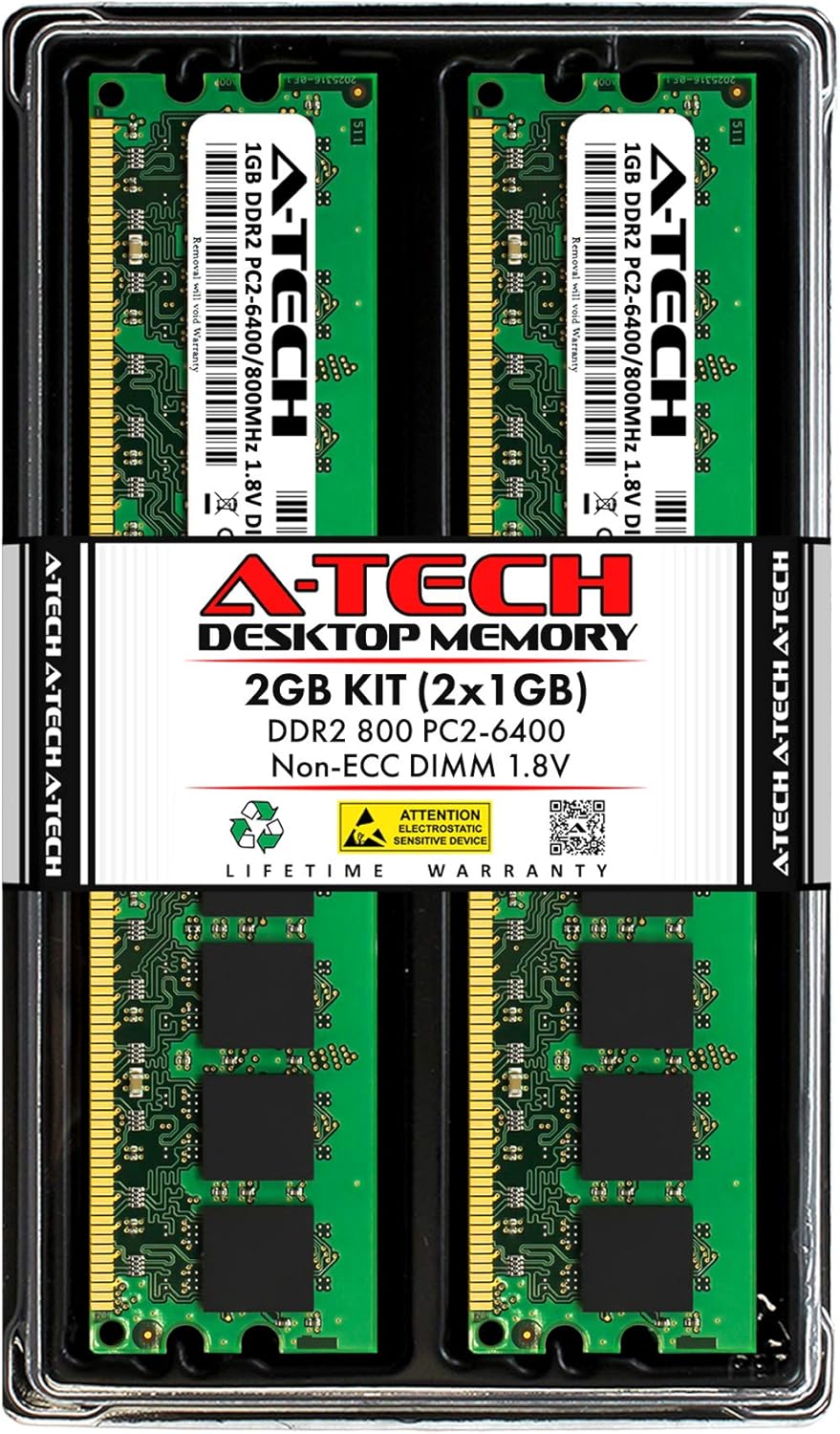
A-Tech 2GB (2x1GB) DDR2 800MHz UDIMM PC2-6400 CL6 1.8V DIMM Non-ECC Unbuffered Desktop RAM Memory Modules
Bottom line: The A-Tech 2GB (2x1GB) DDR2 800MHz UDIMM PC2-6400 CL6 1.8V DIMM Non-ECC: Matched 2x1GB pair suits dual-channel DDR2 desktop boards; main trade-off: 2GB total is tight for anything newer than XP-era workloads.
As an Amazon Associate, SpecPicks earns from qualifying purchases. Full disclosure →
Pros & Cons
Pros
- ✓ Matched 2x1GB pair suits dual-channel DDR2 desktop boards
- ✓ PC2-6400 800MHz speed, also works in boards that clock DDR2 lower
- ✓ JEDEC-standard 1.8V, so no BIOS voltage tweaks needed
- ✓ Non-ECC unbuffered UDIMM, the type consumer desktop boards use
- ✓ Lifetime warranty from A-Tech plus pre- and post-sale tech support
Cons
- ✗ 2GB total is tight for anything newer than XP-era workloads
- ✗ 1GB modules use up slots fast when you're aiming for 4GB or more
- ✗ Rank ships as 1Rx8 or 2Rx8, and you can't choose which you get
- ✗ Not for servers or workstations that require ECC or registered DIMMs
Manufacturer description
Bring an older DDR2 desktop back to usable speed with the A-Tech 2GB (2x1GB) DDR2 800MHz RAM kit. You get two 240-pin UDIMM modules rated for PC2-6400 at CL6, running at the JEDEC-standard 1.8V that DDR2 motherboards expect by default. That makes the kit a sensible pick for Core 2, Pentium D, Athlon 64 X2, and Phenom-era retro builds, office towers, and period-correct gaming rigs. The modules are non-ECC and unbuffered, the type consumer desktop boards use. Rank can be 1Rx8 or 2Rx8, so check your motherboard manual if your board is picky about module organization. Installing two matched 1GB…
SpecPicks Verdict
SpecPicks has no buyer-rating or benchmark data for A-Tech 2GB (2x1GB) DDR2 800MHz UDIMM PC2-6400 CL6 1.8V DIMM Non-ECC…, so this read rests on the manufacturer's listed specs (how we evaluate). Compare with similarly-priced alternatives in the memory & ram category before committing. On the listing's own facts, the case for it is "Matched 2x1GB pair suits dual-channel DDR2 desktop boards"; the main trade-off is "2GB total is tight for anything newer than XP-era workloads". If those two points fit how you will use it, put it beside one or two close alternatives in the Compare tool to confirm the price.
Common buyer scenarios for memory & ram of this kind: matching it to an existing build, replacing a failing part, or upgrading from a previous-generation equivalent. Check the spec table below against your current setup — particularly socket / form-factor / power-rating fields — and confirm compatibility on the retailer's listing before purchase. Prices and stock are set by the retailer and may have moved since this page was last updated.
Frequently Asked Questions
Will this A-Tech DDR2 kit work in my laptop?
No. These are 240-pin desktop DIMMs. Laptops use smaller SO-DIMM modules, so you need a DDR2 SO-DIMM kit for a notebook.
Can I use this RAM in a server that needs ECC or registered memory?
No. The modules are non-ECC and unbuffered (UDIMM). Boards that require ECC or registered/buffered DDR2 won't accept them. They're meant for consumer desktop motherboards.
Will 800MHz DDR2 work in a motherboard that only supports 667MHz or 533MHz?
DDR2 modules usually run at the board's lower supported speed. Check your motherboard or PC manual to confirm it supports PC2-6400 modules before you buy.
What voltage and timings does this memory run at?
The kit runs at the JEDEC DDR2 standard of 1.8V with CL6 latency at 800MHz (PC2-6400), so most DDR2 boards will run it at default BIOS settings.
What warranty comes with the A-Tech 2GB DDR2 kit?
A-Tech backs this kit with a lifetime warranty, and its tech support team can help before and after purchase. Check the product listing for the full warranty terms.
Key Features
Quoted from the manufacturer's listing. Where it differs from the pros and cons above, those note the conditions the listing leaves out.
- Memory RAM Compatible for select DDR2 capable Desktop, PC Computers + Easy to install at home, no expertise required
- Maximize your system's performance, boost loading speeds, and multitask with ease
- Backed by A-Tech's Lifetime Warranty + Friendly tech support team available to help before and after your purchase
- 2GB RAM Kit ( 2 x 1GB Modules ) | DDR2 DIMM 240-Pin
- Speeds up to 800MHz, PC2-6400
- NON-ECC Unbuffered ( UDIMM ) | 1Rx8 or 2Rx8 - Single or Dual Rank | JEDEC DDR2 standard 1.8V
Full Specifications
| Brand | A-Tech |
|---|---|
| Voltage | 1.8 Volts |
| RAM Size | 2 GB |
| Model Name | FBA_CT2KIT12864AA800 |
| Unit Count | 2.0 Count |
| Form Factor | DIMM |
| Memory Speed | 800 MHz |
| Model Number | FBA_CT2KIT12864AA800 |
| Compatibility | PC |
| Number of Pins | 240 |
| Mfr Part Number | FBA_CT2KIT12864AA800 |
| Memory Generation | DDR2 |
| Compatible Devices | Desktop |
| Data Transfer Rate | 6400 Megabytes Per Second |
| Memory Form Factor | UDIMM |
| Additional Features | Lightweight |
| Computer Memory Size | 2 GB |
| Warranty Description | Limited Lifetime Warranty Covering Defects In Materials And Workmanship |
| RAM Memory Technology | DDR2 |
| Column Address Strobe Latency | 6 |
Ready to buy?
A-Tech 2GB (2x1GB) DDR2 800MHz UDIMM PC2-6400 CL6 1.8V DIMM Non-ECC Unbuffered Desktop RAM Memory Modules is vintage hardware; the used and vintage market on eBay carries most of the live inventory. Prices and condition vary by seller and move in real time, so we link the live listing rather than quote a cached price. It also has an Amazon listing — check it for current price and availability. SpecPicks earns a small commission on qualifying purchases — thank you for supporting independent review work.
Related Memory & RAM


More guides & deep dives from the SpecPicks archive
Browse all articles & guides →- RTX 4070 Super vs RX 7800 XT — Which to Buy in 2026
- The Complete Voodoo5 5500 AGP Driver Guide (2026 Edition)
- Best Retro Handhelds in 2026: Pocket, Mid-Tier and FPGA Picks
- Emulation Hardware in 2026: FPGA, Software, and Cart-Reader Ecosystems
- Best 1440p Gaming GPUs in 2026
- How to Build a Windows 98 Retro PC in 2026
- Best Budget Gaming PC Build 2026 — ~$1,000 Parts List
More reviews from the SpecPicks archive
Browse all reviews →- Silent, SD-Free Retro Storage: CompactFlash + IDE on Win98/XP
- RTX 4090 AI Server vs AMD Instinct: 2025 Guide
- Best Apartment Sim Racing Wheel Setup: Quiet and Clamp-On (2026)
- Sound Blaster Live! Restoration Guide: Period-Correct Audigy FX Bridge for Win98 Builds
- Ollama on a 12GB RTX 3060: Best Models and tok/s in 2026
- Ryzen AI Max+ 395 LLM Inference: Specs, Bandwidth, Reality
- RTX 5080 vs RTX 5070: Which Blackwell GPU Should You Buy in 2026?
- AMD RX 9070 XT Hits All-Time-Low $629 in Amazon Lightning Sale
- Replace a Dying IDE Drive With CompactFlash in a Win98 Retro PC
- Forza Horizon 6 on Steam Deck: Best Settings, Dock & Storage in 2026
- KOORUI 27" 4K QD-Mini LED: Is a Budget 4K Gaming Monitor Enough for an RTX 3060?
- Qwen2.5 7B on a Budget: RTX 3060 12GB vs Ryzen 5 5600G iGPU (2026)
- Forza Horizon 6 PC Benchmarks: What GPU Hits 60 FPS at 1440p?
- Best GPU for gpt-oss 20B in 2026
- Troubleshooting Ryzen 5 5600X No-POST: Memory, BIOS, and Cooler Mount Fixes (2026)
- Retro Games With 1:1 Remakes: The Faithful Rebuild List
- Amazon RTX 5060 Deal: $324 Budget GPU for 1080p Gaming
- Build a Raspberry Pi Retro Handheld in 2026: Parts and Setup
- Gemini Intelligence Hardware Requirements Explained
- Local LLM Inference on the RTX 3060 12GB: 2026 Quantization Playbook
- Best Budget Gaming PC Parts Under $700 in 2026
- Retro Game Emulator for TV: 2025 Setup & GPU Guide
- Steam Deck Gyro Aiming for FPS Games: A Setup Guide
- Local AI Server Build 2026: RAM, VRAM and NVMe for 13B+ Models
Earliest SpecPicks reviews
Browse full archive →- Best GPU for Llama 3.1 8B (2026)
- Best GPU for Qwen 3 14B (2026)
- Best GPU for Qwen 3 32B (2026)
- Best GPU for Llama 3.1 70B (2026)
- Best GPU for DeepSeek-R1 32B (2026)
- Best GPU for Llama 3.1 405B (2026)
- How to run Llama 3.1 8B on NVIDIA GeForce RTX 5090
- How to run Qwen 3 14B on NVIDIA GeForce RTX 5090
- How to run Qwen 3 32B on NVIDIA GeForce RTX 5090
- How to run Llama 3.1 70B on NVIDIA GeForce RTX 5090
- How to run DeepSeek-R1 32B on NVIDIA GeForce RTX 5090
- How to run Llama 3.1 8B on NVIDIA GeForce RTX 4090