
Coolgear
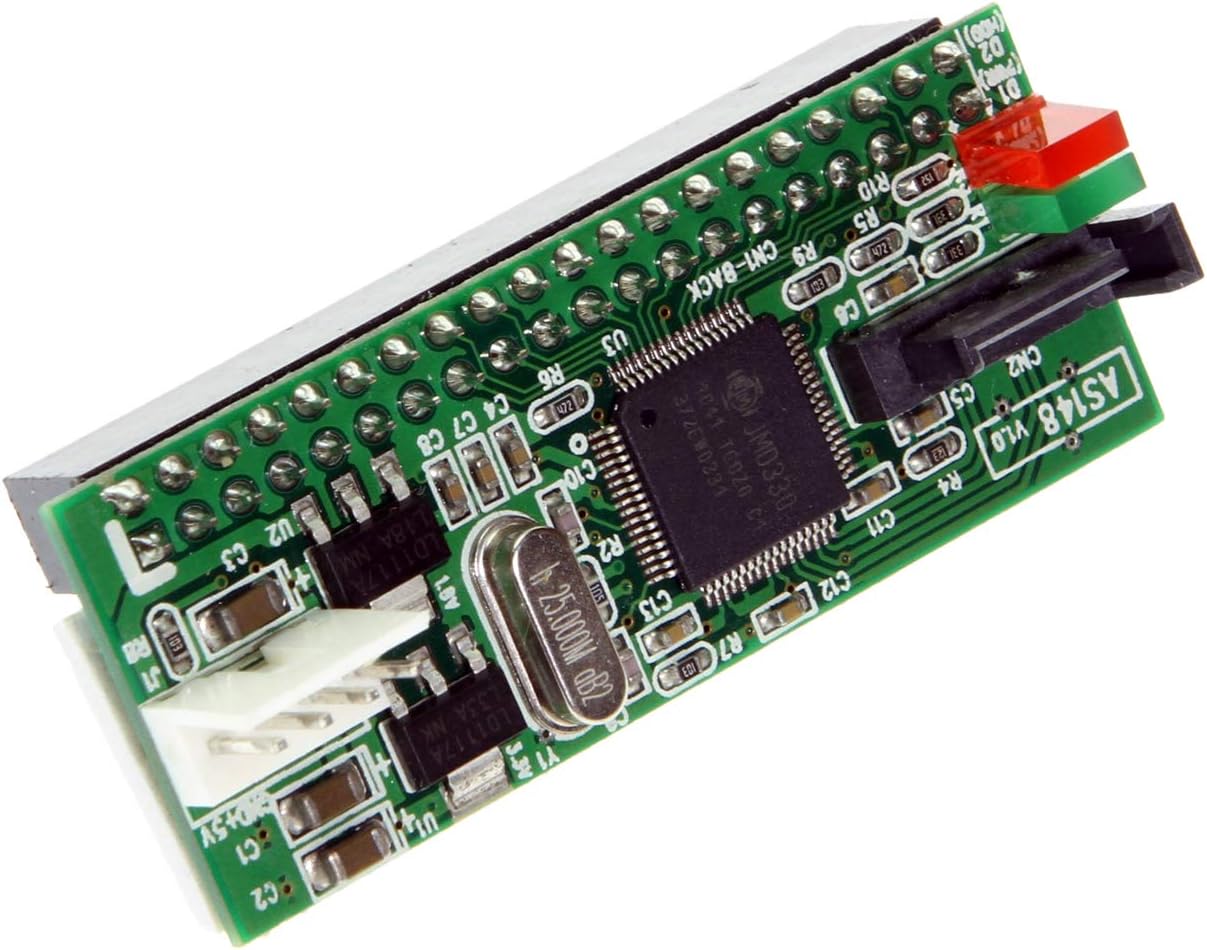
Coolgear IDE Hard Drive to SATA Port Adapter
Bottom line: Per its Amazon listing, the Coolgear IDE Hard Drive to SATA Port Adapter: supports Serial ATA with data transfer rate up to 150MB/s; works with ANY Brand Hard Drive from 40GB up to 750GB.
As an Amazon Associate, SpecPicks earns from qualifying purchases. Full disclosure →
Pros & Cons
Pros
- ✓ Built with Chipset JMicron JM20330
- ✓ Backed by Coolgear's warranty and support channels
Cons
- ✗ Confirm socket / form-factor / power-rating compatibility against your build before ordering
- ✗ Price, stock, shipping and returns are set by the retailer and may have changed since this page was last updated
SpecPicks Verdict
SpecPicks has no buyer-rating or benchmark data for Coolgear IDE Hard Drive to SATA Port Adapter, so this read rests on the manufacturer's listed specs (how we evaluate). Compare with similarly-priced alternatives in the storage adapters category before committing. Judge it on the specification table and the price rather than on sentiment: check the figures that decide your use case, then put it side-by-side with two or three close alternatives in the Compare tool before clicking through.
Before ordering, match it to the drive and the host: the drive interface it takes (SATA, NVMe or other), the drive sizes it accepts, whether it powers a 3.5" drive (desktop drives need 12V, which a USB port alone does not supply), and the USB or PCIe generation of the port you will plug it into, which caps the transfer speed. Prices and stock are set by the retailer and may have moved since this page was last updated.
Key Features
Quoted from the manufacturer's listing. Where it differs from the pros and cons above, those note the conditions the listing leaves out.
- Built with Chipset JMicron JM20330
- Dimension 56(L) x 20(W) x 23(H)mm
- Supports Serial ATA with data transfer rate up to 150MB/s
- Works with ANY Brand Hard Drive from 40GB up to 750GB. Supports SATA I and SATA II MotherBoard Input.
- OS Support: Win98SE / 2000 / ME / XP /Vista & Windows 7 32 and 64 Bit as well as all Linux Versions
Full Specifications
| Brand | Coolgear |
|---|---|
| Color | Clear/Silver |
| OS Support | Win98SE / 2000 / ME / XP /Vista & Windows 7 32 and 64 Bit as well as all Linux Versions |
| Unit Count | 1.0 Count |
| Model Number | SS-IDESATA |
| Compatibility | Linux |
| Connector Type | sata |
| Mfr Part Number | SS-IDESATA |
| Warranty Description | 1 Year |
| Item Package Quantity | 1 |
| Global Trade Identification Number | 00729440691523 |
Ready to buy?
Coolgear IDE Hard Drive to SATA Port Adapter is listed on Amazon. Price, availability, shipping and returns are set by Amazon and its sellers — check the listing for current terms. SpecPicks earns a small commission on qualifying purchases — thank you for supporting independent review work.
Related Storage Adapters


More guides & deep dives from the SpecPicks archive
Browse all articles & guides →- Best 1440p Gaming GPUs in 2026
- Best Budget Gaming PC Build 2026 — ~$1,000 Parts List
- Emulation Hardware in 2026: FPGA, Software, and Cart-Reader Ecosystems
- The Complete Voodoo5 5500 AGP Driver Guide (2026 Edition)
- RTX 4070 Super vs RX 7800 XT — Which to Buy in 2026
- Best Retro Handhelds in 2026: Pocket, Mid-Tier and FPGA Picks
- How to Build a Windows 98 Retro PC in 2026
More reviews from the SpecPicks archive
Browse all reviews →- When a Game Boy Clone Runs Too Fast: The Crystal-Swap Fix Behind a Viral Repair
- Building a 2002 LAN Party PC: GeForce 4 Ti + Athlon XP
- Logitech G502 Hero vs SteelSeries QcK: Building a Competitive FPS Loadout in 2026
- Ryzen AI Max+ 'Gorgon Halo' 192GB vs RTX 3060 12GB for Local LLMs
- Raspberry Pi AI HAT+ 2: 40 TOPS Hailo-10H Specs and Verdict
- Self-Host Jellyfin on a Ryzen 5 5600G Mini Build in 2026: Measured Power and Transcoding
- Thinking Machines Drops Inkling, a 975B Open Model Leading US Labs
- Enthusiast Hides Gaming PC Inside Living Room Fan
- Is Your First Homelab Right? A 2026 Hardware Sanity Check on a Ryzen 5 5600G
- Dumping and Imaging Vintage IDE and CompactFlash Drives in 2026: A Safe Workflow
- Anthropic's 2GW AMD Deal: What It Means for Local-vs-Cloud Builders
- llama.cpp vs vLLM for Single-User Local Chat in 2026: Which Wins on a 12GB GPU?
- Old RAM Identification: Decode Part Numbers & Specs
- Llama.cpp Console Released: What Changes for Local LLM Operators on a 12GB GPU
- VibeThinker-3B: A 3B Reasoning Model on RTX 3060 and Raspberry Pi 4
- Ryzen 7 5800X vs 5700X for Gaming: Is the $60 Gap Worth It?
- Period-Correct 1999 Voodoo2 SLI + Pentium III LAN-Party Build Log (2026)
- Installing 3dfx Voodoo Glide Drivers on Windows 98 in 2026
- Build a Silent Home NAS on a Raspberry Pi 4 8GB With a SATA SSD (2026)
- Best Mouse Pad for FPS and MOBA Esports Players (2026)
- Best CPU Cooler for a Ryzen Build in 2026 (Air & AIO)
- Best Streaming & Content-Creation Starter Kit in 2026
- Ryzen AI Max 385 Mini PC: Specs and What It's Really For
- Raspberry Pi 4 as a SimHub Dash for a Logitech G29 Rig
Earliest SpecPicks reviews
Browse full archive →- Best GPU for Llama 3.1 8B (2026)
- Best GPU for Qwen 3 14B (2026)
- Best GPU for Qwen 3 32B (2026)
- Best GPU for Llama 3.1 70B (2026)
- Best GPU for DeepSeek-R1 32B (2026)
- Best GPU for Llama 3.1 405B (2026)
- How to run Llama 3.1 8B on NVIDIA GeForce RTX 5090
- How to run Qwen 3 14B on NVIDIA GeForce RTX 5090
- How to run Qwen 3 32B on NVIDIA GeForce RTX 5090
- How to run Llama 3.1 70B on NVIDIA GeForce RTX 5090
- How to run DeepSeek-R1 32B on NVIDIA GeForce RTX 5090
- How to run Llama 3.1 8B on NVIDIA GeForce RTX 4090