

Linksys
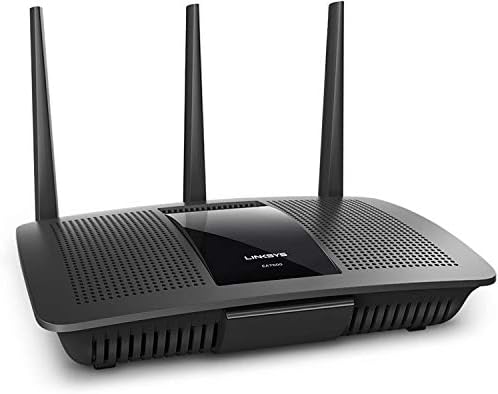
Linksys EA8300 Max-Stream: AC2200 Tri-Band Wi-Fi Router for Wireless Home Network
Status: Linksys EA8300 Max-Stream: AC2200 Tri-Band Wi-Fi…: Unavailable on Amazon as of . SpecPicks has no in-stock listing with matching specs on file; the search below lists current offers. eBay sellers may still list this model new or used.
Bottom line: The Linksys EA8300 Max-Stream: AC2200 Tri-Band Wi-Fi Router: Two separate 5 GHz bands split streaming and gaming traffic onto different radios; main trade-off: wi-Fi 5 (802.11ac), so no Wi-Fi 6 OFDMA or WPA3 on newer clients.
As an Amazon Associate, SpecPicks earns from qualifying purchases. Full disclosure →
Search Amazon for an in-stock match → Original listing (currently unavailable) →
Compare to similar networking
Pros & Cons
Pros
- ✓ Two separate 5 GHz bands split streaming and gaming traffic onto different radios
- ✓ 2.2 Gbps combined throughput: 867 + 867 + 400 Mbps across three bands
- ✓ MU-MIMO serves multiple clients at once instead of taking turns
- ✓ Four Gigabit Ethernet ports for console, desktop, or NAS wired runs
- ✓ Amazon-exclusive 18-month extended warranty beyond standard coverage
Cons
- ✗ Wi-Fi 5 (802.11ac), so no Wi-Fi 6 OFDMA or WPA3 on newer clients
- ✗ Second 5 GHz band caps at 400 Mbps, well under the primary 867 Mbps
- ✗ 1,500 sq ft ceiling leaves larger or multi-story homes needing a node
- ✗ 15-device guidance is easy to exceed in a smart-home setup
Manufacturer description
The Linksys EA8300 Max-Stream is a tri-band AC2200 router built for households that run out of Wi-Fi before they run out of devices. Three bands split the load: one 2.4 GHz band at 867 Mbps and two separate 5 GHz bands at 867 Mbps and 400 Mbps, for a combined 2.2 Gbps of throughput. That extra 5 GHz radio matters when a 4K stream, a game session, and a dozen phones are all competing at once, because the router can hand each group its own lane instead of queuing them on one. MU-MIMO serves multiple clients simultaneously rather than round-robin, and four high-performance antennas push…
SpecPicks Verdict
SpecPicks has no buyer-rating or benchmark data for Linksys EA8300 Max-Stream: AC2200 Tri-Band Wi-Fi Router, so this read rests on the manufacturer's listed specs (how we evaluate). Compare with similarly-priced alternatives in the networking category before committing. On the listing's own facts, the case for it is "Two separate 5 GHz bands split streaming and gaming traffic onto different radios"; the main trade-off is "Wi-Fi 5 (802.11ac), so no Wi-Fi 6 OFDMA or WPA3 on newer clients". If those two points fit how you will use it, put it beside one or two close alternatives in the Compare tool to confirm the price.
Before ordering, check the listed dimensions, ports, power requirements and supported devices or systems in the spec table below against how you plan to use it, and confirm them on the retailer's listing. Prices and stock are set by the retailer and may have moved since this page was last updated.
Frequently Asked Questions
How much area does the EA8300 actually cover?
Linksys rates it at up to 1,500 square feet for 15 or more wireless devices. Coverage in practice depends on wall construction and router placement, so treat that as a ceiling for a single unit rather than a guarantee.
What do the three bands run at?
Combined speeds reach 2.2 Gbps: one 5 GHz band at 867 Mbps, a second 5 GHz band at 400 Mbps, and a 2.4 GHz band at 867 Mbps. The router assigns devices across them so heavy clients do not share one radio.
Do I still need my modem?
Yes. The EA8300 works with your existing modem and does not replace it. Connect the modem to the router's WAN port, then complete setup through the Linksys App.
Is this a Wi-Fi 6 router?
No. The EA8300 is an AC2200 802.11ac (Wi-Fi 5) router with MU-MIMO. Wi-Fi 6 clients will connect and work fine, but they fall back to Wi-Fi 5 rates and features.
What warranty comes with it?
This Amazon-exclusive version includes an extended 18-month warranty. Check the current product listing for full terms and any regional differences before purchasing.
Key Features
Quoted from the manufacturer's listing. Where it differs from the pros and cons above, those note the conditions the listing leaves out.
- Provides up to 1,500 square feet of Wi-Fi coverage for 15plus wireless devices
- Works with existing modem, simple setup through Linksys App
- Enjoy 4K HD streaming, gaming and more in high quality without buffering
- Tri band technology delivers the fastest combined Wi-Fi speeds to all your devices
- Tri band Wi-Fi speeds up to 2.2 Gbps (5 GHz / 400 Mbps) plus (5 GHz / 867 Mbps) plus (2.4 GHz / 867 Mbps)
- MU MIMO (Multi User Multiple Input Multiple Output) provides Wi-Fi to multiple devices at once, at the same high speed
Full Specifications
| Brand | Linksys |
|---|---|
| Color | Black, Blue |
| Voltage | 240 Volts |
| Coverage | Up to 1,500 square feet |
| Frequency | 2.4 GHz |
| Model Name | EA8300 |
| Unit Count | 1.0 Count |
| Antenna Type | Retractable |
| Connectivity | Wireless, WiFi, 2.4GHz |
| Model Number | EA8300 |
| Built-In Media | Wi-Fi Router |
| Control Method | App |
| Item Type Name | Linksys Tri-Band WiFi Router for Home (Max-Stream AC2200 MU-MIMO Fast Wireless Router) |
| Connection Type | Wireless |
| Controller Type | Vera |
| Mfr Part Number | EA8300 |
| Number of Ports | 4 |
| Special Feature | Guest Mode, WPS |
| Antenna Location | Gaming, Home |
| Wi-Fi Generation | Wi-Fi 5 |
| Full listing title | Linksys EA8300 Max-Stream: AC2200 Tri-Band Wi-Fi Router for Wireless Home Network, Uninterrupted Gaming and Streaming, MU-MIMO (Black) |
Ready to buy?
Amazon shows no buyable offer for Linksys EA8300 Max-Stream: AC2200 Tri-Band Wi-Fi… at the last check. An Amazon search for this model lists current offers. SpecPicks earns a small commission on qualifying purchases — thank you for supporting independent review work.
Related Networking



More guides & deep dives from the SpecPicks archive
Browse all articles & guides →- RTX 4070 Super vs RX 7800 XT — Which to Buy in 2026
- Best Budget Gaming PC Build 2026 — ~$1,000 Parts List
- Emulation Hardware in 2026: FPGA, Software, and Cart-Reader Ecosystems
- How to Build a Windows 98 Retro PC in 2026
- The Complete Voodoo5 5500 AGP Driver Guide (2026 Edition)
- Best 1440p Gaming GPUs in 2026
- Best Retro Handhelds in 2026: Pocket, Mid-Tier and FPGA Picks
More reviews from the SpecPicks archive
Browse all reviews →- Best Storage Kit for Archiving a Physical Game Collection in 2026
- Best 4K Gaming Monitor Under $500 in 2026
- Building a 1998 Voodoo2 SLI Glide Rig in 2026: CompactFlash Boot and Quake II
- 8BitDo Pro 2 on Win98 SE and WinXP: Mapping a Modern Bluetooth Pad to DOSBox, Glide Games, and…
- Raspberry Pi 5 Pinout Guide: The Full 40-Pin GPIO Breakdown
- Best NVMe SSD for Local AI Model Storage in 2026
- Hailo-8 vs Hailo-8L vs Coral TPU: Which AI Accelerator Wins on Raspberry Pi 5?
- RTX 3060 12GB vs Intel Arc B580 for 1080p gaming: FPS per dollar (2026)
- Intel Arc A770 LLM Performance: Local Inference Guide
- Best Peripherals for a Modern Retro-PC LAN Party (2026)
- 2002 GeForce 4 Ti Win98 Build: CompactFlash Storage Done Right
- Samsung SSD Brand Guide 2026: Every Drive Worth Buying
- Rescue Dying Vintage IDE & SATA Drives with a USB Adapter Before They Fail
- Why PSU Fans Aren't Built for Repairability
- GameSir G7 SE vs 8BitDo Pro 2 vs DualSense for PC
- Microsoft + Nvidia Agent PCs vs a DIY RTX 3060 12GB Local-Agent Box
- Linux Gaming Is Getting Faster: Windows APIs Hit the Kernel
- Best Streaming and Podcasting Gear for 2026: 5 Picks for Mic, Light, and Monitoring
- Building a Silent Pentium III Windows 98 Gaming Rig in 2026
- Noctua NH-U12S vs Cooler Master ML240L: Which Cools a 5800X?
- Steam Deck OLED vs ROG Ally X vs Legion Go: 2026 Gaming Handheld Shootout
- GeForce FX 5900 Won't POST or Crashes in WinXP: Troubleshooting Guide
- AMD EXPO Ultra-Low Latency BIOS Updates: 600-Series Guide
- How to Image and Preserve Vintage IDE and CompactFlash Drives in 2026
Earliest SpecPicks reviews
Browse full archive →- Best GPU for Llama 3.1 8B (2026)
- Best GPU for Qwen 3 14B (2026)
- Best GPU for Qwen 3 32B (2026)
- Best GPU for Llama 3.1 70B (2026)
- Best GPU for DeepSeek-R1 32B (2026)
- Best GPU for Llama 3.1 405B (2026)
- How to run Llama 3.1 8B on NVIDIA GeForce RTX 5090
- How to run Qwen 3 14B on NVIDIA GeForce RTX 5090
- How to run Qwen 3 32B on NVIDIA GeForce RTX 5090
- How to run Llama 3.1 70B on NVIDIA GeForce RTX 5090
- How to run DeepSeek-R1 32B on NVIDIA GeForce RTX 5090
- How to run Llama 3.1 8B on NVIDIA GeForce RTX 4090