

LTC
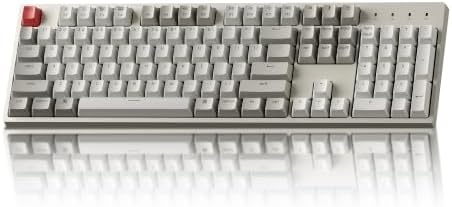
LTC NB681 Nimbleback Wired 65% Mechanical Keyboard
Bottom line: The LTC NB681 Nimbleback Wired 65% Mechanical Keyboard: Hot-swap PCB takes 3-pin and 5-pin MX-style switches, including Gateron and Kailh; main trade-off: wired-only Type-C connection; no wireless mode listed.
As an Amazon Associate, SpecPicks earns from qualifying purchases. Full disclosure →
Pros & Cons
Pros
- ✓ Hot-swap PCB takes 3-pin and 5-pin MX-style switches, including Gateron and Kailh
- ✓ 65% layout keeps dedicated arrow, navigation and control keys in just 68 keys
- ✓ Two built-in USB 2.0 passthrough ports for a mouse, flash drive or phone charging
- ✓ 18 onboard RGB modes with 5 brightness and 5 speed levels
- ✓ LTC software remaps keys, records macros and customizes lighting
Cons
- ✗ Wired-only Type-C connection; no wireless mode listed
- ✗ Passthrough ports are USB 2.0, so flash drive transfers run slower
- ✗ No dedicated function row; F-keys sit on a secondary layer
- ✗ Brown switches give a mild bump, not the click some typists want
Manufacturer description
The LTC NB681 Nimbleback is a wired 65% mechanical keyboard that fits 68 keys into a compact footprint. It still keeps the dedicated arrow, navigation and control keys that many smaller boards drop, so you get more desk room for mouse sweeps without giving up the keys you use for editing and gaming. The hot-swappable PCB accepts both 3-pin and 5-pin MX-style switches from brands like Gateron and Kailh. You can change the feel later without a soldering iron. Out of the box, this white version ships with brown switches, which have a light tactile bump and low noise. That makes them a good fit…
SpecPicks Verdict
SpecPicks has no buyer-rating or benchmark data for LTC NB681 Nimbleback Wired 65% Mechanical Keyboard, so this read rests on the manufacturer's listed specs (how we evaluate). Compare with similarly-priced alternatives in the gaming peripherals category before committing. On the listing's own facts, the case for it is "Hot-swap PCB takes 3-pin and 5-pin MX-style switches, including Gateron and Kailh"; the main trade-off is "Wired-only Type-C connection; no wireless mode listed". If those two points fit how you will use it, put it beside one or two close alternatives in the Compare tool to confirm the price.
Before ordering, check the listed dimensions, load rating and mounting or device compatibility in the spec table below against how you plan to use it, and confirm them on the retailer's listing. Prices and stock are set by the retailer and may have moved since this page was last updated.
Frequently Asked Questions
Can I change the switches on the LTC NB681 Nimbleback?
Yes. The hot-swap PCB accepts both 3-pin and 5-pin MX-style switches, including Gateron and Kailh models, so you can pull the stock brown switches and fit new ones without soldering.
Does this 65% keyboard have arrow keys?
Yes. The 68-key layout keeps dedicated arrow keys plus separate navigation and control keys. What it drops is the function row and the number pad.
Will the NB681 work with a Mac?
LTC lists compatibility with Windows 7, 8 and 10, iOS and Mac. For whether the LTC driver software for remapping and macros runs on macOS, check the manufacturer's product listing.
What can I plug into the USB ports on the keyboard?
The keyboard has two built-in USB 2.0 passthrough ports. You can use them for a mouse, a flash drive or other peripherals, or to charge a phone or accessories.
Is the LTC NB681 wireless?
No. It connects with a wired Type-C cable, which LTC specifies for a stable, high-speed connection. No Bluetooth or 2.4GHz mode is listed.
Key Features
Quoted from the manufacturer's listing. Where it differs from the pros and cons above, those note the conditions the listing leaves out.
- Compact but Practical 65% Layout - Ultra-compact design with 68 keys portable layout. Geared with the practical arrow, navigation, and control keys, it well balanced the characteristic of functional and space-saving.
- Hot-swappable All-around Brown - Hot-swap PCB allows you to replace 3 pins/5 pins switches freely, compatible with any MX-style switch (brands like Gateron and Kailh, etc.).Equipped with brown switch which compromises the merit of tactile bump and low noise. A good blend of typing and gaming.
- 2 USB 2.0 Ports and Type-C Wired Connection - 2 built-in USB passthrough ports allow you to connect more periphery devices such as mouse and flash disk directly into the keyboard for easy access and faster productivity. You can also use it as charging ports for cell phones and accessories. The type-C wired connection method guarantees a high speed and stable data transmission.
- Dynamic RGB Backlight - 18 preset backlight modes available on board. 5 brightness and flowing speed levels adjustable. Gorgeous color schemes and reactive effects.
- Professional Software Supports - Remap keys' function, assign macros, and customize RGB lighting effect with the powerful LTC drive. The keyboard is compatible with win7,win8,win10, iOS, and MAC system.
Full Specifications
| Brand | LTC |
|---|---|
| Color | White |
| Style | Contemporary |
| Theme | Gaming |
| Model Name | NB681 |
| Style Name | Contemporary |
| Unit Count | 1 Count |
| Switch Type | Tactile |
| Connectivity | USB |
| Model Number | NB681 |
| Power Source | Corded Electric |
| Compatibility | Switch, iOS, Mac |
| Series Number | 681 |
| Built-In Media | USB Cable |
| Number of Keys | 68 |
| Button Quantity | 68 |
| Connection Type | Wired |
| Keyboard Layout | AZERTY |
| Number of Packs | 1 |
| Special Feature | Lighting |
| Full listing title | LTC NB681 Nimbleback Wired 65% Mechanical Keyboard, RGB Backlit Ultra-Compact 68 Keys Gaming Keyboard with Hot-Swappable Switch and Stand-Alone Arrow/Control Keys (Hot Swappable Brown Switch, White) |
Ready to buy?
LTC NB681 Nimbleback Wired 65% Mechanical Keyboard, RGB Backlit Ultra-Compact 68 Keys Gaming Keyboard with Hot-Swappable Switch and Stand-Alone Arrow/Control Keys (Hot Swappable Brown Switch, White) is listed on Amazon. Price, availability, shipping and returns are set by Amazon and its sellers — check the listing for current terms. SpecPicks earns a small commission on qualifying purchases — thank you for supporting independent review work.
Related Gaming Peripherals


More guides & deep dives from the SpecPicks archive
Browse all articles & guides →- Emulation Hardware in 2026: FPGA, Software, and Cart-Reader Ecosystems
- The Complete Voodoo5 5500 AGP Driver Guide (2026 Edition)
- Best Retro Handhelds in 2026: Pocket, Mid-Tier and FPGA Picks
- Best 1440p Gaming GPUs in 2026
- Best Budget Gaming PC Build 2026 — ~$1,000 Parts List
- RTX 4070 Super vs RX 7800 XT — Which to Buy in 2026
- How to Build a Windows 98 Retro PC in 2026
More reviews from the SpecPicks archive
Browse all reviews →- ComfyUI on an RTX 3060 12GB: SDXL Throughput and VRAM Tuning
- MiniMax-M3 Tops Open-Weight Models at Intelligence Index 55
- Offline Suitcase Robot: Jetson Orin NX SUPER + Gemma 4 E4B
- Self-Hosting Immich on a Raspberry Pi 4 8GB: Power and Performance
- Best Budget AM4 Build for Local LLM Inference in 2026
- MicroPython Now Runs on the Super Nintendo — Here's What That Means
- Secluso: Private DIY Home Security on a Raspberry Pi 4
- Qwen 3.6 35B-A3B-MTP on a GTX 1060 6GB: How Far Can Old GPUs Still Go?
- Sound BlasterX G6 vs Audigy FX for Modern Retro WinXP Gaming
- Best CPU Cooler for the Ryzen 7 5800X: Air vs 240mm AIO
- OpenAI Codex Price War vs Running a Local Coding Model on an RTX 3060
- GPT-5.6 Sol at One-Third the Cost: When Local Inference Still Wins
- Asus ROG Harpe II Extreme Brings a 65K-DPI Sensor — and a Gold Price Tag
- Qwen2.5 7B on a Budget: RTX 3060 12GB vs Ryzen 5 5600G iGPU (2026)
- DualSense vs 8BitDo Pro 2 vs GameSir G7 SE: Best PC Controller in 2026
- Best Gaming CPU for 1080p and 1440p Builds in 2026
- Xbox Cloud Gaming in 2025: How It Works & What You Need
- How to run DeepSeek-R1 32B on Arc B580
- How to run Qwen 3 14B on NVIDIA GeForce RTX 5080
- Build a 2001 GeForce 3 Windows 98 Gaming PC in 2026: Parts and Setup
- Local LLM Agent Infrastructure: 2026 Hardware Guide
- OG NeoGeo Stick vs 8BitDo SN30 Pro: Which Feels More Period-Correct for Fighting Games in 2026?
- Run DeepSeek Locally on a 12GB RTX 3060: 2026 Quant Guide
- Core i7-9700K vs Ryzen 7 5800X for 1440p Gaming in 2026
Earliest SpecPicks reviews
Browse full archive →- Best GPU for Llama 3.1 8B (2026)
- Best GPU for Qwen 3 14B (2026)
- Best GPU for Qwen 3 32B (2026)
- Best GPU for Llama 3.1 70B (2026)
- Best GPU for DeepSeek-R1 32B (2026)
- Best GPU for Llama 3.1 405B (2026)
- How to run Llama 3.1 8B on NVIDIA GeForce RTX 5090
- How to run Qwen 3 14B on NVIDIA GeForce RTX 5090
- How to run Qwen 3 32B on NVIDIA GeForce RTX 5090
- How to run Llama 3.1 70B on NVIDIA GeForce RTX 5090
- How to run DeepSeek-R1 32B on NVIDIA GeForce RTX 5090
- How to run Llama 3.1 8B on NVIDIA GeForce RTX 4090