
Western Digital
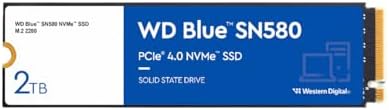
Western Digital 2TB WD Blue SN580 NVMe Internal Solid State Drive SSD (WDS200T3B0E)
Bottom line: The Western Digital 2TB WD Blue SN580 NVMe Internal Solid State Drive SSD ($324.99 on Amazon as of 2026-11-28 08:14 UTC): PCIe Gen4 x4 NVMe with sequential reads rated up to 4,150 MB/s; main trade-off: 4,150 MB/s peak is mid-tier for a PCIe Gen4 drive.
As an Amazon Associate, SpecPicks earns from qualifying purchases. Full disclosure →
*Price sourced from Amazon.com. Last updated 2026-11-28. Product prices and availability are accurate as of the date/time indicated and are subject to change. Any price and availability information displayed on Amazon.com at the time of purchase will apply to the purchase of this product.
Pros & Cons
Pros
- ✓ PCIe Gen4 x4 NVMe with sequential reads rated up to 4,150 MB/s
- ✓ 2TB on one slim M.2 2280 stick fits most laptops and desktops
- ✓ nCache 4.0 speeds up copying of large video and media files
- ✓ Low-power design helps extend laptop battery life
- ✓ 900TBW endurance rating backed by a 5-year limited warranty
Cons
- ✗ 4,150 MB/s peak is mid-tier for a PCIe Gen4 drive
- ✗ Warranty ends early if the 900TBW write limit is reached first
- ✗ Rated speeds come from internal testing and vary by host and workload
- ✗ Listing gives no sequential write or random IOPS figures
Manufacturer description
The Western Digital WD Blue SN580 2TB NVMe SSD (model WDS200T3B0E) is a PCIe Gen4 x4 upgrade for creators, professionals and anyone with a laptop or desktop that has an M.2 2280 slot. Western Digital rates the 1TB and 2TB models for sequential reads of up to 4,150 MB/s, so large projects, game libraries and applications load faster than they would from a SATA drive or a hard disk. Western Digital's nCache 4.0 technology is built to speed up copies of large files and media assets. That helps when you move 4K video footage, photo libraries or big project folders. The full 2TB fits on a single…
SpecPicks Verdict
SpecPicks has no buyer-rating or benchmark data for Western Digital 2TB WD Blue SN580 NVMe Internal Solid State Drive SSD, so this read rests on the manufacturer's listed specs and the current price in the ssds & storage category (how we evaluate). Compare with similarly-priced alternatives in the ssds & storage category before committing. On the listing's own facts, the case for it is "PCIe Gen4 x4 NVMe with sequential reads rated up to 4,150 MB/s"; the main trade-off is "4,150 MB/s peak is mid-tier for a PCIe Gen4 drive". If those two points fit how you will use it, put it beside one or two close alternatives in the Compare tool to confirm the price.
Common buyer scenarios for ssds & storage of this kind: matching it to an existing build, replacing a failing part, or upgrading from a previous-generation equivalent. Check the spec table below against your current setup — particularly socket / form-factor / power-rating fields — and confirm compatibility on the retailer's listing before purchase. Prices and stock are set by the retailer and may have moved since this page was last updated.
Frequently Asked Questions
How fast is the WD Blue SN580 2TB?
Western Digital rates the 1TB and 2TB SN580 models for sequential reads of up to 4,150 MB/s over PCIe Gen4 x4. That figure comes from Western Digital's internal testing, and real-world speed depends on your host device, usage conditions and drive capacity.
Will the SN580 fit in my laptop or desktop?
It uses the M.2 2280 form factor (22 mm wide, 80 mm long) with an NVMe PCIe interface, so it needs an M.2 2280 slot that supports NVMe. Check your laptop or motherboard manual to confirm the slot type and the PCIe generation it supports.
What is the endurance rating and warranty on the 2TB model?
The 2TB model is rated for up to 900TBW (terabytes written), calculated with the JEDEC client workload (JESD219). Western Digital covers it with a 5-year limited warranty that ends at 5 years or when the 900TBW limit is reached, whichever comes first.
How much usable space will I actually get?
Western Digital counts 1TB as 1 trillion bytes, so your operating system will report somewhat less than 2TB once the drive is formatted. The exact usable capacity depends on your operating environment.
Is the WD Blue SN580 good for video editing and large files?
It is built for that kind of work. Western Digital's nCache 4.0 technology speeds up copies of large files and media assets such as 4K video, and the 2TB capacity can hold your applications and media libraries on one drive.
Key Features
Quoted from the manufacturer's listing. Where it differs from the pros and cons above, those note the conditions the listing leaves out.
- Boost productivity or design creatives effortlessly by upgrading to PCIe Gen 4.0 SSDs with up to 4,150 MB/s (2) read speeds (1TB and 2TB (1) models)
- Make light work of heavy files with Western Digital’s nCache 4.0 technology enabling blistering fast copying of large files or media assets
- With up to 2TB (1) of storage on a slim M.2 2280 form-factor, applications, data, and media such as photos, 4K videos, and music can be stored on the same drive
- Keep creating uninterrupted when you’re in the zone or on the go with low-power storage to maximize your laptop’s battery life
- NVMe delivers application responsiveness while multitasking between projects with large and complex workflows
- Rated up to 900TBW (3) (2TB (1) model only) with Western Digital’s 5-year limited warranty (4) for peace of mind reliability
Full Specifications
| Brand | Western Digital |
|---|---|
| Color | Blue |
| Model Name | SN580 |
| Unit Count | 1 Count |
| Form Factor | M.2 2280 |
| Media Speed | 4150 |
| Model Number | WDS200T3B0E |
| Built-In Media | Internal Solid State Drive |
| Hard-Drive Size | 2000 GB |
| Mfr Part Number | WDS200T3B0E |
| Number of Items | 1 |
| Special Feature | Acronis migration software |
| Hardware Platform | PC |
| Installation Type | Internal Hard Drive |
| Compatible Devices | Laptop, Desktop, PC |
| Data Transfer Rate | 4150 megabytes_per_second |
| Enclosure Material | Nand Flash |
| Additional Features | Acronis migration software |
| Hard Disk Interface | NVMe |
| Warranty Description | 5 year limited warranty |
| Full listing title | Western Digital 2TB WD Blue SN580 NVMe Internal Solid State Drive SSD - Gen4 x4 PCIe 16Gb/s, M.2 2280, Up to 4,150 MB/s - WDS200T3B0E |
Ready to buy?
Western Digital 2TB WD Blue SN580 NVMe Internal Solid State Drive SSD - Gen4 x4 PCIe 16Gb/s, M.2 2280, Up to 4,150 MB/s - WDS200T3B0E is listed on Amazon. Price, availability, shipping and returns are set by Amazon and its sellers — check the listing for current terms. SpecPicks earns a small commission on qualifying purchases — thank you for supporting independent review work.
*Price sourced from Amazon.com. Last updated 2026-11-28. Product prices and availability are accurate as of the date/time indicated and are subject to change. Any price and availability information displayed on Amazon.com at the time of purchase will apply to the purchase of this product.
Related SSDs & Storage



More guides & deep dives from the SpecPicks archive
Browse all articles & guides →- Emulation Hardware in 2026: FPGA, Software, and Cart-Reader Ecosystems
- How to Build a Windows 98 Retro PC in 2026
- Best 1440p Gaming GPUs in 2026
- The Complete Voodoo5 5500 AGP Driver Guide (2026 Edition)
- Best Budget Gaming PC Build 2026 — ~$1,000 Parts List
- Best Retro Handhelds in 2026: Pocket, Mid-Tier and FPGA Picks
- RTX 4070 Super vs RX 7800 XT — Which to Buy in 2026
More reviews from the SpecPicks archive
Browse all reviews →- Best Budget SATA SSD for Gaming PC Builds in 2026: 5 Picks Tested for Steam Library Speed
- Why Direct3D Killed Glide: How the 3dfx Voodoo Empire Lost the API Wars
- Best SATA SSD for a PS4 Slim and Emulation Box in 2026
- Best USB Microphone for Discord and Office Calls Under $200 (2026)
- Best Mouse Pad for Competitive FPS Aiming on Large Desks (2026)
- Jetson Orin Nano Super vs Hailo-8 AI HAT+: Which Edge-AI Path Is Right for You?
- KOORUI vs Samsung Odyssey: Best 27-inch 4K Gaming Monitor in 2026
- Ryzen 7 5800X vs Ryzen 5 5600G for a Budget Gaming Build
- How to Image a 90s Big-Box CD-ROM to CompactFlash for IDE-Adapter Retro PCs
- Best CPU for Gaming in 2026: Intel vs AMD Showdown
- Claude Opus 4.8 Takes #1 on the Artificial Analysis Intelligence Index at 61.4
- The $500M Claude Bill: What Local LLM Inference Actually Costs
- Imaging a vintage IDE hard drive with a USB adapter in 2026
- Linux 7.3: 'Flatten the Pick' Scheduler Gains for Gaming
- Is the RTX 3060 12GB Still Worth It for 1080p and 1440p Gaming in 2026?
- Raspberry Pi Pico W Becomes a Driverless USB WiFi Adapter
- Best Budget SSD for Gaming PC Builds in 2026: 5 Picks
- Best SSD for PS4 Pro Upgrade in 2026: SATA Picks That Actually Cut Load Times
- Grok Imagine Video 1.5 Hits #2 — But Local Video Gen on an RTX 3060 Is Still Free
- ComfyUI on an RTX 3060 12GB: Flux and SDXL Speeds in 2026
- Best Noctua and Quiet-Tier CPU Coolers in 2026
- Best Sound Card and DAC for Competitive FPS Players in 2026
- AI coding assistants ranked — Claude Code, Cursor, GitHub Copilot, Aider
- 3dfx Voodoo3 3000 PCI vs Voodoo5 5500 AGP: Win98 Performance Synthesis (2026)
Earliest SpecPicks reviews
Browse full archive →- Best GPU for Llama 3.1 8B (2026)
- Best GPU for Qwen 3 14B (2026)
- Best GPU for Qwen 3 32B (2026)
- Best GPU for Llama 3.1 70B (2026)
- Best GPU for DeepSeek-R1 32B (2026)
- Best GPU for Llama 3.1 405B (2026)
- How to run Llama 3.1 8B on NVIDIA GeForce RTX 5090
- How to run Qwen 3 14B on NVIDIA GeForce RTX 5090
- How to run Qwen 3 32B on NVIDIA GeForce RTX 5090
- How to run Llama 3.1 70B on NVIDIA GeForce RTX 5090
- How to run DeepSeek-R1 32B on NVIDIA GeForce RTX 5090
- How to run Llama 3.1 8B on NVIDIA GeForce RTX 4090