VILONG
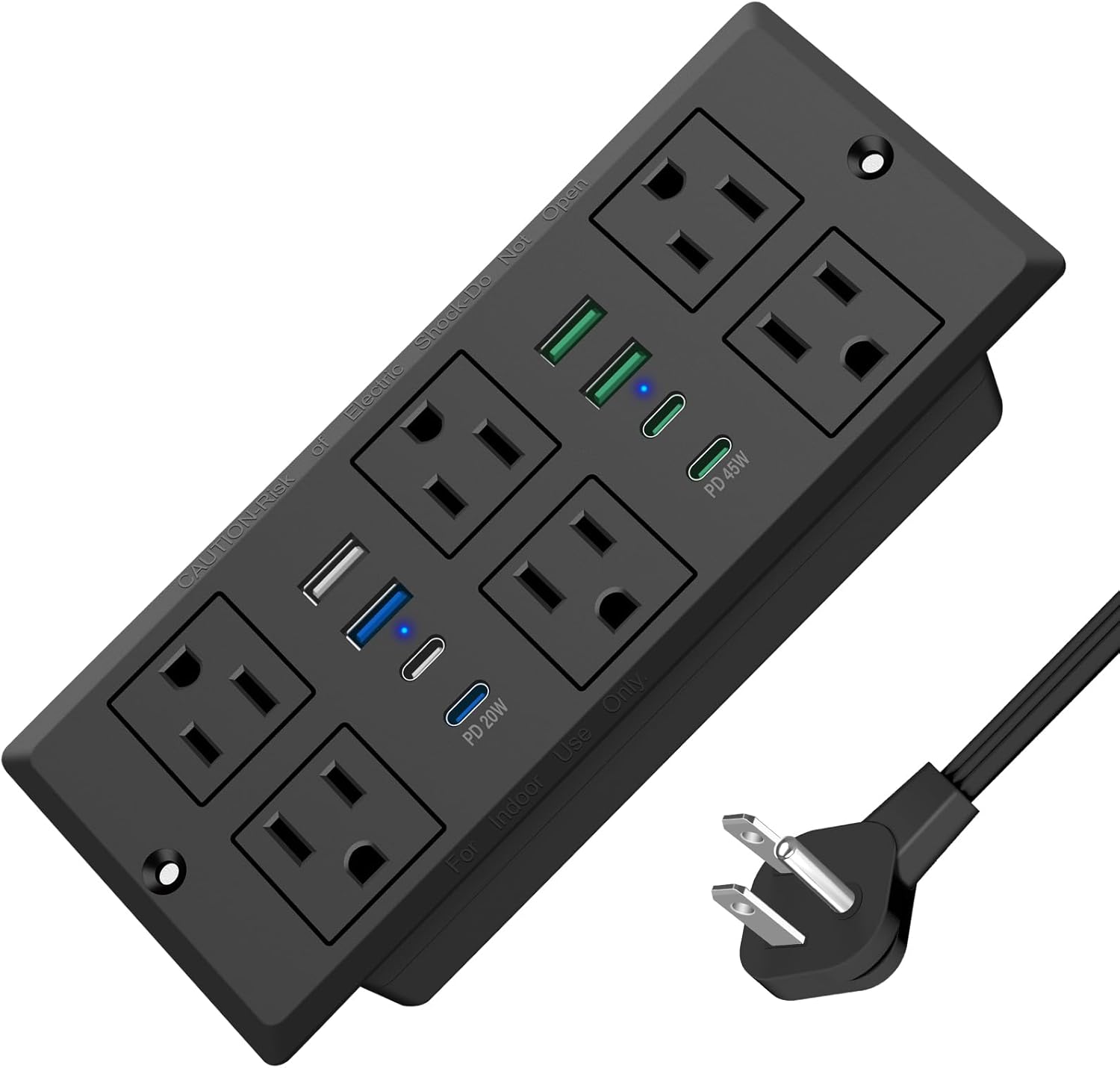
VILONG 45W Recessed Power Strip, Flush Mount, 6AC Outlet, 8USB Ports, 1200J
Bottom line: The VILONG 45W Recessed Power Strip: Two USB-C PD ports up to 45W, enough for many laptops and tablets; main trade-off: needs a permanent hole cut in your desk; not a move-anywhere strip.
As an Amazon Associate, SpecPicks earns from qualifying purchases. Full disclosure →
Pros & Cons
Pros
- ✓ Two USB-C PD ports up to 45W, enough for many laptops and tablets
- ✓ 8 USB ports total: 4 USB-C plus 4 USB-A on one flush panel
- ✓ 1200J surge protection plus over-current and short-circuit guards
- ✓ 45-degree flat plug sits close to the wall behind furniture
- ✓ Compact 6 x 2.6 in cutout fits standing desks and conference tables
Cons
- ✗ Needs a permanent hole cut in your desk; not a move-anywhere strip
- ✗ Only 2 of the 8 USB ports reach 45W; the rest top out at 20W or less
- ✗ 1500W total AC capacity is shared across all 6 outlets
- ✗ 6ft cord may be short for large conference tables
Manufacturer description
The VILONG 45W Recessed Power Strip sits flush in your desk or conference table, so power is within reach and you don't have a bulky strip on the work surface. Cut a 6 in x 2.6 in rectangle, drop the unit in, and screw it tight. You get 6 AC outlets and 8 USB ports in one panel. The USB side covers most of what's on a desk. Two USB-C PD ports reach up to 45W for a laptop or tablet. Two more USB-C PD ports top out at 20W for fast phone charging, three USB-A ports handle up to 18W, and one QC3.0 USB-A port delivers 5V/2.1A. The AC outlets are rated 12A, 125V/60Hz and 1500W in total. A built-in…
SpecPicks Verdict
SpecPicks has no buyer-rating or benchmark data for VILONG 45W Recessed Power Strip, so this read rests on the manufacturer's listed specs (how we evaluate). Compare with similarly-priced alternatives in the home & kitchen category before committing. On the listing's own facts, the case for it is "Two USB-C PD ports up to 45W, enough for many laptops and tablets"; the main trade-off is "Needs a permanent hole cut in your desk; not a move-anywhere strip". If those two points fit how you will use it, put it beside one or two close alternatives in the Compare tool to confirm the price.
Before ordering, check the listed dimensions, load rating and mounting or device compatibility in the spec table below against how you plan to use it, and confirm them on the retailer's listing. Prices and stock are set by the retailer and may have moved since this page was last updated.
Frequently Asked Questions
What size hole do I need to cut to install the VILONG recessed power strip?
The hole cut size is 6 in long by 2.6 in wide. Cut a rectangle in the table surface, set the outlet in, and screw it tight to secure it.
Can the USB-C ports charge a laptop?
Two USB-C PD ports deliver up to 45W (5V/3A, 9V/3A, 12V/2.5A, 15V/2A), which suits many laptops and tablets that charge over USB-C. The other two USB-C ports max out at 20W, which is better suited to phones.
How many devices can I plug in at once?
You get 6 AC outlets and 8 USB ports: 2 USB-C at 45W, 2 USB-C at 20W, 3 USB-A at up to 18W and 1 QC3.0 USB-A at 5V/2.1A. Total AC load is rated at 12A, 125V/60Hz, 1500W.
Does it have surge protection?
Yes. It has a built-in 1200J surge protector plus over-current, over-voltage and short-circuit protection, inside an ABS+PC fire-resistant shell.
How long is the power cord and what kind of plug does it use?
It comes with a 6ft cable that ends in a 45-degree flat plug, which lets it sit close to the wall behind a desk or cabinet. Check the product listing for current warranty terms.
Key Features
Quoted from the manufacturer's listing. Where it differs from the pros and cons above, those note the conditions the listing leaves out.
- ✔ Recessed Power Strip with USB Ports- Allows easy access to 6 outlets & 8 USB ports connections. With a 6ft cable and a 45° flat plug.(12A 125V/60Hz 1500W)This desk outlet is perfect for your conference table, standing desk, office, home, etc.
- ✔ Conference Recessed Power Strip-Adopting an ABS+PC fire-resistant outer shell and built-in 1200J surge protector to maximize electrical safety and protection against power surges.
- ✔Built in Power Strip- Hole cut size: L6 in * W2.6 in. Cut a rectangle in the table, place the recessed outlet in, then screw it tight. This unique recessed plug outlet gets rid of bulky adapters and messy plugs.
- ✔PD 45W Fast Charger- PD 45W 2USB-C 5V/3A, 9V/3A, 12V/2.5A, 15V/2A(Max 45W), PD 20W 2USB-C 5V/3A, 9V/3A, 12V/2.5A, 15V/2A(Max 20W), PD 20W 3USB-A 5V/3A (MAX 18W), QC3.0 USB-A Port 5V/2.1A MAX
- ✔1200J Surge Protection- Functional over-current, over-voltage, and short-circuit protection effectively protect your devices from damage and ensure safer overnight charging
Full Specifications
| Brand | VILONG |
|---|---|
| Color | Black |
| Shape | Rectangle |
| Voltage | 125 |
| Amperage | 12 A |
| Plug Type | Type C |
| Unit Count | 1 Count |
| Connectivity | USB |
| Model Number | JN02-06-03 |
| Compatibility | PC |
| Maximum Current | 12 A |
| Number of Ports | 6 |
| Power Plug Type | Type C |
| Special Feature | PD45W Fast Charging Usb Slot, Surge Protection, recessed Mountable |
| Total Usb Ports | 8 |
| Number of Outlets | 14 |
| Compatible Devices | [Any device with a standard North American plug] |
| Enclosure Material | Acrylonitrile Butadiene Styrene |
| Total Power Outlets | 14 |
| Warranty Description | 1 year manufacturer |
Ready to buy?
VILONG 45W Recessed Power Strip, Flush Mount, 6AC Outlet, 8USB Ports, 1200J is listed on Amazon. Price, availability, shipping and returns are set by Amazon and its sellers — check the listing for current terms. SpecPicks earns a small commission on qualifying purchases — thank you for supporting independent review work.
Related Home & Kitchen


More guides & deep dives from the SpecPicks archive
Browse all articles & guides →- How to Build a Windows 98 Retro PC in 2026
- Best 1440p Gaming GPUs in 2026
- Emulation Hardware in 2026: FPGA, Software, and Cart-Reader Ecosystems
- The Complete Voodoo5 5500 AGP Driver Guide (2026 Edition)
- RTX 4070 Super vs RX 7800 XT — Which to Buy in 2026
- Best Retro Handhelds in 2026: Pocket, Mid-Tier and FPGA Picks
- Best Budget Gaming PC Build 2026 — ~$1,000 Parts List
More reviews from the SpecPicks archive
Browse all reviews →- Best Streaming Starter Kit for Creators in 2026
- Meta Muse Spark 1.1 Hits 51 on the Intelligence Index: The Local Angle
- Best 4K Monitor for PS5 (4K/120Hz) in 2026
- Best Controller for Emulation and Retro Gaming on PC (2026)
- Can a Ryzen AI Max+ 395 Mini-PC With 128GB Run Big LLMs? The r/LocalLLaMA Question
- GeForce 4 Ti 4600 Won't Boot Past POST: AGP Voltage and BIOS Field Guide
- Period-Correct Storage for a Windows XP Gaming Rig: SSD, CompactFlash, or IDE?
- Raspberry Pi Projects for Home Automation in 2025
- Best Gaming CPU for 1080p and 1440p Builds in 2026
- Sub-$300 4K Mini-LED Gaming Monitors Hit the Mainstream
- Best CPU Coolers for Ryzen in 2026: 5 Tested Picks
- Win98 SE on 1GB+ RAM: The vcache Fix Every Retro Builder Needs
- 768GB Optane vs RTX 3060 12GB: The Trillion-Param LLM Reality
- How to run Qwen 3 14B on AMD Radeon RX 7900 XTX
- IBM Granite 4.1 (3B / 8B / 30B): Local Inference Benchmarks and Hardware Picks
- Booting Windows 98 From CompactFlash: The Silent Solid-State Retro Drive
- FLUX.2 Klein 4B for Halloween Art: RTX 3060 12GB vs RTX 5060 8GB
- GPT-5.6 Sol matches Fable 5 near one-third the cost
- ComfyUI for NVIDIA Cosmos 3 on an RTX 3060 12GB: Setup + Limits
- 1999 Dream Build Reborn: Voodoo3, Pentium III, CF Storage
- RX 7900 XTX 24GB vs RTX 4080 16GB for Local LLM Inference (2026)
- What a $15 Raspberry Pi Zero W Can Still Do in 2026
- Voodoo3 3000 Won't POST: Troubleshooting a 1999 Build in 2026
- Period-Correct Windows XP Gaming PC: 2002-2005 Build Guide for 2026
Earliest SpecPicks reviews
Browse full archive →- Best GPU for Llama 3.1 8B (2026)
- Best GPU for Qwen 3 14B (2026)
- Best GPU for Qwen 3 32B (2026)
- Best GPU for Llama 3.1 70B (2026)
- Best GPU for DeepSeek-R1 32B (2026)
- Best GPU for Llama 3.1 405B (2026)
- How to run Llama 3.1 8B on NVIDIA GeForce RTX 5090
- How to run Qwen 3 14B on NVIDIA GeForce RTX 5090
- How to run Qwen 3 32B on NVIDIA GeForce RTX 5090
- How to run Llama 3.1 70B on NVIDIA GeForce RTX 5090
- How to run DeepSeek-R1 32B on NVIDIA GeForce RTX 5090
- How to run Llama 3.1 8B on NVIDIA GeForce RTX 4090