

DLisiting
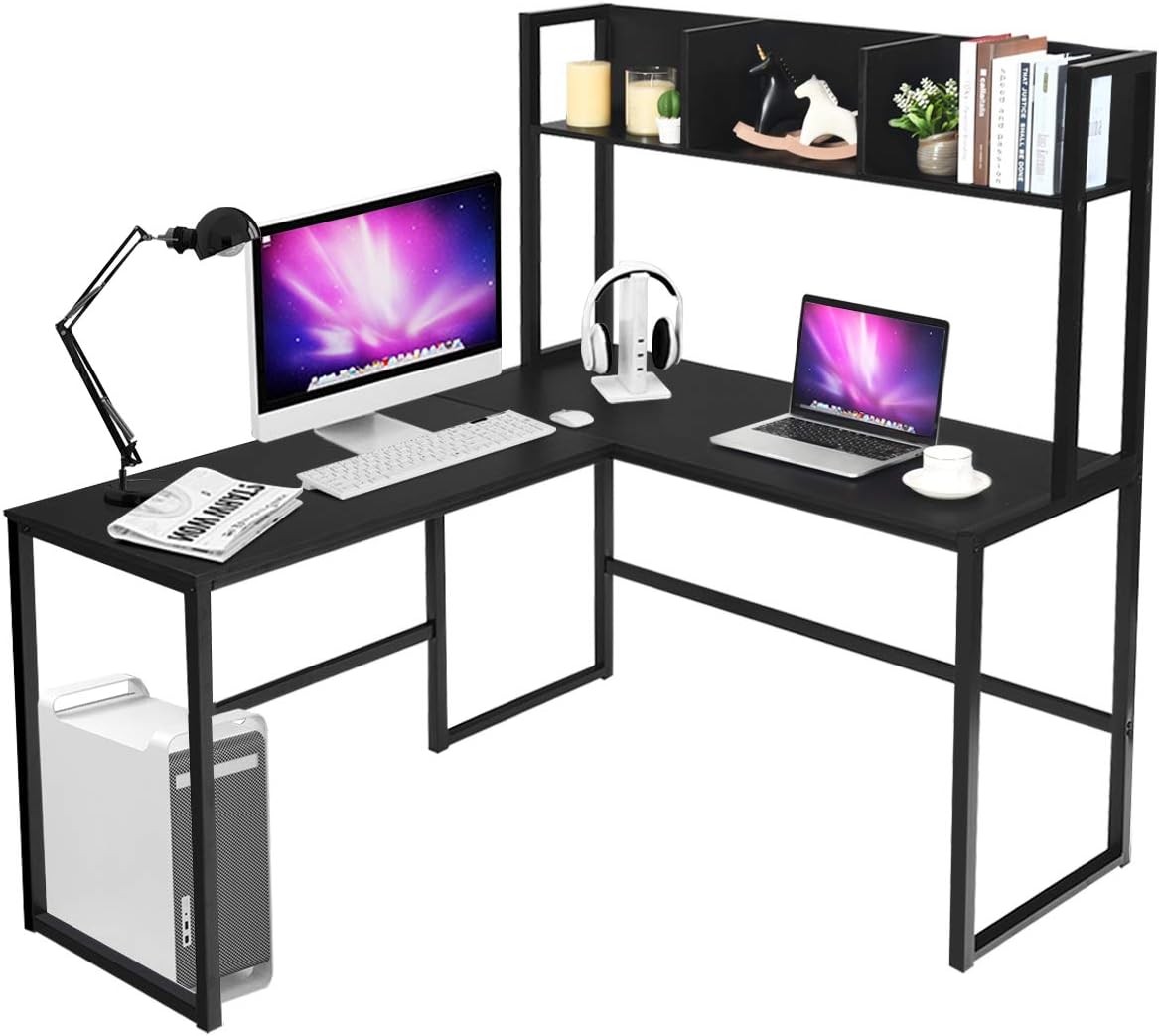
DLisiting Small L Shaped Gaming Desk with Shelves
Bottom line: The DLisiting Small L Shaped Gaming Desk with Shelves: Built-in power strip with 3 AC outlets and 2 USB charging ports; main trade-off: P2 particle board top, not solid wood or steel.
As an Amazon Associate, SpecPicks earns from qualifying purchases. Full disclosure →
Pros & Cons
Pros
- ✓ Built-in power strip with 3 AC outlets and 2 USB charging ports
- ✓ 40 inch L shape fits tight bedroom or dorm corners
- ✓ 2 shelves mount left or right at two different heights
- ✓ Extra steel brackets and adjustable leg pads keep the top level
- ✓ Assembles in about 20 minutes with the included tool
Cons
- ✗ P2 particle board top, not solid wood or steel
- ✗ Listing gives no maximum weight capacity
- ✗ Only 3 AC outlets; a multi-device setup may need an extra strip
- ✗ No cable management tray or grommets mentioned in the listing
Manufacturer description
The DLisiting Small L Shaped Gaming Desk fits a full PC setup into a 40 inch corner footprint, so it works well in a teen's bedroom, a dorm, or a small home office. You get a built-in power strip with 3 AC outlets and 2 USB charging ports, which means your monitor, PC, controller and phone can all charge at the desk instead of from a power strip on the floor. Two storage shelves let you set up the space the way you want. You can mount them on the left or right side, and at either of two heights, so there is room for a console, speakers, books or a printer. The splice-board top is thick P2…
SpecPicks Verdict
SpecPicks has no buyer-rating or benchmark data for DLisiting Small L Shaped Gaming Desk with Shelves, so this read rests on the manufacturer's listed specs (how we evaluate). Compare with similarly-priced alternatives in the gaming desks category before committing. On the listing's own facts, the case for it is "Built-in power strip with 3 AC outlets and 2 USB charging ports"; the main trade-off is "P2 particle board top, not solid wood or steel". If those two points fit how you will use it, put it beside one or two close alternatives in the Compare tool to confirm the price.
Common buyer scenarios for gaming desks: matching surface dimensions to the room footprint and monitor count, checking height-adjustment range for sit-stand setups, verifying cable-management channels for a clean multi-monitor build, and confirming weight capacity for a full tower + dual-monitor load. Review the spec sheet for assembly difficulty before ordering.
Frequently Asked Questions
How many outlets and USB ports does the built-in power strip have?
The power strip has 3 AC power outlets and 2 USB charging ports, enough for a computer, a monitor and a phone or tablet charging at the same time.
Can I put the shelves on the left or right side?
Yes. The 2 storage shelves can go on either the left or the right side, and you can mount them at two different heights to fit your storage needs.
What is the desktop made of?
The top is thick P2 particle board with a scratch-resistant, anti-collision and waterproof surface. The frame uses extra fixed steel brackets for stability.
How long does assembly take, and do I need my own tools?
Assembly takes about 20 minutes. A detailed instruction manual and the required tool come in the box, so you don't need any other tools.
Will it scratch my floor or wobble on uneven ground?
Adjustable leg pads let you level the desk, and non-slip, anti-scratch protectors under the legs protect the floor and reduce noise when you move it.
Key Features
Quoted from the manufacturer's listing. Where it differs from the pros and cons above, those note the conditions the listing leaves out.
- Safety Multifunctional Power Strip: The computer desk includes a built-in power strip with 3 power outlets & 2 USB charging ports for your computer, monitor, gaming gear, pad, phone and other electronic devices.
- Modern Simple Style Design: Computer desk with 2 storage shelves, you can try this two installation methods (left or right), and have two different heights of installation, you can customize the storage space to your needs. This splice board desk is made of thick P2 particle wood board with scratch-resistant, anti-collision and waterproof, protect home office desk surface from daily wear and tear.
- Sturdy Structure: Extra fixed steel brackets and adjustable leg pads provide greater stability, ensure the desktop is level, non-slip & anti-scratch protectors under the legs to protect your floor from scratching and reducing noises when moving. It can suit for the teenager or writers workstation.
- Easy Assemble: A detailed instruction manual and tool are provided, no other tools required, quick and easy to assemble, about 20 minutes.
- After-sale Service: Provides professional customer service, easy and fast replacement is guaranteed if have quality problem of the desk, please feel free to contact us.
Full Specifications
| Base | Metal |
|---|---|
| Size | 40'' |
| Brand | DLisiting |
| Color | Black |
| Shape | L-Shape |
| Style | Modern |
| Base Type | Metal |
| Room Type | Bedroom, Living Room, Office |
| Top Color | Black |
| Base Color | Black |
| Item Depth | 27.5 inches |
| Model Name | L shaped deks |
| Style Name | Modern |
| Unit Count | 1 Count |
| Desk Design | Computer Desk, Writing Desk |
| Desk design | Computer Desk, Writing Desk |
| Finish Type | Powder Coated |
| Connectivity | USB |
| Finish Types | Powder Coated |
| Model Number | LST-LS2SP40-Black |
| Full listing title | DLisiting Small L Shaped Gaming Desk with Shelves, 40 Inch Small Corner Computer Gaming Desk for Boys Teens Bedroom, Study Work PC Desks for Home Office Bedroom, Black |
Ready to buy?
DLisiting Small L Shaped Gaming Desk with Shelves, 40 Inch Small Corner Computer Gaming Desk for Boys Teens Bedroom, Study Work PC Desks for Home Office Bedroom, Black is listed on Amazon. Price, availability, shipping and returns are set by Amazon and its sellers — check the listing for current terms. SpecPicks earns a small commission on qualifying purchases — thank you for supporting independent review work.
Related Gaming Desks



More guides & deep dives from the SpecPicks archive
Browse all articles & guides →- Best Budget Gaming PC Build 2026 — ~$1,000 Parts List
- Best Retro Handhelds in 2026: Pocket, Mid-Tier and FPGA Picks
- How to Build a Windows 98 Retro PC in 2026
- Best 1440p Gaming GPUs in 2026
- RTX 4070 Super vs RX 7800 XT — Which to Buy in 2026
- Emulation Hardware in 2026: FPGA, Software, and Cart-Reader Ecosystems
- The Complete Voodoo5 5500 AGP Driver Guide (2026 Edition)
More reviews from the SpecPicks archive
Browse all reviews →- Intel llm-scaler-vllm 1.4: Arc Pro B70 Inference Support Lands
- Best CPU Cooler for AM4 Ryzen in 2026
- Anker's Thus Chip Claims 150x AI Boost: No Benchmarks Yet
- Etched's Transformer-Only Inference Chip vs Your GPU: What Changes for Local Builders
- Best NVMe SSD for Local AI Model Storage in 2026
- Best Budget Local-LLM Box: RTX 3060 12GB + Ryzen 5 5600G
- Best Retro PC Storage Adapters in 2026: IDE, SATA & CompactFlash Picks
- RX 580 in 2026: Still Worth It for 1080p Gaming?
- Mount a 90s Big-Box CD-ROM ISO on Win98 Without a CD Drive: The CompactFlash + IDE Workflow
- IPEX-LLM + Ollama on Intel Arc: Setup, tok/s, and the RTX 3060 Reality Check
- Best SATA SSDs Under $100 in 2026: 5 Picks for Boot Drives, Upgrades, and Retro PCs
- Old RAM Identification: Decode Part Numbers & Specs
- Best AIO Liquid CPU Coolers for High-TDP Builds in 2026
- Best SSD for Steam Deck and Handheld Emulation in 2026
- Forza Horizon 6 on Steam Deck: Best Dock and Controller Setup for 2026
- Best Budget AM4 Gaming PC Parts in 2026
- oQ vs Q4_K/Q6_K vs MXFP4 vs UD-MLX: Which Quantization Format Should You Pick in 2026?
- Best CPU Cooler for High-TDP Builds (2026)
- Intel Core Ultra 7 270K Plus: Dual-Channel Memory Scaling Tested
- Sega's TMSS Explained: The Lock-Out Chip Behind the Genesis, and Why It Still Trips Up Reissues
- Set Up a Local LLM Coding Assistant in VS Code on an RTX 3060 12GB (2026)
- How to Run a SATA SSD on a Windows XP Retro Gaming PC (AHCI + Adapters)
- Best SSD for PS4 Pro in 2026: SATA Upgrades That Cut Load Times
- Raspberry Pi Zero 2W: Privacy-Preserving Ring Alternative
Earliest SpecPicks reviews
Browse full archive →- Best GPU for Llama 3.1 8B (2026)
- Best GPU for Qwen 3 14B (2026)
- Best GPU for Qwen 3 32B (2026)
- Best GPU for Llama 3.1 70B (2026)
- Best GPU for DeepSeek-R1 32B (2026)
- Best GPU for Llama 3.1 405B (2026)
- How to run Llama 3.1 8B on NVIDIA GeForce RTX 5090
- How to run Qwen 3 14B on NVIDIA GeForce RTX 5090
- How to run Qwen 3 32B on NVIDIA GeForce RTX 5090
- How to run Llama 3.1 70B on NVIDIA GeForce RTX 5090
- How to run DeepSeek-R1 32B on NVIDIA GeForce RTX 5090
- How to run Llama 3.1 8B on NVIDIA GeForce RTX 4090