
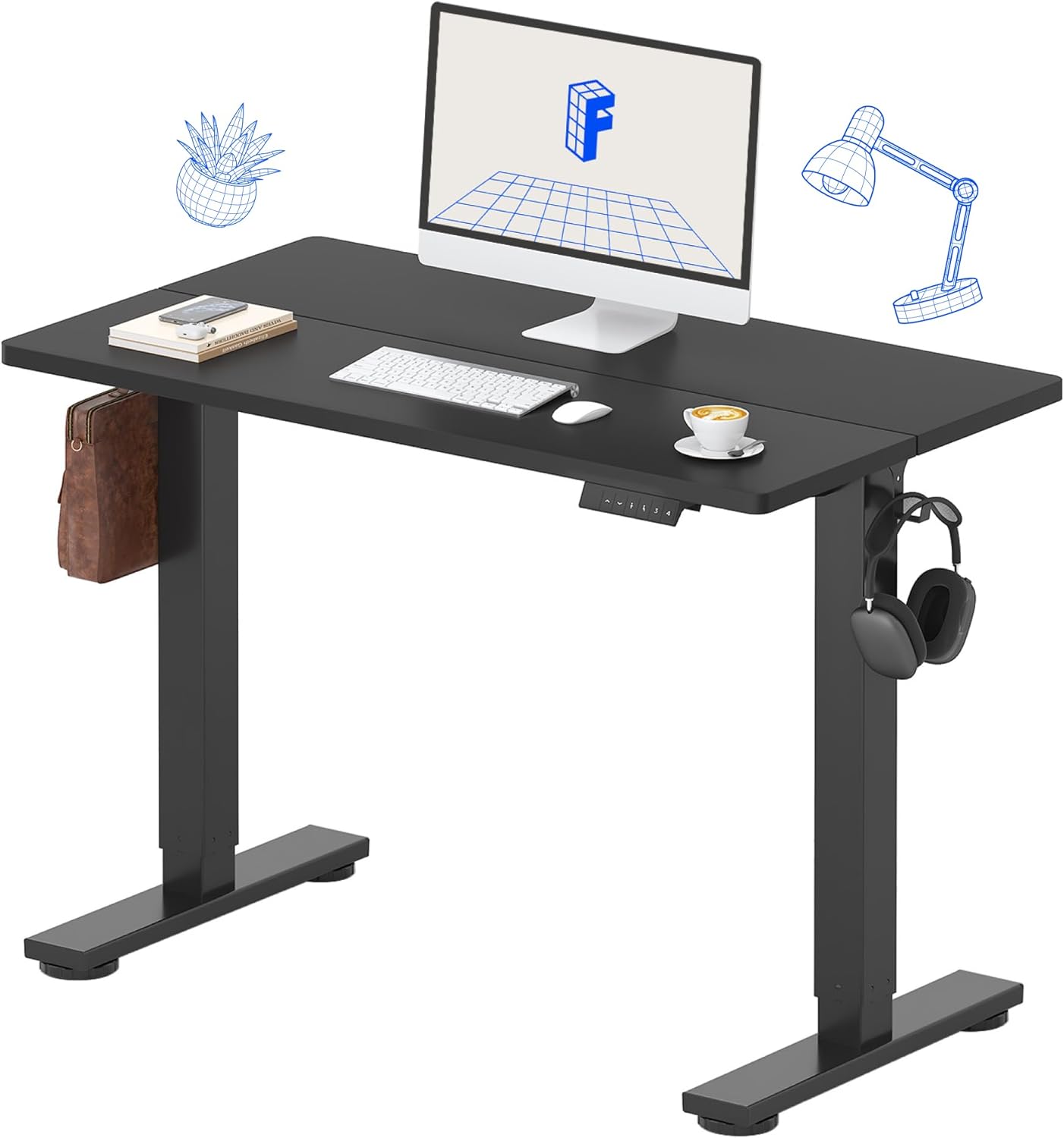
FLEXISPOT 40x24 Inch Electric Standing Desk
Bottom line: The FLEXISPOT 40x24 Inch Electric Standing Desk: Motorized height range of 28.9 to 46.5 inches covers sitting and standing; main trade-off: spliced desktop has a seam instead of one solid panel.
As an Amazon Associate, SpecPicks earns from qualifying purchases. Full disclosure →
Pros & Cons
Pros
- ✓ Motorized height range of 28.9 to 46.5 inches covers sitting and standing
- ✓ 4 memory presets save your preferred sit and stand heights
- ✓ Motor runs under 50dB, quiet enough for calls or shared rooms
- ✓ 154 lb weight capacity for a monitor, laptop and desk accessories
- ✓ Compact 40 x 24 inch top fits small rooms and study corners
Cons
- ✗ Spliced desktop has a seam instead of one solid panel
- ✗ 40-inch width is tight for dual-monitor or ultrawide setups
- ✗ 46.5-inch max height may sit low for taller users when standing
- ✗ Requires assembly before first use
Manufacturer description
The FLEXISPOT 40x24 Inch Electric Standing Desk gives you a motorized sit-stand workspace in a small footprint. Its 40" x 24" black desktop holds a laptop, a monitor and a keyboard. That makes it a practical fit for a small home office, a study space or a corner setup where a full-size desk won't fit. The height adjusts from 28.9" to 46.5", so you can work seated and then raise the desk to standing height with the push of a button. Four memory presets store your preferred heights, which saves you from adjusting by hand every time you switch. The motor runs at under 50dB, so you can change…
SpecPicks Verdict
SpecPicks has no buyer-rating or benchmark data for FLEXISPOT 40x24 Inch Electric Standing Desk, so this read rests on the manufacturer's listed specs (how we evaluate). Compare with similarly-priced alternatives in the gaming desks category before committing. On the listing's own facts, the case for it is "Motorized height range of 28.9 to 46.5 inches covers sitting and standing"; the main trade-off is "Spliced desktop has a seam instead of one solid panel". If those two points fit how you will use it, put it beside one or two close alternatives in the Compare tool to confirm the price.
Common buyer scenarios for gaming desks: matching surface dimensions to the room footprint and monitor count, checking height-adjustment range for sit-stand setups, verifying cable-management channels for a clean multi-monitor build, and confirming weight capacity for a full tower + dual-monitor load. Review the spec sheet for assembly difficulty before ordering.
Frequently Asked Questions
What is the height range of the FLEXISPOT 40x24 standing desk?
The desk adjusts electrically from 28.9 inches to 46.5 inches, which covers both seated and standing positions for most users.
How much weight can this standing desk hold?
The FLEXISPOT 40x24 desk has a 154 lb weight capacity, enough for a laptop, monitor and typical desk accessories.
Can I save my sitting and standing heights?
Yes. The controller has 4 memory presets, so you can store your preferred sitting and standing heights and switch between them with one button.
How loud is the motor when the desk moves?
FLEXISPOT rates the motor at under 50dB during height adjustments, quiet enough for a shared room or a video call.
Is the desktop one solid piece, and is assembly difficult?
The 40 x 24 inch desktop is spliced, so it is made of joined panels rather than one solid board. Assembly tools, written instructions and an installation video are provided. Check the product listing for current warranty terms.
Key Features
Quoted from the manufacturer's listing. Where it differs from the pros and cons above, those note the conditions the listing leaves out.
- ERGONOMIC & SPACE-SAVING: The 40" x 24" desktop creates a comfortable home office setup while maintaining a compact footprint, perfect for small spaces.
- CUSTOM HEIGHT SETTINGS: Save your preferred heights with 4 memory presets and switch effortlessly between sitting and standing. Adjusts from 28.9” to 46.5” to help reduce back and neck strain from prolonged sitting.
- STURDY & DEPENDABLE: Built to last with solid construction and a 154 lb weight capacity, this desk provides a stable, durable workspace for all your essentials.
- WHISPER-QUIET MOTOR: The ultra-quiet motor (<50dB) ensures smooth height adjustments without distracting noise, keeping your workspace peaceful and focused.
- HASSLE-FREE SETUP & SUPPORT: Includes assembly tools, clear instructions, and an installation video for easy setup. Have questions? Our support team is ready to help!
Full Specifications
| Base | Alloy Steel |
|---|---|
| Size | 40"x24" |
| Brand | FLEXISPOT |
| Color | Black |
| Shape | Rectangular |
| Style | Modern |
| Weight | 154 lb |
| Base Type | Leg |
| Room Type | Classroom, Dormitory, Living Room, Office, Study Room |
| Top Color | Black |
| Base Color | Black |
| Item Depth | 24 inches |
| Style Name | Modern |
| Desk Design | Computer Desk, Standing Desk |
| Desk design | Computer Desk, Standing Desk |
| Finish Type | Powder Coated |
| Finish Types | Powder Coated |
| Base Material | Alloy Steel |
| Compatibility | Switch |
| Material Type | Alloy Steel |
| Full listing title | FLEXISPOT 40x24 Inch Electric Standing Desk, Black | Home Office, Remote Work, Study Space, Laptop & Monitor Setup, Everyday Use, Spliced Desktop |
Ready to buy?
FLEXISPOT 40x24 Inch Electric Standing Desk, Black | Home Office, Remote Work, Study Space, Laptop & Monitor Setup, Everyday Use, Spliced Desktop is listed on Amazon. Price, availability, shipping and returns are set by Amazon and its sellers — check the listing for current terms. SpecPicks earns a small commission on qualifying purchases — thank you for supporting independent review work.
Related Gaming Desks


More guides & deep dives from the SpecPicks archive
Browse all articles & guides →- The Complete Voodoo5 5500 AGP Driver Guide (2026 Edition)
- RTX 4070 Super vs RX 7800 XT — Which to Buy in 2026
- How to Build a Windows 98 Retro PC in 2026
- Best Retro Handhelds in 2026: Pocket, Mid-Tier and FPGA Picks
- Best Budget Gaming PC Build 2026 — ~$1,000 Parts List
- Best 1440p Gaming GPUs in 2026
- Emulation Hardware in 2026: FPGA, Software, and Cart-Reader Ecosystems
More reviews from the SpecPicks archive
Browse all reviews →- Intel Arc Stable Diffusion Guide: Setup & Benchmarks 2025
- Advanced Shader Delivery on the RX 9070 XT: Benchmark Results
- Local LLM Inference on the RTX 3060 12GB: 2026 Quantization Playbook
- Jetson Orin Nano Super vs Hailo-8 AI HAT+: Which Edge-AI Path Is Right for You?
- Is the KOORUI 27" 4K QD-Mini LED Worth It for RTX 3060 Gaming?
- 20GB Homelab Memory Left: What to Add Next
- DeepCool AK620 vs Noctua NH-U12S for the Ryzen 7 5800X
- Noctua NH-U12S vs CoolerMaster ML240L: Air or AIO for 5800X
- HyperX QuadCast 2 vs Blue Yeti for Streaming in an Untreated Room
- DIY Handheld Tricorder Build Guide 2026
- Best CPU Cooler for Ryzen 7 5800X Heavy Workloads (2026)
- AMD Ryzen AI Halo Review Roundup: AMD Builds Its Own DGX Spark Rival
- AA-AgentPerf: What the New Agentic Inference Benchmark Means for Local Coding Rigs
- RTX 3060 12GB for 1080p 240Hz Esports: CS2, Valorant, Apex
- VibeThinker-3B: A 3B Reasoning Model on RTX 3060 and Raspberry Pi 4
- Best SSD for a Local-LLM Rig in 2026: NVMe vs SATA
- Crucial BX500 vs Samsung 870 EVO: Best SATA SSD for Game Loads
- Best Budget Local-AI Workstation Parts in 2026: 5 Picks
- CompactFlash as a Retro PC Boot Drive: The 2026 CF-to-IDE Build Guide
- Why PSU Fans Aren't Built for Repairability
- Best Budget GPU for Local LLM Inference Under $400 (2026)
- Logitech G29 vs HORI Force Feedback Wheel — Which First Wheel Is Right?
- Period-Correct Windows 98 Boot Drive: CompactFlash vs IDE SSD
- AMD Ryzen AI Max+ 395 vs Mac Studio M4 Max for Local LLM Inference
Earliest SpecPicks reviews
Browse full archive →- Best GPU for Llama 3.1 8B (2026)
- Best GPU for Qwen 3 14B (2026)
- Best GPU for Qwen 3 32B (2026)
- Best GPU for Llama 3.1 70B (2026)
- Best GPU for DeepSeek-R1 32B (2026)
- Best GPU for Llama 3.1 405B (2026)
- How to run Llama 3.1 8B on NVIDIA GeForce RTX 5090
- How to run Qwen 3 14B on NVIDIA GeForce RTX 5090
- How to run Qwen 3 32B on NVIDIA GeForce RTX 5090
- How to run Llama 3.1 70B on NVIDIA GeForce RTX 5090
- How to run DeepSeek-R1 32B on NVIDIA GeForce RTX 5090
- How to run Llama 3.1 8B on NVIDIA GeForce RTX 4090